Sharad Purnima Poster Design in CorelDraw, Easy Method, Complete Steps, Download Practice File
Hello! Friends Welcome to www.vedantsri.net In this Project, I am going to Teach you How To Design Sharad Purnima Poster Design in CorelDraw. In this Project, you can Learn How to make Poster Design in CorelDraw Application an Easy Method. You can also Download the Practice File in this Post. So Let’s Start this Project. Before Starting this Project I request you to Please Follow given below Steps to Learn Properly Step by step. Sharad Purnima Poster Design in CorelDraw
Durgakund 8808888478Rathyatra 9415802061दोनों शाखाएँ सोमवार–शनिवार सुबह 7 से रात 8 बजे तक खुली हैं। कोर्स की जानकारी के लिए Durgakund 8808888478 और Rathyatra 9415802061 पर सातों दिन, किसी भी समय कॉल कर सकते हैं।
How To Open CorelDraw Application
What is CorelDRAW software?
CorelDRAW is professional graphic design software used for vector illustration, page layout, photo editing, and typography. It can be used to create posters, logos, brochures, and other visual designs. In this tutorial, you will use it to make a Sharad Purnima poster with images, shapes, colours, and text.
- CorelDraw Open करने के लिए Window + R Press करे Run Box Open करे।

- Run Box मे coreldrw Type करे।
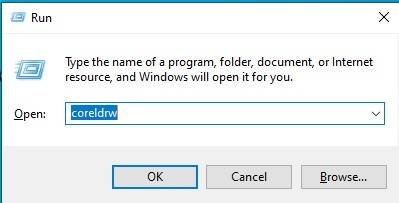
- अब Ok पर Click करके CorelDraw का Application Open करे।

CorelDraw Page Size SetUp
- CTRL + N Press करके New Page का Window Open करे।

- अब Ok पर Click करके CorelDraw का Main Page open करे
- Rectangle Tool पर Double Click करे।

- Interactive Fill Tool से Shape मे Color Fill करे।

- Basic Shape tool > Star Shape Tool से Shape Draw करे
- CTRL + D से Shape का Duplicate करे Page पर Set करे।

- अब नीचे दिये गये लिंग से PNG Image Download करे
- Menu bar> Effects Option > Power Clip > Place Inside Container Option पर Click करे।
- Page पर CTRL + Mouse से Left Click करे Image को Page पर Set करे।
- Page के बाहर CTRL + Mouse से Left Click करे।

- अब नीचे दिये गये लिंग से PNG Image Download करे
- Menu bar> Effects Option > Power Clip > Place Inside Container Option पर Click करे।
- Page पर CTRL + Mouse से Left Click करे Image को Page पर Set करे।
- Page के बाहर CTRL + Mouse से Left Click करे।

- अब नीचे दिये गये लिंग से PNG Image Download करे
- Menu bar> Effects Option > Power Clip > Place Inside Container Option पर Click करे।
- Page पर CTRL + Mouse से Left Click करे Image को Page पर Set करे।
- Page के बाहर CTRL + Mouse से Left Click करे।

- अब Logo को नीचे दिये गये लिंग से download करे Page पर set करे।

- अब Detail लिखे, Save

Created & Explained By Pratibha Modanwal
शरद पूर्णिमा पोस्टर कैसे बनाएं?
You can create a Sharad Purnima poster in CorelDraw by combining a moon image, पूजा visuals, kheer image, decorative shapes, and suitable text. First, set the page size and background. Then place the images using Power Clip. Arrange the elements neatly, add the festival details, and save your design for practice.
FAQ
शरद पूर्णिमा पोस्टर कैसे बनाएं?
To make a Sharad Purnima poster, open CorelDraw and create a new page. Add a moon image, पूजा visuals, and a kheer image. Arrange them with suitable colours, add the text, and save the finished design.
What is the official website of CorelDRAW?
The official CorelDRAW website is coreldraw.com. It provides product details, feature comparisons, learning resources, support information, and trial options. You can review the available desktop and web products there before choosing a version. Check the product details before installing or using the software.
What is CorelDRAW Web?
CorelDRAW Web is a browser-based design app included with a CorelDRAW Graphics Suite subscription. It lets users create illustrations and designs without installing the desktop app on that device. It provides a subset of desktop features, so some tools and other suite applications may not be available in the web version.
- Important Link – DFA Course Fees, Syllabus, Duration, Scope, Jobs, and Institute in Varanasi
- Visit Also – https://www.corelclass.com
- Read it – CorelDraw Course Fees, Duration, Scope, Syllabus, Admission, Institutes & Jobs in Varanasi
- Read Also – Tally Course Fees, Duration, Scope, Syllabus, Admission, Institutes & Jobs in Varanasi
- Also Read – CCC Course Fees, Syllabus, Duration, Scope, Jobs, and Institute in Varanasi
- Visit – ADCA Course Fees, Duration, Scope, Syllabus, Admission, Institutes & Jobs in Varanasi