
Vijayadashmi Poster in CorelDraw, Top 1 Best Easy and Effective, Download Source File
Vijayadashmi Poster in CorelDraw, Top 1 Best Easy and Effective, Download source File
Hello! Friends Welcome to www.vedantsri.net In this Project, I am going to Teach you How To Design Vijayadashami Poster in CorelDraw. In this Project, you can Learn How to make a Design in CorelDraw Application an Easy Method. Dussehra Card Design In CorelDraw.
What is CorelDRAW software?
CorelDRAW is a professional graphic design and vector illustration software. It helps users create logos, posters, brochures, page layouts, and illustrations. It also offers tools for typography and photo editing. In this Vijayadashmi poster project, CorelDRAW is used to arrange text, pictures, shapes, and colours into one design.
You can also Download the Practice File in this Post. So let’s start this Project. Before Starting this Project I request you to Please Follow given below Steps to Learn Properly Step by step.
- Press Windows + R on Keyboard.
- To Open Run Dialog Box.

- Type coreldrw in Run Dialog Box.

- Click at OK.
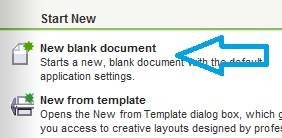
- Click at New Blank Document
- Fill all information > regarding new page.
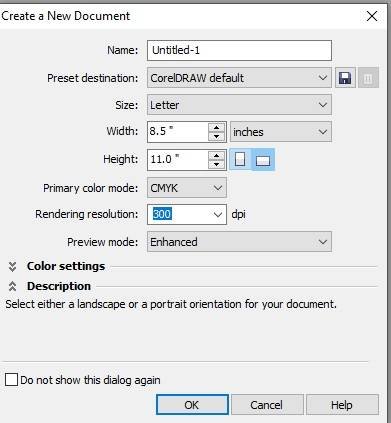
- Click at OK.
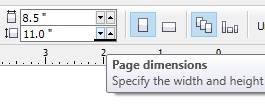
- Define Page Dimension.
- Go to Rectangle Tool > From Tool Option.
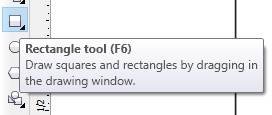
- Double Click at Rectangle Tool > Something like this appears.
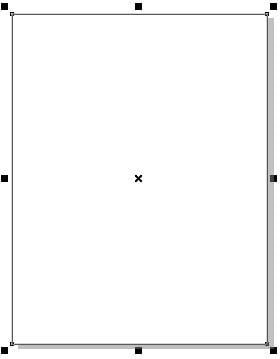
- Go To Color Palate > Click at Page >Select Color > like this.

- Go to Interactive Tool > Click at Interactive tool
- Select this Option.
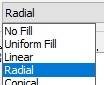
- Fill another color > like this

- Insert a Picture of Shree Ram

- Insert Ravan Picture > at page.

- Insert Decorative Hanging > In Both Corners.
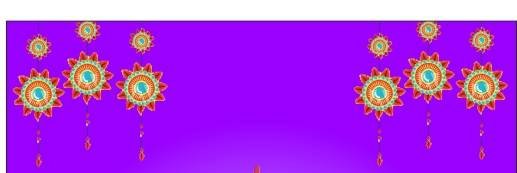
- Insert Clip art design in Corner > like this.

- Go to Text tool > type Happy vijayadashmi > like This > Change Font Style > Font List.
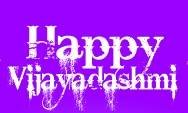
- Insert Clip art in Side border.

- Type Institution Site > in bottom side

- Insert LOGO of an Institution.

- Now Vijayadashmi Poster is Ready.

Created and Explained By Sakshi Rawat
What is the official website of CorelDRAW?
The official website is coreldraw.com. It provides product details for CorelDRAW Graphics Suite, CorelDRAW Standard, and CorelDRAW Go. Visitors can compare options, check features, review system requirements, and access official trial or purchase information. Confirm the website address before downloading or buying the software.
What is CorelDRAW Web?
CorelDRAW Web is a browser-based design app connected with CorelDRAW Graphics Suite. Eligible subscribers and active maintenance customers can sign in through a browser without installing the full desktop application on that device. It supports online design work and lets users continue compatible projects between web and desktop versions.
Important link
- Visit at – https://www.corelclass.com
- Read Also it – https://msexcelclass.com/
- Also Read- Tally Course Fees, Duration, Scope, Syllabus, Admission, Institutes
- Also Read – CCC Course Fees, Syllabus, Duration, Scope, Jobs, and Institute
- Important Link – DFA Course Fees, Syllabus, Duration, Scope, Jobs, and Institute
- Visit – https://mswordclass.com/
इसे भी पढ़ें
Advance Login System Excel VBA Software Pradip VedantSri
Advance Login System Excel VBA Software Pradip VedantSri Yah This Workbook Code hai Yah Userform1 as Login Software ka code hai Yah…
Excel VBA DataEntry Software Project Beginner to Advance | Data Entry, Search, Update, Print in Excel
Excel VBA DataEntry Software Project Beginner to Advance | Data Entry, Search, Update, Print in Excel This is UserForm1 Code Yah Userform2…
Excel VBA Typing Master Project for beginners | Excel VBA Project by Pradip VedantSri
Excel VBA Typing Master Project for beginners | Excel VBA Project by Pradip VedantSri This Workbook ka code Private Sub Workbook_Open()Application.Visible =…
Top 10 Methods to Speed Up your Slow Computer System in 2026
Top 10 Methods to Speed Up Your Slow Computer System in 2026 1- Checks for issues within the system image 👉Download link…

Top 20 Microsoft Word-Related Jobs in India
Top 20 Microsoft Word-Related Jobs in India In India’s dynamic job market, proficiency in Microsoft Word remains a fundamental skill sought after…

20 Best Computer Courses for Jobs, Salary & Career in India
20 Best Computer Courses for Jobs, Salary & Career in India Choosing the right computer course can help in 20 Best Computer…