
Karwa Chauth Poster Design In CorelDraw, Easy Method, Complete Steps, Download Practice File
Karwa Chauth Poster Design In CorelDraw, Easy Method, Complete Steps, Download Practice File
Hello! Friends Welcome to www.vedantsri.net In this Project, I am going to Teach you How To Design Karwa Chauth Poster Design In CorelDraw In this Project, you can Learn How to make a Design in CorelDraw Application an Easy Method. You can also Download the Practice File in this Post. So let’s start this Project. Before Starting this Project I request you to Please Follow given below Steps to Learn Properly Step by step. Karwa Chauth Poster Design In CorelDraw
How to Open CorelDraw Application
- CorelDraw Open करने के लिए Window +R Press करके Run Box Open करे।

- Run Box मे CorelDraw Type करे।

- अब Ok पर Click करे CorelDraw का Appliction Open करे।

- CTRL + N Press करे New Page का Window Open करे।

- अब Ok पर Click करके CorelDraw का Main Page Open करे।
- Rectangle Tool पर Double Click करे।
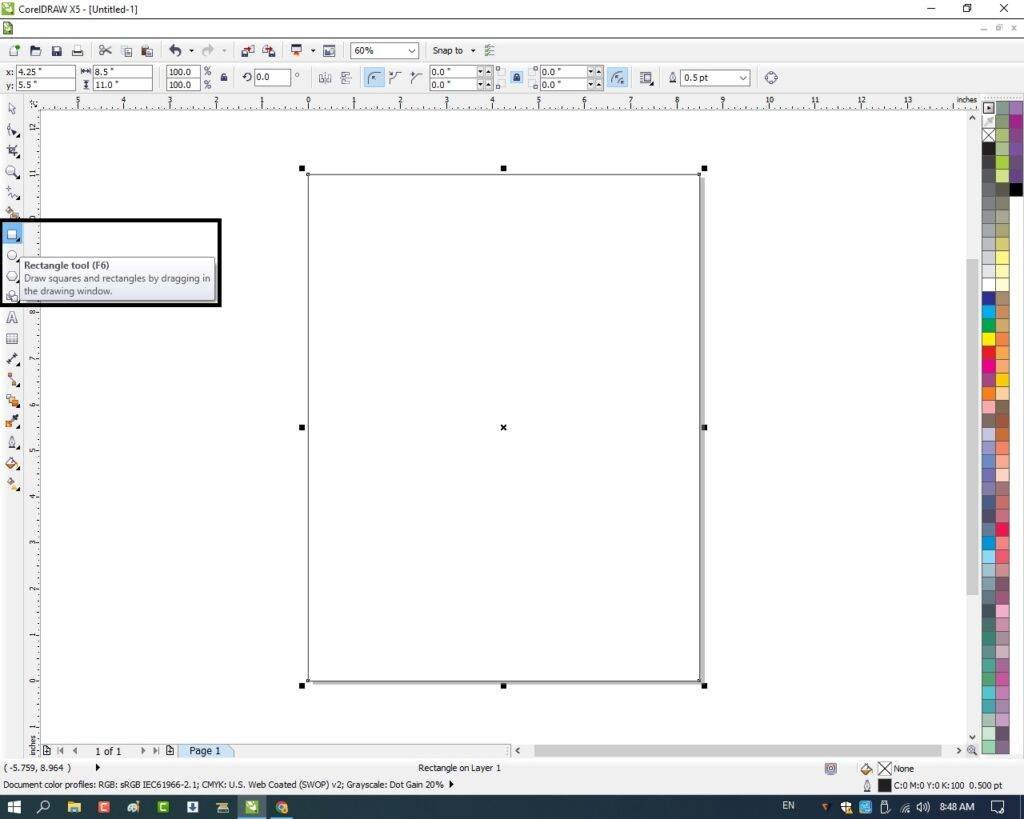
- Interactive fill tool से Shape मे Color Fill करे। Karwa Chauth Poster Design In CorelDraw

- Moon Image नीचे दिये गये लिंक से Download करे। Karwa Chauth Poster Design In CorelDraw
- Menu Bar >Effects Option > Power Clip > Place Inside Container Option पर Click करे

- अब Photoनीचे दिये गये लिंक से Download करे।
- Menu Bar >Effects Option > Power Clip > Place Inside Container Option पर Click करे

- PNG Image नीचे दिये गये लिंक से Download करे।
- Menu Bar >Effects Option > Power Clip > Place Inside Container Option पर Click करे

- PNG Image 2 नीचे दिये गये लिंक से Download करे।
- Menu Bar >Effects Option > Power Clip > Place Inside Container Option पर Click करे

- Logo नीचे दिये गये लिंक से Download करे।

- Star Shap Draw करे CTRL + D से Duplicate करे Color Fill करे। Outline None करे
- Ellipse Shape Draw करे CTRL + D से Duplicate करे Color Fill करे। Outline None करे

- Text tool से Detail Fill करे Font Style, Size, Color, Change करे।

- CTRL + S से File करे ।

Created & Explained Pratibha Modanwal
Important Links
1-VedantSri Official Website:- https://vedantsri.com
2-Student Support Website:- https://www.vedantsri.net
3-Jobs Assist Website:- https://www.jobdo.in
External Link
1-VedantSri Official Website:- https://vedantsri.com
2-Course Store Website:- https://vedantsri.in
3-Jobs Assist Website:- https://www.jobdo.in
4-MS Word Class:- https://mswordclass.com/
5-Corel Free Class:- https://corelclass.com/
6-Free Excel Class:- https://msexcelclass.com/
इसे भी पढ़ें
Advance Login System Excel VBA Software Pradip VedantSri
Advance Login System Excel VBA Software Pradip VedantSri Yah This Workbook Code hai Yah Userform1 as Login Software ka code hai Yah…
Excel VBA DataEntry Software Project Beginner to Advance | Data Entry, Search, Update, Print in Excel
Excel VBA DataEntry Software Project Beginner to Advance | Data Entry, Search, Update, Print in Excel This is UserForm1 Code Yah Userform2…
Excel VBA Typing Master Project for beginners | Excel VBA Project by Pradip VedantSri
Excel VBA Typing Master Project for beginners | Excel VBA Project by Pradip VedantSri This Workbook ka code Private Sub Workbook_Open()Application.Visible =…
Top 10 Methods to Speed Up your Slow Computer System in 2026
Top 10 Methods to Speed Up Your Slow Computer System in 2026 1- Checks for issues within the system image 👉Download link…

Top 20 Microsoft Word-Related Jobs in India
Top 20 Microsoft Word-Related Jobs in India In India’s dynamic job market, proficiency in Microsoft Word remains a fundamental skill sought after…



20 Best Computer Courses for Jobs, Salary & Career in India
20 Best Computer Courses for Jobs, Salary & Career in India Choosing the right computer course can help in 20 Best Computer…