Home Blog Page 36

14 Usage in English-Speaking

14 Usage in English-Speaking

Use Of ‘Can’t Risk = खतरा न मोल लेना’
Use Of ‘Fed up with = तंग आ जाना’
Use Of ‘Used To = आ करता था’
Use Of ‘Intend To = दबाब डालना’
Use Of ‘Can’t Help = सहायता न करना’
Use Of ‘Nothing but = किताबे ही किताबे’
Use Of ‘Hassle to = जी का जंजाल’
Use Of ‘So….as = उतना….जितना की’
Use Of ‘Find = पाना’
Use Of ‘Now…..Now = कभी…..कभी’
Use Of ‘sooner or later = कभी न कभी’
Use Of ‘Sometimes = कभी कभी’
Use Of ‘Whatever = जो कुछ भी’
Use Of ‘What else = और क्या ‘

14 Usage in English-Speaking

14 Usage in English-Speaking

If You are preparing for CCC Exam or any competitive exam then you should visit this www.vedantsri.net website for such type of informative knowledge. (14 Usage in English-Speaking)

you can also download this app from the play store and you find Just like many more Online Test Series Related For Example MS Word, MS Excel, MS PowerPoint, and Internet-related. (14 Usage in English-Speaking)

This is Provided By VedantSri Computer Institute in Varanasi. The VedantSri Provides the Best Computer Classes, Courses, Coaching, and Computer Training in Varanasi Uttar Pradesh India. (14 Usage in English-Speaking)

Important Links

1-VedantSri Official Website:- https://vedantsri.com

2-VedantSri Student Support Website:- https://www.vedantsri.net

3-Students Jobs Assist Website:- https://www.jobdo.in

4- News By Students Website:- https://vedantsri.com/

5-Best Deal on IT Website:- https://www.computeritpoint.com

External Link

1-Course Store Website:- https://vedantsri.in

2-Jobs Assist Website:- https://www.jobdo.in

3-MS Word Class:- https://mswordclass.com/

4-Corel Free Class:- https://corelclass.com/

5-Free Excel Class:- https://msexcelclass.com/

Learn Tense in English-Speaking

Learn Tense in English-Speaking

Chapter-3
Tense (काल/समय)

Tense क्या है?
एक बार Grammarian (ब्याकरणबिदो) ने बर्षो से परिश्रम के बाद दुनिया के सभी वाक्यों को इकठ्ठा किया और सभी वाक्यों को गौर करने के बाद उन्होंने पाया की लगभग तीन तरह के वाक्य थे
पहले तरह का वाक्य जिसके अंत में है, हूँ, हो
दुसरे तरह का वाक्य जिसके अंत में था, थी, थे
तीसरे तरह का वाक्य जिसके अंत में गा, गी, गे आते है Learn Tense in English-Speaking

Grammarian को लगा की मुख्य रूप से तीन तरह के वाक्य होते है और वाक्यों के बर्गीकरण करने की खोज यही पर समाप्त कर दिया| परन्तु जल्द ही उन्हें एहसास हुवा और वे रिसर्च को पुनः शुरू कर दिए अंतत उन्होंने पाया की तीनो तरह के वाक्यों (है,था,गा) में प्रत्येक के चार-चार भाग है |जैसे की –
(A). है 1-ता है, 2-रहा है, 3-चूका है, 4-रहा है+समय से
(B). था 1-ता था, 2-रहा था, 3-चूका था, 4-रहा था+समय से
(C). गा 1-गा, 2-रहा होगा, 3-चूका होगा, 4-रहा होगा+समय से Learn Tense in English-Speaking

अब एक वाक्य को ता है से प्रारंभ करेंगे और रहा होगा + समय से तक लिख कर अभ्यास करेंगे-
तुम पत्र लिखते हो
तुम पत्र लिख रहे हो
तुम पत्र लिख चुके हो
तुम सुबह से पत्र लिख रहे हो

तुम पत्र लिखते थे/लिखे
तुम पत्र लिख रहे थे
तुम पत्र लिख चुके थे
तुम सुबह से पत्र लिख रहे थे

तुम पत्र लिखोगे
तुम पत्र लिख रहे होगे
तुम पत्र लिख चुके होगे
तुम सुबह से पत्र लिख रहे होगे

अब हम ऊपर के Tense Formula Chart के हिसाब से एक वाक्य को बारहों Tense के Parts में Translate करेंगे |
1. तुम पत्र लिखते होYou write a letter.
2. तुम पत्र लिख रहे होYou are writing a letter.
3. तुम पत्र लिख चुके होYou have written a letter.
4. तुम सुबह से पत्र लिख रहे होYou have been written a letter. Since Morning.

1. तुम पत्र लिखते थेYou wrote a letter.
2. तुम पत्र लिख रहे थेYou were writing a letter.
3. तुम पत्र लिख चुके थेYou had written a letter.
4. तुम सुबह से पत्र लिख रहे होYou had been writing a letter Since Morning.

1. तुम पत्र लिखोगेYou will write a letter.
2. तुम पत्र लिख रहे होगेYou will be writing a letter.
3. तुम पत्र लिख चुके होगेYou will have written a letter.
4. तुम सुबह से पत्र लिख रहे होगेYou will have been writing a Letter Since morning.
Note: – वाक्य में समय के बाद ‘से’ शब्द की इंग्लिश since या for उपयोग करते है |
Since का प्रयोग:=दिन के नाम, महीने के नाम, वर्ष के नाम, बजे, सुबह, शाम, दोपहर,
For का प्रयोग:=दिन, महिना, वर्ष, घंटा, मिनट, सेकंड, आज, कल, परसों, Learn Tense in English-Speaking

Learn Tense in English-Speaking

About VedantSri

Learn Tense in English-Speaking

VedantSri Computer Institute provides the best Computer Courses, Classes, and Training in Varanasi. There is NEILIT Courses CCC, BCC, O’level, Certificates, and Diploma Computer Courses available with the best training materials. Also Available Top 100 Best Computer Courses, For Example, OM, DCA, ADCA, DTP, DFA, ADAM, ADTP, ADFA, DCE, and MS Office. VedantSri Computer Coaching updates CCC Online Test 2019 on www.vedantsri.net. There are some important computer Courses for jobs CCC Classes, Typing, Internships, And Spoken English Available Free of cost with Offer. Learn Tense in English-Speaking

More than 50 Computer Courses are available with a 50% Fee Discount in VedantSri Varanasi. You can get the Best Digital Marketing Course at Varanasi Institute VedantSri. There is the Latest Computer Course Offer in ADCA Computer Course, DCA Computer Course, CCC Computer Course & English Spoken. (Learn Tense in English-Speaking)

External Link

Daily Routine in English-Speaking

Daily Routine in English-Speaking

Chapter-2
Daily-Routine (दिनचर्या)

इस आध्याय में हम सीखेंगे की प्रतिदिन के कार्यो को अंग्रेजी में कैसे प्रेजेंट (प्रस्तुत) करे | यह एक महत्वपूर्ण अध्याय है क्योकि स्पोकन इंग्लिश सिखने वाले छात्र-छात्राओ को अपने माइंड तथा आस-पास में इंग्लिश का माहौल बनाने की जरूरत होती है जिसमें अक्सर खुद से बात करके जुबान को अंग्रेजी बोलने तथा मस्तिष्क को अंग्रेजी में सोचने के लिए आदी बनाना होता है इस प्रक्रिया में डेली-रूटीन सुरुवाती दौर में बहुत मददगार साबित होता है | तो आइये प्रारंभ करते है- Daily Routine in English-Speaking

VedantSri Logo
VedantSri Logo

Daily Routine in English-Speaking

डेली-रूटीन सिखने हेतु मुख्य तीन रूल:-
1) हमेशा प्रेजेंट इन्डेफनिट अर्थात वाक्य के अंत में ता है,ती है,ते है शब्द आते है |
2) इन वाक्यों को 1-3-2 के नियम से अंग्रेजी में Translate (अनुवाद) करते है |
3) दो वाक्यों के बीच में Than या After that (उसके बाद) का प्रयोग करे |

Note – (ज्यादेतर लोग Than After का प्रयोग करते है जो की सही नही है)

प्रत्येक हिंदी वाक्य मे क्रम से Subject(कर्ता, वाक्य में कार्य को करने वाला), Object(कर्म) तथा Verb(क्रिया, वाक्य में जो कार्य हो रहा है) तीन तरह से शब्द होते है

जैसे की(As That)= मै अंग्रेजी सीखता हूँ
ऊपर के वाक्य में पहला स्थान पर ‘मै’, दुसरे स्थान पर ‘अंग्रेजी’, तीसरे स्थान पर ‘सीखता हूँ’ शब्द है|पर जैसे ही इस वाक्य को अंग्रेजी में Translate करते है तब वाक्य में पहला स्थान पर ‘मै’, दुसरे स्थान पर ‘सीखता हूँ’ तथा तीसरे स्थान पर ‘अंग्रेजी’, शब्द का इंग्लिश में ट्रांसलेशन बनाते है| Daily Routine in English-Speaking

जैसे की(As That) = I Learn English.
अर्थात यदि गौर करे तो हिंदी में कर्ता,क्रिया,कर्म जो 1-2-3 के क्रम में है वह अंग्रेजी में 1-3-2 का क्रम में हो जाता है|
Example (उदाहरण):–
वह फल खाता है He eats Fruit.
तुम मेरे बारे में सोचते हो You Think About Me.

यदि वाक्य में ज्यादे शब्द हो तो पहले Subject को Circle में कर ले फिर Verb को Circle में कर ले इनके बाद बीच में बचे सभी शब्दो को Object में Circle करके आसानी से Subject(कर्ता), Object(कर्म) तथा Verb(क्रिया) को पहचाना जा सकता है | Daily Routine in English-Speaking

Exercise on Daily Routine:-
1. मै सुबह 4 बजे जगता हूँ
2. उसके बाद, मै ब्रश करता हूँ
3. उसके बाद, मै स्नान करता हूँ
4. उसके बाद, मै मंदिर जाता हूँ
5. उसके बाद, घर आकर, मै नाश्ता करता हूँ
6. उसके बाद, मै दफ्तर जाता हूँ
7. उसके बाद, मै दोपहर में भोजन करता हूँ
8. उसके बाद, मै 5 बजे शाम को घर लौटता हूँ
9. उसके बाद, मै अपने मित्रो के साथ बातचीत करता हूँ
10. उसके बाद, मै बाहर घुमने जाता हूँ
अब ऊपर के वाक्यों को हम बताये गये नियम के द्वारा इंग्लिश में Translate करेंगे Daily Routine in English-Speaking
1. I get up at 4 o’clock in the morning.
2. After that, I brush up.
3. After That, I Take Bathe.
4. After that, I go to the temple.
5. After coming home, I take Breakfast.
6. After that, I go to Office.
7. After That, I Take lunch.
8. After that, I return Home in the evening at 5 o’clock.
9. After That, I talk with my friends.
10. After that, I go to wander outside.
जिस वाक्य में Object(कर्म) बॉक्स में एक से अधिक शब्द हो तो इनको राईट से लेफ्ट translate करते है|
ऊपर वाक्य 8 देखिये As That (जैसे की) – मै 5 बजे शाम को घर लौटता हूँ
ऊपर के इस वाक्य में Object के इस 5 बजे शाम को घर सभी शब्दों को उल्टा अर्थात राईट से लेफ्ट Translate करेंगे| 5 बजे शाम को घर = Home in evening at 5 o’Clock Daily Routine in English-Speaking

Daily Routine in English-Speaking

About VedantSri

Daily Routine in English-Speaking

VedantSri Computer Institute provides the best Computer Courses, Classes, and Training in Varanasi. There is NEILIT Courses CCC, BCC, O’level, Certificates, and Diploma Computer Courses available with the best training materials. Also Available Top 100 Best Computer Courses, For Example, OM, DCA, ADCA, DTP, DFA, ADAM, ADTP, ADFA, DCE, and MS Office. VedantSri Computer Coaching updates CCC Online Test 2019 on www.vedantsri.net. There are some important computer Courses for jobs CCC Classes, Typing, Internships, And Spoken English Available Free of cost with Offer. More than 50 Computer Courses are available with a 50% Fee Discount in VedantSri Varanasi. You can get the Best Digital Marketing Course at Varanasi Institute VedantSri. There is the Latest Computer Course Offer in ADCA Computer Course, DCA Computer Course, CCC Computer Course & English Spoken. (Daily Routine in English-Speaking)

Introduction in English-Speaking

Introduction in English-Speaking

Chapter-1
Introduction (परिचय)

आप सभी का स्वाग़त है स्पोकेन इन्ग्लिश के पहले अध्याय में, इस अध्याय मे हम सिखेगे कि एक बेहतर introduction कैसे दें, इंट्रोडक्शन (परिचय) की बात करे तो हमारे बारे वो सब सभी बाते जिससे की सुनने वाला चाहे वो इंटरव्यूअर (इंटरव्यू लेने वाला) हो या औडिएंस (श्रोता) उन्हें हमारे बारे में ठीक-ठीक पता चल जाये जिससे की वो हमारा एक पॉजिटिव (सकारात्मक) इमेज (छवि) अपने माइंड में क्रिएट कर सके, जो की 8-10 लाइन का हो तो बेहतर है| तो आइये प्रारंभ करते है-(Introduction in English-Speaking)

1. Good Morning/After Noon/ Evening (समयानुसार)
2. I am Pradeep/My Name Is Pradeep/Myself I Pradeep/This Is Pradeep.
3. My Father Mr. Kameshwar Mishra is a good Business Man.
4. I Belong to Varanasi at Durgakund, Kabir Nagar/I live in Varanasi at Durgakund, Kabir Nagar. (Introduction in English-Speaking)
5. I have qualified/I have done/I Have Completed 10th from C.H.S. Varanasi with 1st Division.
6. I am pursuing/I am appearing 12th From C.H.S.
7. My Hobbies are Playing Games and watching Hollywood movies/My Interest is in Playing Game and watching Hollywood Movies.
8. My Target, I want to be an IAS Officer. (Introduction in English-Speaking)
Thank You to Listen to Me. (सुनने के लिए आप सभी को धन्यबाद)


1. Good Morning/After Noon/ Evening (समयानुसार)
2. I am Pradeep/My Name Is Pradeep/Myself I Pradeep/This Is Pradeep.
3. My Father Mr. Kameshwar Mishra is a good Business Man.
4. I Belong to Varanasi at Durgakund, Kabir Nagar/I live in Varanasi at Durgakund, Kabir Nagar.
5. I have qualified/I have done/I Have Completed 10th from C.H.S. Varanasi with 1st Division.
6. I am pursuing/I am appearing 12th From C.H.S.
7. My Hobbies are Playing Games and watching Hollywood movies/My Interest is in Playing Game and watching Hollywood Movies.
8. My Target, I want to be an IAS Officer. (Introduction in English-Speaking)
Thank You to Listen to Me. (सुनने के लिए आप सभी को धन्यबाद)

Introduction in English-Speaking

Myself = मै स्वम
Business Man = ब्यापारी
Belong to/ live = निवासी हूँ/रहता हूँ
Qualified/ Completed/ done = उत्तीर्ण/पूरा/किया
Pursuing/ appearing = चल रहा है
Division = श्रेणी
Hobbies/ Interest = आदते/रूचि
Target/Goal/Aim/Destination = लक्ष्य/मंजिल

Introduction in English-Speaking (Introduction in English-Speaking)

About VedantSri

Introduction in English-Speaking

VedantSri Computer Institute provides the best Computer Courses, Classes, and Training in Varanasi. There is NEILIT Courses CCC, BCC, O’level, Certificates, and Diploma Computer Courses available with the best training materials. (Introduction in English-Speaking) Also Available Top 100 Best Computer Courses, For Example, OM, DCA, ADCA, DTP, DFA, ADAM, ADTP, ADFA, DCE, and MS Office. VedantSri Computer Coaching updates CCC Online Test 2019 on www.vedantsri.net. (Introduction in English-Speaking)

There are some important computer Courses for jobs CCC Classes, Typing, Internships, And Spoken English Available Free of cost with Offer. More than 50 Computer Courses are available with a 50% Fee Discount in VedantSri Varanasi. (Introduction in English-Speaking) You can get the Best Digital Marketing Course at Varanasi Institute VedantSri. There is the Latest Computer Course Offer in ADCA Computer Course, DCA Computer Course, CCC Computer Course & English Spoken. (Introduction in English-Speaking)

Important Links

1-VedantSri Official Website:- https://vedantsri.com

2-VedantSri Student Support Website:- https://www.vedantsri.net

3-Students Jobs Assist Website:- https://www.jobdo.in

4- News By Students Website:- https://vedantsri.com/

5-Best Deal on IT Website:- https://www.computeritpoint.com
External Link

1-Course Store Website:- https://vedantsri.in

2-Jobs Assist Website:- https://www.jobdo.in

3-MS Word Class:- https://mswordclass.com/

4-Corel Free Class:- https://corelclass.com/

5-Free Excel Class:- https://msexcelclass.com/

Most Used Words English-Spoken

Most Used words English-Spoken

Important Words (महत्वपूर्ण शब्द)

की (Ki) = of

और (Aur) = and

एक (Ek) = a, one

तक (Tak) = till, up to

में (Mein) = in

है (Hain) = is

आप (Aap) = you (formal)

कि (Ki) = that

यह (Yah) = it

वह (Vah) = he

था (Tha) = was

लिए (Liye) = for

पर (Par) = on

केवल (Keval) = only

सदा (Sadaa) = always

साथ (Sath) = with

उसके (uske) = his

वे (Veh) = they

मैं (Main) = I

बाद (Baad) = after

होना (Hona) = be

खाना (Khana) = to eat, food

माँ (Maa) = mother

से (Se) = from

या (Ya) = or

नाम (Naam) = name

घर (Ghar) = home

द्वारा (Dwara) = through

शब्द (Sabdh) = word

लेकिन (Lekin) = but

नहीं (Nahi) = no

क्या (Kya) = what

सब (Sab) = all

थे (The) = were

हम (Ham, written as Hum) = we

जब (Jab) = when

आपके (Aapke) = yours

भाषा (Bhasha) = language

कहा (Kaha) = said

वहाँ (Vahan) = there

उपयोग (Upyog) = use

देश (Desh) = country, land

प्रत्येक (Pratek) = every

जो (Jo) = who

हमारा (Hamara) = our

करना (Karna) = to do

कैसे (Kaise) = how

उनके (Unke) = their

अगर (Agar) = if

होगा (Hoga) = will be

ऊपर (Uppar) = on, above

के (Ke) = of

उधर (Udhar) = there

बहुत (Bahut) = very

फिर (Fir) = again

उन (Un) = them

इन (In) = these

इसलिए (Isliye) = that is why, because of that

कुछ (Kuch) = some

उसे (Use) = to him, to her

अच्छा (Achcha) = good, well, nice

बनाना (Banaanaa) = to build, to construct

जैसा (Jaisa) = as, like

बोला (Bola) = spoken

सुना (Suna) = heard

समय (Samay) = time

सामने (Saamane) = in front

देखना (Dekhna) = to look

कम (Kam) = less

अधिक (Adhik) = more

लिखना (Likhna) ) = to write

जाना (Jaana) = to go

धन्यवाद (Dhanyavaad) = thank you

संख्या (Sangya) = number, count

कोई (Koi) = someone, something

रास्ता (Rasta) = way

सका (Saka) = could (masculine)

लोग (Log) = people

मेरे (Mere) = mine

गया (Gaya) = gone (masculine)

पहले (Pehle) = before

पानी (Paanī) = water

VedantSri Logo
VedantSri Logo

Most Used words English-Spoken

किया (Kiya) = done

पीना (Pīna) = to drink

कौन (Kaun) = who

दो (Do) = give, two

अब (Ab) = now

भी (Bhī) = also, as well, too

दोपहर (Daupahar) = noon

नीचे (Nīche) = below

दिन (Din) = day

रात (Raat) = night

मिल (Mil) = meet

आना (Aana) = to come, come

बनाया (Banaaya) = build

आराम (Aaram) = rest, relax

भाग (Bhag) = part

सुबह (Subah) = morning

सोना (Sona) = to sleep, gold

Most Used words English-Spoken

About VedantSri

Most Used words English-Spoken

VedantSri Computer Institute provides the best Computer Courses, Classes, and Training in Varanasi. There is NEILIT Courses CCC, BCC, O’level, Certificates, and Diploma Computer Courses available with the best training materials. Also Available Top 100 Best Computer Courses, For Example, OM, DCA, ADCA, DTP, DFA, ADAM, ADTP, ADFA, DCE, and MS Office. VedantSri Computer Coaching updates CCC Online Test 2019 on www.vedantsri.net. Most Used Words English-Spoken Most Used words English-Spoken

There are some important computer Courses for jobs CCC Classes, Typing, Internships, And Spoken English Available Free of cost with Offer. More than 50 Computer Courses are available with a 50% Fee Discount in VedantSri Varanasi. You can get the Best Digital Marketing Course at Varanasi Institute VedantSri. There is the Latest Computer Course Offer in ADCA Computer Course, DCA Computer Course, CCC Computer Course & English Spoken.

1-VedantSri Official Website:- https://vedantsri.com

2-Student Support Website:- https://www.vedantsri.net

3-Jobs Assist Website:- https://www.jobdo.in

(20 Most using Model-Sentences)

External Link

1-Course Store Website:- https://vedantsri.in

2-Jobs Assist Website:- https://www.jobdo.in

3-MS Word Class:- https://mswordclass.com/

4-Corel Free Class:- https://corelclass.com/

5-Free Excel Class:- https://msexcelclass.com/

View Hidden Internet History

View Hidden Internet History

Today, all major browsers have functionality that allows you to quickly and easily view your Internet browser’s history. However, as multiple devices contain browser history, there are multiple ways to view it as well. To proceed, choose your devices from the section below and follow the instructions.

आज, सभी प्रमुख ब्राउज़रों में सिस्टम है जो आपको अपने इंटरनेट ब्राउज़र के इतिहास को जल्दी और आसानी से देखने की अनुमति देता है। हालाँकि, कई उपकरणों में ब्राउज़र इतिहास कई तरीके का होता है, इसलिए इसे देखने के भी कई तरीके हैं। आगे बढ़ने के लिए, नीचे दिए गए उपकरणों के हिसाब से हिस्ट्री देखने के तरीके बताये गए है। View Hidden Internet History

Desktop or laptop computer

If you are using Windows, Linux, or macOS, there are quick shortcut key combinations that allow you to view your history.

यदि आप Windows, Linux, या macOS का उपयोग कर रहे हैं, तो क्विक शॉर्टकट कुंजी कॉम्बिनेशन हैं जो आपको अपना इतिहास देखने की अनुमति देते हैं।

Windows and Linux users: Ctrl+H

Apple users: Command + Shift + H

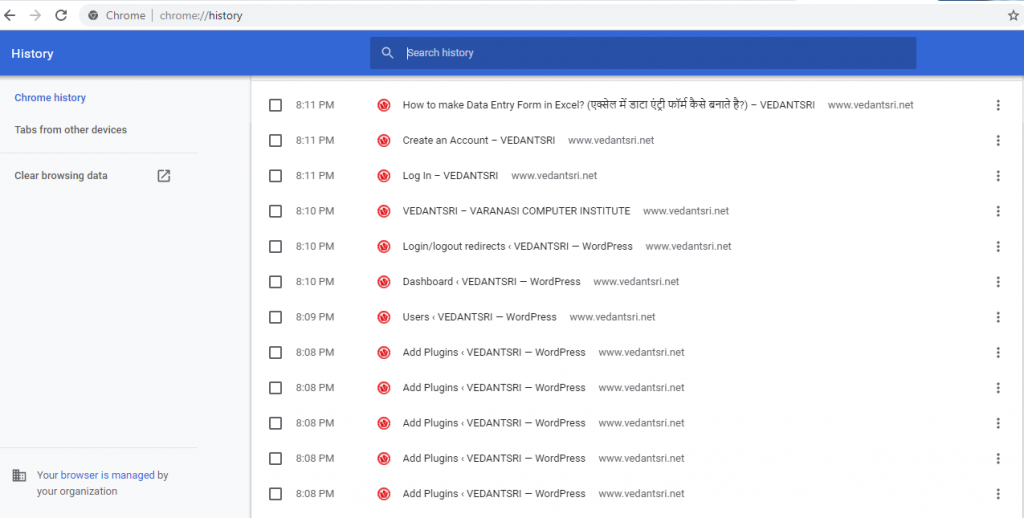
Once one of the above shortcut keys is pressed, a history section similar to the example below should appear. In the following screenshot, browsing history is viewed in Google Chrome.

उपरोक्त शॉर्टकट कुंजियों में से एक को दबाए जाने के बाद, नीचे दिए गए उदाहरण के समान एक इतिहास अनुभाग दिखाई देना चाहिए। निम्नलिखित स्क्रीनशॉट में, ब्राउज़िंग इतिहास को Google Chrome में देखा जा रहा है।

View Hidden Internet history
View Hidden Internet History

Android phone or tablet running Google Chrome

View Hidden Internet history
View Hidden Internet History

Users who are running Google Chrome on their Android phone or tablet can view their history with the following steps.

जो उपयोगकर्ता अपने Android फ़ोन या टेबलेट पर Google Chrome चला रहे हैं, वे निम्न चरणों के साथ अपना इतिहास देख सकते हैं।

  1. Open the Google Chrome Internet browser.
  2. In the upper-right corner of the screen tap the icon.
  3. In the drop-down menu that appears, select history and show in the image.
  4. The following page will contain your device’s history.

iPhone or iPad running Safari

Users who are running Safari for iOS on their iPhone or iPad can view their history with the following steps.

जो उपयोगकर्ता अपने iPhone या iPad पर iOS के लिए Safari चला रहे हैं, वे निम्न चरणों के साथ अपने इतिहास को देख सकते हैं।

  1. On your device, open the Safari Internet browser.
  2. In the lower-left corner of the browser window, press and hold the back arrow.
  3. The next screen will contain your browser’s history.

View Hidden Internet History

About VedantSri

Who invented the Internet

VedantSri Computer Institute provides the best Computer Courses, Classes, and Training in Varanasi. There is NEILIT Courses CCC, BCC, O’level, Certificates, and Diploma Computer Courses available with the best training materials. Also Available Top 100 Best Computer Courses, For Example, OM, DCA, ADCA, DTP, DFA, ADAM, ADTP, ADFA, DCE, and MS Office. VedantSri Computer Coaching update CCC Online Test 2019 in www.vedantsri.net. There are some important computer Courses for jobs CCC Classes, Typing, Internships, And Spoken English Available Free of cost with Offer. More than 50 Computer Courses are available with a 50% Fee Discount in VedantSri Varanasi. You can get the Best Digital Marketing Course at Varanasi Institute VedantSri. There is the Latest Computer Course Offer in ADCA Computer Course, DCA Computer Course, CCC Computer Course & English Spoken. (View Hidden Internet History)

1-VedantSri Official Website:- https://vedantsri.com

2-Student Support Website:- https://www.vedantsri.net

3-Jobs Assist Website:- https://www.jobdo.in

(20 Most using Model-Sentences)

External Link

1-Course Store Website:- https://vedantsri.in

2-Jobs Assist Website:- https://www.jobdo.in

3-MS Word Class:- https://mswordclass.com/

4-Corel Free Class:- https://corelclass.com/

5-Free Excel Class:- https://msexcelclass.com/

Who invented the Internet

Who invented the Internet

A single person did not create the Internet that we know and use today. Below is a listing of different people who have helped contribute to and develop the Internet.

इन्टरनेट जिसे हम जानते व इस्तेमाल करते है इसे किसी एक ब्यक्ति द्वारा नही बनाया गया है| इन्टरनेट के अविष्कार एवं खोज में अनेको लोगो का अहम् योगदान रहा है , निचे उन लोगो के बारे में जानेगे जिन्होंने इन्टरनेट के अविष्कार व विकास करने में अहम् योगदान दिया|

The idea

The initial idea of the Internet is credited to Leonard Klein rock after he published his first paper entitled “Information Flow in Large Communication Nets” on May 31, 1961.

31 मई, 1961 को “सूचना प्रवाह में बड़े संचार नेट्स” शीर्षक से अपना पहला पेपर प्रकाशित करने के बाद इंटरनेट के शुरुआती विचार का श्रेय लियोनार्ड क्लेन रॉक को दिया जाता है।

In 1962, J.C.R. Licklider became the first Director of IPTO and gave his vision of a galactic network. Also, with ideas from Licklider and Kleinrock, Robert Taylor helped create the idea of the network that later became ARPANET.

1962 में, जे.सी.आर. लिक्लिडर IPTO के पहले निदेशक बने और उन्होंने एक गांगेय नेटवर्क के बारे में अपना दृष्टिकोण दिया। इसके अलावा, लिक्लाइडर और क्लेनक्रॉक के विचारों के साथ, रॉबर्ट टेलर ने नेटवर्क के विचार को बनाने में मदद की जो बाद में ARPANET बन गया।

Initial creation

The Internet as we know it today first started being developed in the late 1960s in California in the United States.

इंटरनेट जैसा कि हम जानते हैं कि आज पहली बार 1960 के दशक के अंत में अमेरिका के कैलिफोर्निया में विकसित होना शुरू हुआ था।

In the summer of 1968, the NWG (Network Working Group) held its first meeting, chaired by Elmer Shapiro, at the SRI (Stanford Research Institute). Other attendees included Steve CarrSteve CrockerJeff Rulifson, and Ron Stoughton. In the meeting, the group discussed solving issues related to getting hosts to communicate with each other.

1968 की गर्मियों में, NWG (नेटवर्क वर्किंग ग्रुप) ने एसआरआई (स्टैनफोर्ड रिसर्च इंस्टीट्यूट) में एल्मर शपीरो की अध्यक्षता में अपनी पहली बैठक की। अन्य उपस्थित लोगों में स्टीव कार, स्टीव क्रोकर, जेफ रुलिफ़सन और रॉन स्टफटन शामिल थे। बैठक में, समूह ने मेजबानों को एक दूसरे के साथ संवाद करने के लिए मुद्दों को सुलझाने पर चर्चा की।

In December 1968, Elmer Shapiro with SRI released a report “A Study of Computer Network Design Parameters.” Based on this and earlier work by Paul BaranThomas Marill and others, Lawrence Roberts and Barry Wessler created the IMP (Interface Message Processor) specifications. BBN (Bolt Beranek and Newman, Inc.) was later awarded the contract to design and build the IMP sub-network.

दिसंबर 1968 में, एसआरआई के साथ एल्मर शापिरो ने एक रिपोर्ट जारी की “ए स्टडी ऑफ़ कंप्यूटर नेटवर्क डिज़ाइन पैरामीटर्स।” इसके आधार पर और पॉल बारन, थॉमस मारिल और अन्य द्वारा पहले किए गए काम के आधार पर, लॉरेंस रॉबर्ट्स और बैरी वेसलर ने आईएमपी (इंटरफ़ेस संदेश प्रोसेसर) विनिर्देशों का निर्माण किया। बीबीएन (बोल्ट बेरेनेक और न्यूमैन, इंक।) को बाद में आईएमपी उप-नेटवर्क को डिजाइन और निर्माण करने के लिए अनुबंध से सम्मानित किया गया।

General public learns about Internet

The UCLA (University of California, Los Angeles) put out a press release introducing the public to the Internet on July 3, 1969.

यूसीएलए (कैलिफोर्निया विश्वविद्यालय, लॉस एंजिल्स) ने 3 जुलाई, 1969 को एक प्रेस विज्ञप्ति जारी कर जनता को इंटरनेट से परिचित कराया।

First network equipment

Who invented the Internet

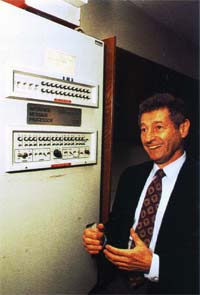
On August 29, 1969, the first network switch and the first piece of network equipment called “IMP” (Interface Message Processor) is sent to UCLA.

29 अगस्त, 1969 को पहला नेटवर्क स्विच और “IMP” (इंटरफेस मैसेज प्रोसेसर) नामक नेटवर्क उपकरण का पहला टुकड़ा यूसीएलए को भेजा गया।

On September 2, 1969, the first data moves from the UCLA host to the switch. The picture is Leonard Kleinrock next to the IMP.

2 सितंबर, 1969 को, पहला डेटा यूसीएलए होस्ट से स्विच में चला गया। छोटा सा भूत लियोनार्ड क्लेरॉक की तस्वीर है।

The first message and network crash

On Friday, October 29, 1969, at 10:30 p.m., the first Internet message was sent from computer science Professor Leonard Kleinrock’s laboratory at UCLA, to a computer at SRI. The connection not only enabled the first transmission to be made, but is also considered the first Internet backbone.

शुक्रवार, 29 अक्टूबर, 1969 को 10:30 बजे, यूसीएलए में कंप्यूटर विज्ञान के प्रोफेसर लियोनार्ड क्लेरॉक की प्रयोगशाला से एसआरआई में एक कंप्यूटर पर पहला इंटरनेट संदेश भेजा गया था। कनेक्शन ने न केवल पहले ट्रांसमिशन को सक्षम किया, बल्कि इसे पहला इंटरनेट बैकबोन भी माना जाता है।

The first message to be distributed was LO, which was an attempt at LOGIN, by Charley S. Kline to log into the SRI computer from UCLA. However, the message was unable to be completed because the SRI system crashed. Shortly after the crash, the issue was resolved, and he was able to log into the computer.

वितरित किया जाने वाला पहला संदेश था LO, जो कि UCLA से SRI कंप्यूटर में लॉग इन करने के लिए चार्ली एस। क्लाइन द्वारा LOGIN का एक प्रयास था। हालाँकि, संदेश पूरा नहीं हो सका क्योंकि SRI सिस्टम क्रैश हो गया। क्रैश के तुरंत बाद, समस्या हल हो गई थी, और वह कंप्यूटर में लॉग इन करने में सक्षम था।

E-mail is developed

Ray Tomlinson sends the first network e-mail in 1971. It’s the first messaging system to send messages across a network to other users.

रे टॉमलिंसन 1971 में पहला नेटवर्क ई-मेल भेजता है। यह अन्य उपयोगकर्ताओं को एक नेटवर्क पर संदेश भेजने के लिए पहला संदेश प्रणाली है।

(Who invented the Internet)

TCP is developed

Who invented the Internet

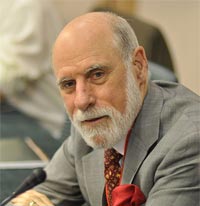
Vinton Cerf and Robert Kahn design TCP during 1973 and later publish it with the help of Yogen Dalal and Carl Sunshine in RFC 675, published in December 1974. Most people consider these two people the inventors of the Internet.

विंटन सेर्फ़ और रॉबर्ट काह्न 1973 के दौरान टीसीपी डिज़ाइन करते हैं और बाद में इसे YFC दलाल और कार्ल सनशाइन की मदद से RFC 675 में प्रकाशित करते हैं, जो दिसंबर 1974 में प्रकाशित हुआ था। अधिकांश लोग इन दो लोगों को इंटरनेट के आविष्कारक मानते हैं।

First commercial network

A commercial version of ARPANET, known as Telenet, is introduced in 1974 and considered to be the first ISP (Internet service provider).

ARPANET का एक व्यावसायिक संस्करण, जिसे टेलनेट के रूप में जाना जाता है, 1974 में पेश किया गया और इसे पहला ISP (इंटरनेट सेवा प्रदाता) माना जाता है।

Who invented the Internet

Ethernet is conceived

Bob Metcalfe develops the idea of Ethernet in 1973.

बॉब मेटकाफ 1973 में ईथरनेट के विचार को विकसित करता है।

The modem is introduced

Dennis Hayes and Dale Heatherington released the 80-103A modem in 1977. The modem and their subsequent modems become a popular choice for home users to connect to the Internet and get online.

डेनिस हेस और डेल हीथरिंगटन ने 1977 में 80-103A मॉडेम जारी किया। मॉडेम और उनके बाद के मॉडेम घर उपयोगकर्ताओं के लिए इंटरनेट से जुड़ने और ऑनलाइन प्राप्त करने के लिए एक लोकप्रिय विकल्प बन गए।

Who invented the Internet

TCP/IP is created

In 1978, TCP splits into TCP/IP, driven by Danny CohenDavid Reed, and John Shoch to support real-time traffic. The creation of TCP/IP help create UDP and is later standardized into ARPANET on January 1, 1983. Today, TCP/IP is still the primary protocol used on the Internet.

1978 में, टीसीपी ने टीसीपी / आईपी में विभाजन किया, जो वास्तविक समय यातायात का समर्थन करने के लिए डैनी कोहेन, डेविड रीड और जॉन शॉच द्वारा संचालित था। टीसीपी / आईपी मदद का निर्माण यूडीपी बनाता है और बाद में 1 जनवरी, 1983 को ARPANET में मानकीकृत किया गया है। आज भी, टीसीपी / आईपी अभी भी इंटरनेट पर उपयोग किया जाने वाला प्राथमिक प्रोटोकॉल है।

Who invented the Internet

DNS is introduced

Paul Mockapetris and Jon Postel introduce DNS in 1984, which also introduces the domain name system. The first Internet domain name, symbolics.com, is registered on March 15, 1985 by Symbolics, a Massachusetts computer company.

पॉल मॉकपेट्री और जॉन पोस्टेल 1984 में डीएनएस का परिचय देते हैं, जो डोमेन नाम प्रणाली का भी परिचय देता है। पहला इंटरनेट डोमेन नाम, symbolics.com, 15 मार्च 1985 को मैसाचुसेट्स कंप्यूटर कंपनी सिम्बॉलिक्स द्वारा पंजीकृत है।

Who invented the Internet

First commercial dial-up ISP

The first commercial ISP (Internet service provider) in the US, known as “The World,” is introduced in 1989. The World was the first ISP to be used on what we now consider to be the Internet.

यूएस में पहला वाणिज्यिक आईएसपी (इंटरनेट सेवा प्रदाता), जिसे “द वर्ल्ड” के रूप में जाना जाता है, को 1989 में पेश किया गया था। विश्व का पहला आईएसपी था जिसे अब हम इंटरनेट के रूप में उपयोग करते हैं।

Who invented the Internet

HTML

Who invented the Internet Varanasi

In 1990, while working at CERN, Tim Berners-Lee develops HTML, which made a huge contribution to how we navigate and view the Internet today.

1990 में, CERN में काम करते हुए, टिम बर्नर्स-ली ने HTML विकसित किया, जिसने आज हम इंटरनेट पर कैसे नेविगेट करते हैं और कैसे देखते हैं, इसमें बहुत बड़ा योगदान दिया।

The first website, info.cern.ch, is developed by Tim Berners-Lee at CERN and published online on August 6, 1991.

पहली वेबसाइट, info.cern.ch, टिम बर्नर्स-ली द्वारा सर्न में विकसित की गई है और 6 अगस्त, 1991 को ऑनलाइन प्रकाशित हुई है।

Who invented the Internet

WWW

Tim Berners-Lee introduces WWW (World Wide Web) to the public on August 6, 1991, and becomes publicly available on August 23, 1991. The WWW is what most people today consider the “Internet” or a series of sites and pages that are connected with links. The Internet had hundreds of people who helped develop the standards and technologies used today, but without the WWW, the Internet would not be as popular as it is today.

टिम बर्नर्स-ली 6 अगस्त, 1991 को डब्ल्यूडब्ल्यूडब्ल्यू (वर्ल्ड वाइड वेब) को जनता के सामने पेश करते हैं, और 23 अगस्त, 1991 को सार्वजनिक रूप से उपलब्ध हो जाते हैं। डब्ल्यूडब्ल्यूडब्ल्यू वह है जिसे आज ज्यादातर लोग “इंटरनेट” या साइटों और पृष्ठों की एक श्रृंखला मानते हैं। लिंक के साथ जुड़े हुए हैं। इंटरनेट में सैकड़ों लोग थे जो आज इस्तेमाल किए जाने वाले मानकों और प्रौद्योगिकियों को विकसित करने में मदद करते हैं, लेकिन WWW के बिना, इंटरनेट उतना लोकप्रिय नहीं होगा जितना कि आज है।(Who invented the Internet)

First graphical Internet browser

VedantSri

Mosaic is the first widely-used graphical World Wide Web browser, released on April 22, 1993 by the NCSA with the help of Marc Andreessen and Eric Bina. A big competitor to Mosaic was Netscape, which was released a year later. Today’s Internet browsers we use today (e.g., Internet Explorer, Chrome, Firefox, etc.), got their inspiration from the Mosaic browser.

मोज़ेक पहला व्यापक रूप से इस्तेमाल किया जाने वाला ग्राफ़िकल वर्ल्ड वाइड वेब ब्राउज़र है, जिसे एनसीएसए ने मार्क आंद्रेसेन और एरिक बीना की मदद से 22 अप्रैल, 1993 को रिलीज़ किया था। मोज़ेक का एक बड़ा प्रतियोगी नेटस्केप था, जिसे एक साल बाद जारी किया गया था। आज के इंटरनेट ब्राउज़र का हम आज उपयोग करते हैं (जैसे, इंटरनेट एक्सप्लोरर, क्रोम, फ़ायरफ़ॉक्स, आदि), मोज़ेक ब्राउज़र से उनकी प्रेरणा मिली।

Who invented the Internet

Java and JavaScript

Originally known as oakJava is a programming language developed by James Gosling and others at Sun Microsystems in 1995. Today, Java is still used to create Internet applications and other software programs.

मूल रूप से ओक के रूप में जाना जाता है, जावा 1995 में सन माइक्रोसिस्टम्स में जेम्स गोसलिंग और अन्य द्वारा विकसित एक प्रोग्रामिंग भाषा है। आज भी, जावा का उपयोग इंटरनेट एप्लिकेशन और अन्य सॉफ्टवेयर प्रोग्राम बनाने के लिए किया जाता है।

JavaScript was developed by Brendan Eich in 1995 and originally known as LiveScript. LiveScript was released with Netscape Navigator 2.0 and renamed to JavaScript with Netscape Navigator 2.0B3. JavaScript is an interpreted client-side scripting language that allows a web designer the ability to insert code into their web page.

जावास्क्रिप्ट 1995 में ब्रेंडन ईच द्वारा विकसित किया गया था और मूल रूप से लाइवस्क्रिप्ट के रूप में जाना जाता था। लाइवस्क्रिप्ट को नेटस्केप नेविगेटर 2.0 के साथ जारी किया गया और इसका नाम बदलकर जावास्क्रिप्ट के साथ नेटस्केप नेविगेटर 2.0 बी 3 कर दिया गया। जावास्क्रिप्ट एक व्याख्यायित क्लाइंट-साइड स्क्रिप्टिंग भाषा है जो एक वेब डिजाइनर को अपने वेब पेज में कोड डालने की क्षमता देता है।

Who invented the Internet

About VedantSri

Who invented the Internet

VedantSri Computer Institute provides best Computer CoursesClasses and Training in Varanasi. There is NEILIT Courses CCC, BCC, O’level, Certificates and Diploma Computer Courses available with best training materials. Also Available Top 100 Best Computer Courses, For Example, OMDCAADCADTPDFAADAMADTP, ADFA, DCEMS Office. VedantSri Computer Coaching update CCC Online Test 2019 in www.vedantsri.net. There are some important computer Courses for jobs CCC ClassTyping, Internship And Spoken English Available Free of cost with Offer. More than 50 Computer Courses which are available with 50% Fee Discount in VedantSri Varanasi. You can get the Best Digital Marketing Course in Varanasi Institute VedantSri. There is Latest Computer Course Offer in ADCA Computer Course, DCA Computer Course, CCC Computer Course & English Spoken.

Important Links

1-VedantSri Official Website:- https://vedantsri.com

2-VedantSri Student Support Website:- https://www.vedantsri.net

3-Students Jobs Assist Website:- https://www.jobdo.in

4- News By Students Website:- https://vedantsri.com/

5-Best Deal on IT Website:- https://www.computeritpoint.com
MS Excel Transfer Data Macros Project-27

MS Excel Transfer Data Macros Project-27

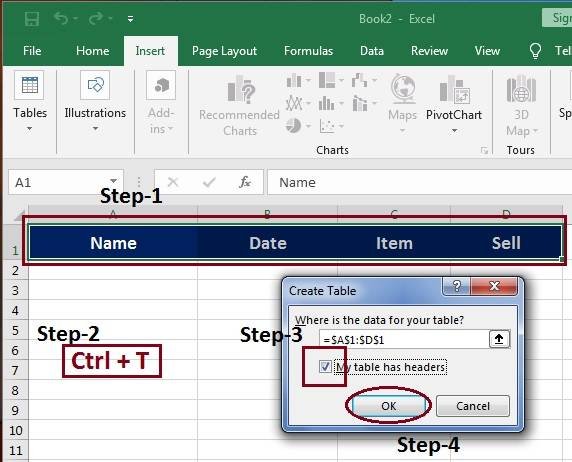
स्वागत है एक बार फिर MS-Excel Latest वर्शन के प्रोजेक्ट बेस्ड क्लासेज में इस विडियो के अंतर्गत आप सीखेंगे की MS-Excel के किसी भी वर्शन पर Transfer Data कैसे डिजाईन किया जाता है |इस विडियो को आराम से देखेते हुए स्टेप by स्टेप फॉलो करें| यदि किसी भी प्रकार का कोई क्वेश्चन का क्वेरी है तो नीचे कमेंट बॉक्स में जरुर लिखें धन्यवाद

इस विडियो के माध्यम से आप यह जान पाएंगे कि MS Excel के अंतर्गत आने वाले विभिन्न प्रकार के शेपस,कलर,टेक्स्ट,टूल्स,फॉण्ट,टेबल्स इत्यादि का यूज़ करके एक बेहतर Transfer Data डिज़ाइन कैसे क्रिएट कर सकते हैं जो देखने में आकर्षक लगे

MS Excel Transfer Data Macros Project-27

MS-Excel Transfer Data Project

MS-Excel Data Entry-Form Projects:- This is an MS Excel project, Website Page. If you are preparing for the CCC Exam or any competitive exam, then you should visit the www.vedantsri.net website.

You can also download this app from the Play Store, and you will find many more online test series related to, for example, MS Word, MS Excel, MS PowerPoint, and Internet-related.

VedantSri Computer Institute in Varanasi provides this. VedantSri provides the Best Computer Classes, Courses, Coaching, and Training in Varanasi, Uttar Pradesh, India.

About VedantSri

MS Excel Transfer Data Macros Project-27

VedantSri Computer Institute provides the best Computer Courses, Classes, and Training in Varanasi. There are NEILIT Courses, CCC, BCC, O-level, Certificates and Diploma Computer Courses available with the best training materials. Also Available: Top 100 Best Computer Courses, For Example, OM, DCA, ADCA, DTP, DFA, ADAM, ADTP, ADFA, DCE, and MS Office. VedantSri Computer Coaching updates the CCC Online Test on www.vedantsri.net.

There are some important computer Courses for jobs, CCC Classes, Typing, Internships, And Spoken English Available Free of cost with an offer. More than 50 Computer Courses are available with a 50% fee discount at VedantSri Varanasi. You can get the Best Digital Marketing Course at Varanasi Institute VedantSri. There is the Latest Computer Course Offer in the ADCA Computer Course, DCA Computer Course, CCC Computer Course & English Spoken. MS Excel Transfer Data Macros Project-27

(20 Most Used Model Sentences)

External Link

MS Excel Count Row Column

Ms Excel Count Row Column

इस विडियो के माध्यम से आप यह जान पाएंगे कि MS Excel के Row and Column को कैसे Count करना है

MS Excel Count Row Column

MS Excel Count Row Column

यदि आप TallyERP Bank Entry Transaction को बनाना सीखनाचाहते हैं तो इस लिंक पर जाए

About VedantSri

MS Excel Count Row Column

VedantSri Computer Institute provides the best Computer Courses, Classes, and Training in Varanasi. There is NEILIT Courses CCC, BCC, O’level, Certificates, and Diploma Computer Courses available with the best training materials. Also Available Top 100 Best Computer Courses, For Example, OMDCAADCADTPDFAADAMADTP, ADFA, DCE, and MS Office. VedantSri Computer Coaching updates CCC Online Test on www.vedantsri.net. (MS Excel Count Row Column)

There are some important computer Courses for jobs CCC Classes, Typing, Internships, And Spoken English Available Free of cost with Offer. More than 50 Computer Courses are available with a 50% Fee Discount in VedantSri Varanasi. You can get the Best Digital Marketing Course at Varanasi Institute VedantSri. There is the Latest Computer Course Offer in ADCA Computer Course, DCA Computer Course, CCC Computer Course & English Spoken. (MS Excel Count Row Column)

यदि आप MS Word Border Setting को बनाना सीखनाचाहते हैं तो इस लिंक पर जाए

CCC Online Test

CCC Online Test :- This is the CCC Online Test Website Page. If You are preparing for CCC Exam or any competitive exam then you should visit this www.vedantsri.net website. (MS Excel Count Row Column)

you can also download this app from the play store and you find Just like many more Online Test Series Related For Example MS Word, MS Excel, MS PowerPoint, and Internet-related. (MS Excel Count Row Column)

This is Provided By VedantSri Computer Institute in Varanasi. The VedantSri Provides the Best Computer Classes, Courses, Coaching, and Computer Training in Varanasi Uttar Pradesh India. (MS Excel Count Row Column)

यदि आप MsWord Indent Outline Level Tool को बनाना सीखनाचाहते हैं तो इस लिंक पर जाए

External Link

MS Excel Data Transfer Project-28

MS Excel Data Transfer Project

इस विडियो के माध्यम से आप यह जान पाएंगे कि MS Excel के अंतर्गत आने वाले विभिन्न प्रकार के शेपस,कलर,टेक्स्ट,टूल्स,फॉण्ट,टेबल्स इत्यादि का यूज़ करके एक बेहतरMs Excel Data Transfer Project डिज़ाइन कैसे क्रिएट कर सकते हैं जो देखने में आकर्षक लगे

MsWord Use of Mailings

MS Excel Data Transfer Project-28

MsWord Sentence on separate pages

Ms Excel Data Transfer Project

About VedantSri

MsExcel Data Transfer Project

VedantSri Computer Institute provides the best Computer Courses, Classes and Training in Varanasi. There is NEILIT Courses CCC, BCC, O’level, Certificates and Diploma Computer Courses available with the best training materials. Also Available Top 100 Best Computer Courses, For Example, OM, DCA, ADCA, DTP, DFA, ADAM, ADTP, ADFA, DCE, MS Office. VedantSri Computer Coaching updates CCC Online Test 2019 on www.vedantsri.net. There are some important computer Courses for jobs CCC Classes, Typing, Internship, And Spoken English Available Free of cost with Offer. More than 50 Computer Courses are available with a 50% Fee Discount in VedantSri Varanasi. You can get the Best Digital Marketing Course at Varanasi Institute VedantSri. There is Latest Computer Course Offer in ADCA Computer Course, DCA Computer Course, CCC Computer Course & English Spoken.

you can also download this app from the play store and you find Just like many more Online Test Series Related For Example MS Word, MS Excel, MS PowerPoint, and Internet-related.

This is Provided By VedantSri Computer Institute in Varanasi. The VedantSri Provides the Best Computer Classes, Courses, Coaching, and Computer Training in Varanasi Uttar Pradesh India.

(MsExcel Data Transfer Project)

1-VedantSri Official Website:- https://vedantsri.com

2-Student Support Website:- https://www.vedantsri.net

3-Jobs Assist Website:- https://www.jobdo.in

(20 Most using Model-Sentences)

External Link

1-Course Store Website:- https://vedantsri.in

2-Jobs Assist Website:- https://www.jobdo.in

3-MS Word Class:- https://mswordclass.com/

4-Corel Free Class:- https://corelclass.com/

5-Free Excel Class:- https://msexcelclass.com/

MS Word Indent Outline Level Tool

MsWord Indent Outline Level Tool

इस विडियो के माध्यम से आप यह जान पाएंगे कि MS Word के अंतर्गत आने वाला Indent Outline Level Tool का क्या यूज़ है

MS Word Indent Outline Level Tool

MsWord Indent Outline Level Tool

VedantSri Computer Institute Varanasi

MsWord Indent Outline Level Tool

provides the best Computer CoursesClasses, and Training in Varanasi. There is NIELIT Courses CCC, BCC, O’level, Certificates, and Diploma Computer Courses available with the best training materials. Also Available Top 100 Best Computer Courses, For Example, OM, DCA, ADCA, DTP, DFA, ADAM, ADTP, ADFA, DCE, and MS Office. VedantSri Computer Coaching updates CCC Online Test 2020 on www.vedantsri.net. (MS Word Indent Outline Level Tool)

There are some important computer Courses for jobs CCC Classes, Typing, Internships, And Spoken English Available Free of cost with Offer. More than 50 Computer Courses are available with a 50% Fee Discount in VedantSri Varanasi. You can get the Best Digital Marketing Course at Varanasi Institute VedantSri. There is the Latest Computer Course Offer in ADCA Computer Course, DCA Computer Course, CCC Computer Course & English Spoken. (MS Word Indent Outline Level Tool)

About VedantSri Computer Institute Varanasi

VedantSri Computer Institute in Varanasi is the Government recognized and ISO Certified Computer Institute in Varanasi running since 2011. It Provides Computer Courses, Classes, and Training through different own branches all over Varanasi. There is Computer Scholarship Courses DCE Scholarship (Diploma in Computer Engineering), DIT most trusted computer course Available under Scholarship Test Scheme. (MS Word Indent Outline Level Tool)

Varanasi Computer Institute vedantsri works at different places to ensure students to get better computer education. VedantSri Computer Classes has Diploma courses and advance diploma courses on the computerVedantSri Institute provides the latest version of computer application training in computer courses. (MS Word Indent Outline Level Tool)

वेदांतश्री कम्प्यूटर इंस्टिट्यूट’ वाराणसी में पिछले 10 वर्षो से बेहतर व न्यूनतम शुल्क में कम्प्यूटर शिक्षा प्रदान करने वाली एक कम्प्यूटर ट्रेनिंग इंस्टिट्यूट है | यह संस्था कम्प्यूटर व इंग्लिश स्पीकिंग कोर्स की ट्रेनिंग प्रदान करती है | वाराणसी में कम्प्यूटर शिक्षा को बेहतर व न्यूनतम शुल्क में छात्रो तक पहुचाने में वेदांतश्री पिछले 10 वर्षो से प्रयासरत है | (MS Word Indent Outline Level Tool)

Free To Learn In VedantSri Computer Institute in Varanasi

इस वेबसाइट का यूज़ वेदांतश्री में पढ़ रहे छात्रो को कोर्स से सम्बंधित ऑनलाइन सपोर्ट करने से सम्बंधित है | इस वेबसाइट पर उपलब्ध विडियो, टेस्ट शीट, Questions & Answer सेशन, ट्रिक्स, टिप्स वेदांतश्री में सिख रहे कोर्सेज से सम्बंधित है | उपलब्ध कंटेंट संस्था में सिख रहे छात्रो के डिमांड पर अपडेट किया जाता है | उपलब्ध कंटेंट वेदांतश्री में पढ़ रहे छात्रो व सम्बंधित छात्रो को निशुल्क प्रदान किया जाता है जिसका कोई अलग से शुल्क नही लिया जाता है | इस वेबसाइट पर उपलब्ध कंटेंट कम्प्यूटर कोर्सेज व इंग्लिश स्पीकिंग कोर्सेज से सम्बंधित अपडेट किया जाता है |  (MS Word Indent Outline Level Tool)

(MS Word Indent Outline Level Tool)

About CCC Online Test 2020

CCC Online Test 2020:- This is the CCC Online Test Website Page. If You are preparing for CCC Exam or any competitive exam then you should visit this www.vedantsri.net website. (MS Word Indent Outline Level Tool)

you can also download this app from the play store and you find Just like many more Online Test Series Related For Example MS Word, MS Excel, MS PowerPoint, and Internet-related. (MS Word Indent Outline Level Tool)

This is Provided By VedantSri Computer Institute Varanasi. The VedantSri Provides the Best Computer Classes, Courses, Coaching, and Computer Training in Varanasi Uttar Pradesh India. (MS Word Indent Outline Level Tool)

(MS Word Indent Outline Level Tool)

Important Links

1-VedantSri Official Website:- https://vedantsri.com

2-Student Support Website:- https://www.vedantsri.net

3-Jobs Assist Website:- https://www.jobdo.in

4- Varanasi Gyan Website:- https://vedantsri.com/

5-Best Deal on IT Website:- https://www.computeritpoint.com
(MS Word Indent Outline Level Tool)

External Link

1-Course Store Website:- https://vedantsri.in

2-Jobs Assist Website:- https://www.jobdo.in

3-MS Word Class:- https://mswordclass.com/

4-Corel Free Class:- https://corelclass.com/

5-Free Excel Class:- https://msexcelclass.com/

MsWord Indentation Special Tool

MsWord Indentation Special Tool

इस विडियो के माध्यम से आप यह जान पाएंगे कि MS Word के अंतर्गत आने वाला MS Word Indentation Special Tool का क्या यूज़ है और कैसे इसे आसान तरीके से कर सकते हैं .

MsWord Indentation Special Tool

MS Word Indentation Special Tool

VedantSri Computer Institute Varanasi

MsWord Indentation Special Tool

provides the best Computer CoursesClasses, and Training in Varanasi. There is NIELIT Courses CCC, BCC, O’level, Certificates, and Diploma Computer Courses available with the best training materials. Also Available Top 100 Best Computer Courses, For Example, OM, DCA, ADCA, DTP, DFA, ADAM, ADTP, ADFA, DCE, and MS Office. VedantSri Computer Coaching updates CCC Online Test 2020 on www.vedantsri.net. There are some important computer Courses for jobs CCC Classes, Typing, Internships, And Spoken English Available Free of cost with Offer. More than 50 Computer Courses are available with a 50% Fee Discount in VedantSri Varanasi. You can get the Best Digital Marketing Course at Varanasi Institute VedantSri. There is the Latest Computer Course Offer in ADCA Computer Course, DCA Computer Course, CCC Computer Course & English Spoken. MsWord Indentation Special Tool

About VedantSri Computer Institute Varanasi

VedantSri Computer Institute in Varanasi is the Government recognized and ISO Certified Computer Institute in Varanasi running since 2011. It Provides Computer Courses, Classes, and Training through different own branches all over Varanasi. There is Computer Scholarship Courses DCE Scholarship (Diploma in Computer Engineering), DIT most trusted computer course Available under Scholarship Test Scheme.

Varanasi Computer Institute vedantsri works at different places to ensure students to get better computer education. VedantSri Computer Classes has Diploma courses and advance diploma courses on the computerVedantSri Institute provides the latest version of computer application training in computer courses.

वेदांतश्री कम्प्यूटर इंस्टिट्यूट’ वाराणसी में पिछले 10 वर्षो से बेहतर व न्यूनतम शुल्क में कम्प्यूटर शिक्षा प्रदान करने वाली एक कम्प्यूटर ट्रेनिंग इंस्टिट्यूट है | यह संस्था कम्प्यूटर व इंग्लिश स्पीकिंग कोर्स की ट्रेनिंग प्रदान करती है | वाराणसी में कम्प्यूटर शिक्षा को बेहतर व न्यूनतम शुल्क में छात्रो तक पहुचाने में वेदांतश्री पिछले 10 वर्षो से प्रयासरत है |

Free To Learn In VedantSri Computer Institute in Varanasi

इस वेबसाइट का यूज़ वेदांतश्री में पढ़ रहे छात्रो को कोर्स से सम्बंधित ऑनलाइन सपोर्ट करने से सम्बंधित है | इस वेबसाइट पर उपलब्ध विडियो, टेस्ट शीट, Questions & Answer सेशन, ट्रिक्स, टिप्स वेदांतश्री में सिख रहे कोर्सेज से सम्बंधित है | उपलब्ध कंटेंट संस्था में सिख रहे छात्रो के डिमांड पर अपडेट किया जाता है | उपलब्ध कंटेंट वेदांतश्री में पढ़ रहे छात्रो व सम्बंधित छात्रो को निशुल्क प्रदान किया जाता है जिसका कोई अलग से शुल्क नही लिया जाता है | इस वेबसाइट पर उपलब्ध कंटेंट कम्प्यूटर कोर्सेज व इंग्लिश स्पीकिंग कोर्सेज से सम्बंधित अपडेट किया जाता है | 

(MsWord Indentation Special Tool)

About CCC Online Test 2020

CCC Online Test 2020:- This is the CCC Online Test Website Page. If You are preparing for CCC Exam or any competitive exam then you should visit this www.vedantsri.net website.

you can also download this app from the play store and you find Just like many more Online Test Series Related For Example MS Word, MS Excel, MS PowerPoint, and Internet-related.

This is Provided By VedantSri Computer Institute Varanasi. The VedantSri Provides the Best Computer Classes, Courses, Coaching, and Computer Training in Varanasi Uttar Pradesh India.

(MsWord Indentation Special Tool)

1-VedantSri Official Website:- https://vedantsri.com

2-Student Support Website:- https://www.vedantsri.net

3-Jobs Assist Website:- https://www.jobdo.in

(20 Most using Model-Sentences)

External Link

1-Course Store Website:- https://vedantsri.in

2-Jobs Assist Website:- https://www.jobdo.in

3-MS Word Class:- https://mswordclass.com/

4-Corel Free Class:- https://corelclass.com/

5-Free Excel Class:- https://msexcelclass.com/

MsWord Sentence on separate pages

MsWord Sentence on separate pages

इस विडियो के माध्यम से आप यह जान पाएंगे कि MS Word के अंतर्गत आने वाला MS Word Sentence on separate pageका क्या यूज़ है और कैसे इसे आसान तरीके से कर सकते हैं .

MsWord Sentence on separate pages

MsWord Sentence on separate pages

VedantSri Computer Institute Varanasi

MsWord Sentence on separate pages

provides the best Computer CoursesClasses, and Training in Varanasi. There is NIELIT Courses CCC, BCC, O’level, Certificates, and Diploma Computer Courses available with the best training materials. Also Available Top 100 Best Computer Courses, For Example, OM, DCA, ADCA, DTP, DFA, ADAM, ADTP, ADFA, DCE, and MS Office. VedantSri Computer Coaching updates CCC Online Test 2020 on www.vedantsri.net. There are some important computer Courses for jobs CCC Classes, Typing, Internships, And Spoken English Available Free of cost with Offer. More than 50 Computer Courses are available with a 50% Fee Discount in VedantSri Varanasi. You can get the Best Digital Marketing Course at Varanasi Institute VedantSri. There is the Latest Computer Course Offer in ADCA Computer Course, DCA Computer Course, CCC Computer Course & English Spoken.

About VedantSri Computer Institute Varanasi

VedantSri Computer Institute in Varanasi is the Government recognized and ISO Certified Computer Institute in Varanasi running since 2011. It Provides Computer Courses, Classes, and Training through different own branches all over Varanasi. There is Computer Scholarship Courses DCE Scholarship (Diploma in Computer Engineering), DIT most trusted computer course Available under Scholarship Test Scheme.

Logo
MsWord Sentence on separate pages

Varanasi Computer Institute vedantsri works at different places to ensure students to get better computer education. VedantSri Computer Classes has Diploma courses and advance diploma courses on the computerVedantSri Institute provides the latest version of computer application training in computer courses.

वेदांतश्री कम्प्यूटर इंस्टिट्यूट’ वाराणसी में पिछले 10 वर्षो से बेहतर व न्यूनतम शुल्क में कम्प्यूटर शिक्षा प्रदान करने वाली एक कम्प्यूटर ट्रेनिंग इंस्टिट्यूट है | यह संस्था कम्प्यूटर व इंग्लिश स्पीकिंग कोर्स की ट्रेनिंग प्रदान करती है | वाराणसी में कम्प्यूटर शिक्षा को बेहतर व न्यूनतम शुल्क में छात्रो तक पहुचाने में वेदांतश्री पिछले 10 वर्षो से प्रयासरत है |

Free To Learn In VedantSri Computer Institute in Varanasi

इस वेबसाइट का यूज़ वेदांतश्री में पढ़ रहे छात्रो को कोर्स से सम्बंधित ऑनलाइन सपोर्ट करने से सम्बंधित है | इस वेबसाइट पर उपलब्ध विडियो, टेस्ट शीट, Questions & Answer सेशन, ट्रिक्स, टिप्स वेदांतश्री में सिख रहे कोर्सेज से सम्बंधित है | उपलब्ध कंटेंट संस्था में सिख रहे छात्रो के डिमांड पर अपडेट किया जाता है | उपलब्ध कंटेंट वेदांतश्री में पढ़ रहे छात्रो व सम्बंधित छात्रो को निशुल्क प्रदान किया जाता है जिसका कोई अलग से शुल्क नही लिया जाता है | इस वेबसाइट पर उपलब्ध कंटेंट कम्प्यूटर कोर्सेज व इंग्लिश स्पीकिंग कोर्सेज से सम्बंधित अपडेट किया जाता है | 

(MsWord Sentence on separate pages)

About CCC Online Test 2020

CCC Online Test 2020:- This is the CCC Online Test Website Page. If You are preparing for CCC Exam or any competitive exam then you should visit this www.vedantsri.net website.

you can also download this app from the play store and you find Just like many more Online Test Series Related For Example MS Word, MS Excel, MS PowerPoint, and Internet-related.

This is Provided By VedantSri Computer Institute Varanasi. The VedantSri Provides the Best Computer Classes, Courses, Coaching, and Computer Training in Varanasi Uttar Pradesh India.

(MsWord Sentence on separate pages)

1-VedantSri Official Website:- https://vedantsri.com

2-Student Support Website:- https://www.vedantsri.net

3-Jobs Assist Website:- https://www.jobdo.in

(20 Most using Model-Sentences)

External Link

1-Course Store Website:- https://vedantsri.in

2-Jobs Assist Website:- https://www.jobdo.in

3-MS Word Class:- https://mswordclass.com/

4-Corel Free Class:- https://corelclass.com/

5-Free Excel Class:- https://msexcelclass.com/

MS Word Border Setting

MS Word Border Setting

इस विडियो के माध्यम से आप यह जान पाएंगे कि MS Word के अंतर्गत आने वाला MS Word Border Setting का क्या यूज़ है और कैसे इसे आसान तरीके से कर सकते हैं . MS Word Border Setting

MS Word Border Setting

VedantSri Computer Institute Varanasi

MS Word Border Setting

provides the best Computer CoursesClasses, and Training in Varanasi. There is NIELIT Courses CCC, BCC, O’level, Certificates, and Diploma Computer Courses available with the best training materials. Also Available Top 100 Best Computer Courses, For Example, OM, DCA, ADCA, DTP, DFA, ADAM, ADTP, ADFA, DCE, and MS Office.

VedantSri Computer Coaching updates CCC Online Test 2020 on www.vedantsri.net. There are some important computer Courses for jobs CCC Classes, Typing, Internships, And Spoken English Available Free of cost with Offer. More than 50 Computer Courses are available with a 50% Fee Discount in VedantSri Varanasi. MS Word Border Setting

You can get the Best Digital Marketing Course at Varanasi Institute VedantSri. There is the Latest Computer Course Offer in ADCA Computer Course, DCA Computer Course, CCC Computer Course & English Spoken. MS Word Border Setting

About VedantSri Computer Institute Varanasi

VedantSri Computer Institute in Varanasi is the Government recognized and ISO Certified Computer Institute in Varanasi running since 2011. It Provides Computer Courses, Classes, and Training through different own branches all over Varanasi. There is Computer Scholarship Courses DCE Scholarship (Diploma in Computer Engineering), DIT most trusted computer course Available under Scholarship Test Scheme. MS Word Border Setting

Varanasi Computer Institute vedantsri works at different places to ensure students to get better computer education. VedantSri Computer Classes has Diploma courses and advance diploma courses on the computerVedantSri Institute provides the latest version of computer application training in computer courses. MS Word Border Setting

वेदांतश्री कम्प्यूटर इंस्टिट्यूट’ वाराणसी में पिछले 10 वर्षो से बेहतर व न्यूनतम शुल्क में कम्प्यूटर शिक्षा प्रदान करने वाली एक कम्प्यूटर ट्रेनिंग इंस्टिट्यूट है | यह संस्था कम्प्यूटर व इंग्लिश स्पीकिंग कोर्स की ट्रेनिंग प्रदान करती है | वाराणसी में कम्प्यूटर शिक्षा को बेहतर व न्यूनतम शुल्क में छात्रो तक पहुचाने में वेदांतश्री पिछले 10 वर्षो से प्रयासरत है | MS Word Border Setting

MS Word Border Setting

Free To Learn In VedantSri Computer Institute in Varanasi

इस वेबसाइट का यूज़ वेदांतश्री में पढ़ रहे छात्रो को कोर्स से सम्बंधित ऑनलाइन सपोर्ट करने से सम्बंधित है | इस वेबसाइट पर उपलब्ध विडियो, टेस्ट शीट, Questions & Answer सेशन, ट्रिक्स, टिप्स वेदांतश्री में सिख रहे कोर्सेज से सम्बंधित है | उपलब्ध कंटेंट संस्था में सिख रहे छात्रो के डिमांड पर अपडेट किया जाता है | उपलब्ध कंटेंट वेदांतश्री में पढ़ रहे छात्रो व सम्बंधित छात्रो को निशुल्क प्रदान किया जाता है जिसका कोई अलग से शुल्क नही लिया जाता है | इस वेबसाइट पर उपलब्ध कंटेंट कम्प्यूटर कोर्सेज व इंग्लिश स्पीकिंग कोर्सेज से सम्बंधित अपडेट किया जाता है |  MS Word Border Setting

(MS Word Border Setting)

About CCC Online Test 2020

CCC Online Test 2020:- This is the CCC Online Test Website Page. If You are preparing for CCC Exam or any competitive exam then you should visit this www.vedantsri.net website. MS Word Border Setting

you can also download this app from the play store and you find Just like many more Online Test Series Related For Example MS Word, MS Excel, MS PowerPoint, and Internet-related.

This is Provided By VedantSri Computer Institute Varanasi. The VedantSri Provides the Best Computer Classes, Courses, Coaching, and Computer Training in Varanasi Uttar Pradesh India.

Visit at – https://www.corelclass.com

Read Also it – https://msexcelclass.com/

Also, Read- Tally Course Fees, Duration, Scope, Syllabus, Admission, Institutes

Also Read – CCC Course Fees, Syllabus, Duration, Scope, Jobs, and Institute

Important Link – DFA Course Fees, Syllabus, Duration, Scope, Jobs, and Institute

Visit – https://mswordclass.com/

MsWord Increase-Decrease Space Between-Alphabet

MsWord Increase-Decrease Space Between-Alphabet

इस विडियो के माध्यम से आप यह जान पाएंगे कि MS Word के अंतर्गत आने वाला MS Word Increase-Decrease Space Between-Alphabet का क्या यूज़ है और कैसे इसे आसान तरीके से कर सकते हैं ! MsWord Increase-Decrease Space Between-Alphabet

MsWord Increase-Decrease Space Between-Alphabet

VedantSri Computer Institute Varanasi

MsWord Increase-Decrease Space Between-Alphabet

provides the best Computer CoursesClasses, and Training in Varanasi. There is NIELIT Courses CCC, BCC, O’level, Certificates, and Diploma Computer Courses available with the best training materials. Also Available Top 100 Best Computer Courses, For Example, OM, DCA, ADCA, DTP, DFA, ADAM, ADTP, ADFA, DCE, and MS Office. MsWord Increase-Decrease Space Between-Alphabet

VedantSri Computer Coaching updates CCC Online Test 2020 on www.vedantsri.net. There are some important computer Courses for jobs CCC Classes, Typing, Internships, And Spoken English Available Free of cost with Offer. MsWord Increase-Decrease Space Between-Alphabet

More than 50 Computer Courses are available with a 50% Fee Discount in VedantSri Varanasi. You can get the Best Digital Marketing Course at Varanasi Institute VedantSri. There is the Latest Computer Course Offer in ADCA Computer Course, DCA Computer Course, CCC Computer Course & English Spoken. MsWord Increase-Decrease Space Between-Alphabet

About VedantSri Computer Institute Varanasi

VedantSri Computer Institute in Varanasi is the Government recognized and An ISO Certified Computer Institute in Varanasi running since 2011. It Provides Computer Courses, Classes, and Training through different own branches all over Varanasi. There is Computer Scholarship Courses DCE Scholarship (Diploma in Computer Engineering), DIT most trusted computer course Available under Scholarship Test Scheme. MsWord Increase-Decrease Space Between-Alphabet

Varanasi Computer Institute vedantsri works at different places to ensure students to get better computer education. VedantSri Computer Classes has Diploma courses and advance diploma courses on the computerVedantSri Institute provides the latest version of computer application training in computer courses.

वेदांतश्री कम्प्यूटर इंस्टिट्यूट’ वाराणसी में पिछले 10 वर्षो से बेहतर व न्यूनतम शुल्क में कम्प्यूटर शिक्षा प्रदान करने वाली एक कम्प्यूटर ट्रेनिंग इंस्टिट्यूट है | यह संस्था कम्प्यूटर व इंग्लिश स्पीकिंग कोर्स की ट्रेनिंग प्रदान करती है | वाराणसी में कम्प्यूटर शिक्षा को बेहतर व न्यूनतम शुल्क में छात्रो तक पहुचाने में वेदांतश्री पिछले 10 वर्षो से प्रयासरत है |

MsWord Increase-Decrease Space Between-Alphabet

Free To Learn In VedantSri Computer Institute in Varanasi

इस वेबसाइट का यूज़ वेदांतश्री में पढ़ रहे छात्रो को कोर्स से सम्बंधित ऑनलाइन सपोर्ट करने से सम्बंधित है | इस वेबसाइट पर उपलब्ध विडियो, टेस्ट शीट, Questions & Answer सेशन, ट्रिक्स, टिप्स वेदांतश्री में सिख रहे कोर्सेज से सम्बंधित है | उपलब्ध कंटेंट संस्था में सिख रहे छात्रो के डिमांड पर अपडेट किया जाता है | उपलब्ध कंटेंट वेदांतश्री में पढ़ रहे छात्रो व सम्बंधित छात्रो को निशुल्क प्रदान किया जाता है जिसका कोई अलग से शुल्क नही लिया जाता है | इस वेबसाइट पर उपलब्ध कंटेंट कम्प्यूटर कोर्सेज व इंग्लिश स्पीकिंग कोर्सेज से सम्बंधित अपडेट किया जाता है | 

(MsWord Increase-Decrease Space Between-Alphabet)

About CCC Online Test 2020

CCC Online Test 2020:- This is the CCC Online Test Website Page. If You are preparing for CCC Exam or any competitive exam then you should visit this www.vedantsri.net website. MsWord Increase-Decrease Space Between-Alphabet

you can also download this app from the play store and you find Just like many more Online Test Series Related For Example MS Word, MS Excel, MS PowerPoint, and Internet-related.

This is Provided By VedantSri Computer Institute Varanasi. The VedantSri Provides the Best Computer Classes, Courses, Coaching, and Computer Training in Varanasi Uttar Pradesh India.

(MsWord Increase-Decrease Space Between-Alphabet)

Visit at – https://www.corelclass.com

Read Also it – https://msexcelclass.com/

Also, Read- Tally Course Fees, Duration, Scope, Syllabus, Admission, Institutes

Also Read – CCC Course Fees, Syllabus, Duration, Scope, Jobs, and Institute

Important Link – DFA Course Fees, Syllabus, Duration, Scope, Jobs, and Institute

Visit – https://mswordclass.com/

MS Word Use single-Double Strikethrough

MS Word Use single-Double Strikethrough

इस विडियो के माध्यम से आप यह जान पाएंगे कि MS Word के अंतर्गत आने वाला MS Word Use single-Double Strikethrough का क्या यूज़ है और कैसे इसे आसान तरीके से Apply कर सकते हैं . MS Word Use single-Double Strikethrough

MsWord Use single-Double Strikethrough

About VedantSri

MsWord Use single-Double Strikethrough

VedantSri Computer Institute provides the best Computer Courses, Classes, and Training in Varanasi. There is NEILIT Courses CCC, BCC, O’level, Certificates, and Diploma Computer Courses available with the best training materials. Also Available Top 100 Best Computer Courses, For Example, OM, DCA, ADCA, DTP, DFA, ADAM, ADTP, ADFA, DCE, and MS Office. MS Word Use single-Double Strikethrough

VedantSri Computer Coaching updates CCC Online Test 2019 on www.vedantsri.net. There are some important computer Courses for jobs CCC Classes, Typing, Internships, And Spoken English Available Free of cost with Offer. More than 50 Computer Courses are available with a 50% Fee Discount in VedantSri Varanasi. MS Word Use single-Double Strikethrough

MS Word Use single-Double Strikethrough

You can get the Best Digital Marketing Course at Varanasi Institute VedantSri. There is the Latest Computer Course Offer in ADCA Computer Course, DCA Computer Course, CCC Computer Course & English Spoken. MS Word Use single-Double Strikethrough

CCC Online Test 2020

CCC Online Test 2019:- This is the CCC Online Test Website Page. If You are preparing for CCC Exam or any competitive exam then you should visit this www.vedantsri.net website. MS Word Use single-Double Strikethrough

you can also download this app from the play store and you find Just like many more Online Test Series Related For Example MS Word, MS Excel, MS PowerPoint, and Internet-related.

This is Provided By VedantSri Computer Institute in Varanasi. The VedantSri Provides the Best Computer Classes, Courses, Coaching, and Computer Training in Varanasi Uttar Pradesh India.

Visit at – https://www.corelclass.com

Read Also it – https://msexcelclass.com/

Also, Read- Tally Course Fees, Duration, Scope, Syllabus, Admission, Institutes

Also Read – CCC Course Fees, Syllabus, Duration, Scope, Jobs, and Institute

Important Link – DFA Course Fees, Syllabus, Duration, Scope, Jobs, and Institute

Visit – https://mswordclass.com/

MsWord Small-Caps and All-Caps

MsWord Small-Caps and All-Caps

इस विडियो के माध्यम से आप यह जान पाएंगे कि MS Word के अंतर्गत आने वाला MS Word Small-Caps and All-Caps का क्या यूज़ है और कैसे इसे आसान तरीके से Apply कर सकते हैं . MsWord Small-Caps and All-Caps

MsWord Small-Caps and All-Caps

VedantSri Computer Institute Varanasi

MsWord Small-Caps and All-Caps

provides the best Computer CoursesClasses, and Training in Varanasi. There is NIELIT Courses CCC, BCC, O’level, Certificates, and Diploma Computer Courses available with the best training materials. Also Available Top 100 Best Computer Courses, For Example, OM, DCA, ADCA, DTP, DFA, ADAM, ADTP, ADFA, DCE, and MS Office. MsWord Small-Caps and All-Caps

VedantSri Computer Coaching updates CCC Online Test 2020 on www.vedantsri.net. There are some important computer Courses for jobs CCC Classes, Typing, Internships, And Spoken English Available Free of cost with Offer. MsWord Small-Caps and All-Caps

More than 50 Computer Courses are available with a 50% Fee Discount in VedantSri Varanasi. You can get the Best Digital Marketing Course at Varanasi Institute VedantSri. There is the Latest Computer Course Offer in ADCA Computer Course, DCA Computer Course, CCC Computer Course & English Spoken.

MsWord Small-Caps and All-Caps

About VedantSri Computer Institute Varanasi

VedantSri Computer Institute in Varanasi is the Government recognized and ISO Certified Computer Institute in Varanasi running since 2011. It Provides Computer Courses, Classes, and Training through different own branches all over Varanasi. There is Computer Scholarship Courses DCE Scholarship (Diploma in Computer Engineering), DIT most trusted computer course Available under Scholarship Test Scheme. MsWord Small-Caps and All-Caps

Varanasi Computer Institute vedantsri works at different places to ensure students to get better computer education. VedantSri Computer Classes has Diploma courses and advance diploma courses on the computerVedantSri Institute provides the latest version of computer application training in computer courses. MsWord Small-Caps and All-Caps

वेदांतश्री कम्प्यूटर इंस्टिट्यूट’ वाराणसी में पिछले 10 वर्षो से बेहतर व न्यूनतम शुल्क में कम्प्यूटर शिक्षा प्रदान करने वाली एक कम्प्यूटर ट्रेनिंग इंस्टिट्यूट है | यह संस्था कम्प्यूटर व इंग्लिश स्पीकिंग कोर्स की ट्रेनिंग प्रदान करती है | वाराणसी में कम्प्यूटर शिक्षा को बेहतर व न्यूनतम शुल्क में छात्रो तक पहुचाने में वेदांतश्री पिछले 10 वर्षो से प्रयासरत है | MsWord Small-Caps and All-Caps

Free To Learn In VedantSri Computer Institute in Varanasi

इस वेबसाइट का यूज़ वेदांतश्री में पढ़ रहे छात्रो को कोर्स से सम्बंधित ऑनलाइन सपोर्ट करने से सम्बंधित है | इस वेबसाइट पर उपलब्ध विडियो, टेस्ट शीट, Questions & Answer सेशन, ट्रिक्स, टिप्स वेदांतश्री में सिख रहे कोर्सेज से सम्बंधित है | उपलब्ध कंटेंट संस्था में सिख रहे छात्रो के डिमांड पर अपडेट किया जाता है | उपलब्ध कंटेंट वेदांतश्री में पढ़ रहे छात्रो व सम्बंधित छात्रो को निशुल्क प्रदान किया जाता है जिसका कोई अलग से शुल्क नही लिया जाता है | इस वेबसाइट पर उपलब्ध कंटेंट कम्प्यूटर कोर्सेज व इंग्लिश स्पीकिंग कोर्सेज से सम्बंधित अपडेट किया जाता है |  MsWord Small-Caps and All-Caps

(MsWord Small-Caps and All-Caps)

About CCC Online Test 2020

CCC Online Test 2020:- This is the CCC Online Test Website Page. If You are preparing for CCC Exam or any competitive exam then you should visit this www.vedantsri.net website.

you can also download this app from the play store and you find Just like many more Online Test Series Related For Example MS Word, MS Excel, MS PowerPoint, and Internet-related.

This is Provided By VedantSri Computer Institute Varanasi. The VedantSri Provides the Best Computer Classes, Courses, Coaching, and Computer Training in Varanasi Uttar Pradesh India.

(MsWord Small-Caps and All-Caps)

Visit at – https://www.corelclass.com

Read Also it – https://msexcelclass.com/

Also, Read- Tally Course Fees, Duration, Scope, Syllabus, Admission, Institutes

Also Read – CCC Course Fees, Syllabus, Duration, Scope, Jobs, and Institute

Important Link – DFA Course Fees, Syllabus, Duration, Scope, Jobs, and Institute

Visit – https://mswordclass.com/

MsWord Match Field Tool

MsWord Match Field Tool

इस विडियो के माध्यम से आप यह जान पाएंगे कि MS Word के अंतर्गत आने वाला MS Word Match Field Tool का क्या यूज़ है और कैसे इसे आसान तरीके से कर सकते हैं

MsWord Match Field Tool

MsWord Match Field Tool

VedantSri Computer Institute Varanasi

MsWord Match Field Tool

provides the best Computer CoursesClasses, and Training in Varanasi. There is NIELIT Courses CCC, BCC, O’level, Certificates, and Diploma Computer Courses available with the best training materials. Also Available Top 100 Best Computer Courses, For Example, OM, DCA, ADCA, DTP, DFA, ADAM, ADTP, ADFA, DCE, and MS Office. MsWord Match Field Tool

VedantSri Computer Coaching updates CCC Online Test 2020 on www.vedantsri.net. There are some important computer Courses for jobs CCC Classes, Typing, Internships, And Spoken English Available Free of cost with Offer. More than 50 Computer Courses are available with a 50% Fee Discount in VedantSri Varanasi. You can get the Best Digital Marketing Course at Varanasi Institute VedantSri. There is the Latest Computer Course Offer in ADCA Computer Course, DCA Computer Course, CCC Computer Course & English Spoken. MsWord Match Field Tool

MsWord Match Field Tool

About VedantSri Computer Institute Varanasi

VedantSri Computer Institute in Varanasi is the Government recognized and ISO Certified Computer Institute in Varanasi running since 2011. It Provides Computer Courses, Classes, and Training through different own branches all over Varanasi. There is Computer Scholarship Courses DCE Scholarship (Diploma in Computer Engineering), DIT most trusted computer course Available under Scholarship Test Scheme. MsWord Match Field Tool

Varanasi Computer Institute vedantsri works at different places to ensure students to get better computer education. VedantSri Computer Classes has Diploma courses and advance diploma courses on the computerVedantSri Institute provides the latest version of computer application training in computer courses. MsWord Match Field Tool

वेदांतश्री कम्प्यूटर इंस्टिट्यूट’ वाराणसी में पिछले 10 वर्षो से बेहतर व न्यूनतम शुल्क में कम्प्यूटर शिक्षा प्रदान करने वाली एक कम्प्यूटर ट्रेनिंग इंस्टिट्यूट है | यह संस्था कम्प्यूटर व इंग्लिश स्पीकिंग कोर्स की ट्रेनिंग प्रदान करती है | वाराणसी में कम्प्यूटर शिक्षा को बेहतर व न्यूनतम शुल्क में छात्रो तक पहुचाने में वेदांतश्री पिछले 10 वर्षो से प्रयासरत है |

Free To Learn In VedantSri Computer Institute in Varanasi

इस वेबसाइट का यूज़ वेदांतश्री में पढ़ रहे छात्रो को कोर्स से सम्बंधित ऑनलाइन सपोर्ट करने से सम्बंधित है | इस वेबसाइट पर उपलब्ध विडियो, टेस्ट शीट, Questions & Answer सेशन, ट्रिक्स, टिप्स वेदांतश्री में सिख रहे कोर्सेज से सम्बंधित है | उपलब्ध कंटेंट संस्था में सिख रहे छात्रो के डिमांड पर अपडेट किया जाता है | उपलब्ध कंटेंट वेदांतश्री में पढ़ रहे छात्रो व सम्बंधित छात्रो को निशुल्क प्रदान किया जाता है जिसका कोई अलग से शुल्क नही लिया जाता है | इस वेबसाइट पर उपलब्ध कंटेंट कम्प्यूटर कोर्सेज व इंग्लिश स्पीकिंग कोर्सेज से सम्बंधित अपडेट किया जाता है | 

(MsWord Match Field Tool)

About CCC Online Test 2020

CCC Online Test 2020:- This is the CCC Online Test Website Page. If You are preparing for CCC Exam or any competitive exam then you should visit this www.vedantsri.net website.

you can also download this app from the play store and you find Just like many more Online Test Series Related For Example MS Word, MS Excel, MS PowerPoint, and Internet-related.

This is Provided By VedantSri Computer Institute Varanasi. The VedantSri Provides the Best Computer Classes, Courses, Coaching, and Computer Training in Varanasi Uttar Pradesh India.

(MsWord Match Field Tool)

Visit at – https://www.corelclass.com

Read Also it – https://msexcelclass.com/

Also, Read- Tally Course Fees, Duration, Scope, Syllabus, Admission, Institutes

Also Read – CCC Course Fees, Syllabus, Duration, Scope, Jobs, and Institute

Important Link – DFA Course Fees, Syllabus, Duration, Scope, Jobs, and Institute

Visit – https://mswordclass.com/

MsWord Insert Merge Field

MsWord Insert Merge Field

इस विडियो के माध्यम से आप यह जान पाएंगे कि MS Word के अंतर्गत आने वाला MS Word Insert Merge Field का क्या यूज़ है और कैसे इसे आसान तरीके से कर सकते हैं MsWord Insert Merge Field

MsWord Insert Merge Field

VedantSri Computer Institute Varanasi

MsWord Insert Merge Field

provides the best Computer CoursesClasses, and Training in Varanasi. There is NIELIT Courses CCC, BCC, O’level, Certificates, and Diploma Computer Courses available with the best training materials. Also Available Top 100 Best Computer Courses, For Example, OM, DCA, ADCA, DTP, DFA, ADAM, ADTP, ADFA, DCE, and MS Office. MsWord Insert Merge Field

VedantSri Computer Coaching updates CCC Online Test 2020 on www.vedantsri.net. There are some important computer Courses for jobs CCC Classes, Typing, Internships, And Spoken English Available Free of cost with Offer. MsWord Insert Merge Field

More than 50 Computer Courses are available with a 50% Fee Discount in VedantSri Varanasi. You can get the Best Digital Marketing Course at Varanasi Institute VedantSri. There is the Latest Computer Course Offer in ADCA Computer Course, DCA Computer Course, CCC Computer Course & English Spoken. MsWord Insert Merge Field

MsWord Insert Merge Field

About VedantSri Computer Institute Varanasi

VedantSri Computer Institute in Varanasi is the Government recognized and ISO Certified Computer Institute in Varanasi running since 2011. It Provides Computer Courses, Classes, and Training through different own branches all over Varanasi. There is Computer Scholarship Courses DCE Scholarship (Diploma in Computer Engineering), DIT most trusted computer course Available under Scholarship Test Scheme. MsWord Insert Merge Field

Varanasi Computer Institute Vedantsri works at different places to ensure students to get better computer education. VedantSri Computer Classes has Diploma courses and advanced diploma courses on the computerVedantSri Institute provides the latest version of computer application training in computer courses.

वेदांतश्री कम्प्यूटर इंस्टिट्यूट’ वाराणसी में पिछले 10 वर्षो से बेहतर व न्यूनतम शुल्क में कम्प्यूटर शिक्षा प्रदान करने वाली एक कम्प्यूटर ट्रेनिंग इंस्टिट्यूट है | यह संस्था कम्प्यूटर व इंग्लिश स्पीकिंग कोर्स की ट्रेनिंग प्रदान करती है | वाराणसी में कम्प्यूटर शिक्षा को बेहतर व न्यूनतम शुल्क में छात्रो तक पहुचाने में वेदांतश्री पिछले 10 वर्षो से प्रयासरत है | MsWord Insert Merge Field

Free To Learn In VedantSri Computer Institute in Varanasi

इस वेबसाइट का यूज़ वेदांतश्री में पढ़ रहे छात्रो को कोर्स से सम्बंधित ऑनलाइन सपोर्ट करने से सम्बंधित है | इस वेबसाइट पर उपलब्ध विडियो, टेस्ट शीट, Questions & Answer सेशन, ट्रिक्स, टिप्स वेदांतश्री में सिख रहे कोर्सेज से सम्बंधित है | उपलब्ध कंटेंट संस्था में सिख रहे छात्रो के डिमांड पर अपडेट किया जाता है | उपलब्ध कंटेंट वेदांतश्री में पढ़ रहे छात्रो व सम्बंधित छात्रो को निशुल्क प्रदान किया जाता है जिसका कोई अलग से शुल्क नही लिया जाता है | इस वेबसाइट पर उपलब्ध कंटेंट कम्प्यूटर कोर्सेज व इंग्लिश स्पीकिंग कोर्सेज से सम्बंधित अपडेट किया जाता है | MsWord Insert Merge Field

(MsWord Insert Merge Field)

About CCC Online Test 2020

CCC Online Test 2020:- This is the CCC Online Test Website Page. If You are preparing for CCC Exam or any competitive exam then you should visit this www.vedantsri.net website.

you can also download this app from the play store and you find Just like many more Online Test Series Related For Example MS Word, MS Excel, MS PowerPoint, and Internet-related.

This is Provided By VedantSri Computer Institute Varanasi. The VedantSri Provides the Best Computer Classes, Courses, Coaching, and Computer Training in Varanasi Uttar Pradesh India.

MsWord Insert Merge Field

Visit at – https://www.corelclass.com

Read Also it – https://msexcelclass.com/

Also, Read- Tally Course Fees, Duration, Scope, Syllabus, Admission, Institutes

Also Read – CCC Course Fees, Syllabus, Duration, Scope, Jobs, and Institute

Important Link – DFA Course Fees, Syllabus, Duration, Scope, Jobs, and Institute

Visit – https://mswordclass.com/

CorelDraw Shape Tools

CorelDraw Shape Tools

Useful Link:-CorelDraw Course Fees, Duration, Scope, Syllabus, Admission, Institutes

About VedantSri

CorelDraw Shape Tools

CorelDraw Shape Tools:-VedantSri Computer Institute provides the best Computer Courses, Classes and Training in Varanasi. There is NEILIT Courses CCC, BCC, O’level, Certificates, and Diploma Computer Courses available with the best training materials. Also Available Top 100 Best Computer Courses, For Example, OM, DCA, ADCA, DTP, DFA, ADAM, ADTP, ADFA, DCE, MS Office. VedantSri Computer Coaching update CCC Online Test 2019 in www.vedantsri.net.

There are some important computer Courses for jobs CCC Class, Typing, Internship, And Spoken English Available Free of cost with Offer. More than 50 Computer Courses are available with a 50% Fee Discount in VedantSri Varanasi. You can get the Best Digital Marketing Course at Varanasi Institute VedantSri. There is Latest Computer Course Offer in ADCA Computer Course, DCA Computer Course, CCC Computer Course & English Spoken.

(CorelDraw Shape Tools)

About CCC Online Test 2021

MS-Word Online Test 2019:- This is the CCC Online Test Website Page. If You are preparing for CCC Exam or any competitive exam then you should visit this www.vedantsri.net website.

you can also download this app from the play store and you find Just like many more Online Test Series Related For Example MS Word, MS Excel, MS PowerPoint, and Internet-related.

This is Provided By VedantSri Computer Institute in Varanasi. The VedantSri Provides the Best Computer Classes, Courses, Coaching, and Computer Training in Varanasi Uttar Pradesh India.

(CorelDraw Shape Tools)

1-VedantSri Official Website:- https://vedantsri.com

2-Student Support Website:- https://www.vedantsri.net

3-Jobs Assist Website:- https://www.jobdo.in

External Link

1-VedantSri Official Website:- https://vedantsri.com

2-Course Store Website:- https://vedantsri.in

3-Jobs Assist Website:- https://www.jobdo.in

4-MS Word Class:- https://mswordclass.com/

5-Corel Free Class:- https://corelclass.com/

6-Free Excel Class:- https://msexcelclass.com/

0%
1108
A To Z Tally Shortcut Keys Online Test Series 2026 Pradip VedantSri

A To Z Tally Shortcut Keys Online Test Series 2026

1 / 36

Shortcut Key To Check Tally Product Information

2 / 36

Shortcut key To Open Features Setting In Tally?

3 / 36

F9 Open Purchase Return Voucher

4 / 36

Press Alt+F5 to Open Which Voucher

5 / 36

Press F8 To Open

6 / 36

Contra Voucher Used To Record Banks Related Entry in Tally

7 / 36

Press F3 in Tally To Open

8 / 36

Tally Shortcut key to Change Current date?

9 / 36

Shortcut Key To Open Configuration Setting in Tally?

10 / 36

Press F5 To Open

11 / 36

Shortcut Key to Open Physical Stock in Tally?

12 / 36

Use of Ctrl+A in Tally

13 / 36

Press Ctrl+F3 in Tally To Open

14 / 36

Press Ctrl+Alt+R in Tally To Open

15 / 36

Shortcut Key To Open Purchase Order Voucher?

16 / 36

Single Underline Represents in Tally

17 / 36

Tally Shortcut to Open Help Website?

18 / 36

Tally Shortcut Key to Open Others Voucher?

19 / 36

Press Alt+F3 in Tally Open

20 / 36

Tally Shortcut key To Change Date Periods?

21 / 36

Tally Shortcut Key To Check Installed Release

22 / 36

Tally Shortcut Key To Open Company Menu

23 / 36

Double Underline Represent in Tally

24 / 36

Press Ctrl+F4 To Open

25 / 36

Press F6 to Open

26 / 36

F7 Open Journal Voucher in Tally

27 / 36

F1 Key

28 / 36

Shortcut key To Open Stock Journal in Tally?

29 / 36

Tally F4 To Open

30 / 36

Press Alt+F8 To Open

31 / 36

Esc Key Press to Go Back/Previous Pages in Tally

32 / 36

Press Alt+F9 To Open

33 / 36

Press Ctrl+F5 To Open Rejection Out Voucher in Tally

34 / 36

Press Backspace Key Go to Previous Options in Tally

35 / 36

Press Ctrl+F8 To Open

36 / 36

Press Ctrl+F6 To Open

Your score is

The average score is 30%

0%