Home Blog Page 36

Introduction in English-Speaking

Introduction in English-Speaking

Chapter-1
Introduction (परिचय)

आप सभी का स्वाग़त है स्पोकेन इन्ग्लिश के पहले अध्याय में, इस अध्याय मे हम सिखेगे कि एक बेहतर introduction कैसे दें, इंट्रोडक्शन (परिचय) की बात करे तो हमारे बारे वो सब सभी बाते जिससे की सुनने वाला चाहे वो इंटरव्यूअर (इंटरव्यू लेने वाला) हो या औडिएंस (श्रोता) उन्हें हमारे बारे में ठीक-ठीक पता चल जाये जिससे की वो हमारा एक पॉजिटिव (सकारात्मक) इमेज (छवि) अपने माइंड में क्रिएट कर सके, जो की 8-10 लाइन का हो तो बेहतर है| तो आइये प्रारंभ करते है-(Introduction in English-Speaking)

1. Good Morning/After Noon/ Evening (समयानुसार)
2. I am Pradeep/My Name Is Pradeep/Myself I Pradeep/This Is Pradeep.
3. My Father Mr. Kameshwar Mishra is a good Business Man.
4. I Belong to Varanasi at Durgakund, Kabir Nagar/I live in Varanasi at Durgakund, Kabir Nagar. (Introduction in English-Speaking)
5. I have qualified/I have done/I Have Completed 10th from C.H.S. Varanasi with 1st Division.
6. I am pursuing/I am appearing 12th From C.H.S.
7. My Hobbies are Playing Games and watching Hollywood movies/My Interest is in Playing Game and watching Hollywood Movies.
8. My Target, I want to be an IAS Officer. (Introduction in English-Speaking)
Thank You to Listen to Me. (सुनने के लिए आप सभी को धन्यबाद)


1. Good Morning/After Noon/ Evening (समयानुसार)
2. I am Pradeep/My Name Is Pradeep/Myself I Pradeep/This Is Pradeep.
3. My Father Mr. Kameshwar Mishra is a good Business Man.
4. I Belong to Varanasi at Durgakund, Kabir Nagar/I live in Varanasi at Durgakund, Kabir Nagar.
5. I have qualified/I have done/I Have Completed 10th from C.H.S. Varanasi with 1st Division.
6. I am pursuing/I am appearing 12th From C.H.S.
7. My Hobbies are Playing Games and watching Hollywood movies/My Interest is in Playing Game and watching Hollywood Movies.
8. My Target, I want to be an IAS Officer. (Introduction in English-Speaking)
Thank You to Listen to Me. (सुनने के लिए आप सभी को धन्यबाद)

Introduction in English-Speaking

Myself = मै स्वम
Business Man = ब्यापारी
Belong to/ live = निवासी हूँ/रहता हूँ
Qualified/ Completed/ done = उत्तीर्ण/पूरा/किया
Pursuing/ appearing = चल रहा है
Division = श्रेणी
Hobbies/ Interest = आदते/रूचि
Target/Goal/Aim/Destination = लक्ष्य/मंजिल

Introduction in English-Speaking (Introduction in English-Speaking)

About VedantSri

Introduction in English-Speaking

VedantSri Computer Institute provides the best Computer Courses, Classes, and Training in Varanasi. There is NEILIT Courses CCC, BCC, O’level, Certificates, and Diploma Computer Courses available with the best training materials. (Introduction in English-Speaking) Also Available Top 100 Best Computer Courses, For Example, OM, DCA, ADCA, DTP, DFA, ADAM, ADTP, ADFA, DCE, and MS Office. VedantSri Computer Coaching updates CCC Online Test 2019 on www.vedantsri.net. (Introduction in English-Speaking)

There are some important computer Courses for jobs CCC Classes, Typing, Internships, And Spoken English Available Free of cost with Offer. More than 50 Computer Courses are available with a 50% Fee Discount in VedantSri Varanasi. (Introduction in English-Speaking) You can get the Best Digital Marketing Course at Varanasi Institute VedantSri. There is the Latest Computer Course Offer in ADCA Computer Course, DCA Computer Course, CCC Computer Course & English Spoken. (Introduction in English-Speaking)

Important Links

1-VedantSri Official Website:- https://vedantsri.com

2-VedantSri Student Support Website:- https://www.vedantsri.net

3-Students Jobs Assist Website:- https://www.jobdo.in

4- News By Students Website:- https://vedantsri.com/

5-Best Deal on IT Website:- https://www.computeritpoint.com

External Link

1-Course Store Website:- https://vedantsri.in

2-Jobs Assist Website:- https://www.jobdo.in

3-MS Word Class:- https://mswordclass.com/

4-Corel Free Class:- https://corelclass.com/

5-Free Excel Class:- https://msexcelclass.com/

Most Used Words English-Spoken

Most Used words English-Spoken

Important Words (महत्वपूर्ण शब्द)

की (Ki) = of

और (Aur) = and

एक (Ek) = a, one

तक (Tak) = till, up to

में (Mein) = in

है (Hain) = is

आप (Aap) = you (formal)

कि (Ki) = that

यह (Yah) = it

वह (Vah) = he

था (Tha) = was

लिए (Liye) = for

पर (Par) = on

केवल (Keval) = only

सदा (Sadaa) = always

साथ (Sath) = with

उसके (uske) = his

वे (Veh) = they

मैं (Main) = I

बाद (Baad) = after

होना (Hona) = be

खाना (Khana) = to eat, food

माँ (Maa) = mother

से (Se) = from

या (Ya) = or

नाम (Naam) = name

घर (Ghar) = home

द्वारा (Dwara) = through

शब्द (Sabdh) = word

लेकिन (Lekin) = but

नहीं (Nahi) = no

क्या (Kya) = what

सब (Sab) = all

थे (The) = were

हम (Ham, written as Hum) = we

जब (Jab) = when

आपके (Aapke) = yours

भाषा (Bhasha) = language

कहा (Kaha) = said

वहाँ (Vahan) = there

उपयोग (Upyog) = use

देश (Desh) = country, land

प्रत्येक (Pratek) = every

जो (Jo) = who

हमारा (Hamara) = our

करना (Karna) = to do

कैसे (Kaise) = how

उनके (Unke) = their

अगर (Agar) = if

होगा (Hoga) = will be

ऊपर (Uppar) = on, above

के (Ke) = of

उधर (Udhar) = there

बहुत (Bahut) = very

फिर (Fir) = again

उन (Un) = them

इन (In) = these

इसलिए (Isliye) = that is why, because of that

कुछ (Kuch) = some

उसे (Use) = to him, to her

अच्छा (Achcha) = good, well, nice

बनाना (Banaanaa) = to build, to construct

जैसा (Jaisa) = as, like

बोला (Bola) = spoken

सुना (Suna) = heard

समय (Samay) = time

सामने (Saamane) = in front

देखना (Dekhna) = to look

कम (Kam) = less

अधिक (Adhik) = more

लिखना (Likhna) ) = to write

जाना (Jaana) = to go

धन्यवाद (Dhanyavaad) = thank you

संख्या (Sangya) = number, count

कोई (Koi) = someone, something

रास्ता (Rasta) = way

सका (Saka) = could (masculine)

लोग (Log) = people

मेरे (Mere) = mine

गया (Gaya) = gone (masculine)

पहले (Pehle) = before

पानी (Paanī) = water

VedantSri Logo
VedantSri Logo

Most Used words English-Spoken

किया (Kiya) = done

पीना (Pīna) = to drink

कौन (Kaun) = who

दो (Do) = give, two

अब (Ab) = now

भी (Bhī) = also, as well, too

दोपहर (Daupahar) = noon

नीचे (Nīche) = below

दिन (Din) = day

रात (Raat) = night

मिल (Mil) = meet

आना (Aana) = to come, come

बनाया (Banaaya) = build

आराम (Aaram) = rest, relax

भाग (Bhag) = part

सुबह (Subah) = morning

सोना (Sona) = to sleep, gold

Most Used words English-Spoken

About VedantSri

Most Used words English-Spoken

VedantSri Computer Institute provides the best Computer Courses, Classes, and Training in Varanasi. There is NEILIT Courses CCC, BCC, O’level, Certificates, and Diploma Computer Courses available with the best training materials. Also Available Top 100 Best Computer Courses, For Example, OM, DCA, ADCA, DTP, DFA, ADAM, ADTP, ADFA, DCE, and MS Office. VedantSri Computer Coaching updates CCC Online Test 2019 on www.vedantsri.net. Most Used Words English-Spoken Most Used words English-Spoken

There are some important computer Courses for jobs CCC Classes, Typing, Internships, And Spoken English Available Free of cost with Offer. More than 50 Computer Courses are available with a 50% Fee Discount in VedantSri Varanasi. You can get the Best Digital Marketing Course at Varanasi Institute VedantSri. There is the Latest Computer Course Offer in ADCA Computer Course, DCA Computer Course, CCC Computer Course & English Spoken.

1-VedantSri Official Website:- https://vedantsri.com

2-Student Support Website:- https://www.vedantsri.net

3-Jobs Assist Website:- https://www.jobdo.in

(20 Most using Model-Sentences)

External Link

1-Course Store Website:- https://vedantsri.in

2-Jobs Assist Website:- https://www.jobdo.in

3-MS Word Class:- https://mswordclass.com/

4-Corel Free Class:- https://corelclass.com/

5-Free Excel Class:- https://msexcelclass.com/

View Hidden Internet History

View Hidden Internet History

Today, all major browsers have functionality that allows you to quickly and easily view your Internet browser’s history. However, as multiple devices contain browser history, there are multiple ways to view it as well. To proceed, choose your devices from the section below and follow the instructions.

आज, सभी प्रमुख ब्राउज़रों में सिस्टम है जो आपको अपने इंटरनेट ब्राउज़र के इतिहास को जल्दी और आसानी से देखने की अनुमति देता है। हालाँकि, कई उपकरणों में ब्राउज़र इतिहास कई तरीके का होता है, इसलिए इसे देखने के भी कई तरीके हैं। आगे बढ़ने के लिए, नीचे दिए गए उपकरणों के हिसाब से हिस्ट्री देखने के तरीके बताये गए है। View Hidden Internet History

Desktop or laptop computer

If you are using Windows, Linux, or macOS, there are quick shortcut key combinations that allow you to view your history.

यदि आप Windows, Linux, या macOS का उपयोग कर रहे हैं, तो क्विक शॉर्टकट कुंजी कॉम्बिनेशन हैं जो आपको अपना इतिहास देखने की अनुमति देते हैं।

Windows and Linux users: Ctrl+H

Apple users: Command + Shift + H

Once one of the above shortcut keys is pressed, a history section similar to the example below should appear. In the following screenshot, browsing history is viewed in Google Chrome.

उपरोक्त शॉर्टकट कुंजियों में से एक को दबाए जाने के बाद, नीचे दिए गए उदाहरण के समान एक इतिहास अनुभाग दिखाई देना चाहिए। निम्नलिखित स्क्रीनशॉट में, ब्राउज़िंग इतिहास को Google Chrome में देखा जा रहा है।

View Hidden Internet history
View Hidden Internet History

Android phone or tablet running Google Chrome

View Hidden Internet history
View Hidden Internet History

Users who are running Google Chrome on their Android phone or tablet can view their history with the following steps.

जो उपयोगकर्ता अपने Android फ़ोन या टेबलेट पर Google Chrome चला रहे हैं, वे निम्न चरणों के साथ अपना इतिहास देख सकते हैं।

  1. Open the Google Chrome Internet browser.
  2. In the upper-right corner of the screen tap the icon.
  3. In the drop-down menu that appears, select history and show in the image.
  4. The following page will contain your device’s history.

iPhone or iPad running Safari

Users who are running Safari for iOS on their iPhone or iPad can view their history with the following steps.

जो उपयोगकर्ता अपने iPhone या iPad पर iOS के लिए Safari चला रहे हैं, वे निम्न चरणों के साथ अपने इतिहास को देख सकते हैं।

  1. On your device, open the Safari Internet browser.
  2. In the lower-left corner of the browser window, press and hold the back arrow.
  3. The next screen will contain your browser’s history.

View Hidden Internet History

About VedantSri

Who invented the Internet

VedantSri Computer Institute provides the best Computer Courses, Classes, and Training in Varanasi. There is NEILIT Courses CCC, BCC, O’level, Certificates, and Diploma Computer Courses available with the best training materials. Also Available Top 100 Best Computer Courses, For Example, OM, DCA, ADCA, DTP, DFA, ADAM, ADTP, ADFA, DCE, and MS Office. VedantSri Computer Coaching update CCC Online Test 2019 in www.vedantsri.net. There are some important computer Courses for jobs CCC Classes, Typing, Internships, And Spoken English Available Free of cost with Offer. More than 50 Computer Courses are available with a 50% Fee Discount in VedantSri Varanasi. You can get the Best Digital Marketing Course at Varanasi Institute VedantSri. There is the Latest Computer Course Offer in ADCA Computer Course, DCA Computer Course, CCC Computer Course & English Spoken. (View Hidden Internet History)

1-VedantSri Official Website:- https://vedantsri.com

2-Student Support Website:- https://www.vedantsri.net

3-Jobs Assist Website:- https://www.jobdo.in

(20 Most using Model-Sentences)

External Link

1-Course Store Website:- https://vedantsri.in

2-Jobs Assist Website:- https://www.jobdo.in

3-MS Word Class:- https://mswordclass.com/

4-Corel Free Class:- https://corelclass.com/

5-Free Excel Class:- https://msexcelclass.com/

Who invented the Internet

Who invented the Internet

A single person did not create the Internet that we know and use today. Below is a listing of different people who have helped contribute to and develop the Internet.

इन्टरनेट जिसे हम जानते व इस्तेमाल करते है इसे किसी एक ब्यक्ति द्वारा नही बनाया गया है| इन्टरनेट के अविष्कार एवं खोज में अनेको लोगो का अहम् योगदान रहा है , निचे उन लोगो के बारे में जानेगे जिन्होंने इन्टरनेट के अविष्कार व विकास करने में अहम् योगदान दिया|

The idea

The initial idea of the Internet is credited to Leonard Klein rock after he published his first paper entitled “Information Flow in Large Communication Nets” on May 31, 1961.

31 मई, 1961 को “सूचना प्रवाह में बड़े संचार नेट्स” शीर्षक से अपना पहला पेपर प्रकाशित करने के बाद इंटरनेट के शुरुआती विचार का श्रेय लियोनार्ड क्लेन रॉक को दिया जाता है।

In 1962, J.C.R. Licklider became the first Director of IPTO and gave his vision of a galactic network. Also, with ideas from Licklider and Kleinrock, Robert Taylor helped create the idea of the network that later became ARPANET.

1962 में, जे.सी.आर. लिक्लिडर IPTO के पहले निदेशक बने और उन्होंने एक गांगेय नेटवर्क के बारे में अपना दृष्टिकोण दिया। इसके अलावा, लिक्लाइडर और क्लेनक्रॉक के विचारों के साथ, रॉबर्ट टेलर ने नेटवर्क के विचार को बनाने में मदद की जो बाद में ARPANET बन गया।

Initial creation

The Internet as we know it today first started being developed in the late 1960s in California in the United States.

इंटरनेट जैसा कि हम जानते हैं कि आज पहली बार 1960 के दशक के अंत में अमेरिका के कैलिफोर्निया में विकसित होना शुरू हुआ था।

In the summer of 1968, the NWG (Network Working Group) held its first meeting, chaired by Elmer Shapiro, at the SRI (Stanford Research Institute). Other attendees included Steve CarrSteve CrockerJeff Rulifson, and Ron Stoughton. In the meeting, the group discussed solving issues related to getting hosts to communicate with each other.

1968 की गर्मियों में, NWG (नेटवर्क वर्किंग ग्रुप) ने एसआरआई (स्टैनफोर्ड रिसर्च इंस्टीट्यूट) में एल्मर शपीरो की अध्यक्षता में अपनी पहली बैठक की। अन्य उपस्थित लोगों में स्टीव कार, स्टीव क्रोकर, जेफ रुलिफ़सन और रॉन स्टफटन शामिल थे। बैठक में, समूह ने मेजबानों को एक दूसरे के साथ संवाद करने के लिए मुद्दों को सुलझाने पर चर्चा की।

In December 1968, Elmer Shapiro with SRI released a report “A Study of Computer Network Design Parameters.” Based on this and earlier work by Paul BaranThomas Marill and others, Lawrence Roberts and Barry Wessler created the IMP (Interface Message Processor) specifications. BBN (Bolt Beranek and Newman, Inc.) was later awarded the contract to design and build the IMP sub-network.

दिसंबर 1968 में, एसआरआई के साथ एल्मर शापिरो ने एक रिपोर्ट जारी की “ए स्टडी ऑफ़ कंप्यूटर नेटवर्क डिज़ाइन पैरामीटर्स।” इसके आधार पर और पॉल बारन, थॉमस मारिल और अन्य द्वारा पहले किए गए काम के आधार पर, लॉरेंस रॉबर्ट्स और बैरी वेसलर ने आईएमपी (इंटरफ़ेस संदेश प्रोसेसर) विनिर्देशों का निर्माण किया। बीबीएन (बोल्ट बेरेनेक और न्यूमैन, इंक।) को बाद में आईएमपी उप-नेटवर्क को डिजाइन और निर्माण करने के लिए अनुबंध से सम्मानित किया गया।

General public learns about Internet

The UCLA (University of California, Los Angeles) put out a press release introducing the public to the Internet on July 3, 1969.

यूसीएलए (कैलिफोर्निया विश्वविद्यालय, लॉस एंजिल्स) ने 3 जुलाई, 1969 को एक प्रेस विज्ञप्ति जारी कर जनता को इंटरनेट से परिचित कराया।

First network equipment

Who invented the Internet

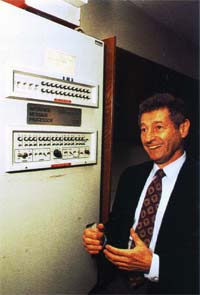
On August 29, 1969, the first network switch and the first piece of network equipment called “IMP” (Interface Message Processor) is sent to UCLA.

29 अगस्त, 1969 को पहला नेटवर्क स्विच और “IMP” (इंटरफेस मैसेज प्रोसेसर) नामक नेटवर्क उपकरण का पहला टुकड़ा यूसीएलए को भेजा गया।

On September 2, 1969, the first data moves from the UCLA host to the switch. The picture is Leonard Kleinrock next to the IMP.

2 सितंबर, 1969 को, पहला डेटा यूसीएलए होस्ट से स्विच में चला गया। छोटा सा भूत लियोनार्ड क्लेरॉक की तस्वीर है।

The first message and network crash

On Friday, October 29, 1969, at 10:30 p.m., the first Internet message was sent from computer science Professor Leonard Kleinrock’s laboratory at UCLA, to a computer at SRI. The connection not only enabled the first transmission to be made, but is also considered the first Internet backbone.

शुक्रवार, 29 अक्टूबर, 1969 को 10:30 बजे, यूसीएलए में कंप्यूटर विज्ञान के प्रोफेसर लियोनार्ड क्लेरॉक की प्रयोगशाला से एसआरआई में एक कंप्यूटर पर पहला इंटरनेट संदेश भेजा गया था। कनेक्शन ने न केवल पहले ट्रांसमिशन को सक्षम किया, बल्कि इसे पहला इंटरनेट बैकबोन भी माना जाता है।

The first message to be distributed was LO, which was an attempt at LOGIN, by Charley S. Kline to log into the SRI computer from UCLA. However, the message was unable to be completed because the SRI system crashed. Shortly after the crash, the issue was resolved, and he was able to log into the computer.

वितरित किया जाने वाला पहला संदेश था LO, जो कि UCLA से SRI कंप्यूटर में लॉग इन करने के लिए चार्ली एस। क्लाइन द्वारा LOGIN का एक प्रयास था। हालाँकि, संदेश पूरा नहीं हो सका क्योंकि SRI सिस्टम क्रैश हो गया। क्रैश के तुरंत बाद, समस्या हल हो गई थी, और वह कंप्यूटर में लॉग इन करने में सक्षम था।

E-mail is developed

Ray Tomlinson sends the first network e-mail in 1971. It’s the first messaging system to send messages across a network to other users.

रे टॉमलिंसन 1971 में पहला नेटवर्क ई-मेल भेजता है। यह अन्य उपयोगकर्ताओं को एक नेटवर्क पर संदेश भेजने के लिए पहला संदेश प्रणाली है।

(Who invented the Internet)

TCP is developed

Who invented the Internet

Vinton Cerf and Robert Kahn design TCP during 1973 and later publish it with the help of Yogen Dalal and Carl Sunshine in RFC 675, published in December 1974. Most people consider these two people the inventors of the Internet.

विंटन सेर्फ़ और रॉबर्ट काह्न 1973 के दौरान टीसीपी डिज़ाइन करते हैं और बाद में इसे YFC दलाल और कार्ल सनशाइन की मदद से RFC 675 में प्रकाशित करते हैं, जो दिसंबर 1974 में प्रकाशित हुआ था। अधिकांश लोग इन दो लोगों को इंटरनेट के आविष्कारक मानते हैं।

First commercial network

A commercial version of ARPANET, known as Telenet, is introduced in 1974 and considered to be the first ISP (Internet service provider).

ARPANET का एक व्यावसायिक संस्करण, जिसे टेलनेट के रूप में जाना जाता है, 1974 में पेश किया गया और इसे पहला ISP (इंटरनेट सेवा प्रदाता) माना जाता है।

Who invented the Internet

Ethernet is conceived

Bob Metcalfe develops the idea of Ethernet in 1973.

बॉब मेटकाफ 1973 में ईथरनेट के विचार को विकसित करता है।

The modem is introduced

Dennis Hayes and Dale Heatherington released the 80-103A modem in 1977. The modem and their subsequent modems become a popular choice for home users to connect to the Internet and get online.

डेनिस हेस और डेल हीथरिंगटन ने 1977 में 80-103A मॉडेम जारी किया। मॉडेम और उनके बाद के मॉडेम घर उपयोगकर्ताओं के लिए इंटरनेट से जुड़ने और ऑनलाइन प्राप्त करने के लिए एक लोकप्रिय विकल्प बन गए।

Who invented the Internet

TCP/IP is created

In 1978, TCP splits into TCP/IP, driven by Danny CohenDavid Reed, and John Shoch to support real-time traffic. The creation of TCP/IP help create UDP and is later standardized into ARPANET on January 1, 1983. Today, TCP/IP is still the primary protocol used on the Internet.

1978 में, टीसीपी ने टीसीपी / आईपी में विभाजन किया, जो वास्तविक समय यातायात का समर्थन करने के लिए डैनी कोहेन, डेविड रीड और जॉन शॉच द्वारा संचालित था। टीसीपी / आईपी मदद का निर्माण यूडीपी बनाता है और बाद में 1 जनवरी, 1983 को ARPANET में मानकीकृत किया गया है। आज भी, टीसीपी / आईपी अभी भी इंटरनेट पर उपयोग किया जाने वाला प्राथमिक प्रोटोकॉल है।

Who invented the Internet

DNS is introduced

Paul Mockapetris and Jon Postel introduce DNS in 1984, which also introduces the domain name system. The first Internet domain name, symbolics.com, is registered on March 15, 1985 by Symbolics, a Massachusetts computer company.

पॉल मॉकपेट्री और जॉन पोस्टेल 1984 में डीएनएस का परिचय देते हैं, जो डोमेन नाम प्रणाली का भी परिचय देता है। पहला इंटरनेट डोमेन नाम, symbolics.com, 15 मार्च 1985 को मैसाचुसेट्स कंप्यूटर कंपनी सिम्बॉलिक्स द्वारा पंजीकृत है।

Who invented the Internet

First commercial dial-up ISP

The first commercial ISP (Internet service provider) in the US, known as “The World,” is introduced in 1989. The World was the first ISP to be used on what we now consider to be the Internet.

यूएस में पहला वाणिज्यिक आईएसपी (इंटरनेट सेवा प्रदाता), जिसे “द वर्ल्ड” के रूप में जाना जाता है, को 1989 में पेश किया गया था। विश्व का पहला आईएसपी था जिसे अब हम इंटरनेट के रूप में उपयोग करते हैं।

Who invented the Internet

HTML

Who invented the Internet Varanasi

In 1990, while working at CERN, Tim Berners-Lee develops HTML, which made a huge contribution to how we navigate and view the Internet today.

1990 में, CERN में काम करते हुए, टिम बर्नर्स-ली ने HTML विकसित किया, जिसने आज हम इंटरनेट पर कैसे नेविगेट करते हैं और कैसे देखते हैं, इसमें बहुत बड़ा योगदान दिया।

The first website, info.cern.ch, is developed by Tim Berners-Lee at CERN and published online on August 6, 1991.

पहली वेबसाइट, info.cern.ch, टिम बर्नर्स-ली द्वारा सर्न में विकसित की गई है और 6 अगस्त, 1991 को ऑनलाइन प्रकाशित हुई है।

Who invented the Internet

WWW

Tim Berners-Lee introduces WWW (World Wide Web) to the public on August 6, 1991, and becomes publicly available on August 23, 1991. The WWW is what most people today consider the “Internet” or a series of sites and pages that are connected with links. The Internet had hundreds of people who helped develop the standards and technologies used today, but without the WWW, the Internet would not be as popular as it is today.

टिम बर्नर्स-ली 6 अगस्त, 1991 को डब्ल्यूडब्ल्यूडब्ल्यू (वर्ल्ड वाइड वेब) को जनता के सामने पेश करते हैं, और 23 अगस्त, 1991 को सार्वजनिक रूप से उपलब्ध हो जाते हैं। डब्ल्यूडब्ल्यूडब्ल्यू वह है जिसे आज ज्यादातर लोग “इंटरनेट” या साइटों और पृष्ठों की एक श्रृंखला मानते हैं। लिंक के साथ जुड़े हुए हैं। इंटरनेट में सैकड़ों लोग थे जो आज इस्तेमाल किए जाने वाले मानकों और प्रौद्योगिकियों को विकसित करने में मदद करते हैं, लेकिन WWW के बिना, इंटरनेट उतना लोकप्रिय नहीं होगा जितना कि आज है।(Who invented the Internet)

First graphical Internet browser

VedantSri

Mosaic is the first widely-used graphical World Wide Web browser, released on April 22, 1993 by the NCSA with the help of Marc Andreessen and Eric Bina. A big competitor to Mosaic was Netscape, which was released a year later. Today’s Internet browsers we use today (e.g., Internet Explorer, Chrome, Firefox, etc.), got their inspiration from the Mosaic browser.

मोज़ेक पहला व्यापक रूप से इस्तेमाल किया जाने वाला ग्राफ़िकल वर्ल्ड वाइड वेब ब्राउज़र है, जिसे एनसीएसए ने मार्क आंद्रेसेन और एरिक बीना की मदद से 22 अप्रैल, 1993 को रिलीज़ किया था। मोज़ेक का एक बड़ा प्रतियोगी नेटस्केप था, जिसे एक साल बाद जारी किया गया था। आज के इंटरनेट ब्राउज़र का हम आज उपयोग करते हैं (जैसे, इंटरनेट एक्सप्लोरर, क्रोम, फ़ायरफ़ॉक्स, आदि), मोज़ेक ब्राउज़र से उनकी प्रेरणा मिली।

Who invented the Internet

Java and JavaScript

Originally known as oakJava is a programming language developed by James Gosling and others at Sun Microsystems in 1995. Today, Java is still used to create Internet applications and other software programs.

मूल रूप से ओक के रूप में जाना जाता है, जावा 1995 में सन माइक्रोसिस्टम्स में जेम्स गोसलिंग और अन्य द्वारा विकसित एक प्रोग्रामिंग भाषा है। आज भी, जावा का उपयोग इंटरनेट एप्लिकेशन और अन्य सॉफ्टवेयर प्रोग्राम बनाने के लिए किया जाता है।

JavaScript was developed by Brendan Eich in 1995 and originally known as LiveScript. LiveScript was released with Netscape Navigator 2.0 and renamed to JavaScript with Netscape Navigator 2.0B3. JavaScript is an interpreted client-side scripting language that allows a web designer the ability to insert code into their web page.

जावास्क्रिप्ट 1995 में ब्रेंडन ईच द्वारा विकसित किया गया था और मूल रूप से लाइवस्क्रिप्ट के रूप में जाना जाता था। लाइवस्क्रिप्ट को नेटस्केप नेविगेटर 2.0 के साथ जारी किया गया और इसका नाम बदलकर जावास्क्रिप्ट के साथ नेटस्केप नेविगेटर 2.0 बी 3 कर दिया गया। जावास्क्रिप्ट एक व्याख्यायित क्लाइंट-साइड स्क्रिप्टिंग भाषा है जो एक वेब डिजाइनर को अपने वेब पेज में कोड डालने की क्षमता देता है।

Who invented the Internet

About VedantSri

Who invented the Internet

VedantSri Computer Institute provides best Computer CoursesClasses and Training in Varanasi. There is NEILIT Courses CCC, BCC, O’level, Certificates and Diploma Computer Courses available with best training materials. Also Available Top 100 Best Computer Courses, For Example, OMDCAADCADTPDFAADAMADTP, ADFA, DCEMS Office. VedantSri Computer Coaching update CCC Online Test 2019 in www.vedantsri.net. There are some important computer Courses for jobs CCC ClassTyping, Internship And Spoken English Available Free of cost with Offer. More than 50 Computer Courses which are available with 50% Fee Discount in VedantSri Varanasi. You can get the Best Digital Marketing Course in Varanasi Institute VedantSri. There is Latest Computer Course Offer in ADCA Computer Course, DCA Computer Course, CCC Computer Course & English Spoken.

Important Links

1-VedantSri Official Website:- https://vedantsri.com

2-VedantSri Student Support Website:- https://www.vedantsri.net

3-Students Jobs Assist Website:- https://www.jobdo.in

4- News By Students Website:- https://vedantsri.com/

5-Best Deal on IT Website:- https://www.computeritpoint.com

MS Excel Transfer Data Macros Project-27

MS Excel Transfer Data Macros Project-27

स्वागत है एक बार फिर MS-Excel Latest वर्शन के प्रोजेक्ट बेस्ड क्लासेज में इस विडियो के अंतर्गत आप सीखेंगे की MS-Excel के किसी भी वर्शन पर Transfer Data कैसे डिजाईन किया जाता है |इस विडियो को आराम से देखेते हुए स्टेप by स्टेप फॉलो करें| यदि किसी भी प्रकार का कोई क्वेश्चन का क्वेरी है तो नीचे कमेंट बॉक्स में जरुर लिखें धन्यवाद

इस विडियो के माध्यम से आप यह जान पाएंगे कि MS Excel के अंतर्गत आने वाले विभिन्न प्रकार के शेपस,कलर,टेक्स्ट,टूल्स,फॉण्ट,टेबल्स इत्यादि का यूज़ करके एक बेहतर Transfer Data डिज़ाइन कैसे क्रिएट कर सकते हैं जो देखने में आकर्षक लगे

MS Excel Transfer Data Macros Project-27

MS-Excel Transfer Data Project

MS-Excel Data Entry-Form Projects:- This is an MS Excel project, Website Page. If you are preparing for the CCC Exam or any competitive exam, then you should visit the www.vedantsri.net website.

You can also download this app from the Play Store, and you will find many more online test series related to, for example, MS Word, MS Excel, MS PowerPoint, and Internet-related.

VedantSri Computer Institute in Varanasi provides this. VedantSri provides the Best Computer Classes, Courses, Coaching, and Training in Varanasi, Uttar Pradesh, India.

About VedantSri

MS Excel Transfer Data Macros Project-27

VedantSri Computer Institute provides the best Computer Courses, Classes, and Training in Varanasi. There are NEILIT Courses, CCC, BCC, O-level, Certificates and Diploma Computer Courses available with the best training materials. Also Available: Top 100 Best Computer Courses, For Example, OM, DCA, ADCA, DTP, DFA, ADAM, ADTP, ADFA, DCE, and MS Office. VedantSri Computer Coaching updates the CCC Online Test on www.vedantsri.net.

There are some important computer Courses for jobs, CCC Classes, Typing, Internships, And Spoken English Available Free of cost with an offer. More than 50 Computer Courses are available with a 50% fee discount at VedantSri Varanasi. You can get the Best Digital Marketing Course at Varanasi Institute VedantSri. There is the Latest Computer Course Offer in the ADCA Computer Course, DCA Computer Course, CCC Computer Course & English Spoken. MS Excel Transfer Data Macros Project-27

(20 Most Used Model Sentences)

External Link

MS Excel Count Row Column

Ms Excel Count Row Column

इस विडियो के माध्यम से आप यह जान पाएंगे कि MS Excel के Row and Column को कैसे Count करना है

MS Excel Count Row Column

MS Excel Count Row Column

यदि आप TallyERP Bank Entry Transaction को बनाना सीखनाचाहते हैं तो इस लिंक पर जाए

About VedantSri

MS Excel Count Row Column

VedantSri Computer Institute provides the best Computer Courses, Classes, and Training in Varanasi. There is NEILIT Courses CCC, BCC, O’level, Certificates, and Diploma Computer Courses available with the best training materials. Also Available Top 100 Best Computer Courses, For Example, OMDCAADCADTPDFAADAMADTP, ADFA, DCE, and MS Office. VedantSri Computer Coaching updates CCC Online Test on www.vedantsri.net. (MS Excel Count Row Column)

There are some important computer Courses for jobs CCC Classes, Typing, Internships, And Spoken English Available Free of cost with Offer. More than 50 Computer Courses are available with a 50% Fee Discount in VedantSri Varanasi. You can get the Best Digital Marketing Course at Varanasi Institute VedantSri. There is the Latest Computer Course Offer in ADCA Computer Course, DCA Computer Course, CCC Computer Course & English Spoken. (MS Excel Count Row Column)

यदि आप MS Word Border Setting को बनाना सीखनाचाहते हैं तो इस लिंक पर जाए

CCC Online Test

CCC Online Test :- This is the CCC Online Test Website Page. If You are preparing for CCC Exam or any competitive exam then you should visit this www.vedantsri.net website. (MS Excel Count Row Column)

you can also download this app from the play store and you find Just like many more Online Test Series Related For Example MS Word, MS Excel, MS PowerPoint, and Internet-related. (MS Excel Count Row Column)

This is Provided By VedantSri Computer Institute in Varanasi. The VedantSri Provides the Best Computer Classes, Courses, Coaching, and Computer Training in Varanasi Uttar Pradesh India. (MS Excel Count Row Column)

यदि आप MsWord Indent Outline Level Tool को बनाना सीखनाचाहते हैं तो इस लिंक पर जाए

External Link

MS Excel Data Transfer Project-28

MS Excel Data Transfer Project

इस विडियो के माध्यम से आप यह जान पाएंगे कि MS Excel के अंतर्गत आने वाले विभिन्न प्रकार के शेपस,कलर,टेक्स्ट,टूल्स,फॉण्ट,टेबल्स इत्यादि का यूज़ करके एक बेहतरMs Excel Data Transfer Project डिज़ाइन कैसे क्रिएट कर सकते हैं जो देखने में आकर्षक लगे

MsWord Use of Mailings

MS Excel Data Transfer Project-28

MsWord Sentence on separate pages

Ms Excel Data Transfer Project

About VedantSri

MsExcel Data Transfer Project

VedantSri Computer Institute provides the best Computer Courses, Classes and Training in Varanasi. There is NEILIT Courses CCC, BCC, O’level, Certificates and Diploma Computer Courses available with the best training materials. Also Available Top 100 Best Computer Courses, For Example, OM, DCA, ADCA, DTP, DFA, ADAM, ADTP, ADFA, DCE, MS Office. VedantSri Computer Coaching updates CCC Online Test 2019 on www.vedantsri.net. There are some important computer Courses for jobs CCC Classes, Typing, Internship, And Spoken English Available Free of cost with Offer. More than 50 Computer Courses are available with a 50% Fee Discount in VedantSri Varanasi. You can get the Best Digital Marketing Course at Varanasi Institute VedantSri. There is Latest Computer Course Offer in ADCA Computer Course, DCA Computer Course, CCC Computer Course & English Spoken.

you can also download this app from the play store and you find Just like many more Online Test Series Related For Example MS Word, MS Excel, MS PowerPoint, and Internet-related.

This is Provided By VedantSri Computer Institute in Varanasi. The VedantSri Provides the Best Computer Classes, Courses, Coaching, and Computer Training in Varanasi Uttar Pradesh India.

(MsExcel Data Transfer Project)

1-VedantSri Official Website:- https://vedantsri.com

2-Student Support Website:- https://www.vedantsri.net

3-Jobs Assist Website:- https://www.jobdo.in

(20 Most using Model-Sentences)

External Link

1-Course Store Website:- https://vedantsri.in

2-Jobs Assist Website:- https://www.jobdo.in

3-MS Word Class:- https://mswordclass.com/

4-Corel Free Class:- https://corelclass.com/

5-Free Excel Class:- https://msexcelclass.com/

MS Word Indent Outline Level Tool

MsWord Indent Outline Level Tool

इस विडियो के माध्यम से आप यह जान पाएंगे कि MS Word के अंतर्गत आने वाला Indent Outline Level Tool का क्या यूज़ है

MS Word Indent Outline Level Tool

MsWord Indent Outline Level Tool

VedantSri Computer Institute Varanasi

MsWord Indent Outline Level Tool

provides the best Computer CoursesClasses, and Training in Varanasi. There is NIELIT Courses CCC, BCC, O’level, Certificates, and Diploma Computer Courses available with the best training materials. Also Available Top 100 Best Computer Courses, For Example, OM, DCA, ADCA, DTP, DFA, ADAM, ADTP, ADFA, DCE, and MS Office. VedantSri Computer Coaching updates CCC Online Test 2020 on www.vedantsri.net. (MS Word Indent Outline Level Tool)

There are some important computer Courses for jobs CCC Classes, Typing, Internships, And Spoken English Available Free of cost with Offer. More than 50 Computer Courses are available with a 50% Fee Discount in VedantSri Varanasi. You can get the Best Digital Marketing Course at Varanasi Institute VedantSri. There is the Latest Computer Course Offer in ADCA Computer Course, DCA Computer Course, CCC Computer Course & English Spoken. (MS Word Indent Outline Level Tool)

About VedantSri Computer Institute Varanasi

VedantSri Computer Institute in Varanasi is the Government recognized and ISO Certified Computer Institute in Varanasi running since 2011. It Provides Computer Courses, Classes, and Training through different own branches all over Varanasi. There is Computer Scholarship Courses DCE Scholarship (Diploma in Computer Engineering), DIT most trusted computer course Available under Scholarship Test Scheme. (MS Word Indent Outline Level Tool)

Varanasi Computer Institute vedantsri works at different places to ensure students to get better computer education. VedantSri Computer Classes has Diploma courses and advance diploma courses on the computerVedantSri Institute provides the latest version of computer application training in computer courses. (MS Word Indent Outline Level Tool)

वेदांतश्री कम्प्यूटर इंस्टिट्यूट’ वाराणसी में पिछले 10 वर्षो से बेहतर व न्यूनतम शुल्क में कम्प्यूटर शिक्षा प्रदान करने वाली एक कम्प्यूटर ट्रेनिंग इंस्टिट्यूट है | यह संस्था कम्प्यूटर व इंग्लिश स्पीकिंग कोर्स की ट्रेनिंग प्रदान करती है | वाराणसी में कम्प्यूटर शिक्षा को बेहतर व न्यूनतम शुल्क में छात्रो तक पहुचाने में वेदांतश्री पिछले 10 वर्षो से प्रयासरत है | (MS Word Indent Outline Level Tool)

Free To Learn In VedantSri Computer Institute in Varanasi

इस वेबसाइट का यूज़ वेदांतश्री में पढ़ रहे छात्रो को कोर्स से सम्बंधित ऑनलाइन सपोर्ट करने से सम्बंधित है | इस वेबसाइट पर उपलब्ध विडियो, टेस्ट शीट, Questions & Answer सेशन, ट्रिक्स, टिप्स वेदांतश्री में सिख रहे कोर्सेज से सम्बंधित है | उपलब्ध कंटेंट संस्था में सिख रहे छात्रो के डिमांड पर अपडेट किया जाता है | उपलब्ध कंटेंट वेदांतश्री में पढ़ रहे छात्रो व सम्बंधित छात्रो को निशुल्क प्रदान किया जाता है जिसका कोई अलग से शुल्क नही लिया जाता है | इस वेबसाइट पर उपलब्ध कंटेंट कम्प्यूटर कोर्सेज व इंग्लिश स्पीकिंग कोर्सेज से सम्बंधित अपडेट किया जाता है |  (MS Word Indent Outline Level Tool)

(MS Word Indent Outline Level Tool)

About CCC Online Test 2020

CCC Online Test 2020:- This is the CCC Online Test Website Page. If You are preparing for CCC Exam or any competitive exam then you should visit this www.vedantsri.net website. (MS Word Indent Outline Level Tool)

you can also download this app from the play store and you find Just like many more Online Test Series Related For Example MS Word, MS Excel, MS PowerPoint, and Internet-related. (MS Word Indent Outline Level Tool)

This is Provided By VedantSri Computer Institute Varanasi. The VedantSri Provides the Best Computer Classes, Courses, Coaching, and Computer Training in Varanasi Uttar Pradesh India. (MS Word Indent Outline Level Tool)

(MS Word Indent Outline Level Tool)

Important Links

1-VedantSri Official Website:- https://vedantsri.com

2-Student Support Website:- https://www.vedantsri.net

3-Jobs Assist Website:- https://www.jobdo.in

4- Varanasi Gyan Website:- https://vedantsri.com/

5-Best Deal on IT Website:- https://www.computeritpoint.com

(MS Word Indent Outline Level Tool)

External Link

1-Course Store Website:- https://vedantsri.in

2-Jobs Assist Website:- https://www.jobdo.in

3-MS Word Class:- https://mswordclass.com/

4-Corel Free Class:- https://corelclass.com/

5-Free Excel Class:- https://msexcelclass.com/

MsWord Indentation Special Tool

MsWord Indentation Special Tool

इस विडियो के माध्यम से आप यह जान पाएंगे कि MS Word के अंतर्गत आने वाला MS Word Indentation Special Tool का क्या यूज़ है और कैसे इसे आसान तरीके से कर सकते हैं .

MsWord Indentation Special Tool

MS Word Indentation Special Tool

VedantSri Computer Institute Varanasi

MsWord Indentation Special Tool

provides the best Computer CoursesClasses, and Training in Varanasi. There is NIELIT Courses CCC, BCC, O’level, Certificates, and Diploma Computer Courses available with the best training materials. Also Available Top 100 Best Computer Courses, For Example, OM, DCA, ADCA, DTP, DFA, ADAM, ADTP, ADFA, DCE, and MS Office. VedantSri Computer Coaching updates CCC Online Test 2020 on www.vedantsri.net. There are some important computer Courses for jobs CCC Classes, Typing, Internships, And Spoken English Available Free of cost with Offer. More than 50 Computer Courses are available with a 50% Fee Discount in VedantSri Varanasi. You can get the Best Digital Marketing Course at Varanasi Institute VedantSri. There is the Latest Computer Course Offer in ADCA Computer Course, DCA Computer Course, CCC Computer Course & English Spoken. MsWord Indentation Special Tool

About VedantSri Computer Institute Varanasi

VedantSri Computer Institute in Varanasi is the Government recognized and ISO Certified Computer Institute in Varanasi running since 2011. It Provides Computer Courses, Classes, and Training through different own branches all over Varanasi. There is Computer Scholarship Courses DCE Scholarship (Diploma in Computer Engineering), DIT most trusted computer course Available under Scholarship Test Scheme.

Varanasi Computer Institute vedantsri works at different places to ensure students to get better computer education. VedantSri Computer Classes has Diploma courses and advance diploma courses on the computerVedantSri Institute provides the latest version of computer application training in computer courses.

वेदांतश्री कम्प्यूटर इंस्टिट्यूट’ वाराणसी में पिछले 10 वर्षो से बेहतर व न्यूनतम शुल्क में कम्प्यूटर शिक्षा प्रदान करने वाली एक कम्प्यूटर ट्रेनिंग इंस्टिट्यूट है | यह संस्था कम्प्यूटर व इंग्लिश स्पीकिंग कोर्स की ट्रेनिंग प्रदान करती है | वाराणसी में कम्प्यूटर शिक्षा को बेहतर व न्यूनतम शुल्क में छात्रो तक पहुचाने में वेदांतश्री पिछले 10 वर्षो से प्रयासरत है |

Free To Learn In VedantSri Computer Institute in Varanasi

इस वेबसाइट का यूज़ वेदांतश्री में पढ़ रहे छात्रो को कोर्स से सम्बंधित ऑनलाइन सपोर्ट करने से सम्बंधित है | इस वेबसाइट पर उपलब्ध विडियो, टेस्ट शीट, Questions & Answer सेशन, ट्रिक्स, टिप्स वेदांतश्री में सिख रहे कोर्सेज से सम्बंधित है | उपलब्ध कंटेंट संस्था में सिख रहे छात्रो के डिमांड पर अपडेट किया जाता है | उपलब्ध कंटेंट वेदांतश्री में पढ़ रहे छात्रो व सम्बंधित छात्रो को निशुल्क प्रदान किया जाता है जिसका कोई अलग से शुल्क नही लिया जाता है | इस वेबसाइट पर उपलब्ध कंटेंट कम्प्यूटर कोर्सेज व इंग्लिश स्पीकिंग कोर्सेज से सम्बंधित अपडेट किया जाता है | 

(MsWord Indentation Special Tool)

About CCC Online Test 2020

CCC Online Test 2020:- This is the CCC Online Test Website Page. If You are preparing for CCC Exam or any competitive exam then you should visit this www.vedantsri.net website.

you can also download this app from the play store and you find Just like many more Online Test Series Related For Example MS Word, MS Excel, MS PowerPoint, and Internet-related.

This is Provided By VedantSri Computer Institute Varanasi. The VedantSri Provides the Best Computer Classes, Courses, Coaching, and Computer Training in Varanasi Uttar Pradesh India.

(MsWord Indentation Special Tool)

1-VedantSri Official Website:- https://vedantsri.com

2-Student Support Website:- https://www.vedantsri.net

3-Jobs Assist Website:- https://www.jobdo.in

(20 Most using Model-Sentences)

External Link

1-Course Store Website:- https://vedantsri.in

2-Jobs Assist Website:- https://www.jobdo.in

3-MS Word Class:- https://mswordclass.com/

4-Corel Free Class:- https://corelclass.com/

5-Free Excel Class:- https://msexcelclass.com/

MsWord Sentence on separate pages

MsWord Sentence on separate pages

इस विडियो के माध्यम से आप यह जान पाएंगे कि MS Word के अंतर्गत आने वाला MS Word Sentence on separate pageका क्या यूज़ है और कैसे इसे आसान तरीके से कर सकते हैं .

MsWord Sentence on separate pages

MsWord Sentence on separate pages

VedantSri Computer Institute Varanasi

MsWord Sentence on separate pages

provides the best Computer CoursesClasses, and Training in Varanasi. There is NIELIT Courses CCC, BCC, O’level, Certificates, and Diploma Computer Courses available with the best training materials. Also Available Top 100 Best Computer Courses, For Example, OM, DCA, ADCA, DTP, DFA, ADAM, ADTP, ADFA, DCE, and MS Office. VedantSri Computer Coaching updates CCC Online Test 2020 on www.vedantsri.net. There are some important computer Courses for jobs CCC Classes, Typing, Internships, And Spoken English Available Free of cost with Offer. More than 50 Computer Courses are available with a 50% Fee Discount in VedantSri Varanasi. You can get the Best Digital Marketing Course at Varanasi Institute VedantSri. There is the Latest Computer Course Offer in ADCA Computer Course, DCA Computer Course, CCC Computer Course & English Spoken.

About VedantSri Computer Institute Varanasi

VedantSri Computer Institute in Varanasi is the Government recognized and ISO Certified Computer Institute in Varanasi running since 2011. It Provides Computer Courses, Classes, and Training through different own branches all over Varanasi. There is Computer Scholarship Courses DCE Scholarship (Diploma in Computer Engineering), DIT most trusted computer course Available under Scholarship Test Scheme.

Logo
MsWord Sentence on separate pages

Varanasi Computer Institute vedantsri works at different places to ensure students to get better computer education. VedantSri Computer Classes has Diploma courses and advance diploma courses on the computerVedantSri Institute provides the latest version of computer application training in computer courses.

वेदांतश्री कम्प्यूटर इंस्टिट्यूट’ वाराणसी में पिछले 10 वर्षो से बेहतर व न्यूनतम शुल्क में कम्प्यूटर शिक्षा प्रदान करने वाली एक कम्प्यूटर ट्रेनिंग इंस्टिट्यूट है | यह संस्था कम्प्यूटर व इंग्लिश स्पीकिंग कोर्स की ट्रेनिंग प्रदान करती है | वाराणसी में कम्प्यूटर शिक्षा को बेहतर व न्यूनतम शुल्क में छात्रो तक पहुचाने में वेदांतश्री पिछले 10 वर्षो से प्रयासरत है |

Free To Learn In VedantSri Computer Institute in Varanasi

इस वेबसाइट का यूज़ वेदांतश्री में पढ़ रहे छात्रो को कोर्स से सम्बंधित ऑनलाइन सपोर्ट करने से सम्बंधित है | इस वेबसाइट पर उपलब्ध विडियो, टेस्ट शीट, Questions & Answer सेशन, ट्रिक्स, टिप्स वेदांतश्री में सिख रहे कोर्सेज से सम्बंधित है | उपलब्ध कंटेंट संस्था में सिख रहे छात्रो के डिमांड पर अपडेट किया जाता है | उपलब्ध कंटेंट वेदांतश्री में पढ़ रहे छात्रो व सम्बंधित छात्रो को निशुल्क प्रदान किया जाता है जिसका कोई अलग से शुल्क नही लिया जाता है | इस वेबसाइट पर उपलब्ध कंटेंट कम्प्यूटर कोर्सेज व इंग्लिश स्पीकिंग कोर्सेज से सम्बंधित अपडेट किया जाता है | 

(MsWord Sentence on separate pages)

About CCC Online Test 2020

CCC Online Test 2020:- This is the CCC Online Test Website Page. If You are preparing for CCC Exam or any competitive exam then you should visit this www.vedantsri.net website.

you can also download this app from the play store and you find Just like many more Online Test Series Related For Example MS Word, MS Excel, MS PowerPoint, and Internet-related.

This is Provided By VedantSri Computer Institute Varanasi. The VedantSri Provides the Best Computer Classes, Courses, Coaching, and Computer Training in Varanasi Uttar Pradesh India.

(MsWord Sentence on separate pages)

1-VedantSri Official Website:- https://vedantsri.com

2-Student Support Website:- https://www.vedantsri.net

3-Jobs Assist Website:- https://www.jobdo.in

(20 Most using Model-Sentences)

External Link

1-Course Store Website:- https://vedantsri.in

2-Jobs Assist Website:- https://www.jobdo.in

3-MS Word Class:- https://mswordclass.com/

4-Corel Free Class:- https://corelclass.com/

5-Free Excel Class:- https://msexcelclass.com/

MS Word Border Setting

MS Word Border Setting

इस विडियो के माध्यम से आप यह जान पाएंगे कि MS Word के अंतर्गत आने वाला MS Word Border Setting का क्या यूज़ है और कैसे इसे आसान तरीके से कर सकते हैं . MS Word Border Setting

MS Word Border Setting

VedantSri Computer Institute Varanasi

MS Word Border Setting

provides the best Computer CoursesClasses, and Training in Varanasi. There is NIELIT Courses CCC, BCC, O’level, Certificates, and Diploma Computer Courses available with the best training materials. Also Available Top 100 Best Computer Courses, For Example, OM, DCA, ADCA, DTP, DFA, ADAM, ADTP, ADFA, DCE, and MS Office.

VedantSri Computer Coaching updates CCC Online Test 2020 on www.vedantsri.net. There are some important computer Courses for jobs CCC Classes, Typing, Internships, And Spoken English Available Free of cost with Offer. More than 50 Computer Courses are available with a 50% Fee Discount in VedantSri Varanasi. MS Word Border Setting

You can get the Best Digital Marketing Course at Varanasi Institute VedantSri. There is the Latest Computer Course Offer in ADCA Computer Course, DCA Computer Course, CCC Computer Course & English Spoken. MS Word Border Setting

About VedantSri Computer Institute Varanasi

VedantSri Computer Institute in Varanasi is the Government recognized and ISO Certified Computer Institute in Varanasi running since 2011. It Provides Computer Courses, Classes, and Training through different own branches all over Varanasi. There is Computer Scholarship Courses DCE Scholarship (Diploma in Computer Engineering), DIT most trusted computer course Available under Scholarship Test Scheme. MS Word Border Setting

Varanasi Computer Institute vedantsri works at different places to ensure students to get better computer education. VedantSri Computer Classes has Diploma courses and advance diploma courses on the computerVedantSri Institute provides the latest version of computer application training in computer courses. MS Word Border Setting

वेदांतश्री कम्प्यूटर इंस्टिट्यूट’ वाराणसी में पिछले 10 वर्षो से बेहतर व न्यूनतम शुल्क में कम्प्यूटर शिक्षा प्रदान करने वाली एक कम्प्यूटर ट्रेनिंग इंस्टिट्यूट है | यह संस्था कम्प्यूटर व इंग्लिश स्पीकिंग कोर्स की ट्रेनिंग प्रदान करती है | वाराणसी में कम्प्यूटर शिक्षा को बेहतर व न्यूनतम शुल्क में छात्रो तक पहुचाने में वेदांतश्री पिछले 10 वर्षो से प्रयासरत है | MS Word Border Setting

MS Word Border Setting

Free To Learn In VedantSri Computer Institute in Varanasi

इस वेबसाइट का यूज़ वेदांतश्री में पढ़ रहे छात्रो को कोर्स से सम्बंधित ऑनलाइन सपोर्ट करने से सम्बंधित है | इस वेबसाइट पर उपलब्ध विडियो, टेस्ट शीट, Questions & Answer सेशन, ट्रिक्स, टिप्स वेदांतश्री में सिख रहे कोर्सेज से सम्बंधित है | उपलब्ध कंटेंट संस्था में सिख रहे छात्रो के डिमांड पर अपडेट किया जाता है | उपलब्ध कंटेंट वेदांतश्री में पढ़ रहे छात्रो व सम्बंधित छात्रो को निशुल्क प्रदान किया जाता है जिसका कोई अलग से शुल्क नही लिया जाता है | इस वेबसाइट पर उपलब्ध कंटेंट कम्प्यूटर कोर्सेज व इंग्लिश स्पीकिंग कोर्सेज से सम्बंधित अपडेट किया जाता है |  MS Word Border Setting

(MS Word Border Setting)

About CCC Online Test 2020

CCC Online Test 2020:- This is the CCC Online Test Website Page. If You are preparing for CCC Exam or any competitive exam then you should visit this www.vedantsri.net website. MS Word Border Setting

you can also download this app from the play store and you find Just like many more Online Test Series Related For Example MS Word, MS Excel, MS PowerPoint, and Internet-related.

This is Provided By VedantSri Computer Institute Varanasi. The VedantSri Provides the Best Computer Classes, Courses, Coaching, and Computer Training in Varanasi Uttar Pradesh India.

Visit at – https://www.corelclass.com

Read Also it – https://msexcelclass.com/

Also, Read- Tally Course Fees, Duration, Scope, Syllabus, Admission, Institutes

Also Read – CCC Course Fees, Syllabus, Duration, Scope, Jobs, and Institute

Important Link – DFA Course Fees, Syllabus, Duration, Scope, Jobs, and Institute

Visit – https://mswordclass.com/

MsWord Increase-Decrease Space Between-Alphabet

MsWord Increase-Decrease Space Between-Alphabet

इस विडियो के माध्यम से आप यह जान पाएंगे कि MS Word के अंतर्गत आने वाला MS Word Increase-Decrease Space Between-Alphabet का क्या यूज़ है और कैसे इसे आसान तरीके से कर सकते हैं ! MsWord Increase-Decrease Space Between-Alphabet

MsWord Increase-Decrease Space Between-Alphabet

VedantSri Computer Institute Varanasi

MsWord Increase-Decrease Space Between-Alphabet

provides the best Computer CoursesClasses, and Training in Varanasi. There is NIELIT Courses CCC, BCC, O’level, Certificates, and Diploma Computer Courses available with the best training materials. Also Available Top 100 Best Computer Courses, For Example, OM, DCA, ADCA, DTP, DFA, ADAM, ADTP, ADFA, DCE, and MS Office. MsWord Increase-Decrease Space Between-Alphabet

VedantSri Computer Coaching updates CCC Online Test 2020 on www.vedantsri.net. There are some important computer Courses for jobs CCC Classes, Typing, Internships, And Spoken English Available Free of cost with Offer. MsWord Increase-Decrease Space Between-Alphabet

More than 50 Computer Courses are available with a 50% Fee Discount in VedantSri Varanasi. You can get the Best Digital Marketing Course at Varanasi Institute VedantSri. There is the Latest Computer Course Offer in ADCA Computer Course, DCA Computer Course, CCC Computer Course & English Spoken. MsWord Increase-Decrease Space Between-Alphabet

About VedantSri Computer Institute Varanasi

VedantSri Computer Institute in Varanasi is the Government recognized and An ISO Certified Computer Institute in Varanasi running since 2011. It Provides Computer Courses, Classes, and Training through different own branches all over Varanasi. There is Computer Scholarship Courses DCE Scholarship (Diploma in Computer Engineering), DIT most trusted computer course Available under Scholarship Test Scheme. MsWord Increase-Decrease Space Between-Alphabet

Varanasi Computer Institute vedantsri works at different places to ensure students to get better computer education. VedantSri Computer Classes has Diploma courses and advance diploma courses on the computerVedantSri Institute provides the latest version of computer application training in computer courses.

वेदांतश्री कम्प्यूटर इंस्टिट्यूट’ वाराणसी में पिछले 10 वर्षो से बेहतर व न्यूनतम शुल्क में कम्प्यूटर शिक्षा प्रदान करने वाली एक कम्प्यूटर ट्रेनिंग इंस्टिट्यूट है | यह संस्था कम्प्यूटर व इंग्लिश स्पीकिंग कोर्स की ट्रेनिंग प्रदान करती है | वाराणसी में कम्प्यूटर शिक्षा को बेहतर व न्यूनतम शुल्क में छात्रो तक पहुचाने में वेदांतश्री पिछले 10 वर्षो से प्रयासरत है |

MsWord Increase-Decrease Space Between-Alphabet

Free To Learn In VedantSri Computer Institute in Varanasi

इस वेबसाइट का यूज़ वेदांतश्री में पढ़ रहे छात्रो को कोर्स से सम्बंधित ऑनलाइन सपोर्ट करने से सम्बंधित है | इस वेबसाइट पर उपलब्ध विडियो, टेस्ट शीट, Questions & Answer सेशन, ट्रिक्स, टिप्स वेदांतश्री में सिख रहे कोर्सेज से सम्बंधित है | उपलब्ध कंटेंट संस्था में सिख रहे छात्रो के डिमांड पर अपडेट किया जाता है | उपलब्ध कंटेंट वेदांतश्री में पढ़ रहे छात्रो व सम्बंधित छात्रो को निशुल्क प्रदान किया जाता है जिसका कोई अलग से शुल्क नही लिया जाता है | इस वेबसाइट पर उपलब्ध कंटेंट कम्प्यूटर कोर्सेज व इंग्लिश स्पीकिंग कोर्सेज से सम्बंधित अपडेट किया जाता है | 

(MsWord Increase-Decrease Space Between-Alphabet)

About CCC Online Test 2020

CCC Online Test 2020:- This is the CCC Online Test Website Page. If You are preparing for CCC Exam or any competitive exam then you should visit this www.vedantsri.net website. MsWord Increase-Decrease Space Between-Alphabet

you can also download this app from the play store and you find Just like many more Online Test Series Related For Example MS Word, MS Excel, MS PowerPoint, and Internet-related.

This is Provided By VedantSri Computer Institute Varanasi. The VedantSri Provides the Best Computer Classes, Courses, Coaching, and Computer Training in Varanasi Uttar Pradesh India.

(MsWord Increase-Decrease Space Between-Alphabet)

Visit at – https://www.corelclass.com

Read Also it – https://msexcelclass.com/

Also, Read- Tally Course Fees, Duration, Scope, Syllabus, Admission, Institutes

Also Read – CCC Course Fees, Syllabus, Duration, Scope, Jobs, and Institute

Important Link – DFA Course Fees, Syllabus, Duration, Scope, Jobs, and Institute

Visit – https://mswordclass.com/

MS Word Use single-Double Strikethrough

MS Word Use single-Double Strikethrough

इस विडियो के माध्यम से आप यह जान पाएंगे कि MS Word के अंतर्गत आने वाला MS Word Use single-Double Strikethrough का क्या यूज़ है और कैसे इसे आसान तरीके से Apply कर सकते हैं . MS Word Use single-Double Strikethrough

MsWord Use single-Double Strikethrough

About VedantSri

MsWord Use single-Double Strikethrough

VedantSri Computer Institute provides the best Computer Courses, Classes, and Training in Varanasi. There is NEILIT Courses CCC, BCC, O’level, Certificates, and Diploma Computer Courses available with the best training materials. Also Available Top 100 Best Computer Courses, For Example, OM, DCA, ADCA, DTP, DFA, ADAM, ADTP, ADFA, DCE, and MS Office. MS Word Use single-Double Strikethrough

VedantSri Computer Coaching updates CCC Online Test 2019 on www.vedantsri.net. There are some important computer Courses for jobs CCC Classes, Typing, Internships, And Spoken English Available Free of cost with Offer. More than 50 Computer Courses are available with a 50% Fee Discount in VedantSri Varanasi. MS Word Use single-Double Strikethrough

MS Word Use single-Double Strikethrough

You can get the Best Digital Marketing Course at Varanasi Institute VedantSri. There is the Latest Computer Course Offer in ADCA Computer Course, DCA Computer Course, CCC Computer Course & English Spoken. MS Word Use single-Double Strikethrough

CCC Online Test 2020

CCC Online Test 2019:- This is the CCC Online Test Website Page. If You are preparing for CCC Exam or any competitive exam then you should visit this www.vedantsri.net website. MS Word Use single-Double Strikethrough

you can also download this app from the play store and you find Just like many more Online Test Series Related For Example MS Word, MS Excel, MS PowerPoint, and Internet-related.

This is Provided By VedantSri Computer Institute in Varanasi. The VedantSri Provides the Best Computer Classes, Courses, Coaching, and Computer Training in Varanasi Uttar Pradesh India.

Visit at – https://www.corelclass.com

Read Also it – https://msexcelclass.com/

Also, Read- Tally Course Fees, Duration, Scope, Syllabus, Admission, Institutes

Also Read – CCC Course Fees, Syllabus, Duration, Scope, Jobs, and Institute

Important Link – DFA Course Fees, Syllabus, Duration, Scope, Jobs, and Institute

Visit – https://mswordclass.com/

MsWord Small-Caps and All-Caps

MsWord Small-Caps and All-Caps

इस विडियो के माध्यम से आप यह जान पाएंगे कि MS Word के अंतर्गत आने वाला MS Word Small-Caps and All-Caps का क्या यूज़ है और कैसे इसे आसान तरीके से Apply कर सकते हैं . MsWord Small-Caps and All-Caps

MsWord Small-Caps and All-Caps

VedantSri Computer Institute Varanasi

MsWord Small-Caps and All-Caps

provides the best Computer CoursesClasses, and Training in Varanasi. There is NIELIT Courses CCC, BCC, O’level, Certificates, and Diploma Computer Courses available with the best training materials. Also Available Top 100 Best Computer Courses, For Example, OM, DCA, ADCA, DTP, DFA, ADAM, ADTP, ADFA, DCE, and MS Office. MsWord Small-Caps and All-Caps

VedantSri Computer Coaching updates CCC Online Test 2020 on www.vedantsri.net. There are some important computer Courses for jobs CCC Classes, Typing, Internships, And Spoken English Available Free of cost with Offer. MsWord Small-Caps and All-Caps

More than 50 Computer Courses are available with a 50% Fee Discount in VedantSri Varanasi. You can get the Best Digital Marketing Course at Varanasi Institute VedantSri. There is the Latest Computer Course Offer in ADCA Computer Course, DCA Computer Course, CCC Computer Course & English Spoken.

MsWord Small-Caps and All-Caps

About VedantSri Computer Institute Varanasi

VedantSri Computer Institute in Varanasi is the Government recognized and ISO Certified Computer Institute in Varanasi running since 2011. It Provides Computer Courses, Classes, and Training through different own branches all over Varanasi. There is Computer Scholarship Courses DCE Scholarship (Diploma in Computer Engineering), DIT most trusted computer course Available under Scholarship Test Scheme. MsWord Small-Caps and All-Caps

Varanasi Computer Institute vedantsri works at different places to ensure students to get better computer education. VedantSri Computer Classes has Diploma courses and advance diploma courses on the computerVedantSri Institute provides the latest version of computer application training in computer courses. MsWord Small-Caps and All-Caps

वेदांतश्री कम्प्यूटर इंस्टिट्यूट’ वाराणसी में पिछले 10 वर्षो से बेहतर व न्यूनतम शुल्क में कम्प्यूटर शिक्षा प्रदान करने वाली एक कम्प्यूटर ट्रेनिंग इंस्टिट्यूट है | यह संस्था कम्प्यूटर व इंग्लिश स्पीकिंग कोर्स की ट्रेनिंग प्रदान करती है | वाराणसी में कम्प्यूटर शिक्षा को बेहतर व न्यूनतम शुल्क में छात्रो तक पहुचाने में वेदांतश्री पिछले 10 वर्षो से प्रयासरत है | MsWord Small-Caps and All-Caps

Free To Learn In VedantSri Computer Institute in Varanasi

इस वेबसाइट का यूज़ वेदांतश्री में पढ़ रहे छात्रो को कोर्स से सम्बंधित ऑनलाइन सपोर्ट करने से सम्बंधित है | इस वेबसाइट पर उपलब्ध विडियो, टेस्ट शीट, Questions & Answer सेशन, ट्रिक्स, टिप्स वेदांतश्री में सिख रहे कोर्सेज से सम्बंधित है | उपलब्ध कंटेंट संस्था में सिख रहे छात्रो के डिमांड पर अपडेट किया जाता है | उपलब्ध कंटेंट वेदांतश्री में पढ़ रहे छात्रो व सम्बंधित छात्रो को निशुल्क प्रदान किया जाता है जिसका कोई अलग से शुल्क नही लिया जाता है | इस वेबसाइट पर उपलब्ध कंटेंट कम्प्यूटर कोर्सेज व इंग्लिश स्पीकिंग कोर्सेज से सम्बंधित अपडेट किया जाता है |  MsWord Small-Caps and All-Caps

(MsWord Small-Caps and All-Caps)

About CCC Online Test 2020

CCC Online Test 2020:- This is the CCC Online Test Website Page. If You are preparing for CCC Exam or any competitive exam then you should visit this www.vedantsri.net website.

you can also download this app from the play store and you find Just like many more Online Test Series Related For Example MS Word, MS Excel, MS PowerPoint, and Internet-related.

This is Provided By VedantSri Computer Institute Varanasi. The VedantSri Provides the Best Computer Classes, Courses, Coaching, and Computer Training in Varanasi Uttar Pradesh India.

(MsWord Small-Caps and All-Caps)

Visit at – https://www.corelclass.com

Read Also it – https://msexcelclass.com/

Also, Read- Tally Course Fees, Duration, Scope, Syllabus, Admission, Institutes

Also Read – CCC Course Fees, Syllabus, Duration, Scope, Jobs, and Institute

Important Link – DFA Course Fees, Syllabus, Duration, Scope, Jobs, and Institute

Visit – https://mswordclass.com/

MsWord Match Field Tool

MsWord Match Field Tool

इस विडियो के माध्यम से आप यह जान पाएंगे कि MS Word के अंतर्गत आने वाला MS Word Match Field Tool का क्या यूज़ है और कैसे इसे आसान तरीके से कर सकते हैं

MsWord Match Field Tool

MsWord Match Field Tool

VedantSri Computer Institute Varanasi

MsWord Match Field Tool

provides the best Computer CoursesClasses, and Training in Varanasi. There is NIELIT Courses CCC, BCC, O’level, Certificates, and Diploma Computer Courses available with the best training materials. Also Available Top 100 Best Computer Courses, For Example, OM, DCA, ADCA, DTP, DFA, ADAM, ADTP, ADFA, DCE, and MS Office. MsWord Match Field Tool

VedantSri Computer Coaching updates CCC Online Test 2020 on www.vedantsri.net. There are some important computer Courses for jobs CCC Classes, Typing, Internships, And Spoken English Available Free of cost with Offer. More than 50 Computer Courses are available with a 50% Fee Discount in VedantSri Varanasi. You can get the Best Digital Marketing Course at Varanasi Institute VedantSri. There is the Latest Computer Course Offer in ADCA Computer Course, DCA Computer Course, CCC Computer Course & English Spoken. MsWord Match Field Tool

MsWord Match Field Tool

About VedantSri Computer Institute Varanasi

VedantSri Computer Institute in Varanasi is the Government recognized and ISO Certified Computer Institute in Varanasi running since 2011. It Provides Computer Courses, Classes, and Training through different own branches all over Varanasi. There is Computer Scholarship Courses DCE Scholarship (Diploma in Computer Engineering), DIT most trusted computer course Available under Scholarship Test Scheme. MsWord Match Field Tool

Varanasi Computer Institute vedantsri works at different places to ensure students to get better computer education. VedantSri Computer Classes has Diploma courses and advance diploma courses on the computerVedantSri Institute provides the latest version of computer application training in computer courses. MsWord Match Field Tool

वेदांतश्री कम्प्यूटर इंस्टिट्यूट’ वाराणसी में पिछले 10 वर्षो से बेहतर व न्यूनतम शुल्क में कम्प्यूटर शिक्षा प्रदान करने वाली एक कम्प्यूटर ट्रेनिंग इंस्टिट्यूट है | यह संस्था कम्प्यूटर व इंग्लिश स्पीकिंग कोर्स की ट्रेनिंग प्रदान करती है | वाराणसी में कम्प्यूटर शिक्षा को बेहतर व न्यूनतम शुल्क में छात्रो तक पहुचाने में वेदांतश्री पिछले 10 वर्षो से प्रयासरत है |

Free To Learn In VedantSri Computer Institute in Varanasi

इस वेबसाइट का यूज़ वेदांतश्री में पढ़ रहे छात्रो को कोर्स से सम्बंधित ऑनलाइन सपोर्ट करने से सम्बंधित है | इस वेबसाइट पर उपलब्ध विडियो, टेस्ट शीट, Questions & Answer सेशन, ट्रिक्स, टिप्स वेदांतश्री में सिख रहे कोर्सेज से सम्बंधित है | उपलब्ध कंटेंट संस्था में सिख रहे छात्रो के डिमांड पर अपडेट किया जाता है | उपलब्ध कंटेंट वेदांतश्री में पढ़ रहे छात्रो व सम्बंधित छात्रो को निशुल्क प्रदान किया जाता है जिसका कोई अलग से शुल्क नही लिया जाता है | इस वेबसाइट पर उपलब्ध कंटेंट कम्प्यूटर कोर्सेज व इंग्लिश स्पीकिंग कोर्सेज से सम्बंधित अपडेट किया जाता है | 

(MsWord Match Field Tool)

About CCC Online Test 2020

CCC Online Test 2020:- This is the CCC Online Test Website Page. If You are preparing for CCC Exam or any competitive exam then you should visit this www.vedantsri.net website.

you can also download this app from the play store and you find Just like many more Online Test Series Related For Example MS Word, MS Excel, MS PowerPoint, and Internet-related.

This is Provided By VedantSri Computer Institute Varanasi. The VedantSri Provides the Best Computer Classes, Courses, Coaching, and Computer Training in Varanasi Uttar Pradesh India.

(MsWord Match Field Tool)

Visit at – https://www.corelclass.com

Read Also it – https://msexcelclass.com/

Also, Read- Tally Course Fees, Duration, Scope, Syllabus, Admission, Institutes

Also Read – CCC Course Fees, Syllabus, Duration, Scope, Jobs, and Institute

Important Link – DFA Course Fees, Syllabus, Duration, Scope, Jobs, and Institute

Visit – https://mswordclass.com/

MsWord Insert Merge Field

MsWord Insert Merge Field

इस विडियो के माध्यम से आप यह जान पाएंगे कि MS Word के अंतर्गत आने वाला MS Word Insert Merge Field का क्या यूज़ है और कैसे इसे आसान तरीके से कर सकते हैं MsWord Insert Merge Field

MsWord Insert Merge Field

VedantSri Computer Institute Varanasi

MsWord Insert Merge Field

provides the best Computer CoursesClasses, and Training in Varanasi. There is NIELIT Courses CCC, BCC, O’level, Certificates, and Diploma Computer Courses available with the best training materials. Also Available Top 100 Best Computer Courses, For Example, OM, DCA, ADCA, DTP, DFA, ADAM, ADTP, ADFA, DCE, and MS Office. MsWord Insert Merge Field

VedantSri Computer Coaching updates CCC Online Test 2020 on www.vedantsri.net. There are some important computer Courses for jobs CCC Classes, Typing, Internships, And Spoken English Available Free of cost with Offer. MsWord Insert Merge Field

More than 50 Computer Courses are available with a 50% Fee Discount in VedantSri Varanasi. You can get the Best Digital Marketing Course at Varanasi Institute VedantSri. There is the Latest Computer Course Offer in ADCA Computer Course, DCA Computer Course, CCC Computer Course & English Spoken. MsWord Insert Merge Field

MsWord Insert Merge Field

About VedantSri Computer Institute Varanasi

VedantSri Computer Institute in Varanasi is the Government recognized and ISO Certified Computer Institute in Varanasi running since 2011. It Provides Computer Courses, Classes, and Training through different own branches all over Varanasi. There is Computer Scholarship Courses DCE Scholarship (Diploma in Computer Engineering), DIT most trusted computer course Available under Scholarship Test Scheme. MsWord Insert Merge Field

Varanasi Computer Institute Vedantsri works at different places to ensure students to get better computer education. VedantSri Computer Classes has Diploma courses and advanced diploma courses on the computerVedantSri Institute provides the latest version of computer application training in computer courses.

वेदांतश्री कम्प्यूटर इंस्टिट्यूट’ वाराणसी में पिछले 10 वर्षो से बेहतर व न्यूनतम शुल्क में कम्प्यूटर शिक्षा प्रदान करने वाली एक कम्प्यूटर ट्रेनिंग इंस्टिट्यूट है | यह संस्था कम्प्यूटर व इंग्लिश स्पीकिंग कोर्स की ट्रेनिंग प्रदान करती है | वाराणसी में कम्प्यूटर शिक्षा को बेहतर व न्यूनतम शुल्क में छात्रो तक पहुचाने में वेदांतश्री पिछले 10 वर्षो से प्रयासरत है | MsWord Insert Merge Field

Free To Learn In VedantSri Computer Institute in Varanasi

इस वेबसाइट का यूज़ वेदांतश्री में पढ़ रहे छात्रो को कोर्स से सम्बंधित ऑनलाइन सपोर्ट करने से सम्बंधित है | इस वेबसाइट पर उपलब्ध विडियो, टेस्ट शीट, Questions & Answer सेशन, ट्रिक्स, टिप्स वेदांतश्री में सिख रहे कोर्सेज से सम्बंधित है | उपलब्ध कंटेंट संस्था में सिख रहे छात्रो के डिमांड पर अपडेट किया जाता है | उपलब्ध कंटेंट वेदांतश्री में पढ़ रहे छात्रो व सम्बंधित छात्रो को निशुल्क प्रदान किया जाता है जिसका कोई अलग से शुल्क नही लिया जाता है | इस वेबसाइट पर उपलब्ध कंटेंट कम्प्यूटर कोर्सेज व इंग्लिश स्पीकिंग कोर्सेज से सम्बंधित अपडेट किया जाता है | MsWord Insert Merge Field

(MsWord Insert Merge Field)

About CCC Online Test 2020

CCC Online Test 2020:- This is the CCC Online Test Website Page. If You are preparing for CCC Exam or any competitive exam then you should visit this www.vedantsri.net website.

you can also download this app from the play store and you find Just like many more Online Test Series Related For Example MS Word, MS Excel, MS PowerPoint, and Internet-related.

This is Provided By VedantSri Computer Institute Varanasi. The VedantSri Provides the Best Computer Classes, Courses, Coaching, and Computer Training in Varanasi Uttar Pradesh India.

MsWord Insert Merge Field

Visit at – https://www.corelclass.com

Read Also it – https://msexcelclass.com/

Also, Read- Tally Course Fees, Duration, Scope, Syllabus, Admission, Institutes

Also Read – CCC Course Fees, Syllabus, Duration, Scope, Jobs, and Institute

Important Link – DFA Course Fees, Syllabus, Duration, Scope, Jobs, and Institute

Visit – https://mswordclass.com/

CorelDraw Shape Tools

CorelDraw Shape Tools

Useful Link:-CorelDraw Course Fees, Duration, Scope, Syllabus, Admission, Institutes

About VedantSri

CorelDraw Shape Tools

CorelDraw Shape Tools:-VedantSri Computer Institute provides the best Computer Courses, Classes and Training in Varanasi. There is NEILIT Courses CCC, BCC, O’level, Certificates, and Diploma Computer Courses available with the best training materials. Also Available Top 100 Best Computer Courses, For Example, OM, DCA, ADCA, DTP, DFA, ADAM, ADTP, ADFA, DCE, MS Office. VedantSri Computer Coaching update CCC Online Test 2019 in www.vedantsri.net.

There are some important computer Courses for jobs CCC Class, Typing, Internship, And Spoken English Available Free of cost with Offer. More than 50 Computer Courses are available with a 50% Fee Discount in VedantSri Varanasi. You can get the Best Digital Marketing Course at Varanasi Institute VedantSri. There is Latest Computer Course Offer in ADCA Computer Course, DCA Computer Course, CCC Computer Course & English Spoken.

(CorelDraw Shape Tools)

About CCC Online Test 2021

MS-Word Online Test 2019:- This is the CCC Online Test Website Page. If You are preparing for CCC Exam or any competitive exam then you should visit this www.vedantsri.net website.

you can also download this app from the play store and you find Just like many more Online Test Series Related For Example MS Word, MS Excel, MS PowerPoint, and Internet-related.

This is Provided By VedantSri Computer Institute in Varanasi. The VedantSri Provides the Best Computer Classes, Courses, Coaching, and Computer Training in Varanasi Uttar Pradesh India.

(CorelDraw Shape Tools)

1-VedantSri Official Website:- https://vedantsri.com

2-Student Support Website:- https://www.vedantsri.net

3-Jobs Assist Website:- https://www.jobdo.in

External Link

1-VedantSri Official Website:- https://vedantsri.com

2-Course Store Website:- https://vedantsri.in

3-Jobs Assist Website:- https://www.jobdo.in

4-MS Word Class:- https://mswordclass.com/

5-Corel Free Class:- https://corelclass.com/

6-Free Excel Class:- https://msexcelclass.com/

ADCA Course Fees, Duration, Scope, Syllabus, Admission & Jobs in Varanasi (2026 Updated Guide)

ADCA Course Fees, Duration, Scope, Syllabus, Admission & Jobs in Varanasi (2026 Updated Guide)

Overview of ADCA Course

Course NameAdvanced Diploma in Computer Applications (ADCA)
Duration1 Year (4 Semesters)
Eligibility10+2 Pass
Course Fees₹6,999 – ₹30,000
Course TypeJob Oriented Computer Diploma
Job RolesDocuments Creator, Client Customer Product and Services Data Manager, Theme Scheme Plan Idea Based PPT Creator, WWW Communication and Internet Office Manager, Accounting Inventory Taxation and Godown Accounts Operator, Content and Graphic Designer, Photography Designer, Company Web Apps Manager, Content Creator, Computer Operator, Office Administrator, और AI Productivity Creator
Best LocationVaranasi

What is the ADCA Course?

The Advanced Diploma in Computer Applications (ADCA) is a professional diploma program designed to provide students with advanced knowledge of computer applications, accounting software, programming, graphic design, and web development.

In 2026, ADCA has become one of the most popular computer courses after 12th, especially for students who want quick job opportunities in IT, office management, and digital work.

DCA Course Fees, Duration, Scope, Syllabus, Admission, Institutes & Jobs in Varanasi

The course provides practical training in MS Office, Tally Prime, Photoshop, CorelDraw, Web Designing, Python, and Database Management.

ADCA Course Fees, Duration, Scope, Syllabus, Admission & Jobs in Varanasi (2026 Updated Guide)

Students completing ADCA can work in:

  • IT companies
  • Government offices
  • Private organizations
  • Digital marketing agencies
  • Freelancing platforms

This course is widely available in computer institutes in Varanasi and is considered one of the best job-oriented computer courses.

ADCA Course Syllabus Download

ADCA Course Syllabus Download – If you are looking for the latest ADCA (Advanced Diploma in Computer Applications) course syllabus, you have come to the right place. Get the complete, updated semester-wise ADCA syllabus PDF covering all core subjects such as Fundamentals of Computer, Microsoft Office (Word, Excel, PowerPoint), Tally with GST, Internet & E-mail, Photoshop, CorelDRAW, HTML, C Language, and Database Management (SQL). Simply click the button given below to instantly download the updated syllabus in PDF format. You can also receive the same updated syllabus at your email ID and get it directly on WhatsApp for easy offline access. Whether you want to read the full course structure online or save it for future reference, this is the fastest and most reliable way to get the official ADCA syllabus. Don’t forget to share it with friends who are searching for “ADCA syllabus PDF download” or “ADCA course content in Hindi/English”.

ADCA Full Form

The full form of ADCA is: Advanced Diploma in Computer Applications

It is a one-year diploma program that focuses on developing professional skills in:

  • Computer operations
  • Accounting software
  • Graphic design
  • Database management
  • Programming basics

ADCA Course Fees in Varanasi

The ADCA course fees in Varanasi depend on the institute, facilities, and training quality.

Typical fee structure:

Professional Institutes₹8,000 – ₹12,000
Ultimate Institutes₹12,000 – ₹25,000
Expensive Institutes₹25,000 – ₹30,000

However, VedantSri Institute Varanasi offers the ADCA course at ₹6,999 with flexible payment options and scholarships for eligible students.

ADCA Course Fees, Duration, Scope, Syllabus, Admission & Jobs in Varanasi (2026 Updated Guide)

Top 3 Computer Diploma Courses, 6 Months of Computer Diploma, After 12th Pass Out Computer Courses

ADCA Course Duration

The ADCA course typically lasts 1 year, divided into four semesters.

Each semester includes:

  • Theory classes
  • Practical lab training
  • Live projects
  • Presentation training

This structure ensures that students gain both technical knowledge and practical experience.

ADCA Course Fees Duration Scope Syllabus Admission Jobs in Varanasi 2026 Updated Guide 2
ADCA Course Fees, Duration, Scope, Syllabus, Admission & Jobs in Varanasi (2026 Updated Guide) 38

ADCA Course Scope in 2026

The demand for computer professionals is increasing rapidly in India.
After completing ADCA, students can work in many industries.

Career Opportunities After ADCA

  • Office Data Operator
  • Computer Operator
  • Data Entry Operator
  • Document Creator
  • Accountant (Tally Operator)
  • Graphic Designer
  • Web Designer
  • Content Designer
  • IT Support Specialist
  • Online Digital Work

Many ADCA students also start freelancing careers in:

  • Graphic designing
  • Data entry
  • Website creation
  • Digital marketing
Popular Computer Training Institutes in Varanasi: Find Your Best IT Course

DIT Course Details, Fees, Duration, Scope, Syllabus, Admission, Institutes & Jobs

ADCA Course Syllabus (Updated 2026)

The ADCA syllabus is designed to provide complete computer knowledge from basic to advanced levels.

First Semester

  • Basics of Computer Applications
  • System Overview, OS, Assembling
  • MS Word 2024 Advance
  • Documentation
  • Content List, Indexing, Short notes, Citations List
  • Font, Para, Page, Print Formatting
  • Mailings, Review, Layout of Documents
  • Objects Optimization
  • Excel 2024 Pro
  • Workbook Formatting
  • Basic Functions
  • References Function
  • Logical Function
  • Financial Function
  • Date & Time Function
  • Lookup & DGET Function
  • Tables Formatting & Filter
  • Data Entry Functions & Validation
  • Text Function
  • Graph & Charts (Analysis/Report)
  • Align, Merge, Wrap Text, Restrict, Fill, Justify, Flesh Fill, Invoice, Name Manager, Get Data, Duplicate, Consolidate, Validate, Freeze, Macros
  • PPT Updated
  • Internet and Web Technology
  • Freelancing, Affiliate Marketing, Blogging, YouTube, Shorts, Canva, Social Media, Keyword Research
ADCA Course Fees Duration Scope Syllabus Admission Jobs in Varanasi 2026 Updated Guide 4
ADCA Course Fees, Duration, Scope, Syllabus, Admission & Jobs in Varanasi (2026 Updated Guide) 39

Second Semester

  • Tally Prime Latest
  • Accounting
  • Inventory
  • Taxation
  • Godown
  • Configuration
  • Features
  • Master
  • Report
  • Balance sheet
  • Profit & Loss
  • Stock Management
  • Print Management

Third Semester

  • Psd Image Editing
  • Masking
  • Filters
  • Blending Modes
  • Text Designing
  • Layers Designing
  • Animation Formatting
  • Camera Lancing
  • Image Manipulations
  • BG & FG Effects
  • Photoshop Designing
  • Corel Designing
  • Shaping
  • Text Formatting
  • Color Formatting
  • Image Formatting
  • Shadow Formatting
  • Multi-Colour Formatting

CCC Course Fees, Syllabus, Duration, Scope, Jobs, and Institute in Varanasi

Fourth Semester

  • HTML Latest Version
  • CSS Latest Version
  • JavaScript Basics
  • Python Programming
  • Database Management System (DBMS)
  • Networking Concepts
  • 100+ Live Project Training
ADCA Course Fees, Duration, Scope, Syllabus, Admission & Jobs in Varanasi (2026 Updated Guide)

Eligibility for the ADCA Course

To take admission in the ADCA course, students must meet the following criteria:

  • Minimum 10th or 10+2 pass from any recognised board
  • Basic computer knowledge (optional)

Students from the Arts, Commerce, or Science stream can easily join this course.

Admission Process for ADCA Course

The admission process for ADCA is simple and student-friendly.

Steps to Apply

  1. Search for the best computer institute in Varanasi.
  2. Check the course syllabus and facilities.
  3. Fill the application form.
  4. Submit required documents.
  5. Pay the course fees.

After admission, students receive:

  • Practical lab training
  • Project-based learning
  • Internship opportunities

Facilities in ADCA Classes

Modern computer institutes provide advanced learning facilities such as:

  • Projector Classrooms
  • 4-Way teaching technique
  • Project-based training
  • Online tests and assessments
  • Free blog learning resources
  • Internship training programs
  • Presentation training
  • Live project demonstrations

These facilities help students gain real industry skills.

About O Level Course, Top 1 Best Syllabus, Duration, Fees, Scope, Institute, and Jobs in Varanasi

Best ADCA Institutes in Varanasi

Some reputed institutes offering ADCA training include:

  1. VedantSri Varanasi
  2. Varanasi Institutes
  3. Tally Sir Classes

Among them, VedantSri is known for:

  • Affordable fees
  • Updated syllabus
  • Project-based training
  • Internship support

Jobs After the ADCA Course

After completing the ADCA diploma, students can apply for jobs in various sectors.

Popular Job Roles

  • Computer Operator
  • Data Entry Operator
  • Web Designer
  • IT Support Specialist
  • Database Manager
  • Network Administrator
  • Software Assistant

Many students also work in:

  • Banks
  • Government offices
  • Private companies
  • Digital agencies

Special Offers in the ADCA Course

Some institutes also provide free additional training programs along with the ADCA course.

Free Courses with ADCA

  • Computer Typing (3 Months)
  • Personality Development Training
  • AI-Based Industry Level Productivity (Complimentary Added in 2026)
  • CTT Training
  • CCC Course Classes

These additional skills help students increase job opportunities.

People Also Ask

Is ADCA a good course after 12th?

Yes, ADCA is one of the best job-oriented computer courses after 12th because it provides training in MS Office, Tally, Web Designing, Programming, and Graphic Designing, which are highly demanded skills.

What is the salary after ADCA?

The starting salary after ADCA ranges from:

₹10,000 – ₹25,000 per month

Depending on skills and job role.

Can I do ADCA after 10th?

Some institutes allow students to join ADCA after 10th, but the recommended eligibility is 10+2.

Which job is best after ADCA?

The best jobs after ADCA include:

  • Documents Creator
  • Client Customer Product and Services Data Manager
  • Theme Scheme Plan Idea Based PPT Creator
  • WWW Communication and Internet Office Manager
  • Accounting, Inventory, Taxation, and Godown Accounts Operator
  • Content and Graphic Designer
  • Photography Designer
  • Company Web Apps Manager
  • Content Creator
  • Computer Operator
  • Office Administrator
  • AI Productivity Creator
  • Data Entry Operator
  • Office Assistant
  • Data Management Executive
  • Tally Accountant
  • Web Designer
  • Office Administrator

How to Choose the Best ADCA Institute in Varanasi

Before selecting an institute, students should check:

  • Updated syllabus
  • Experienced faculty
  • Practical training
  • Internship opportunities
  • Placement assistance

Choosing the right institute can greatly improve career opportunities in the IT field.

Conclusion

The ADCA course is one of the best computer diploma courses in Varanasi for students who want to build a career in the IT sector quickly.

With skills in MS Office, Tally, Graphic Designing, Web Development, and Programming, ADCA graduates can find jobs in multiple industries.

If you are looking for a job-oriented computer course with practical training, ADCA is a perfect choice.

Important Links

Download VedantSri Android app

Download VedantSri Android app

VedantSri App

Download the VedantSri Android app

VedantSri Computer Institute Varanasi

71 Republic Day Concert VedantSri Varanasi

provides the best Computer CoursesClasses, and Training in Varanasi. There is NIELIT Courses CCC, BCC, O’level, Certificates, and Diploma Computer Courses available with the best training materials. Also Available Top 100 Best Computer Courses, For Example, OM, DCA, ADCA, DTP, DFA, ADAM, ADTP, ADFA, DCE, and MS Office. VedantSri Computer Coaching updates CCC Online Test 2020 on www.vedantsri.net. Download VedantSri Android app

There are some important computer Courses for jobs CCC Classes, Typing, Internships, And Spoken English Available Free of cost with Offer. More than 50 Computer Courses are available with a 50% Fee Discount in VedantSri Varanasi. You can get the Best Digital Marketing Course at Varanasi Institute VedantSri. There is the Latest Computer Course Offer in ADCA Computer Course, DCA Computer Course, CCC Computer Course & English Spoken. Download the VedantSri Android app

यदि आप CorelDraw Most Useful Questions को जानना चाहते हैं तो इस लिंक पर जाए

About VedantSri Computer Institute Varanasi

यादिआप TallyERP Bank Entry Transaction को जानना चाहते हैं तो इस लिंक पर जाए

VedantSri Computer Institute in Varanasi is the Government recognized and ISO Certified Computer Institute in Varanasi running since 2011. It Provides Computer Courses, Classes, and Training through different own branches all over Varanasi. Download VedantSri Android app

There is Computer Scholarship Courses DCE Scholarship (Diploma in Computer Engineering), DIT most trusted computer course Available under Scholarship Test Scheme. Varanasi Computer Institute Vedantsri works at different places to ensure students to get better computer education. Download the VedantSri Android app

Download VedantSri Android app

Contact us for Query के लिए इस लिंक पर जाए

VedantSri Computer Classes has Diploma courses and advance diploma courses on the computerVedantSri Institute provides the latest version of computer application training in computer coursesवेदांतश्री कम्प्यूटर इंस्टिट्यूट’ वाराणसी में पिछले 10 वर्षो से बेहतर व न्यूनतम शुल्क में कम्प्यूटर शिक्षा प्रदान करने वाली एक कम्प्यूटर ट्रेनिंग इंस्टिट्यूट है | Download VedantSri Android app

यह संस्था कम्प्यूटर व इंग्लिश स्पीकिंग कोर्स की ट्रेनिंग प्रदान करती है | वाराणसी में कम्प्यूटर शिक्षा को बेहतर व न्यूनतम शुल्क में छात्रो तक पहुचाने में वेदांतश्री पिछले 10 वर्षो से प्रयासरत है | (1st Rank in Surprise Test) Download VedantSri Android app

Free To Learn In VedantSri Computer Institute in Varanasi

यदि आप Internet Questions with Answers को जानना चाहते हैं तो इस लिंक पर जाए

इस वेबसाइट का यूज़ वेदांतश्री में पढ़ रहे छात्रो को कोर्स से सम्बंधित ऑनलाइन सपोर्ट करने से सम्बंधित है | इस वेबसाइट पर उपलब्ध विडियो, टेस्ट शीट, Questions & Answer सेशन, ट्रिक्स, टिप्स वेदांतश्री में सिख रहे कोर्सेज से सम्बंधित है | Download VedantSri Android app

उपलब्ध कंटेंट संस्था में सिख रहे छात्रो के डिमांड पर अपडेट किया जाता है | उपलब्ध कंटेंट वेदांतश्री में पढ़ रहे छात्रो व सम्बंधित छात्रो को निशुल्क प्रदान किया जाता है जिसका कोई अलग से शुल्क नही लिया जाता है | इस वेबसाइट पर उपलब्ध कंटेंट कम्प्यूटर कोर्सेज व इंग्लिश स्पीकिंग कोर्सेज से सम्बंधित अपडेट किया जाता है |(71 Republic Day Concert VedantSri Varanasi)

About CCC Online Test 2020

CCC Online Test 2020:- This is the CCC Online Test Website Page. If You are preparing for CCC Exam or any competitive exam then you should visit this www.vedantsri.net website. You can also download this app from the play store and you find Just like many more Online Test Series Related For Example MS Word, MS Excel, and MS PowerPoint, Internet-related. Download VedantSri Android app

This is Provided By VedantSri Computer Institute Varanasi. The VedantSri Provides the Best Computer Classes, Courses, Coaching, and Computer Training in Varanasi Uttar Pradesh India. (1st Rank in Surprise Test) Download the VedantSri Android app

Visit at – https://www.corelclass.com

Read Also it – https://msexcelclass.com/

Also, Read- Tally Course Fees, Duration, Scope, Syllabus, Admission, Institutes

Also Read – CCC Course Fees, Syllabus, Duration, Scope, Jobs, and Institute

Important Link – DFA Course Fees, Syllabus, Duration, Scope, Jobs, and Institute

Visit – https://mswordclass.com/

Budget 2019 GD Topic

Budget 2019 GD Topic

The 2019 Union Budget: A Pathway to Dreams or False Hope for India

2019 का केंद्रीय बजट: भारत के लिए सपने या झूठे रास्ते का मार्ग

When the Finance Minister of India, Nirmala Sitharaman of the freshly elected government was making her way to the parliament, the entire country sat in anticipation of better days coming out of the Union Budget 2019 presented by her on July 5, 2019. Shattering the age-old traditions, she carried the budget document in a traditional Indian red cloth instead of the usual practice of carrying a briefcase. It gave the common man of India large hopes. It gave the struggling farmers an assurance ‘Hold on! for things will get better. It gave the common Indian trader, waiting anxiously for the contents of the budget to become public, a reason to smile.

जब भारत की वित्त मंत्री निर्मला सीतारमण नए सिरे से चुनी गई सरकार के लिए संसद का रास्ता बना रही थीं, तो पूरा देश 5 जुलाई, 2019 को उनके द्वारा पेश किए गए केंद्रीय बजट 2019 से बेहतर दिनों की उम्मीद में बैठ गया था। पुरानी परंपराओं, उसने एक ब्रीफ़केस ले जाने की सामान्य प्रथा के बजाय एक पारंपरिक भारतीय लाल कपड़े में बजट दस्तावेज़ को ले लिया। इसने भारत के आम आदमी को बड़ी उम्मीदें दीं। इसने संघर्षरत किसानों को एक आश्वासन दिया an पकड़ो ! चीजों के लिए बेहतर हो जाएगा ‘। इसने आम भारतीय व्यापारी को, बजट की सामग्री के सार्वजनिक रूप से प्रतीक्षा करने, मुस्कुराने का एक कारण दिया।

Plenty of talking points were there in the budget speech which promises India of good things to come especially after witnessing the lowest GDP growth in the last six months. The first full-time female finance minister of India came out in high spirits with her budget speech. The budget speech aimed to touch all the crucial sectors and stressed boosting infrastructure and foreign investment.

Nirmala Sitharaman, the center of attention, described that in the focus of the budget and in all government policies were the poor, the farmers, and the villages in India. With huge problems of unemployment and unsatisfactory growth staring India, this budget and its implementation, as she said, is going to be one of the most important in the history of the country.

बजट भाषण में बहुत सारे ऐसे बिंदु थे जो पिछले छह महीनों में सबसे कम जीडीपी वृद्धि के बाद विशेष रूप से आने के लिए भारत को अच्छी चीजों का वादा करते हैं। भारत की पहली पूर्णकालिक महिला वित्त मंत्री अपने बजट भाषण के साथ उच्च आत्माओं में आईं। बजट भाषण में सभी महत्वपूर्ण क्षेत्रों को छूने का लक्ष्य था और बुनियादी ढांचे और विदेशी निवेश को बढ़ाने पर जोर दिया गया था।

ध्यान का केंद्र निर्मला सीतारमण ने बताया कि बजट में और सभी सरकारी नीतियों में भारत में गरीब, किसान और गाँव शामिल थे। भारत में बेरोजगारी और असंतोषजनक विकास की भारी समस्याओं के साथ, यह बजट और इसके कार्यान्वयन, जैसा कि उसने कहा, देश के इतिहास में सबसे महत्वपूर्ण में से एक होने जा रहा है।

Union Budget 2019: Highlights

The highlights of the 2019-20 annual budget include:-
Budget 2019 GD Topic

  1. The government increased customs duty on gold. According to the Budget proposals, import duty to be hiked on gold and precious metals to 12.5%, from a current level of 10%.
  2. Increase in special additional excise duty and road and infrastructure cess each one by 1 rupee a liter on petrol and diesel finally leading to an Rs.2 per liter price increase on Petrol and Rs.2.50 on Diesel.
  3. To provide further impetus to affordable housing, an additional deduction of Rs.1.5 lakh on interest paid on loans borrowed up to 31 March 2020 for purchase of house up to Rs.45 lakhs.
  4. Additional income tax deduction of 1.5 lakh rupees on the interest paid on the loans taken to purchase Electric vehicles allowed.
  5. To discourage the practice of making business payments in cash, the government proposes to levy TDS of 2% on cash withdrawal exceeding Rs.1crore in a year from a bank account.
  6. PAN & AADHAR cards will be interchangeable. Those who don’t have PAN to file returns can do so by simply quoting the AADHAR number and use it wherever they require to use PAN.
  7. Public sector banks to be provided 70,000 crore rupees to boost capital and improve credit.
  8. A new series of coins of Re 1, 2, 5, 10, 20 easily identifiable to the visually impaired were released by the PM on 7th March 2019. These coins will be made available for public use shortly.
  9. Regulation authority over housing finance sector to be returned from National Housing Bank to RBI.
  10.  To further encourage women entrepreneurship, the Women Self Help Group (SHG) Interest Subvention Program to be expanded to all districts in India.
  11.  India has emerged as a major space power. To harness India’s space ability commercially, a public sector enterprise, New Space India Limited (NSIL) has been incorporated to tap the benefits of ISRO
  12.  The minimum public shareholding in the listed companies to be increased, the Government has asked market regulator SEBI to consider raising the current threshold of 25% to 35%.
  13.  TV channel to be launched to promote startups and to help in matchmaking for funds.
  14.  NRIs to be provided AADHAR card immediately after returning to India. The earlier practice was to hand them the identity proof only after the completion of their stay for more than 180 days.
  15.  To resolve the angel tax issue, the government decides that startups will not be under any scrutiny with respect to any valuation. Funds raised by startups will not be under scrutiny by the Income Tax department.
  16.  The pension benefit will be extended to 3 crore retail traders under the PM Karam Yogi Maan Dhan scheme. It requires only Aadhar numbers and bank accounts.
  17.  TDS of 2% on cash withdrawals, exceeding rupees 1 crore in a year from bank accounts to discourage business payments in cash. Budget 2019 GD Topic

केंद्रीय बजट 2019: मुख्य विशेषताएं

2019-20 के वार्षिक बजट में मुख्य बातें शामिल हैं: –

  1. सरकार ने सोने पर सीमा शुल्क बढ़ा दिया। बजट प्रस्तावों के अनुसार, 10% के वर्तमान स्तर से सोने और कीमती धातुओं पर आयात शुल्क 12.5% ​​तक बढ़ाया जाना चाहिए।
  2. पेट्रोल और डीजल पर विशेष अतिरिक्त उत्पाद शुल्क और सड़क और बुनियादी ढांचा उपकर 1 रुपये प्रति लीटर बढ़ाकर अंतत: पेट्रोल पर 2 रुपये प्रति लीटर और डीजल पर 50 रुपये की वृद्धि हुई।
  3. किफायती आवास के लिए और अधिक प्रोत्साहन प्रदान करने के लिए, 45 लाख रुपये तक के घर की खरीद के लिए 31 मार्च 2020 तक उधार लिए गए ब्याज पर रु। 1.5 लाख की अतिरिक्त कटौती।
  4. इलेक्ट्रिक वाहनों की खरीद के लिए लिए गए ऋण पर दिए गए ब्याज पर 1.5 लाख रुपये की अतिरिक्त आयकर कटौती।
  5. नकद में व्यवसायिक भुगतान करने की प्रथा को हतोत्साहित करने के लिए, सरकार ने बैंक खाते से एक वर्ष में रु .1 करोड़ से अधिक की नकद निकासी पर 2% का टीडीएस लगाने का प्रस्ताव किया है।
  6. पैन और आधार कार्ड विनिमेय होगा। जिन लोगों के पास रिटर्न दाखिल करने के लिए पैन नहीं है, वे केवल आधार नंबर को उद्धृत करके ऐसा कर सकते हैं और जहां भी उन्हें पैन का उपयोग करने की आवश्यकता होती है, उसका उपयोग कर सकते हैं।
  7. सार्वजनिक क्षेत्र के बैंकों को पूंजी को बढ़ावा देने और ऋण में सुधार के लिए 70,000 करोड़ रुपये प्रदान किए जाने हैं।
  8. 7 मार्च 2019 को PM द्वारा 1, 2, 5, 10, 20 के सिक्कों की एक नई श्रृंखला आसानी से पहचाने जाने वाले लोगों के लिए जारी की गई। इन सिक्कों को सार्वजनिक उपयोग के लिए शीघ्र ही उपलब्ध कराया जाएगा।
  9. राष्ट्रीय आवास बैंक से भारतीय रिज़र्व बैंक को दिए जाने वाले आवास वित्त क्षेत्र पर विनियमन प्राधिकरण।
  10.  महिला उद्यमिता को और प्रोत्साहित करने के लिए भारत में सभी जिलों में महिला स्वयं सहायता समूह (एसएचजी) रुचि उपार्जन कार्यक्रम का विस्तार किया जाना है।
  11.  भारत एक प्रमुख अंतरिक्ष शक्ति के रूप में उभरा है। व्यावसायिक रूप से भारत की अंतरिक्ष क्षमता का दोहन करने के लिए, इसरो के लाभों का दोहन करने के लिए एक सार्वजनिक क्षेत्र के उद्यम, न्यू स्पेस इंडिया लिमिटेड (NSIL) को शामिल किया गया है।
  12.  सूचीबद्ध कंपनियों में न्यूनतम सार्वजनिक हिस्सेदारी बढ़ाई जाए, सरकार ने बाजार नियामक सेबी को 25% से 35% की वर्तमान सीमा बढ़ाने पर विचार करने के लिए कहा है।
  13.  स्टार्टअप्स को बढ़ावा देने और फंड्स के लिए मैचमेकिंग में मदद करने के लिए टीवी चैनल लॉन्च किया जाएगा।
  14.  एनआरआई को भारत लौटने के तुरंत बाद आधार कार्ड प्रदान किया जाएगा। पहले का अभ्यास 180 दिनों से अधिक समय तक रहने के बाद ही उन्हें पहचान प्रमाण सौंपना था।
  15.  परी कर के मुद्दे को हल करने के लिए, सरकार ने फैसला किया कि स्टार्टअप किसी भी मूल्यांकन के संबंध में किसी भी जांच में नहीं होगा। स्टार्टअप द्वारा उठाए गए फंड आयकर विभाग द्वारा जांच के अधीन नहीं होंगे।
  16.  पीएम करम योगी मान धन योजना के तहत 3 करोड़ खुदरा व्यापारियों को पेंशन लाभ दिया जाएगा। इसके लिए केवल आधार नंबर और बैंक खातों की आवश्यकता है।
  17.  नकद निकासी पर 2% का टीडीएस, बैंक खातों से नकद में व्यावसायिक भुगतान को हतोत्साहित करने के लिए एक वर्ष में 1 करोड़ रुपये से अधिक।

How Good is Budget? Experts Analyse

The budget got mixed reviews from the economists and experts:

Shyamal Mukherjee, chairman of PwC India had his say on the budget. He said, “The Finance Minister’s Budget speech re-iterates the government’s thrust on minimum government and maximum governance. Ramping up infrastructure investments to ₹20 lakh crores a year would help India move to the 8% growth trajectory. Resource mobilization through further disinvestment and increase in tax rates, and encouraging banks to take risks in lending to NBFCs through partial guarantees to ease credit flow is likely to have a positive impact. The focus given to the MSMEs and the rural sector is welcome.”

कितना अच्छा है बजट? विशेषज्ञों का विश्लेषण

बजट को अर्थशास्त्रियों और विशेषज्ञों से मिश्रित समीक्षा मिली:

PwC इंडिया के चेयरमैन श्यामल मुखर्जी ने बजट पर अपनी बात रखी। उन्होंने कहा, “वित्त मंत्री के बजट भाषण में न्यूनतम सरकार और अधिकतम शासन पर सरकार के जोर को फिर से दोहराया जाता है। बुनियादी ढांचे के निवेश को बढ़ाकर lakh 20 लाख करोड़ प्रति वर्ष करने से भारत को 8% विकास प्रक्षेपवक्र में जाने में मदद मिलेगी। आगे की विनिवेश और कर दरों में वृद्धि के माध्यम से संसाधन जुटाना, और बैंकों को ऋण गारंटी में ढील के लिए आंशिक गारंटी के माध्यम से एनबीएफसी को ऋण देने में जोखिम लेने के लिए प्रोत्साहित करना सकारात्मक प्रभाव पड़ने की संभावना है। एमएसएमई और ग्रामीण क्षेत्र को दिया गया ध्यान स्वागत योग्य है। ”

Budget 2019 GD Topic Amit Gupta, director of Deloitte rated the budget positively. Offering advice, he said, “The Budget places a holistic focus on demand for connectivity across rural and urban markets. RRTS, metro rail, and TOD are expected to improve connectivity to congested urban agglomeration and foster development outside cluttered city centers. The key to success, however, lies in leveraging private sector developments and ensuring coordination across multiple development authorities and alignment of objectives.  Similarly, building large infrastructure projects and affordable housing on large land parcels through pooling/joint models by central/state agencies—as announced in the Budget—will need leadership and monitoring, possibly through empowered program/project-focused agencies.”

Fr. P. Christie, S.J., Director, XLRI- Xavier School of Management welcomed the budget and said, “A robust education system forms the bedrock of a strong and progressive nation. The Government’s initiative in bringing in the New National Education Policy in the near future is a welcome step. There is a need for a Better Governance framework within the education sector and the government’s announcements like bringing reforms in the Higher Education Regulatory Arms to promote greater autonomy and focus on better academic outcomes and the allotment of Rs.400-crore for “World Class Institutions” step in the right direction to build a robust education system” and added further “The government’s move to strengthen research and innovation and emphasis on start-ups are positive steps. We welcome the government’s plan to have a DD TV channel for start-ups. The government’s vision of developing the National Research Foundation (NRF) will set the implementation process in motion and help not only in the intellectual advancement of the youth but of the nation at large. The government’s decision to promote skill training and sports awareness would definitely help in the holistic development of the youth.” Budget 2019 GD Topic    

डेलोइट के निदेशक अमित गुप्ता ने बजट को सकारात्मक रूप से मूल्यांकित किया। उन्होंने सलाह देते हुए कहा, “बजट ग्रामीण और शहरी बाजारों में कनेक्टिविटी की मांग पर समग्र ध्यान केंद्रित करता है। आरआरटीएस, मेट्रो रेल और टीओडी से भीड़भाड़ वाले शहरी केंद्रों के बाहर भीड़भाड़ वाले शहरी ढेर और विकास को बढ़ावा देने के लिए कनेक्टिविटी में सुधार की उम्मीद है। हालांकि, सफलता की कुंजी निजी क्षेत्र के विकास का लाभ उठाने और कई विकास प्राधिकरणों में समन्वय सुनिश्चित करने और उद्देश्यों को संरेखित करने में निहित है। इसी तरह, केंद्रीय / राज्य एजेंसियों द्वारा पूलिंग / संयुक्त मॉडल के माध्यम से बड़े भूमि पार्सल पर बड़ी बुनियादी ढांचा परियोजनाएं और किफायती आवास का निर्माण करना – जैसा कि बजट में घोषणा की गई है- संभवतः कार्यक्रम / परियोजना-केंद्रित एजेंसियों के माध्यम से नेतृत्व और निगरानी की आवश्यकता होगी। “

फादर पी। क्रिस्टी, एसजे, निदेशक, एक्सएलआरआई- जेवियर स्कूल ऑफ मैनेजमेंट ने बजट का स्वागत किया और कहा, “एक मजबूत शिक्षा प्रणाली एक मजबूत और प्रगतिशील राष्ट्र का आधार बनती है। निकट भविष्य में नई राष्ट्रीय शिक्षा नीति लाने की सरकार की पहल एक स्वागत योग्य कदम है। शिक्षा क्षेत्र के भीतर बेहतर प्रशासन की रूपरेखा और सरकार की घोषणाओं जैसे उच्च शिक्षा नियामक सुधारों में सुधार लाने के लिए अधिक स्वायत्तता और बेहतर अकादमिक परिणामों पर ध्यान केंद्रित करने और विश्व स्तर के संस्थानों के लिए 400 करोड़ रुपये के आवंटन की आवश्यकता है। एक मजबूत शिक्षा प्रणाली के निर्माण के लिए सही दिशा में कदम ”और आगे कहा कि“ अनुसंधान और नवाचार को मजबूत करने और स्टार्ट-अप पर जोर देने के लिए सरकार के कदम सकारात्मक कदम हैं। हम स्टार्ट-अप के लिए डीडी टीवी चैनल रखने की सरकार की योजना का स्वागत करते हैं। राष्ट्रीय अनुसंधान फाउंडेशन (NRF) के विकास के लिए सरकार की दृष्टि गति में कार्यान्वयन की प्रक्रिया को निर्धारित करेगी और न केवल युवाओं की बौद्धिक उन्नति में मदद करेगी, बल्कि बड़े पैमाने पर राष्ट्र की। कौशल प्रशिक्षण और खेल जागरूकता को बढ़ावा देने के सरकार के निर्णय से निश्चित रूप से युवाओं के समग्र विकास में मदद मिलेगी। ”

Dr. Bappaditya Mukhopadhyay, Professor, Great Lakes Institute of Management, Gurgaon said, “The announcement to promote service sector is exemplary. For India, this is one sector that has the capability to absorb many without much pressure on additional constrained resources (land, environment, etc.) as well as can employ many with varying skill levels. Indeed, identifying 17 iconic model tourist places is the right move.”

Budget: Not Successful for Change

Criticizing the budget, P. Chidambaram, former finance minister gave a detailed review and declared the budget to be failing to make radical changes which the Indian economy desperately needs after its growth was derailed by demonetization. He said, “The Budget is an insipid one, like the old wine in a new bottle.” Budget 2019 GD Topic

Chidambaram stressed the fact that the vision of the government to make India a $5 Trillion economy can’t be achieved with the current GDP growth rate and a GDP growth rate of 8% is needed to achieve such a feat. He observed that the budget has presence of no solid reforms and contains only incremental changes which are insufficient to solve the current economic problems.  Budget 2019 GD Topic

Attitude & Execution: Key to Success

The budget holds promise definitely yet nothing can be said with certainty whether it is powerful enough to solve the major problems. There was hardly any mention of how the government aims to collect revenue. Nothing major was mentioned regarding making powerful changes in the ailing agricultural sector or the power sector. As experts declared, mainly reiteration of the old policies took place. Yet everything, as it is commonly known, depends on attitude and execution. Budget 2019 GD Topic

डॉ। बप्पादित्य मुखोपाध्याय, प्रोफेसर, ग्रेट लेक्स इंस्टीट्यूट ऑफ मैनेजमेंट, गुड़गांव ने कहा, “सेवा क्षेत्र को बढ़ावा देने की घोषणा अनुकरणीय है। भारत के लिए, यह एक ऐसा क्षेत्र है जो अतिरिक्त विवश संसाधनों (भूमि, पर्यावरण आदि) पर अधिक दबाव के बिना कई को अवशोषित करने की क्षमता रखता है और साथ ही साथ विभिन्न कौशल स्तरों के साथ कई को रोजगार दे सकता है। वास्तव में, 17 प्रतिष्ठित मॉडल पर्यटन स्थल की पहचान करना सही कदम है। ”

बजट: बदलाव के लिए सफल नहीं

बजट की आलोचना करते हुए, पूर्व वित्त मंत्री पी। चिदंबरम ने एक विस्तृत समीक्षा की और बजट में आमूल-चूल परिवर्तन करने में विफल रहने की घोषणा की, जिसे भारतीय अर्थव्यवस्था को इसके विकास के बाद विमुद्रीकरण की आवश्यकता थी। उन्होंने कहा कि “बजट एक नई बोतल में पुरानी शराब की तरह एक द्वेषपूर्ण है।”

चिदंबरम ने इस तथ्य पर जोर दिया कि भारत को $ 5 ट्रिलियन अर्थव्यवस्था बनाने के लिए सरकार की दूरदृष्टि को वर्तमान जीडीपी विकास दर के साथ हासिल नहीं किया जा सकता है और इस तरह की उपलब्धि हासिल करने के लिए 8% की जीडीपी विकास दर की आवश्यकता है। उन्होंने देखा कि बजट में बिना किसी ठोस सुधार के उपस्थिति है और इसमें केवल वृद्धिशील परिवर्तन शामिल हैं जो वर्तमान आर्थिक समस्याओं को हल करने के लिए अपर्याप्त हैं।

रवैया और निष्पादन: सफलता की कुंजी

बजट में निश्चित रूप से वादा किया गया है लेकिन निश्चित रूप से कुछ भी नहीं कहा जा सकता है कि क्या यह बड़ी समस्याओं को हल करने के लिए पर्याप्त शक्तिशाली है। इस बात का शायद ही कोई जिक्र था कि सरकार का लक्ष्य राजस्व एकत्र करना कैसे है। बीमार कृषि क्षेत्र या बिजली क्षेत्र में शक्तिशाली बदलाव करने के बारे में कुछ भी उल्लेख नहीं किया गया था। जैसा कि विशेषज्ञों ने घोषित किया, मुख्य रूप से पुरानी नीतियों का पुनर्मूल्यांकन हुआ। फिर भी सब कुछ जैसा कि आमतौर पर जाना जाता है, रवैया और निष्पादन पर निर्भर करता है।

Budget 2019 GD Topic

About VedantSri

Budget 2019 GD Topic

VedantSri Computer Institute provides best Computer CoursesClasses and Training in Varanasi. There is NEILIT Courses CCC, BCC, O’level, Certificates and Diploma Computer Courses available with best training materials. Also Available Top 100 Best Computer Courses, For Example, OMDCAADCADTPDFAADAMADTP, ADFA, DCEMS Office. VedantSri Computer Coaching update CCC Online Test 2019 in www.vedantsri.net. There are some important computer Courses for jobs CCC ClassTyping, Internship And Spoken English Available Free of cost with Offer. More than 50 Computer Courses which are available with 50% Fee Discount in VedantSri Varanasi. You can get the Best Digital Marketing Course in Varanasi Institute VedantSri. There is Latest Computer Course Offer in ADCA Computer Course, DCA Computer Course, CCC Computer Course & English Spoken.

यदि आप 151 English Interesting presentation-topics की जानकारी चाहते हैं तो इस लिंक पर जाए

(Budget 2019 GD Topic)

About CCC Online Test 2021

MS-Word Online Test 2019:- This is M.S Word Online Test Website Page. If You are preparing for CCC Exam or any competitive exam then you should visit on this www.vedantsri.net website.

यदि आपHow To Apply की जानकारी चाहते हैं तो इस लिंक पर जाए

you can also download this app from play store and you find Just like many more Online Test Series Related For Example MS Word, MS Excel, MS PowerPoint, Internet-related.

यदि आपComputer Courses For Jobs की जानकारी चाहते हैं तो इस लिंक पर जाए

This is Provided By VedantSri Computer Institute in Varanasi. The VedantSri Provides Best Computer Classes, Courses, Coachings and Computer Training in Varanasi Uttar Pradesh India.

यदि आपTallyERP Details About Vouchersकी जानकारी चाहते हैं तो इस लिंक पर जाए

(Budget 2019 GD Topic)

Important Links

यदि आपGet Up to Rs 5000 Scholarship in Computer Courseकी जानकारी के लिए इस लिंक पर जाए

1-VedantSri Official Website:- https://vedantsri.com

2-VedantSri Student Support Website:- https://www.vedantsri.net

3-Students Jobs Assist Website:- https://www.jobdo.in

4- News By Students Website:- https://www.varanasiinstitutes.com/

5-Best Deal on IT Website:- https://www.computeritpoint.com
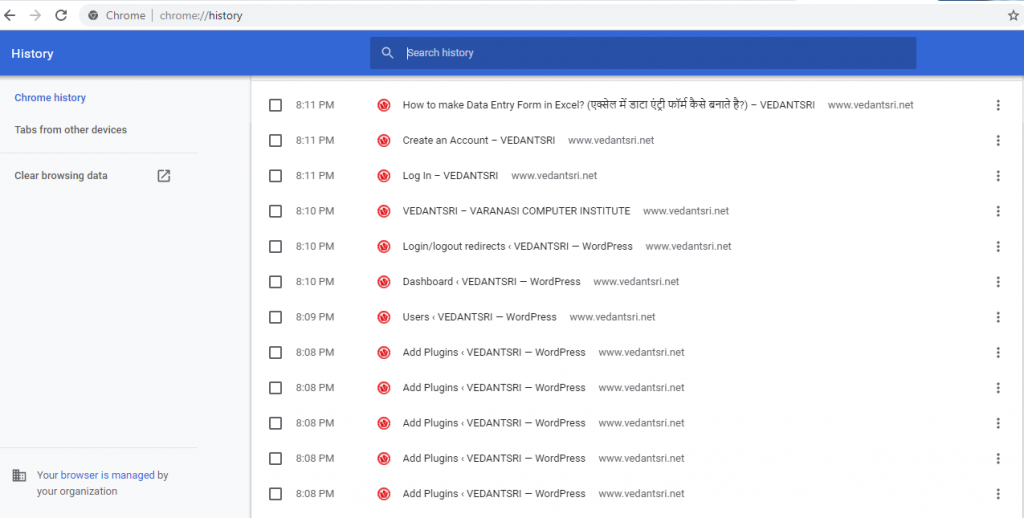
(Budget 2019 GD Topic)

0%
1103
A To Z Tally Shortcut Keys Online Test Series 2026 Pradip VedantSri

A To Z Tally Shortcut Keys Online Test Series 2026

1 / 36

Tally Shortcut Key To Open Company Menu

2 / 36

Press Ctrl+F5 To Open Rejection Out Voucher in Tally

3 / 36

Press Ctrl+Alt+R in Tally To Open

4 / 36

Press F6 to Open

5 / 36

Press Ctrl+F4 To Open

6 / 36

F7 Open Journal Voucher in Tally

7 / 36

Press Ctrl+F3 in Tally To Open

8 / 36

Shortcut Key to Open Physical Stock in Tally?

9 / 36

Contra Voucher Used To Record Banks Related Entry in Tally

10 / 36

Press F8 To Open

11 / 36

Shortcut Key To Check Tally Product Information

12 / 36

Shortcut Key To Open Configuration Setting in Tally?

13 / 36

Tally Shortcut key to Change Current date?

14 / 36

F9 Open Purchase Return Voucher

15 / 36

Double Underline Represent in Tally

16 / 36

Press F3 in Tally To Open

17 / 36

F1 Key

18 / 36

Shortcut Key To Open Purchase Order Voucher?

19 / 36

Tally Shortcut Key To Check Installed Release

20 / 36

Press Ctrl+F8 To Open

21 / 36

Press Backspace Key Go to Previous Options in Tally

22 / 36

Use of Ctrl+A in Tally

23 / 36

Shortcut key To Open Stock Journal in Tally?

24 / 36

Tally Shortcut to Open Help Website?

25 / 36

Press F5 To Open

26 / 36

Shortcut key To Open Features Setting In Tally?

27 / 36

Single Underline Represents in Tally

28 / 36

Tally Shortcut Key to Open Others Voucher?

29 / 36

Press Alt+F9 To Open

30 / 36

Press Alt+F5 to Open Which Voucher

31 / 36

Press Ctrl+F6 To Open

32 / 36

Tally Shortcut key To Change Date Periods?

33 / 36

Esc Key Press to Go Back/Previous Pages in Tally

34 / 36

Press Alt+F3 in Tally Open

35 / 36

Press Alt+F8 To Open

36 / 36

Tally F4 To Open

Your score is

The average score is 30%

0%