2- पहले शीट का नाम DataEntry तथा दुसरे शीट का नाम Database टाइप करे|
3- पहले शीट के फर्स्ट Row में जो भी डिटेल फील करना है उसका हैडिंग लिखे जैसे की Name, Father’s Name, Mobile No इत्यादी|
4- हैडिंग के बैकग्राउंड कलर तथा टेक्स्ट कलर को डिजाईन करें|
5- पुरे हैडिंग को सेलेक्ट करके कॉपी करें| MS Excel Database Macro Project-21 Video
6- दुसरे शीट Database पर जाएँ तथा पहले Row में कॉपी किये गए हैडिंग को पेस्ट कर दें|
7- दुसरे शीट में Same हैडिंग को अपने हिसाब से डिजाईन कर लें|
8- अब View मेनू में सबसे अंतिम टूलबॉक्स Macros में क्लिक करें तथा रिकॉर्ड Macro बटन पर क्लिक करें|
9- एक बॉक्स खुलेगा जिसमे Macro Name DataEntry Type करें| MS Excel Database Macro Project-21 Video
10- Ctrl के आगे बॉक्स में t टाइप करें तथा ओके बटन पर क्लिक करें|
11- इस बात का ध्यान दें जब आप रिकॉर्ड मैक्रो पर क्लिक कर रहे है तो आप पहले शीट पर हों|
a- पहले शीट के Row No 2 पर माउस का राईट बटन क्लिक करें|
b- कॉपी पर लेफ्ट बटन क्लिक करें माउस का|
c- दुसरे शीट पर जाने के लिए Database पर क्लिक करें|
d- दुसरे शीट के Row No 2 पर राईट क्लिक करें| MS Excel Database Macro Project-21 Video
e- Insert Copied Cell आप्शन पर माउस का लेफ्ट बटन क्लिक करें|
f- वापस पहले शीट पर जाने के लिए DataEntry पर लेफ्ट बटन क्लिक करें|
g- इंटर बटन प्रेस करके सिलेक्शन को बंद करें|
12- और लास्ट में मैक्रो को स्टॉप करें|
स्वागत है एक बार फिर MS-Excel 2019 वर्शन के प्रोजेक्ट बेस्ड क्लासेज में इस विडियो के अंतर्गत आप सीखेंगे की MS-Excel के किसी भी वर्शन पर Database Macro कैसे डिजाईन किया जाता है|इस विडियो को आराम से देखेते हुए स्टेप by स्टेप फॉलो करें| यदि किसी भी प्रकार का कोई क्वेश्चन या क्वेरी है तो नीचे कमेंट बॉक्स में जरुर लिखें धन्यवाद
इस विडियो के माध्यम से आप यह जान पाएंगे कि MS Excel के अंतर्गत आने वाले विभिन्न प्रकार के शेपस,कलर,टेक्स्ट,टूल्स,टेबल्स,फॉण्ट इत्यादि का यूज़ करके एक बेहतर sheet कैसे क्रिएट कर सकते हैं जो देखने में आकर्षक लगे
MS-Excel Database Macro Project
About VedantSri
VedantSri Computer Institute provides the best Computer Courses, Classes, and Training in Varanasi. There is NEILIT Courses CCC, BCC, O’level, Certificates, and Diploma Computer Courses available with best training materials. Also Available Top 100 Best Computer Courses, For Example, OM, DCA, ADCA, DTP, DFA, ADAM, ADTP, ADFA, DCE, and MS Office. VedantSri Computer Coaching updates CCC Online Test 2023 on www.vedantsri.net. There are some important computer Courses for jobs CCC Classes, Typing, Internships, And Spoken English Available Free of cost with Offer. More than 50 Computer Courses are available with a 50% Fee Discount in VedantSri Varanasi. You can get the Best Digital Marketing Course in Varanasi Institute VedantSri. There is the Latest Computer Course Offer in ADCA Computer Course, DCA Computer Course, CCC Computer Course & English Spoken.
VedantSri Computer Institute provides the best Computer Courses, Classes, and Training in Varanasi. There is NEILIT Courses CCC, BCC, O’level, Certificates, and Diploma Computer Courses available with the best training materials. Also Available Top 100 Best Computer Courses, For Example, OM, DCA, ADCA, DTP, DFA, ADAM, ADTP, ADFA, DCE, and MS Office. VedantSri Computer Coaching updates CCC Online Test on www.vedantsri.net. MS Excel Attendance Sheet Project-22 Video
There are some important computer Courses for jobs CCC Classes, Typing, Internships, And Spoken English Available Free of cost with Offer. More than 50 Computer Courses are available with a 50% Fee Discount in VedantSri Varanasi. You can get the Best Digital Marketing Course at Varanasi Institute VedantSri. There is the Latest Computer Course Offer in ADCA Computer Course, DCA Computer Course, CCC Computer Course & English Spoken. MS Excel Attendance Sheet Project-22 Video
About CCC Online Test
MS-Word Online Test:- This is the CCC Online Test Website Page. If You are preparing for CCC Exam or any competitive exam then you should visit this www.vedantsri.net website.
you can also download this app from the play store and you find Just like many more Online Test Series Related For Example MS Word, MS Excel, MS PowerPoint, and Internet-related. MS Excel Attendance Sheet Project-22 Video
This is Provided By VedantSri Computer Institute in Varanasi. The VedantSri Provides the Best Computer Classes, Courses, Coaching, and Computer Training in Varanasi Uttar Pradesh India.
VedantSri Computer Institute provides the best Computer Courses, Classes, and Training in Varanasi. There are NEILIT Courses, CCC, BCC, O-level, Certificates, and Diploma Computer Courses available with the best training materials. Also Available: Top 100 Best Computer Courses, For Example, OM, DCA, ADCA, DTP, DFA, ADAM, ADTP, ADFA, DCE, and MS Office. MS Word 6th Interesting Tricks
VedantSri Computer Coaching updates the CCC Online Test 2019 on www.vedantsri.net. There are some important computer Courses for jobs, CCC Classes, Typing, Internships, and Spoken English Available Freeof cost with an offer. MS Word 6th Interesting Tricks
More than 50 Computer Courses are available with a 50% fee discount at VedantSri Varanasi. You can get the Best Digital Marketing Course at Varanasi Institute VedantSri. There is the Latest Computer Course Offer in the ADCA Computer Course, DCA Computer Course, CCC Computer Course & English Spoken. MS Word 6th Interesting Tricks
MS Word Online Test:- This is the MS Word Online Test Website Page. If you are preparing for the CCC Exam or any competitive exam, then you should visit this website www.vedantsri.net.
You can also download this app from the Play Store, and you can find Just like many more Online Test Series Related, For Example, MS Word, MS Excel, MS PowerPoint, and Internet-related.
VedantSri Computer Institute in Varanasi provides this. VedantSri provides the Best Computer Classes, Courses, Coaching, and Training in Varanasi, Uttar Pradesh, India. MS Word 6th Interesting Tricks
VedantSri Computer Institute provides the best Computer Courses, Classes, and Training in Varanasi. There is NEILIT Courses CCC, BCC, O’level, Certificates, and Diploma Computer Courses available with the best training materials. Also Available are the Top 100 Best Computer Courses, For Example, OM, DCA, ADCA, DTP, DFA, ADAM, ADTP, ADFA, DCE, and MS Office. VedantSri Computer Coaching updates CCC Online Test 2019 on www.vedantsri.net. There are some important computer Courses for jobs CCC Classes, Typing, Internships, And Spoken English Available Free of cost with Offer. More than 50 Computer Courses are available with a 50% Fee Discount in VedantSri Varanasi. You can get the Best Digital Marketing Course at Varanasi Institute VedantSri. There is the Latest Computer Course Offered in ADCA Computer Course, DCA Computer Course, CCC Computer Course & English Spoken
MS-Word Online Test 2023- This is M.S Word Online Test Website Page. If You are preparing for CCC Exam or any competitive exam then you should visit on this www.vedantsri.net website.
you can also download this app from the play store and find Just like many more Online Test Series Related For Example MS Word, MS Excel, MS PowerPoint, and Internet-related.
This is Provided By VedantSri Computer Institute in Varanasi. The VedantSri Provides the Best Computer Classes, Courses, Coaching, and Computer Training in Varanasi Uttar Pradesh India.
VedantSri Computer Institute provides the best Computer Courses, Classes, and Training in Varanasi. There is NEILIT Courses CCC, BCC, O’level, Certificates, and Diploma Computer Courses available with the best training materials. Also Available Top 100 Best Computer Courses, For Example, OM, DCA, ADCA, DTP, DFA, ADAM, ADTP, ADFA, DCE, and MS Office. MS Word 7th Interesting Tricks
VedantSri Computer Coaching updates CCC Online Test 2019 on www.vedantsri.net. There are some important computer Courses for jobs CCC Classes, Typing, Internships, And Spoken English Available Free of cost with Offer. More than 50 Computer Courses are available with a 50% Fee Discount in VedantSri Varanasi. You can get the Best Digital Marketing Course at Varanasi Institute VedantSri. There is the Latest Computer Course Offer in ADCA Computer Course, DCA Computer Course, CCC Computer Course & English Spoken. MS Word 7th Interesting Tricks
MS-Word Online Test 2023:- This is M.S Word Online Test Website Page. If You are preparing for CCC Exam or any competitive exam then you should visit this www.vedantsri.net website.
you can also download this app from play store and you find Just like many more Online Test Series Related, For Example, MS Word, MS Excel, MS PowerPoint, Internet-related.
This is Provided By VedantSri Computer Institute in Varanasi. The VedantSri Provides the Best Computer Classes, Courses, Coaching, and Computer Training in Varanasi Uttar Pradesh India.
CCC Questions with Answers – 100 Most Asked Exam Paper Questions in Hindi
CCC (Course on Computer Concepts) की परीक्षा की तैयारी के लिए पिछले वर्षों के पेपर्स में आए प्रश्नों का अभ्यास सबसे कारगर तरीका है। यहाँ हम CCC Exam के 100 सबसे अधिक पूछे जाने वाले प्रश्नों (Most Asked Questions) और उनके संक्षिप्त उत्तरों की सूची प्रस्तुत कर रहे हैं। इन्हें अच्छी तरह याद करके आप परीक्षा में आसानी से सफलता पा सकते हैं। जब आप CCC Questions with Answers – 100 Most Asked Exam Paper Questions in Hindi से तैयारी कर चुके हैं, तब इसका नेक्स्ट सेट
CCC Questions with Answers – 101 to 200
NEW
का लिंक है, जिस पर जाकर आप
Q101 से Q200
CLICK HERE!
तक के CCC Questions की तैयारी करें।
महत्वपूर्ण सूचना:
LATEST
अगर आपने पहले से CCC के Set-01 Questions (Q1–Q100) पढ़ लिए हैं, तो अब आपकी तैयारी को अगले लेवल पर ले जाने का समय आ गया है। 👉 अगला सेट यहाँ पढ़ें: Set-02 : CCC Most Asked Questions (Q101–Q200) इसमें Database, Multimedia & Computer Concepts, Office & Productivity Tools, Digital Banking, E-Governance & Online Services, Internet Applications और Digital Services जैसे महत्वपूर्ण विषय शामिल हैं। ✅ ये सभी प्रश्न नए हैं (Q1–Q100 से बिल्कुल अलग) और 2026 में सबसे ज्यादा पूछे जाने वाले Objective Concepts के आधार पर तैयार किए गए हैं। 🔁 तो अब Set-01 पूरा करने के बाद, Set-02 (Q101–Q200) के लिए यहाँ क्लिक करें।
Computer Fundamental & Hardware – CCC Questions (Q1 to Q20)
Basic Computer Knowledge
CCC Questions with Answers – 100 Most Asked Exam Paper Questions in Hindi
Q6. कंप्यूटर की स्थायी मेमोरी कौन सी है? A6. ROM (रीड ओनली मेमोरी)
Q7. 1 बाइट (Byte) में कितने बिट (Bits) होते हैं? A7. 8 बिट
Q8. 1 किलोबाइट (KB) में कितने बाइट होते हैं? A8. 1024 बाइट
Q9. इनपुट और आउटपुट डिवाइस में क्या अंतर है? उदाहरण दें। A9. इनपुट डिवाइस डेटा देता है (जैसे- कीबोर्ड, माउस)। आउटपुट डिवाइस डेटा दिखाता है (जैसे- मॉनिटर, प्रिंटर)।
Q10. सर्वर (Server) क्या है? A10. एक शक्तिशाली कंप्यूटर जो नेटवर्क में अन्य कंप्यूटरों को संसाधन और सेवाएं प्रदान करता है।
Q11. सॉफ्टवेयर कितने प्रकार के होते हैं? A11. दो प्रकार: सिस्टम सॉफ्टवेयर और एप्लिकेशन सॉफ्टवेयर।
Q12. सिस्टम सॉफ्टवेयर क्या है? उदाहरण दें। A12. वह सॉफ्टवेयर जो कंप्यूटर हार्डवेयर को चलाने व नियंत्रित करने का काम करता है। जैसे- ऑपरेटिंग सिस्टम (विंडोज, लिनक्स)।
Q13. एप्लिकेशन सॉफ्टवेयर के दो उदाहरण दीजिए। A13. एमएस वर्ड, टैली।
Q14. ओपन सोर्स सॉफ्टवेयर क्या है? A14. वह सॉफ्टवेयर जिसका सोर्स कोड सार्वजनिक रूप से उपलब्ध हो और उसे कोई भी बदल व वितरित कर सकता है। जैसे: लिनक्स ऑपरेटिंग सिस्टम।
Q15. फर्मवेयर (Firmware) क्या है? A15. यह एक विशेष प्रकार का सॉफ्टवेयर है जो हार्डवेयर में स्थायी रूप से जड़ा (Embedded) होता है, जैसे- BIOS।
Q16. स्प्रेडशीट सॉफ्टवेयर का मुख्य उद्देश्य क्या है? A16. डेटा को पंक्तियों और स्तंभों (Rows & Columns) में व्यवस्थित करके गणना व विश्लेषण करना।
Q17. प्रेजेंटेशन सॉफ्टवेयर का उदाहरण क्या है? A17. एमएस पावरप्वाइंट या लिब्रेऑफिस इम्प्रेस।
Q18. कंपाइलर (Compiler) क्या करता है? A18. यह पूरे सोर्स कोड को एक साथ मशीनी भाषा (Machine Language) में बदलता है।
Q19. इंटरप्रेटर (Interpreter) और कंपाइलर (Compiler) में क्या अंतर है? A19. इंटरप्रेटर कोड को लाइन-बाय-लाइन परिवर्तित करता है, जबकि कंपाइलर पूरे कोड को एक साथ परिवर्तित करता है।
Q20. पुश टेक्नोलॉजी और पुल टेक्नोलॉजी में अंतर बताएं। A20. पुश टेक्नोलॉजी में सूचना सर्वर द्वारा क्लाइंट को भेजी जाती है, जबकि पुल टेक्नोलॉजी में क्लाइंट सर्वर से जानकारी मांगता है।
Operating System & Software – CCC Questions (Q21 to Q40)
CCC Questions with Answers – 100 Most Asked Exam Paper Questions in Hindi
Q43. वेब ब्राउज़र क्या है? A43. एक सॉफ्टवेयर जो वेब पेजों को एक्सेस और प्रदर्शित करता है (जैसे क्रोम, फ़ायरफ़ॉक्स)।
Q44. URL का पूरा नाम क्या है? A44. यूनिफ़ॉर्म रिसोर्स लोकेटर (Uniform Resource Locator)
Q45. वेबसाइट के एड्रेस को क्या कहते हैं? A45. URL (यूआरएल)
Q46. ‘http’ और ‘https’ में क्या अंतर है? A46. HTTP सुरक्षित नहीं है, जबकि HTTPS सुरक्षित (Secure) और एन्क्रिप्टेड कनेक्शन प्रदान करता है।
Q47. सर्च इंजन क्या है? दो उदाहरण दें। A47. वह प्रोग्राम जो इंटरनेट से जानकारी ढूंढता है। जैसे: गूगल, बिंग।
Q48. ई-मेल एड्रेस में ‘@’ चिह्न का क्या महत्व है? A48. यह यूजरनेम और डोमेन नेम को अलग करता है।
Q49. ईमेल में ‘CC’ और ‘BCC’ का फुल फॉर्म क्या है? A49. CC: कार्बन कॉपी, BCC: ब्लाइंड कार्बन कॉपी
Q50. BCC का क्या उपयोग है? A50. गोपनीय रूप से ईमेल की कॉपी भेजना ताकि अन्य प्राप्तकर्ताओं को उस प्राप्तकर्ता का पता न चले।
Q51. इंटरनेट पर फाइल ट्रांसफर के लिए किस प्रोटोकॉल का उपयोग होता है? A51. FTP (फाइल ट्रांसफर प्रोटोकॉल)
Q52. HTML का पूरा नाम क्या है? A52. हाइपरटेक्स्ट मार्कअप लैंग्वेज (HyperText Markup Language)
Q53. HTML डॉक्यूमेंट का एक्सटेंशन क्या होता है? A53. .html या .htm
Q54. वेबसाइट के होमपेज का क्या मतलब है? A54. किसी वेबसाइट का मुख्य या प्रारंभिक पेज।
Q55. ब्राउज़र में बुकमार्क सेव करने का क्या फायदा है? A55. किसी पसंदीदा वेबपेज तक तुरंत पहुँचने के लिए।
Networking Fundamentals
Q56. कंप्यूटर नेटवर्क क्या है? A56. दो या दो से अधिक कंप्यूटरों का आपस में जुड़ाव, ताकि संसाधन साझा किए जा सकें।
Q57. नेटवर्क का सबसे बड़ा उदाहरण क्या है? A57. इंटरनेट
Q58. LAN और WAN में अंतर बताएं। A58. LAN छोटे क्षेत्र (जैसे इमारत) का नेटवर्क है, WAN बड़े क्षेत्र (जैसे देश) का।
Q59. वाई-फाई (Wi-Fi) का पूरा नाम क्या है? A59. वायरलेस फिडेलिटी (Wireless Fidelity)
Q60. मॉडेम का कार्य क्या है? A60. डिजिटल सिग्नल को एनालॉग में और एनालॉग को डिजिटल में बदलना।
Q61. राउटर (Router) क्या करता है? A61. विभिन्न नेटवर्कों के बीच डेटा पैकेट्स को उनके गंतव्य तक पहुंचाने का मार्ग निर्धारित करता है।
Q62. IP एड्रेस क्या है? A62. इंटरनेट प्रोटोकॉल एड्रेस, नेटवर्क में प्रत्येक डिवाइस का एक अद्वितीय संख्यात्मक पता।
Q63. DNS का फुल फॉर्म और कार्य बताएं। A63. डोमेन नेम सिस्टम (Domain Name System)। यह डोमेन नाम (जैसे google.com) को IP एड्रेस में बदलता है।
Q64. वेब होस्टिंग क्या है? A64. वेबसाइट फाइलों को इंटरनेट पर स्टोर और एक्सेसिबल बनाने की सेवा।
Q65. क्लाउड कंप्यूटिंग क्या है? A65. इंटरनेट के माध्यम से कंप्यूटिंग संसाधनों (स्टोरेज, सर्वर) की ऑन-डिमांड डिलीवरी।
Q66. ई-कॉमर्स क्या है? A66. इंटरनेट के माध्यम से सामान और सेवाओं का क्रय-विक्रय।
Q67. सोशल नेटवर्किंग साइटों के दो उदाहरण दें। A67. फेसबुक, ट्विटर।
Q68. वीडियो कॉन्फ्रेंसिंग के लिए किस सॉफ्टवेयर का उपयोग होता है? A68. जूम, गूगल मीट, माइक्रोसॉफ्ट टीम्स।
Q69. ब्लॉग (Blog) का क्या मतलब है? A69. वेब लॉग (Web Log) – एक ऑनलाइन जर्नल या सूचनात्मक वेबसाइट।
Q70. विकी (Wiki) क्या है? A70. एक सहयोगात्मक वेबसाइट जहाँ यूजर्स सामग्री को एडिट और अपडेट कर सकते हैं (जैसे विकिपीडिया)।
Cyber Security & Ethics – CCC Questions (Q71 to Q100)
CCC Questions with Answers – 100 Most Asked Exam Paper Questions in Hindi
Security & Threats
Q71. कंप्यूटर वायरस क्या है? A71. एक दुर्भावनापूर्ण प्रोग्राम जो खुद को फैलाता है और कंप्यूटर सिस्टम को नुकसान पहुंचाता है।
Q72. एंटीवायरस सॉफ्टवेयर का क्या काम है? A72. वायरस और मैलवेयर का पता लगाना और उन्हें हटाना।
Q73. मैलवेयर (Malware) क्या है? A73. मैलिशियस सॉफ्टवेयर – कोई भी हानिकारक सॉफ्टवेयर (जैसे वायरस, वर्म, ट्रोजन)।
Q74. फ़िशिंग (Phishing) अटैक क्या है? A74. धोखे से यूजर का संवेदनशील डेटा (जैसे पासवर्ड) ईमेल या फर्जी वेबसाइट के जरिए चुराना।
Q75. हैकर (Hacker) और क्रैकर (Cracker) में अंतर? A75. हैकर सिस्टम की कमजोरियाँ ढूंढता है (अच्छे या बुरे इरादे से), जबकि क्रैकर दुर्भावनापूर्ण गतिविधि के लिए सिस्टम में घुसपैठ करता है।
Q76. डेटा एन्क्रिप्शन (Encryption) क्यों जरूरी है? A76. डेटा को गुप्त कोड में बदलकर अनधिकृत पहुँच से बचाने के लिए।
Q77. फायरवॉल (Firewall) का क्या कार्य है? A77. नेटवर्क और बाहरी दुनिया के बीच एक सुरक्षात्मक दीवार बनाकर अनधिकृत एक्सेस को रोकना।
Q78. स्ट्रॉन्ग पासवर्ड की क्या विशेषताएं होनी चाहिए? A78. लंबा (8+ अक्षर), अक्षर, संख्या, विशेष चिह्नों का मिश्रण।
Q79. डिजिटल सिग्नेचर क्या है? A79. एक इलेक्ट्रॉनिक हस्ताक्षर जो दस्तावेज़ की प्रामाणिकता और सत्यता साबित करता है।
Q80. कॉपीराइट (Copyright) क्या है? A80. मूल कृति (सॉफ्टवेयर, किताब) के निर्माता को दिया गया कानूनी अधिकार, जो दूसरों को उसे कॉपी करने से रोकता है।
Emerging Technologies & Abbreviations
Q81. ICT का फुल फॉर्म क्या है? A81. इनफॉर्मेशन एंड कम्युनिकेशन टेक्नोलॉजी (Information and Communication Technology)
Q82. OMR का पूरा नाम बताएं। A82. ऑप्टिकल मार्क रिकग्निशन (Optical Mark Recognition)
Q83. OCR तकनीक क्या है? A83. ऑप्टिकल कैरेक्टर रिकग्निशन – स्कैन किए गए टेक्स्ट को एडिट करने योग्य डिजिटल टेक्स्ट में बदलना।
Q84. UPS का पूरा नाम और कार्य बताएं। A84. अनइंटरप्टिबल पावर सप्लाई (Uninterruptible Power Supply)। बिजली जाने पर भी कुछ समय के लिए बैकअप पावर देना।
Q86. AI का फुल फॉर्म क्या है? A86. आर्टिफिशियल इंटेलिजेंस (Artificial Intelligence)
Q87. IoT का मतलब क्या है? A87. इंटरनेट ऑफ थिंग्स (Internet of Things) – उपकरणों का इंटरनेट से जुड़ाव।
Q88. ई-गवर्नेंस क्या है? A88. सरकारी सेवाओं और सूचनाओं को इलेक्ट्रॉनिक रूप से नागरिकों को उपलब्ध कराना।
Q89. NIELIT का पूरा नाम क्या है? A89. नेशनल इंस्टीट्यूट ऑफ इलेक्ट्रॉनिक्स एंड इंफॉर्मेशन टेक्नोलॉजी (National Institute of Electronics and Information Technology)
Q90. CCC का फुल फॉर्म क्या है? A90. कोर्स ऑन कंप्यूटर कॉन्सेप्ट्स (Course on Computer Concepts)
Q91. IT का फुल फॉर्म क्या है? A91. इनफॉर्मेशन टेक्नोलॉजी (Information Technology)
Q92. PDF फाइल को ओपन करने के लिए किस सॉफ्टवेयर की जरूरत होती है? A92. Adobe Acrobat Reader या कोई अन्य PDF रीडर।
Q93. जेपेग (JPEG) फाइल फॉर्मेट किस प्रकार की फाइल के लिए है? A93. इमेज फाइल (चित्र) के लिए।
Q94. वीडियो कॉल करने के लिए इंटरनेट पर किस प्रोटोकॉल का उपयोग होता है? A94. VoIP (वॉइस ओवर इंटरनेट प्रोटोकॉल)
Q95. किसी को ऑनलाइन परेशान करना या धमकाना क्या कहलाता है? A95. साइबर बुलिंग (Cyber Bullying)
Q96. ‘डार्क वेब’ (Dark Web) क्या है? A96. इंटरनेट का वह हिस्सा जो सामान्य सर्च इंजन से नहीं मिलता, अक्सर गैरकानूनी गतिविधियों के लिए प्रयोग किया जाता है।
Q97. डुप्लिकेट कंटेंट को इंटरनेट पर पोस्ट करना क्या कहलाता है? A97. प्लेजियरिज्म (Plagiarism) – साहित्यिक चोरी।
Q98. डिजिटल इंडिया अभियान का मुख्य उद्देश्य क्या है? A98. देश को डिजिटल रूप से सशक्त समाज और ज्ञान अर्थव्यवस्था में बदलना।
Q99. स्मार्ट कार्ड क्या है? A99. एक प्लास्टिक कार्ड जिसमें एक इंटीग्रेटेड सर्किट (चिप) होती है, जो डेटा स्टोर और प्रोसेस कर सकती है।
Q100. किसी प्रोग्राम को बंद करने (Close) के लिए कौन सी शॉर्टकट की प्रयोग होती है? A100. Alt + F4
ccc me kaise question aate hai
CCC exam me zyada tar objective type sawaal aate hain. Char option me se sahi jawab chunna hota hai. Sawaal syllabus ke basic topics se aate hain. Exam computer par hota hai, isliye computer chalane ki basic practice zaroori hai.
CCC Question Answer का मतलब CCC (Course on Computer Concepts) परीक्षा में पूछे जाने वाले महत्वपूर्ण प्रश्न और उनके सही उत्तर है। इन प्रश्नों में Computer Fundamentals, Windows, MS Office, Internet, Digital Payments, Cyber Security, Cloud Computing, AI, IoT, Networking तथा Online Services जैसे विषय शामिल होते हैं। परीक्षा की तैयारी के लिए केवल रटने के बजाय प्रत्येक उत्तर को समझकर अभ्यास करना अधिक लाभदायक होता है। CCC की तैयारी हिंदी में प्रश्नों और उत्तरों के माध्यम से भी की जा सकती है। इसमें कंप्यूटर की बुनियादी जानकारी, Hardware, Software, Internet, Networking और Cyber Security से जुड़े प्रश्नों का अभ्यास करें। इससे विषयों को समझने और परीक्षा की तैयारी करने में मदद मिलती है।
CCC me puche jane wale question kaise hote hain?
CCC परीक्षा में अधिकांश प्रश्न Multiple Choice Questions (MCQs) होते हैं। प्रत्येक प्रश्न के चार विकल्प दिए जाते हैं, जिनमें से एक सही उत्तर चुनना होता है। प्रश्न आसान से मध्यम स्तर के होते हैं और CCC Syllabus पर आधारित होते हैं। परीक्षा में Computer Basics, MS Word, Excel, PowerPoint, Internet, Email, Cyber Security, Digital Literacy, AI तथा Digital Services से संबंधित प्रश्न पूछे जाते हैं।
CCC ka paper kaisa hota hai?
CCC ka paper poori tarah Online Objective (MCQ) format me hota hai. Isme 100 questions hote hain jinka answer computer par select karna hota hai. Exam me Computer Basics, Operating System, MS Office, Internet, Email, Online Banking, Digital Payments aur Security se related practical knowledge par adhik focus kiya jata hai. Agar aap regular practice aur mock test karte hain to exam clear karna kaafi aasaan ho jata hai. CCCका पेपर कंप्यूटर पर ऑनलाइन दिया जाता है। इसमें कंप्यूटर की बुनियादी जानकारी, Operating System, MS Word, Excel, Internet, Email और Cyber Security जैसे विषयों से प्रश्न पूछे जाते हैं। तैयारी के लिए CCC के पुराने प्रश्नों और Mock Test का अभ्यास करें। परीक्षा के प्रश्न-पत्र और नियमों की पुष्टि आधिकारिक सूचना से करें |
CCC PYQ PDF in Hindi कहाँ से मिलेगी?
CCC Previous Year Questions (PYQ) PDF in Hindi पढ़ने से परीक्षा पैटर्न समझने में मदद मिलती है। तैयारी के लिए केवल पुराने प्रश्नों पर निर्भर न रहें, बल्कि नवीनतम CCC Syllabus के अनुसार Updated Question Bank, Mock Tests और Practice Papers भी अवश्य पढ़ें क्योंकि समय-समय पर नए विषय भी जोड़े जाते हैं।
CCC का Question किस प्रकार पूछा जाता है?
CCC परीक्षा में Computer Basics, Operating System, MS Office, Internet, Networking, Cyber Security, Digital Payments, Cloud Computing, Artificial Intelligence (AI), E-Governance तथा Online Services जैसे विषयों से वस्तुनिष्ठ (MCQ) प्रश्न पूछे जाते हैं। प्रश्नों का स्तर सामान्यतः Beginner से Intermediate तक होता है।
CCC Most Important Questions कौन से हैं?
CCC के सबसे महत्वपूर्ण प्रश्न वे होते हैं जो नवीनतम सिलेबस के मुख्य विषयों पर आधारित होते हैं, जैसे Computer Fundamentals, Hardware, Software, Windows, MS Word, Excel, PowerPoint, Internet, Email, Cyber Security, Digital Payments, AI, Cloud Computing, IoT तथा Government Digital Services। तैयारी के लिए Updated Mock Tests और Practice Sets का नियमित अभ्यास करना सबसे अच्छा तरीका है।
CCC Admit Card कैसे डाउनलोड करें?
CCC Admit Card परीक्षा से पहले जारी किया जाता है। उम्मीदवार आधिकारिक NIELIT Student Portal पर जाकर अपना Application Number तथा जन्मतिथि (या आवश्यक विवरण) दर्ज करके Admit Card डाउनलोड कर सकते हैं। परीक्षा केंद्र पर प्रवेश के लिए Admit Card के साथ एक वैध Photo ID ले जाना आवश्यक होता है।
CCC Result कैसे देखें?
CCC परीक्षा का Result आधिकारिक NIELIT वेबसाइट पर ऑनलाइन जारी किया जाता है। उम्मीदवार अपना Roll Number या आवश्यक विवरण दर्ज करके परिणाम देख सकते हैं। परिणाम जारी होने के बाद उसे डाउनलोड या प्रिंट भी किया जा सकता है।
CCC Full Form क्या है?
CCC की Full Form Course on Computer Concepts है। यह NIELIT (National Institute of Electronics & Information Technology) द्वारा संचालित एक लोकप्रिय कंप्यूटर सर्टिफिकेट कोर्स है, जिसका उद्देश्य उम्मीदवारों को कंप्यूटर और डिजिटल तकनीक का मूलभूत ज्ञान प्रदान करना है।
CCC Certificate क्या है और इसका क्या महत्व है?
CCC Certificate, NIELIT द्वारा जारी किया जाने वाला प्रमाणपत्र है जो यह दर्शाता है कि उम्मीदवार ने कंप्यूटर की मूलभूत जानकारी सफलतापूर्वक प्राप्त की है। यह प्रमाणपत्र विभिन्न सरकारी एवं निजी नौकरियों, कंप्यूटर योग्यता, डिजिटल साक्षरता तथा कई भर्ती प्रक्रियाओं में उपयोगी माना जाता है। प्रमाणपत्र परीक्षा सफलतापूर्वक उत्तीर्ण करने के बाद जारी किया जाता है।
CCC me kitne questions aate hai?
CCC Exam mein aam taur par 100 Multiple Choice Questions (MCQs) pooche jaate hain. Har question 1 number ka hota hai aur exam online computer par hota hai. Questions Computer Fundamentals, Windows, MS Word, Excel, PowerPoint, Internet, Email, Digital Financial Services aur Cyber Security se related hote hain. Achhi practice ke liye regular online mock test dena bahut zaroori hai.
CCC Exam me kya kya lekar jana chahiye?
CCC Exam dene ke liye aam taur par aapko: Original Admit Card Valid Photo ID Proof (Aadhaar Card, Voter ID, PAN Card, Driving License ya Passport) Passport Size Photo (agar centre maange) Reporting Time se 30 minute pehle exam centre pahunchna chahiye. Mobile Phone, Smart Watch, Calculator ya kisi bhi electronic device ko exam hall me le jane ki anumati nahi hoti.
CCC Exam me kitne questions aate hain aur kitna time milta hai?
CCC Exam me 100 Objective Questions (MCQs) hote hain aur unhe solve karne ke liye 90 minutes ka samay diya jata hai. Time management bahut important hota hai, isliye exam se pehle online mock tests ki practice karna faydemand rehta hai.
CCC Important Questions ki tayari kaise kare?
CCC Important Questions ki tayari ke liye sabse pehle latest syllabus complete kijiye, uske baad Previous Year Questions aur Online Mock Tests solve kijiye. VedantSri Computer Institute me students ko latest syllabus ke hisaab se Important Questions, Practice Papers, Mock Tests aur Exam Pattern ke according regular practice karai jaati hai, jisse exam clear karna aur bhi aasaan ho jata hai.
CCC Exam Date 2026 kab hogi?
CCC Exam NIELIT ke dwara saal bhar alag-alag batches me conduct kiya jata hai. Exact Exam Date aapke Registration, City aur Allotment ke hisaab se NIELIT dwara Admit Card mein di jaati hai. Isliye latest Exam Date aur Admit Card ki jankari ke liye hamesha NIELIT ki official website check karni chahiye.
CCC Exam Date October 2026 kab hai?
October 2026 ke CCC Exam ki exact date NIELIT dwara registration complete hone ke baad allot ki jaati hai. Candidate apna Admit Card download karke exam date, timing aur exam centre ki jankari dekh sakte hain. Latest update ke liye official NIELIT portal dekhna sabse sahi rahega.
CCC Exam Date kaise pata kare?
CCC Exam Date jaanne ke liye Registration ke baad NIELIT dwara Admit Card release kiya jata hai. Admit Card me Exam Date, Reporting Time aur Exam Centre ki poori jankari hoti hai. Isliye official notification aur Admit Card ko regular check karna chahiye.
CCC Exam Registration kaise kare?
CCC Exam Registration NIELIT ke official portal ke madhyam se online kiya jata hai. Registration ke baad application verify hota hai aur uske baad Admit Card issue kiya jata hai. Agar aap Registration, Form Filling ya Document Upload me help chahte hain to VedantSri Computer Institute ke Durgakund aur Rathyatra Branch par guidance le sakte hain.
CCC Course kitne mahine ka hota hai?
VedantSri Computer Institute me CCC Course ki duration 80 Hours (lagbhag 3 Months) hoti hai. Daily 1 Hour ki Class, hafte me 6 Days chalti hai. Is duration me theory ke saath practical training aur regular practice bhi ki jaati hai.
CCC Course ka Syllabus kya hai?
VedantSri Computer Institute me CCC Course latest syllabus ke hisaab se padhaya jata hai. Isme: Introduction to Computer History of Computers Types of Computers Components of Computer System Operating System Windows aur Linux Basics File Management MS Word MS Excel MS PowerPoint Internet aur Email Online Banking Digital Payment Methods Cyber Security aur Digital Financial Services ke saath practical classes bhi shamil hoti hain.
CCC Course ki Fees kitni hai?
VedantSri Computer Institute mein CCC Course ki Regular Fees ₹5,000 hai, lekin vartamaan Offer Fees sirf ₹2,500 mein admission diya ja raha hai. Offer samay-samay par badal sakta hai, isliye latest admission offer ke liye institute se sampark karna uchit rahega.
Varanasi mein best CCC institute kaun sa hai?
Agar aap Varanasi me practical training ke saath CCC Course karna chahte hain to VedantSri Computer Institute ek achha vikalp hai. Yahan Durgakund aur Rathyatra Branches par latest syllabus, experienced faculty, practical lab, online mock tests, interview preparation, project submission guidance aur Jobdo.in ke dwara Free Job Assistance bhi di jaati hai.
CCC Course ke baad Job Assistance milti hai?
Haan. VedantSri Computer Institute me CCC Course complete karne ke baad students ko Jobdo.in ke madhyam se Free Job Assistance di jaati hai. Iske saath Interview Preparation Classes, Online Mock Test Practice aur Project Submission Preparation bhi karai jaati hai, jisse students ko job aur interview ke liye better confidence milta hai.
VedantSri Computer Institute me CCC Course kyon join kare?
VedantSri Computer Institute me CCC Course karne ke fayde: Latest 2026 Syllabus 80 Hours (3 Months) Training Daily 1 Hour Class, Week me 6 Days Practical Lab Training Online Mock Tests Previous Year Questions Practice Project Submission Guidance Interview Preparation Classes Jobdo.in ke dwara Free Job Assistance Durgakund aur Rathyatra Branches, Varanasi Affordable Offer Fees ₹2,500 (Regular ₹5,000) Ye FAQs Rank Math FAQ Schema ke liye optimized hain aur Google me search hone wale keywords jaise CCC Questions with Answers, CCC Important Questions, CCC Exam Date 2026, CCC Registration, CCC Course Fees, CCC Course Duration, CCC Syllabus, CCC Institute in Varanasi ko naturally target karte hain.
CCC ke paper mein kya kya aata hai?
CCC ke paper mein computer fundamentals, operating system, internet aur cyber security se jude sawaal aate hain. Article me inhi topics ke 100 sawaal diye gaye hain, jinse paper ka pattern samajh aata hai.
CCC me kya kya aata hai?
CCC me computer basics, operating system, internet, email aur cyber security ki padhai hoti hai. Exam me inhi topics se simple aur direct sawaal puche jaate hain.
CCC important questions kaun se hain?
CCC ke important questions fundamentals, OS, internet aur cyber security ke basic concepts se bante hain. Article me diye gaye 100 sawaalon ko hal karke inki practice ki ja sakti hai.
CCC kya hai diploma ya degree?
Ek certificate course hai. Iska pura naam Course on Computer Concept hai. Course 3 mahine ka hota hai aur iske baad NIELIT ka certificate milta hai. Isliye ise 10th ya 12th ke baad short-term course ke roop me kiya jata hai.
CCC kya hai puri jankari?
CCC ek 3 mahine ka certificate course hai, jiska pura naam Course on Computer Concepts hai. Isme computer fundamentals, operating system, internet aur cyber security ki basic padhai hoti hai. VedantSri me iski fees ₹2,500 hai aur class Monday se Saturday, subah 7 se raat 8 baje tak hoti hai.
CCC exam kaise pass kare?
CCC exam pass karne ke liye syllabus poora cover karein aur roz mock test lagayein. 100 questions me se 50 sahi karne par exam pass ho jata hai. Negative marking nahi hai, isliye saare sawaal attempt karein. Previous year papers se practice karein.
CCC ki taiyari kaise kare?
CCC ki taiyari ke liye NIELIT ka official syllabus download karein. Har chapter ka short note banayein aur computer par practical roz karein. Hafte me teen mock tests dein. Galat jawabon ka reason note karein aur kamzor topics dobara padhein.
Important questions for CCC exam 2026?
CCC exam 2026 ke important topics hain Computer Fundamentals, Operating System, MS Word, Excel, PowerPoint, Internet, Digital Financial Services aur Cyber Security. In modules se zyada sawaal aate hain. NIELIT ke official study material aur previous year papers se practice karein.
Important questions for CCC exam 2026?
CCC exam 2026 ke important questions Computer Fundamentals, Operating System, MS Word, Excel, PowerPoint, Internet, Digital Financial Services aur Cyber Security modules se aate hain. NIELIT ke official syllabus aur previous year papers se practice karein. Har module ke basic concepts clear rakhein.
CCC notes PDF in Hindi?
Download the PDF From Our Site www.vedantsri.net by clicking on the Download button.
CCC all questions PDF?
Download the PDF From Our Site www.vedantsri.net by clicking on the Download button.
CCC हिंदी में क्या होता है?
CCC का पूरा नाम Course on Computer Concept है। हिंदी में इसे कंप्यूटर का बेसिक कोर्स कहते हैं जिसमें कंप्यूटर की शुरुआती जानकारी दी जाती है। यह कोर्स 3 महीने का होता है और VedantSri में इसकी फीस ₹2,500 है।
CCC book in Hindi pdf?
Download from our Official site www.vedantsri.net
CCC का पेपर कैसा होता है?
CCC का पेपर ऑनलाइन और ऑब्जेक्टिव प्रकार का होता है। इसमें 100 प्रश्न होते हैं और पूरा पेपर 100 अंकों का होता है। परीक्षा की अवधि 90 मिनट होती है और कोई नेगेटिव मार्किंग नहीं होती।
CCC Exam कैसे होता है?
CCC Exam ऑनलाइन मोड में NIELIT द्वारा आयोजित किया जाता है। इसमें 100 ऑब्जेक्टिव प्रश्न होते हैं जिन्हें 90 मिनट में हल करना होता है। परीक्षा में MCQ और True/False प्रश्न होते हैं और नेगेटिव मार्किंग नहीं होती।
CCC ka peparकैसा होता है?
CCC का पेपर ऑनलाइन होता है। इसमें कंप्यूटर से संबंधित वस्तुनिष्ठ प्रश्न पूछे जाते हैं। परीक्षा की अवधि, प्रश्नों की संख्या और अंक वितरण की जानकारी के लिए NIELIT की आधिकारिक परीक्षा संबंधी सूचना देखें।
Hindi CCC?
Hindi CCC से आशय CCC परीक्षा की तैयारी हिंदी में करने से हो सकता है। विद्यार्थी कंप्यूटर के महत्वपूर्ण प्रश्नों और उत्तरों को हिंदी में पढ़कर अभ्यास कर सकते हैं। तकनीकी शब्दों को English में भी समझना उपयोगी है।
ccc me kis type ke question aate hain?
CCC exam me zyada tar sawaal objective type ke aate hain. Har sawaal ke char option hote hain, jinme se ek sahi jawab chunna hota hai. Sawaal computer ke basic parts, Windows, MS Word, Excel, Internet aur cyber security jaise vishayon se aate hain. Exam computer par hota hai, isliye mouse aur keyboard chalana aana chahiye. Taiyari ke liye pehle syllabus ko dhyan se padhein. Har topic ke basic concept samjhein, ratne ki jagah practice karein. Purane saal ke question paper (PYQ) solve karein, isse sawaalon ka pattern samajh aata hai. Roz thoda-thoda abhyas karein, isse exam me confidence badhta hai. Basic computer aur hardware ke sawaal Operating System aur software ke sawaal Internet aur networking ke sawaal Cyber security aur naitikta ke sawaal
About VedantSri
VedantSri Computer Institute provides the best Computer Courses, Classes, and Training in Varanasi. There are NEILIT courses, CCC, BCC, O-level, Certificates, and Diploma Computer Courses available with the best training materials. Also Available: Top 100 Best Computer Courses, For Example, OM, DCA, ADCA, DTP, DFA, ADAM, ADTP, ADFA, DCE, and MS Office. CCC Questions with Answers
VedantSri Computer Coaching updates the CCC Online Test on www.vedantsri.net. There are some important computer Courses for jobs, CCC Classes, Typing, Internships, and Spoken English Available Free of cost with an offer.
More than 50 Computer Courses are available with a 50% fee discount at VedantSri Varanasi. You can get the Best Digital Marketing Course at Varanasi Institute VedantSri. There are the latest computer course offers in the ADCA Computer Course, DCA Computer Course, CCC Computer Course & English Spoken. CCC Questions with Answers
CCC Online Test
CCC Online Test: This is the CCC Online Test Website Page. If you are preparing for the CCC Exam or any competitive exam, then you should visit the www.vedantsri.net website. CCC Questions with Answers
You can also download this app from the Play Store, and you will find many more online test series related to, for example, MS Word, MS Excel, MS PowerPoint, and Internet-related topics. CCC Questions with Answers
VedantSri Computer Institute in Varanasi provides this. VedantSri Provides the Best Computer Classes, Courses, Coaching, and Computer Training in Varanasi, Uttar Pradesh, India. CCC Questions with Answers
आज हम सीखेंगे की किसी भी कंपनी, फर्म, आर्गेनाईजेशन इत्यादी का MS-Word Flyer Projects कैसे डिजाईन करते है|
इस प्रोजेक्ट्स को MS Word 2019 वर्शन पर डिजाईन किया गया है परन्तु आप इस फ्लायर प्रोजेक्ट्स को MS Word के 2007/2010/2013/2016 जैसे पुराने वर्शन पर भी डिजाईन कर सकते है|
इस प्रोजेक्ट्स को बनाने के लिए नीचे के स्टेप को carefully फॉलो करें यदि किसी प्रकार के प्रश्न है तो आप नीचे कमेंट में लिख सकते है|
स्वागत है एक बार फिर MS Word 2019 वर्शन के प्रोजेक्ट बेस्ड क्लासेज में इस विडियो के अंतर्गत आप सीखेंगे की MS Word के किसी भी वर्शन पर Flyer कैसे डिजाईन किया जाता है |इस विडियो को आराम से देखेते हुए स्टेप by स्टेप फॉलो करें| यदि किसी भी प्रकार का कोई क्वेश्चन या क्वेरी है तो नीचे कमेंट बॉक्स में जरुर लिखें धन्यवाद
इस विडियो के माध्यम से आप यह जान पाएंगे कि MS Word के अंतर्गत आने वाले विभिन्न प्रकार के शेपस,कलर,टेक्स्ट,टूल्स,फॉण्ट इत्यादि का यूज़ करके एक बेहतर Flyer डिज़ाइन कैसे क्रिएट कर सकते हैं जो देखने में आकर्षक लगे
VedantSri Computer Institute provides the best Computer Courses, Classes, and Training in Varanasi. There are NEILIT Courses, CCC, BCC, O-level, Certificates, and Diploma Computer Courses available with the best training materials. Also Available: Top 100 Best Computer Courses, For Example, OM, DCA, ADCA, DTP, DFA, ADAM, ADTP, ADFA, DCE, and MS Office.
MS Word Flyer Project-20
VedantSri Computer Coaching updates the CCC Online Test 2023 on www.vedantsri.net. There are some important computer Courses for jobs, CCC Classes, Typing, Internships, And Spoken English Available Free of cost with an Offer. More than 50 Computer Courses are available with a 50% Fee Discount in VedantSri Varanasi. You can get the Best Digital Marketing Course at Varanasi Institute VedantSri. There is the Latest Computer Course Offer in the ADCA Computer Course, DCA Computer Course, CCC Computer Course & English Spoken.
provides the best Computer Courses, Classes, and Training in Varanasi. There is NIELIT Courses CCC, BCC, O’level, Certificates, and Diploma Computer Courses available with the best training materials. Also Available Top 100 Best Computer Courses, For Example, OM, DCA, ADCA, DTP, DFA, ADAM, ADTP, ADFA, DCE, and MS Office. VedantSri Computer Coaching updates CCC Online Test 2023 on www.vedantsri.net. (Photoshop Basic Shape Effect Project)
Photoshop Basic Shape Effect Project
There are some important computer Courses for jobs, CCC Classes, Typing, Internship, and Spoken English Available Free of cost with an offer. More than 50 Computer Courses are available with a 50% Fee Discount in VedantSri Varanasi. You can get the Best Digital Marketing Course at Varanasi Institute VedantSri. There is the Latest Computer Course Offer in the ADCA Computer Course, DCA Computer Course, CCC Computer Course & English Spoken. (ADCA Course Offer in Varanasi)
(Photoshop Basic Shape Effect Project)
About VedantSri Computer Institute Varanasi
VedantSri Computer Institute in Varanasi is a government-recognised and ISO Certified Computer Institute in Varanasi, running since 2011. It Provides Computer Courses, Classes, and Training through its own branches all over Varanasi. There are Computer Scholarship Courses, DCE Scholarship (Diploma in Computer Engineering), DIT, the most trusted computer course, available under the Scholarship Test Scheme. (Photoshop Basic Shape Effect Project)
वेदांतश्री कम्प्यूटर इंस्टिट्यूट’ वाराणसी में पिछले 10 वर्षो से बेहतर व न्यूनतम शुल्क में कम्प्यूटर शिक्षा प्रदान करने वाली एक कम्प्यूटर ट्रेनिंग इंस्टिट्यूट है | यह संस्था कम्प्यूटर व इंग्लिश स्पीकिंग कोर्स की ट्रेनिंग प्रदान करती है | वाराणसी में कम्प्यूटर शिक्षा को बेहतर व न्यूनतम शुल्क में छात्रो तक पहुचाने में वेदांतश्री पिछले 10 वर्षो से प्रयासरत है | (Photoshop Basic Shape Effect Project)
Free To Learn In VedantSri Computer Institute in Varanasi
इस वेबसाइट का यूज़ वेदांतश्री में पढ़ रहे छात्रो को कोर्स से सम्बंधित ऑनलाइन सपोर्ट करने से सम्बंधित है | इस वेबसाइट पर उपलब्ध विडियो, टेस्ट शीट, Questions & Answer सेशन, ट्रिक्स, टिप्स वेदांतश्री में सिख रहे कोर्सेज से सम्बंधित है | उपलब्ध कंटेंट संस्था में सिख रहे छात्रो के डिमांड पर अपडेट किया जाता है | उपलब्ध कंटेंट वेदांतश्री में पढ़ रहे छात्रो व सम्बंधित छात्रो को निशुल्क प्रदान किया जाता है जिसका कोई अलग से शुल्क नही लिया जाता है | इस वेबसाइट पर उपलब्ध कंटेंट कम्प्यूटर कोर्सेज व इंग्लिश स्पीकिंग कोर्सेज से सम्बंधित अपडेट किया जाता है |
(Photoshop Basic Shape Effect Project)
About the CCC Online Test
CCC Online Test:- This is the CCC Online Test Website Page. If you are preparing for the CCC Exam or any competitive exam, then you should visit the www.vedantsri.net website. (ADCA Course Fees in Varanasi)
You can also download this app from the Play Store, and you will find Just like many more online test series related to, for example, MS Word, MS Excel, MS PowerPoint, and Internet-related.
This is Provided By VedantSri Computer Institute, Varanasi. The VedantSri Provides the Best Computer Classes, Courses, Coaching, and Computer Training in Varanasi, Uttar Pradesh, India.
Tally Online Test Series Final me exam pattern samajhna zaroori hai. Isse aap practice ke dauran questions, marks aur time ko sahi tarike se manage kar sakte hain.
Tally Online Test Series Final: Exam Pattern (Kitne Questions, Kitne Number, Kitna Time)
Tally Basic Online Test Series me exam pattern samajhna zaroori hai. Isse aap practice ke dauran questions, marks aur time ko sahi tarike se manage kar sakte hain. Neeche diye gaye table me exam pattern ki puri jankari di gayi hai.
Kitne sawaal
Kitne number
Kitna time
30
30
30 minutes
Is exam pattern ke hisaab se regular practice karke aap Tally Final Online Test Series me apna score improve kar sakte hain.
Yeh ek final practice test hai jisme Tally Prime ke saare important topics ka revision milta hai. Is test se aap exam se pehle check kar sakte hain ki aapki taiyari kitni strong hai.
Har question par lagbhag 1 minute se zyada na lagayein.
Roz Tally me practical practice karein, sirf theory kaafi nahi hai.
Shortcut keys yaad rakhein, isse time bachta hai.
About VedantSri
Tally Online Test Series Final
VedantSri Computer Institute provides the best Computer Courses, Classes, and Training in Varanasi. NEILIT Courses CCC, BCC, O Level, Certificates, and Diploma Computer Courses are available with the best training materials. We also offer the top 100 Computer Courses, including OM, DCA, ADCA, DTP, DFA, ADAM, ADTP, ADFA, DCE, and MS Office. VedantSri Computer Coaching updates the CCC Online Test on www.vedantsri.net.
Important computer Courses for jobs, CCC Classes, typing, Internships, And Spoken English are available free of cost with an offer. More than 50 Computer Courses are available with a 50% fee discount at VedantSri Varanasi. Get the Best Digital Marketing Course at Varanasi Institute VedantSri. There are the latest computer course offers in ADCA Computer Course, DCA Computer Course, CCC Computer Course & English Spoken. Tally Online Test 2026
Tally Online Test Series Final
Aksar Poochhe Jaane Wale Sawaal (FAQ)
Q.1- Is test me kitne questions aate hain? Ans- Isme 30 questions hote hain, 30 marks ke aur 30 minutes ke time me.
Q2- Toppers list kahan dekhein? Ans- Quiz ke neeche “Today’s Toppers” link par click karke aap top students ki list dekh sakte hain.
Q3- Kya exam se pehle practice zaroori hai? Ans- Haan, regular practice se speed aur accuracy dono badhti hain. Tally Online Test Series Final me exam pattern samajhna zaroori hai. Isse aap practice ke dauran questions, marks aur time ko sahi tarike se manage kar sakte hain.
If you plan to buy a CCC Class to Learn Online at Home then VedantSri Also Provides a Very Low-cost CCC Online Class with CCC Latest Updated Syllabus here. Photoshop Online Test 2023
You will get this Online Class only by Paying Just Rs. 199/-. You Can Pay Through UPI, Debit or Credit Card, or Net Banking Payment option. To Getting This Paid Course You have to Visit VedantSri Store by Going to the Link Below. Photoshop Online Test 2023
Photoshop Online Test 2023:- This is the Photoshop Online Test 2023 Website Page. If You are preparing for CCC Exam or any competitive exam then you should visit this www.vedantsri.net website.
you can also download this app from the play store and you find Just like many more Online Test Series Related For Example Photoshop, Tally, Accounting, MS Word, MS Excel, MS PowerPoint, and Internet-related.
This is Provided By VedantSri Computer Institute in Varanasi. The VedantSri Provides the Best Computer Classes, Courses, Coaching, and Computer Training in Varanasi Uttar Pradesh India.
About VedantSri
VedantSri Computer Institute provides the best Computer Courses, Classes, and Training in Varanasi. There is NEILIT Courses CCC, BCC, O’level, Certificates, and Diploma Computer Courses available with the best training materials. Also Available Top 100 Best Computer Courses, For Example, OM, DCA, ADCA, DTP, DFA, ADAM, ADTP, ADFA, DCE, and MS Office. Photoshop Online Test 2023
Photoshop Online Test 2023
VedantSri Computer Coaching updates CCC Online Test 2023 on www.vedantsri.net. There are some important computer Courses for jobs CCC Classes, Typing, Internships, And Spoken English Available Free of cost with Offer. Photoshop Online Test 2023
More than 50 Computer Courses are available with a 50% Fee Discount in VedantSri Varanasi. You can get the Best Digital Marketing Course at Varanasi Institute VedantSri. There is the Latest Computer Course Offer in ADCA Computer Course, DCA Computer Course, CCC Computer Course & English Spoken. Photoshop Online Test 2023
Ans- Tally में कंपनी को create करने के लिए Gateway of Tally > Company Info > Create Company. Tally Question Answers
2. Directory में क्या करते है?
Ans- Company data जो location पर store होगी, उसका path हम यहा दे सकते है| Tally Question Answers
3. Name में किसका नाम देते है?
Ans- Name में अपनी कंपनी का नाम देते है|
4. Company logo का क्या मतलब होता है?
Ans- हम यहाँ कंपनी के logo को define कर सकते है| Tally Question Answers (Part-I)
Ans- हम यहाँ कंपनी के logo को define कर सकते है|
5. Mailing name का क्या मतलब होता है?
Ans- यहाँ ऊपर दिया कंपनी का नाम अपने आप आ जाता है, हम अपनी जरुरत के हिसाब से इसमें बदल कर सकते है| Tally Question Answers
Tally Question Answers
6. Base Currency Information में क्या होता है?
Ans- इसमें currency से सम्बंधित विभिन्न जानकारी होती है, जैसे कि- सिम्बल्स, currency के नाम, डेसीमल प्लेसेस आदि|
7. Use Security Control का क्या use होता है?
Ans- Tally में कई security control है जो विभिन्न यूजर कि अथॉरिटी को डिफाइन करता है| इसमें डेटा को एक्सेस करना, डेटा भरना बदल करना या डिलीट करना आदि की अथॉरिटी दे सकते है|
8. Tally Vault Password का क्या use होता है?
Ans- Tally vault एक सुधारित security feature है जो कंपनी की data security के लिए encrypted form में होता है और ये password protected होता है| इस password के बिना data को access नहीं किया जा सकता और अगर यह password भूल गए तो इसे recover नहीं किया जा सकता| Tally Question Answers
Tally Question Answers
9. Modification of Company Information क्या होता है?
Ans- कंपनी बनाने के बाद आप कंपनी के विवरण में बदलाव कर सकते है|इसके लिए Alt+F3 प्रेस करे और जो कंपनी को मॉडिफाई करना है वह select करे| Tally Question Answers
10. Shut Company किसे कहते है?
Ans- यदि अपने कोई कंपनी को open किया है और अब आप इसे बंद करना चाहते है तो Alt+F3 प्रेस करे और कंपनी को select करे इस कंपनी का नाम list से निकाल दिया जाएगा| Tally Question Answers
Basic Questions of Notepad-Related Question Answers
👉 ये 50 सवाल-जवाब CCC, O Level, ADCA, और Competitive Exams में बहुत काम आएंगे।
Q: What is Notepad? A: Notepad ek simple text editor hai jo Windows ke sath aata hai aur plain text documents banane aur edit karne ke liye use hota hai.
Q: Notepad किस company ने बनाया है? A: Microsoft ne Notepad ko develop kiya hai aur ye Windows ke sath pre-installed aata hai.
Q: Notepad किस type ka software है? A: Ye ek System Utility Software hai.
Q: Notepad में किस type ki files save hoti hain? A: Mostly .txt files save hoti hain, lekin aap .html, .css, .js, .bat, .ini etc. bhi bana sakte ho.
Q: Notepad free hai ya paid? A: Notepad ek free built-in software hai jo Windows ke sath aata hai.
Notepad Related Question Answers
Usage Based Questions of Notepad-Related Question Answers
Q: Notepad का main use kya hai? A: Simple text likhna, edit karna, coding karna (HTML, CSS, JavaScript, Python, etc.), aur configuration files banane ke liye.
Q: Notepad me bold, italic text likh sakte hain kya? A: Nahi, Notepad only Plain Text support karta hai, formatting ke liye WordPad ya MS Word use karna hota hai.
Q: Notepad se HTML webpage bana sakte hain kya? A: Haan, aap HTML code likhkar usse .html extension me save karo, fir browser me open karke webpage dekh sakte ho.
Q: Notepad me programming code likh sakte hain? A: Yes, Notepad me aap Python, C, C++, Java, PHP, etc. ka code likh sakte ho, lekin run karne ke liye compiler/interpreter ki jarurat hoti hai.
Q: Notepad aur WordPad me difference kya hai? A: Notepad only plain text support karta hai, jabki WordPad me formatting (bold, italic, images, colors) bhi kar sakte ho.
Notepad-Related Question Answers
Features Questions of Notepad-Related Question Answers
Q: Notepad me word wrap option ka kya use hai? A: Word Wrap enable karne se text automatically next line me chala jata hai screen ke end hone par.
Q: Notepad me Font style kaise change karte hain? A: Format → Font option se font style aur size change kar sakte ho.
Q: Notepad me search (Find) option ka shortcut key kya hai? A: Ctrl + F
Q: Notepad me Replace karne ka shortcut kya hai? A: Ctrl + H
Q: Notepad me new file banane ka shortcut kya hai? A: Ctrl + N
Q: Notepad me file save karne ka shortcut kya hai? A: Ctrl + S
Q: Notepad me print karne ka shortcut kya hai? A: Ctrl + P
Q: Notepad me undo karne ka shortcut kya hai? A: Ctrl + Z
Q: Notepad me redo karne ka shortcut kya hai? A: Ctrl + Y
Q: Notepad me text cut karne ka shortcut kya hai? A: Ctrl + X
Advanced/Practical Questions of Notepad-Related Question Answers
Q: Notepad me coding karna better hai ya IDE me? A: IDE (VS Code, PyCharm) me coding better hoti hai kyunki usme debugging aur highlighting features hote hain.
Q: Notepad me file ka default extension kya hota hai? A: .txt
Q: Notepad me status bar kab dikhata hai? A: Jab Word Wrap disable hota hai tab.
Q: Notepad se batch file (.bat) bana sakte ho kya? A: Haan, aap command likhkar .bat extension me save karoge to batch file ban jayegi.
Q: Notepad se virus banaya ja sakta hai kya? A: Technically, simple harmful scripts batch file ke through banayi ja sakti hain, but ye illegal aur dangerous hai.
Shortcut Keys Questions of Notepad-Related Question Answers
Q: Notepad me Select All karne ka shortcut kya hai? A: Ctrl + A
Q: Notepad me Copy karne ka shortcut kya hai? A: Ctrl + C
Q: Notepad me Paste karne ka shortcut kya hai? A: Ctrl + V
Q: Notepad me Open file karne ka shortcut kya hai? A: Ctrl + O
Q: Notepad me Save As ka shortcut kya hai? A: F12
System & Miscellaneous Questions of Notepad-Related Question Answers
Q: Notepad kis operating system me hota hai? A: Windows OS me pre-installed aata hai.
Q: Notepad Mac OS me hota hai kya? A: Mac OS me default text editor TextEdit hota hai.
Q: Notepad ki maximum file size limit kya hai? A: Windows ke version par depend karta hai, lekin generally large files (500 MB se upar) properly open nahi hoti.
Q: Notepad ka extension .txt ke alawa aur kya ho sakta hai? A: .html, .css, .js, .py, .java, .c, .cpp, .ini, .bat etc.
Q: Notepad++ kya hai? A: Notepad++ ek advanced free text editor hai jisme coding ke liye syntax highlighting aur plugins available hote hain.
Job/Exam Related Questions of Notepad-Related Question Answers
Q: SSC/CCC exam me Notepad ka use kya pucha jata hai? A: File creation, save, extension change, shortcut keys aur HTML coding related questions.
Q: Notepad ek word processor hai kya? A: Nahi, Notepad sirf text editor hai.
Q: Notepad ki first release kab hui thi? A: 1983 me Windows 1.0 ke sath.
Q: Notepad file ko web browser me kaise open karte hain? A: File ko .html extension me save karke double-click karo, browser me open ho jayegi.
Q: Notepad me spell check hota hai kya? A: Nahi, spell check feature nahi hota.
Extra Useful Questions of Notepad-Related Question Answers
Q: Notepad me Date/Time insert karne ka shortcut kya hai? A: F5
Q: Notepad me zoom in/out ka shortcut kya hai? A: Ctrl + Plus/Minus
Q: Notepad ki setting reset kaise karte hain? A: Registry Editor me settings clear karke.
Q: Notepad file ko password protect kar sakte hain kya? A: Directly nahi, lekin compress karke password set kar sakte ho (WinRAR/Zip).
Q: Notepad me Hindi typing possible hai kya? A: Haan, agar system me Hindi keyboard layout installed hai to Hindi me type kar sakte ho.
Q: Notepad ki sabse latest version kaha se download hoti hai? A: Microsoft Store ya Windows Update ke through.
Q: Notepad file mobile me open ho sakti hai kya? A: Haan, koi bhi text editor app (Jio Phone, Android/iOS) me open ho sakti hai.
Q: Notepad aur MS Word me kya difference hai? A: MS Word ek word processor hai jisme formatting, images, tables add ho sakte hain, jabki Notepad sirf plain text support karta hai.
Q: Notepad lightweight kyun hota hai? A: Kyunki isme sirf basic features hote hain aur extra formatting tools nahi hote.
Q: Notepad ka use beginners ke liye kyun important hai? A: Kyunki isse aapko text editing, file extensions, coding basics aur OS ke fundamentals samajhne me help milti hai. Notepad-Related Question Answers
Important link of Notepad-Related Question Answers
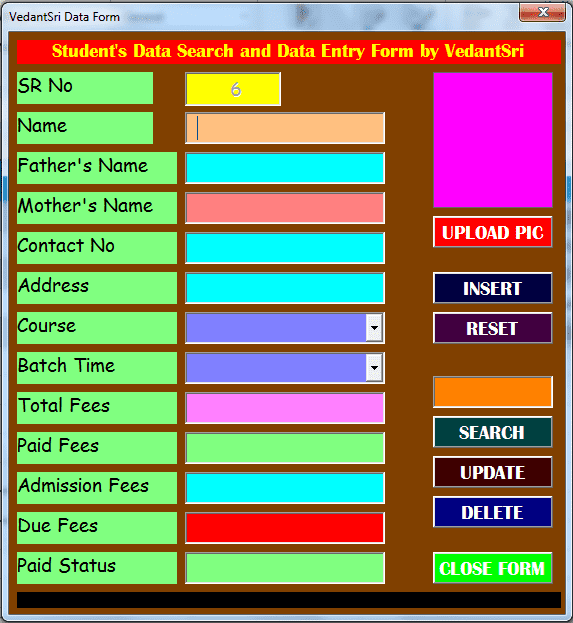
MS Excel UserForm With Database Macros Project-23 Video
In This Project Video, we are going to learn how to create a Microsoft Excel UserForm with database macros, which can be Created Easily by following the steps in the video.
Preview MS Excel UserForm With Database Macros Project
MS Excel UserForm With Database Macros Project-23 Video 44
UserForm Coding
Dim fpath As String
Private Sub CommandButton1_Click()
Dim x As Integer
Application.FileDialog(msoFileDialogOpen).AllowMultiSelect = False
x = Application.FileDialog(msoFileDialogOpen).Show
If x <> 0 Then
fpath = Application.FileDialog(msoFileDialogOpen).SelectedItems(1)
Image1.Picture = LoadPicture(fpath)
Image1.PictureSizeMode = 1
End If
End Sub

Private Sub CommandButton2_Click()
Dim x As Long
Dim y As Worksheet
Set y = Sheet2
x = y.Range("A" & Rows.Count).End(xlUp).Row
With y
.Cells(x + 1, "A").Value = TextBox1.Text
.Cells(x + 1, "B").Value = TextBox2.Text
.Cells(x + 1, "C").Value = TextBox3.Text
.Cells(x + 1, "D").Value = TextBox4.Text
.Cells(x + 1, "E").Value = TextBox5.Text
.Cells(x + 1, "F").Value = TextBox6.Text
.Cells(x + 1, "G").Value = ComboBox1.Text
.Cells(x + 1, "H").Value = ComboBox2.Text
.Cells(x + 1, "I").Value = TextBox7.Text
.Cells(x + 1, "J").Value = TextBox8.Text
.Cells(x + 1, "K").Value = TextBox9.Text
.Cells(x + 1, "L").Value = TextBox10.Text
.Cells(x + 1, "M").Value = TextBox11.Text
End With
On Error Resume Next
Dim i As String
i = TextBox1.Text
FileCopy fpath, "C:\vedantsri\" & i & ".jpg"
Me.TextBox1.Text = ""
End Sub

Private Sub UserForm_Initialize()
TextBox1 = Application.WorksheetFunction.Max(Sheet2.Range("a2:a1000")) + 1
End Sub
Show Form Button Coding
Sub RectangleRoundedCorners1_Click()
UserForm1.Show
End Sub
About VedantSri
VedantSri Computer Institute provides the best Computer Courses, Classes, and Training in Varanasi. There are NEILIT Courses, CCC, BCC, O-level, Certificates, and Diploma Computer Courses available with the best training materials. Also Available: Top 100 Best Computer Courses, For Example, OM, DCA, ADCA, DTP, DFA, ADAM, ADTP, ADFA, DCE, MS Office. VedantSri Computer Coaching update CCC Online Test 2023 in www.vedantsri.net. (MS Excel UserForm With Database Macros Project)
MS Excel UserForm With Database Macros Project-23 Video
MS-Word Online Test:- This is the CCC Online Test Website Page. If you are preparing for the CCC Exam or any other competitive exam, you should visit the website at www.vedantsri.net. You can also download this app from the Play Store, and you will find many more online test series related to MS Word, MS Excel, MS PowerPoint, and Internet-related topics. MS Excel UserForm With Database Macros Project-23 Video
VedantSri Computer Institute in Varanasi provides this. The VedantSri provides the best computer classes, Courses, coaching, and Computer Training in Varanasi, Uttar Pradesh, India.
1-राम से ख़रीदे गए 2000 रूपये के गुड्स में 200 का गुड्स वापस किया F7Ram A/c Dr To Purchase Return
2-सुनील ने 300 रूपये का गुड्स वापस किया F7Sales Return A/c Dr To Sunil A/c
3-ऑफिस के उपयोग के लिए 12 हजार का कंप्यूटर ComputerITPoint से ख़रीदा F7Computer A/c Dr To ComputerITpoint A/c
4-3200 सौ रूपये का गुड्स दान किया F7Charity A/c Dr To Purchase A/c
5-3200 सौ रूपये दान किया F5 Charity A/c Dr To Cash A/c
6- 2500 सौ रूपये का गुड्स स्वम के उपयोग के लिए निकला F7Drawing A/c Dr To Purchase A/c
7-500 सौ रूपये का गुड्स सैंपल में दिया F7Free Sample A/c Dr To Purchase A/c
8-1200 सौ रूपये का गुड्स आग से नुकसान हो गया F7Loss By Fire A/c Dr To Purchase A/c
9-इन्सुरेंस कंपनी ने आग से जले माल पर 1000 रूपये का क्लेम एक्सेप्ट किया F7 Insurence Company A/c Dr To Loss By Fire
10-फर्नीचर पर 1200 रूपये का मूल्यह्रास लगाया F7Depreciation A/c Dr To Furniture A/c
Journal Voucher Entry Transaction
About VedantSri
VedantSri Computer Institute provides the best Computer Courses, Classes, and Training in Varanasi. There is NEILIT Courses CCC, BCC, O’level, Certificates, and Diploma Computer Courses available with the best training materials. Also Available Top 100 Best Computer Courses, For Example, OM, DCA, ADCA, DTP, DFA, ADAM, ADTP, ADFA, DCE, and MS Office. VedantSri Computer Coaching updates CCC Online Test 2023 on www.vedantsri.net. (Journal Voucher Entry Transaction)
Journal Voucher Entry Transaction
There are some important computer Courses for jobs CCC Classes, Typing, Internships, And Spoken English Available Free of cost with Offer. More than 50 Computer Courses are available with a 50% Fee Discount in VedantSri Varanasi. You can get the Best Digital Marketing Course at Varanasi Institute VedantSri. There is the Latest Computer Course Offer in ADCA Computer Course, DCA Computer Course, CCC Computer Course & English Spoken. (Journal Voucher Entry Transaction )
About CCC Online Test 2023
MS-Word Online Test 2023:- This is M.S Word Online Test Website Page. If You are preparing for CCC Exam or any competitive exam then you should visit this www.vedantsri.net website. (Journal Voucher Entry Transaction)
you can also download this app from the play store and you find Just like many more Online Test Series Related For Example MS Word, MS Excel, MS PowerPoint, and Internet-related. (Journal Voucher Entry Transaction)
This is Provided By VedantSri Computer Institute in Varanasi. The VedantSri Provides the Best Computer Classes, Courses, Coaching, and Computer Training in Varanasi Uttar Pradesh India. (Journal Voucher Entry Transaction)
1- टाटा ने 15 लाख रूपये लगाकर ब्यापार प्रारंभ किया (Receipt F6)
2- OBC में 10 लाख जमा किया (Contra F4)
3- OBC से BOI में 5 लाख ट्रान्सफर किया (Contra F4)
4- मोहन फर्नीचर को फर्नीचर का 50 हजार कैश तथा 50 हजार रूपये BOI से पेमेंट किया (Payment F5)
5- कारपेंटर को 10 हजार मजदूरी दिया (Payment F5)
6- सुनील तथा अनिल को 10-10 हजार रूपये सैलरी OBC से पेमेंट किया (Payment F5)
7- साफ़-सफाई वाले को 1000 रूपये खर्च पेमेंट किया (Payment F5)
ऊपर के Transaction में 4 नंबर से 7 नंबर तक का Entry पेमेंट वाउचर में करेंगे
तो सबसे पहले ” 4- मोहन फर्नीचर को फर्नीचर का 50 हजार कैश तथा 50 हजार रूपये BOI से पेमेंट किया ” के एंट्री को Payment Voucher में करेंगे
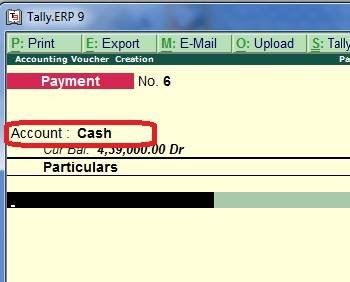
इसके लिए पेमेंट वाउचर पेज पर Account में Cash सेलेक्ट करेंगे (क्योकि पेमेंट वाउचर में जिसमे से अमाउंट निकलता है यूज़ Account में सेलेक्ट करते है)
TallyERP9 Payment Voucher Question
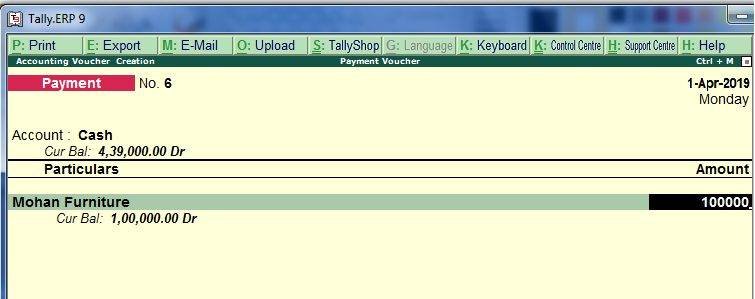
तथा Mohan Furniture का अकाउंट अंडर ग्रुप Fixed Assets में क्रिएट करेंगे और Particular में सेलेक्ट करेंगे
अब Amount में 50 हजार enter करेंगे
TallyERP9 Payment Voucher Question
TallyERP9 Payment Voucher Question
About VedantSri
VedantSri Computer Institute provides the best Computer Courses, Classes, and Training in Varanasi. There is NEILIT Courses CCC, BCC, O’level, Certificates, and Diploma Computer Courses available with the best training materials. Also Available Top 100 Best Computer Courses, For Example, OM, DCA, ADCA, DTP, DFA, ADAM, ADTP, ADFA, DCE, and MS Office.
TallyERP9 Payment Voucher Question
VedantSri Computer Coaching updates CCC Online Test 2023 on www.vedantsri.net. There are some important computer Courses for jobs CCC Classes, Typing, Internships, And Spoken English Available Free of cost with Offer. More than 50 Computer Courses are available with a 50% Fee Discount in VedantSri Varanasi. You can get the Best Digital Marketing Course at Varanasi Institute VedantSri. There is the Latest Computer Course Offer in ADCA Computer Course, DCA Computer Course, CCC Computer Course & English Spoken.
इन्वेंटरी का मतलब कच्चे माल, बिक्री के लिए उपलब्ध आइटम और बिक्री के लिए तैयार हो रहे माल तीनो से है,दूसरे शब्दों में इन्वेंटरी से आशय किसी भी कंपनी द्वारा इन्वर्ट किया गया जो अमाउंट उसके द्वारा कच्चे माल, आधे बने माल और तैयार माल पर खर्च किया जाता है |किसी भी कंपनी की बैलेंस शीट में इन्वेंट्री को सम्पति के रूप में माना जाता है क्योकि वह बिक्री के बाद कैश में बदल जाता है | Tally Inventory Concept in Hindi
About Inventory Feature Setting in Tally
Inventory Features
इस फीचर के द्वारा हमें आवश्यक इनवेंटरी फीचर्स सेट किए जाने की सुविधा मिलती है। F11 पर F2 को सिलेक्ट करने पर हमें निम्नलिखित स्क्रीन प्राप्त होती है। Tally Inventory Concept in Hindi
Tally Inventory Concept in Hindi 55
1.General
(a) Integrate accounts and inventory: यह फील्ड भी अकाउंटिंग फीचर्स में वर्णित किए गए कार्यों को ही निष्पादित करती है। (b) Allow Zero Valued entries: यदि हम शून्य मूल्य की प्रविष्टियाँ करना चाहते है तो इस ऑप्शन को Yes पर सेट किया जाता है।
2. Storage and Classification
(a) Maintain multiple Godowns: यदि हमारे पास एक से अधिक स्टॉक पॉइंट /स्टोरेज लोकेशन्स/ गोडाउन विद्यमान हैं और हम इन लोकेशन्स के मध्य होने वाले स्टॉक के संचालन का हिसाब-किताब रखना चाहते हैं तो इस Options को Yes पर सेट करे। हमारे द्वारा इस options को Yes पर सेट किए जाने बाद ही Gateway of Tally>Inventory info मैन्यू में गोडाउन्स पर stock options प्रदर्शित किया जाएगा। हम प्रत्येक लोकेशन पर अपने स्टॉक्स की पहचान करने में सक्षम होने के साथ ही साथ वाउचर एंट्री के दौरान एक अथवा अधिक लोकेशन्स के लिए स्टॉक संचालन प्रदान कर पाएँगे।
Tally Inventory Concept in Hindi
(b) Maintain Stock Categories: यदि हम स्टॉक केटैगरीज बनाना तथा व्यवस्थित रखना चाहते हैं तो इस options को Yes पर सेट करे। यह Stock item creation स्कीन के अंतर्गत एक नई फील्ड Category की रचना करेगा।
(c) Maintain batch wise details: स्टॉक आइटम्स से संबंधित बैच इंफॉर्मेशन को व्यवस्थित रखने हेतु इस options को Yes पर सेट करें| stock item creation स्कीन के अंतर्गत एक नई फील्ड Use expiry dates प्रदर्शित कर दी जाएगी। Tally Inventory Concept in Hindi
(set expiry dates for batches): यदि हम बैचेज हेतु एक्सपायरी डेट्स सेट करना चाहते है तो इस options को Yes पर सैट करे यह stock item creation स्कीन के अंर्तगत एक अतिरिक्त फील्ड Use expiry dates Show करेगा। यह उन व्यवसायों के लिए उपयोगी होता है जो एक्सपायरी डेट्स वाले माल जैसे कि दवाइयाँ, भोजन और अन्य नाशवान पदार्थों का व्यापार करते हों। Tally Inventory Concept in Hindi
वाउचर एंट्री के दौरान डिफाल्ट रूप से वाउचर की दिनांक को ही उत्पाद के निर्माण की दिनांक के रूप में माना जाता है। इस दिनांक को परिवर्तित किया जा सकता है परंतु वाउचर दिनांक के बाद वाली किसी दिनांक पर नहीं। ठीक इसी तरह से एक्सपायरी दिनांक पर वाउचर दिनांक से पहले की दिनांक नहीं डाली जा सकती है।
(d) use different actual & billed Qty: यदि हम इनवॉइस तैयार करते समय actual और billed Quantity को अलग-अलग रखना चाहते है तो इस options को Yes पर सेट किया जाता है।
3. Order processing
(a) Allow purchase order processing: purchase orders बनाने हेतु यह options yes पर सेट करें। यह फीचर परचेज ऑर्डर के प्री-क्लोजर- हेतु भी प्रयुक्त किया जा सकता है।
(b) Allow sales order processing: sales orders बनाने हेतु यह options yes पर सेट करे। यह फीचर सेल्स ऑर्डर के प्रीआर्डर क्लोजर हेतु भी प्रयुक्त किया जा सकता है। Tally Inventory Concept in Hindi
4. Invoicing
(a) Allow Invoicing: यह फील्ड भी अकाउंटिंग फीचर्स में वर्णित कार्यों का ही निष्पादन करती है।
(b) Use debit/credit notes: यह फील्ड भी अकाउंटिंग फीचर्स में वर्णित किए गए कार्यों का ही निष्पादन करती है।
Use invoice mode for debit notes: यह फील्ड भी अकाउंटिंग फीचर्स में वर्णित कार्यों का ही निष्पादन करती है। Use invoice mode for credit notes: यह फील्ड भी अकाउंटिंग फीचर्स में वर्णित कार्यों का ही निष्पादन करती है। Tally Inventory Concept in Hindi
5. Purchase Management
Track additional of purchase: यह फील्ड भी अकाउंटिंग फीचर्स में वर्णित किए गए कार्यों का ही निष्पादन करती है!
6. Sales Management
Use Multiple price levels: Multiple price levels निर्मित करने हेतु इस विकल्प को Yes पर सेट किया जाता है।
7. Additional Inventory Vouchers
(a) Use tracking numbers (delivery/receipt notes): यदि हम डिलीवरी नोट्स और invoice / bills के मध्य संबंध बनाए रखने के लिए ट्रेकिंग नम्बरों का उपयोग करना चाहते हैँ तो इस विकल्प को Yes पर सेट करे। यह परचेज और सेल्स दोनों के लिए उपलब्ध है।
(b) Use rejection inward/outward notes: यदि हम माल की अस्वीकृति का रिकॉर्ड किसी सामान्य डेबिट नोट या क्रेडिट नोट के माध्यम से नहीं बल्कि अलग से रखना चाहते तो इस विकल्प को Yes पर सेट करे।
VedantSri Computer Institute Varanasi
provides the best Computer Courses, Classes, and Training in Varanasi. There is NIELIT Courses CCC, BCC, O’level, Certificates, and Diploma Computer Courses available with the best training materials. Also Available Top 100 Best Computer Courses, For Example, OM, DCA, ADCA, DTP, DFA, ADAM, ADTP, ADFA, DCE, and MS Office. Tally Inventory Concept in Hindi
VedantSri Computer Coaching updates CCC Online Test 2020 on www.vedantsri.net. There are some important computer Courses for jobs CCC Class, Typing, Internship, And Spoken English Available Free of cost with Offer. More than 50 Computer Courses are available with a 50% Fee Discount in VedantSri Varanasi. You can get the Best Digital Marketing Course at Varanasi Institute VedantSri. There is the Latest Computer Course Offer in ADCA Computer Course, DCA Computer Course, CCC Computer Course & English Spoken. Tally Inventory Concept in Hindi
About VedantSri Computer Institute Varanasi
VedantSri Computer Institute in Varanasi is the Government recognized and ISO Certified Computer Institute in Varanasi running since 2011. It Provides Computer Courses, Classes, and Training through different own branches all over Varanasi. There is Computer Scholarship Courses DCE Scholarship (Diploma in Computer Engineering), DIT most trusted computer course Available under Scholarship Test Scheme. Tally Inventory Concept in Hindi
वेदांतश्री कम्प्यूटर इंस्टिट्यूट’ वाराणसी में पिछले 10 वर्षो से बेहतर व न्यूनतम शुल्क में कम्प्यूटर शिक्षा प्रदान करने वाली एक कम्प्यूटर ट्रेनिंग इंस्टिट्यूट है | यह संस्था कम्प्यूटर व इंग्लिश स्पीकिंग कोर्स की ट्रेनिंग प्रदान करती है | वाराणसी में कम्प्यूटर शिक्षा को बेहतर व न्यूनतम शुल्क में छात्रो तक पहुचाने में वेदांतश्री पिछले 10 वर्षो से प्रयासरत है | Tally Inventory Concept in Hindi
Free To Learn In VedantSri Computer Institute in Varanasi
इस वेबसाइट का यूज़ वेदांतश्री में पढ़ रहे छात्रो को कोर्स से सम्बंधित ऑनलाइन सपोर्ट करने से सम्बंधित है | इस वेबसाइट पर उपलब्ध विडियो, टेस्ट शीट, Questions & Answer सेशन, ट्रिक्स, टिप्स वेदांतश्री में सिख रहे कोर्सेज से सम्बंधित है | उपलब्ध कंटेंट संस्था में सिख रहे छात्रो के डिमांड पर अपडेट किया जाता है | उपलब्ध कंटेंट वेदांतश्री में पढ़ रहे छात्रो व सम्बंधित छात्रो को निशुल्क प्रदान किया जाता है जिसका कोई अलग से शुल्क नही लिया जाता है | इस वेबसाइट पर उपलब्ध कंटेंट कम्प्यूटर कोर्सेज व इंग्लिश स्पीकिंग कोर्सेज से सम्बंधित अपडेट किया जाता है | Tally Inventory Concept in Hindi
(Tally Inventory Concept in Hindi)
About CCC Online Test 2020
CCC Online Test 2020:- This is the CCC Online Test Website Page. If You are preparing for CCC Exam or any competitive exam then you should visit this www.vedantsri.net website.
you can also download this app from the play store and you find Just like many more Online Test Series Related For Example MS Word, MS Excel, MS PowerPoint, and Internet-related. Tally Inventory Concept in Hindi
This is Provided By VedantSri Computer Institute Varanasi. The VedantSri Provides the Best Computer Classes, Courses, Coaching, and Computer Training in Varanasi Uttar Pradesh India. Tally Inventory Concept in Hindi
Ans- इस Tool के द्वारा Page पर लिखे गए किसी Text, Document, Matter के Background को Color करने के लिए इस Tool का Use करते है| MS Word Question Answers (Part II)
2. Paragraph Toolbox में कितने और कौन-कौन से Tools होते है?
Ans- इस Toolbox के अंतर्गत 14 Tools होते है जिनके नाम निम्नलिखित है-
(i) Bullets
(ii) Numbering
(iii) Multilevel list
(iv) Decrease indent
(v) Increase indent
(vi) Sort
(vii) Show/Hide
(viii) Align Text Left
(ix) Center
(x) Align Text Right
(xi) Justify
(xii) Line Spacing
(xiii) Shading
(xiv) Bottom Border
3. Bullet Tool का क्या Use होता है?
Ans- इस Tools के द्वारा Page पर लिखे गए किसी Text, Document, Matter के Paragraph को Graphic या Picture के द्वारा Bullets इफ़ेक्ट देने के लिए Use करते है| MS Word Question Answers (Part II)
MS Word Question Answers
4. Numbering Tool का क्या Use होता है?
Ans- इस Tool के द्वारा Page पर लिखे गए किसी Text, Document, Matter के Paragraph को Numbering देने के लिए इस Tool का Use करते है|
5. Multilevel List Tool का क्या Use होता है?
Ans- इस Tool के द्वारा Page पर लिखे गए किसी Text, Document, Matter के Paragraph को Multilevel List देने के लिए Use करते है|
6. Sort Tool का क्या Use होता है?
Ans- इस Tool के द्वारा Page पर लिखे गए किसी Text, Matter को Ascending व Descending Order में Arrange के लिए इस Tool का Use करते है|
7. Show/Hide Tool का क्या Use होता है?
Ans- इस Tool के द्वारा Page पर लिखे गए किसी Text, Matter में लिखे गये Space और Enter को दिखाने व छिपाने के लिए इस Tool का Use करते है| MS Word Question Answers (Part II)
8. Justify Tool का क्या Use होता है?
Ans- इस Tool के द्वारा Page पर लिखे गए किसी Text, Matter को Justify करने के लिए Use करते है| MS Word Question Answers (Part II)
9. Line Spacing Tool का क्या Use होता है?
Ans- इस Tool के द्वारा Page पर लिखे गए Document के बीच के Line को बढ़ाने या घटाने के लिए Use करते है| MS Word Question Answers (Part II)
10. Shading Tool का क्या Use होता है?
Ans- इस Tool के द्वारा Page पर लिखे गए किसी Text, Matter पर Shading देने केलिए Use करते है| MS Word Question Answers (Part II)
VedantSri Computer Institute provides the best Computer Courses, Classes, and Training in Varanasi. There is NEILIT Courses CCC, BCC, O’level, Certificates and Diploma Computer Courses available with the best training materials. Also Available Top 100 Best Computer Courses, For Example, OM, DCA, ADCA, DTP, DFA, ADAM, ADTP, ADFA, DCE, MS Office. VedantSri Computer Coaching update CCC Online Test 2023 in www.vedantsri.net. There are some important computer Courses for jobs CCC Class, Typing, Internship And Spoken English Available Freeof cost with Offer. More than 50 Computer Courses which are available with 50% Fee Discount in VedantSri Varanasi. You can get the Best Digital Marketing Course in Varanasi Institute VedantSri. There is Latest Computer Course Offer in ADCA Computer Course, DCA Computer Course, CCC Computer Course & English Spoken.
MS-Word Online Test 2023:- This is the CCC Online Test Website Page. If You are preparing for CCC Exam or any competitive exam then you should visit on this www.vedantsri.net website.
you can also download this app from the play store and you find Just like many more Online Test Series Related For Example MS Word, MS Excel, MS PowerPoint, Internet-related.
This is Provided By VedantSri Computer Institute in Varanasi. The VedantSri Provides Best Computer Classes, Courses, Coachings and Computer Training in Varanasi Uttar Pradesh India.
Get Up to Rs 5000 Scholarship in Computer Course(पाए रूपये 5000 तक स्कालरशिप वेदांतश्री कंप्यूटर कोर्सेज के अंतर्गत)
What is Scholarship Course? (स्कालरशिप कोर्स क्या है?)
कम्प्यूटर कोर्सेज के अंतर्गत यह एक एडवांस कंप्यूटर ट्रेनिंग कोर्स है जिसमे नौकरी से सम्बन्धित कम्प्यूटर कोर्सेज की ट्रेनिंग प्रदान की जाती है तथा यह ट्रेनिंग मात्र जानकारी के आधार पर नही बल्कि यह प्रोजेक्ट के आधार पर प्रदान की जाती है, ताकि कोर्स कम्पलीट होने के बाद आप खुद को एक बेहतर जॉब के लिए तैयार कर सकें| Get Up to Rs 5000 Scholarship in Computer Course
What is Benefit of Scholarship Course? (स्कालरशिप कोर्स से क्या बेनिफिट है?)
स्कालरशिप कोर्स के अंतर्गत ऐसे अनेक फायदे है जिनमे से मुख्य 5 फायदे निम्नलिखित है:-
1- स्कालरशिप कोर्स में 80% तक फीस डिस्काउंट होता है|
2- स्कालरशिप कोर्सेज को प्रोजेक्ट के आधार पर सिखाया जाता है ताकि सिर्फ जानकारी न बढे बल्कि आप नौकरी के लिए खुद को तैयार कर सके|
3- इस कोर्स के साथ 90 दिन तक अलग से एक घंटा टाइपिंग, एक घंटा स्पोकन और CCC क्लास फ्री दी जाती है|
4- स्कालरशिप कोर्स सिखने के साथ-साथ अलग से इंटर्नशिप ट्रेनिंग प्रोग्राम दी जाती है ताकि आपके पास कोर्स सर्टिफिकेट के साथ-साथ एक्सपीरियंस सर्टिफिकेट भी हो और नौकरी में एक्सपीरियंस होने के वजह से आपको पहले जॉब में प्रॉफिट मिले|
5- स्कालरशिप कोर्स की ट्रेनिंग लेटेस्ट वर्शन के एप्लीकेशन द्वारा दिया जाता है| Get Up to Rs 5000 Scholarship in Computer Course
Get Up to Rs 5000 Scholarship in Computer Course
(Get Up to Rs 5000 Scholarship in Computer Course)
Why Typing + Spoken + CCC Class Free in Scholarship Course in VedantSri? (वेदांतश्री में स्कालरशिप कोर्स के साथ टाइपिंग + स्पोकन + CCC क्लास फ्री क्यों दी जाती है? )
वेदांतश्री में हिंदी/इंग्लिश टाइपिंग + इंग्लिश स्पीकिंग + CCC क्लास फ्री देने के पीछे आपको एडमिशन लेने के लिए मोटीवेट करना बिलकुल नहीं है बल्कि किसी भी जॉब में टाइपिंग स्पीड, इंग्लिश लैंग्वेज तथा CCC सर्टिफिकेट के डिमांड को देखते हुए इन तीनो कोर्सेज को स्कालरशिप कोर्स के साथ निशुल्क प्रदान किया जाता है| Get Up to Rs 5000 Scholarship in Computer Course
Get Up to Rs 5000 Scholarship in Computer Course
What is Name of Scholarship Course? (स्कालरशिप कोर्स के नाम क्या है?)
वेदांतश्री पिछले 10 वर्षो से कंप्यूटर स्कालरशिप की एडवांस ट्रेनिंग प्रदान कर रहे है तथा यह कोर्सेज निम्नलिखित है:-
ADCE – Advance Diploma in Computer Engineering Get Up to Rs 5000 Scholarship in Computer Course
What is the Course Duration of Scholarship Course? (स्कालरशिप कोर्सेज को कम्पलीट करने का समय कितना होता है?)
स्कालरशिप कंप्यूटर कोर्स को पूरा करने का समय आपके ऊपर निर्भर करता है की आप कौन सा स्कालरशिप कोर्स चुनते है|
उपलब्ध स्कालरशिप कोर्सेज का Duration मिनिमम 3 महीने से लेकर अधिकतम 18 महीने तक होता है | आप जो कोर्स चुनते है उसके आधार पर आपको समय देना होता है| Get Up to Rs 5000 Scholarship in Computer Course
What are Facilities in Scholarship Course? (स्कालरशिप कोर्स में क्या सुबिधाये मिलती है?)
वेदांतश्री स्कालरशिप कोर्सेज के अंतर्गत दी जाने वाली सुबिधाये निम्नलिखित है:-
1- Theory Class on Big Projector Screen
2- Digitally Training Facility
3- Latest Version of Training Application
4- Four-Ways-Easy Method of Teaching
5- Single Computer System Available For Each Student
6- Project Based Training
7- Jobs Alert Notifications
8- Online Trainig Support
9- Job Training
10- Internship Training Program
(Get Up to Rs 5000 Scholarship in Computer Course)
How Scholarship Course is better than Other Institute? (अन्य से वेदांतश्री में स्कालरशिप कोर्स बेहतर कैसे?)
वेदांतश्री पिछले 10 वर्षो से कंप्यूटर स्कालरशिप कोर्स के द्वारा हजारो छात्र-छात्राओ को उनके बेहतर करियर के लिए हर संभव प्रयासरत रहा है| वेदांतश्री उन तमाम छात्र-छात्राओ का शुक्रगुजार है जिन्होंने स्कालरशिप कोर्सेज के बल पर खुद को बिना किसी सोर्स व सिफारिस के जॉब क्षेत्र में खुद को बेहतर बनाया है व हमें निरंतर छात्र-छात्राओ के लिए बेहतर करते रहने की प्रेरणा दी है| Get Up to Rs 5000 Scholarship in Computer Course
वेदांतश्री स्कालरशिप
अन्य इंस्टिट्यूट स्कालरशिप
1-Fee Discount Upto 80%
1- No Fees Discount
2- Free CCC Class
2- Charge For CCC Class
3- Free English Speaking 90 Days
3- Charge For Spoken
4- Free Typing Class For 90 Days
4- Charge For Typing
5- Project+Knowledge Based Class
9- No Support
6- Theory+Notes+Project+Lab
6- Only Lab
7- Theory on Big Projector Screen
7- Theory on White Board
8- Job Based Training
8- Books Based Knowledge
9- Online + Offline Support
8- Job-Based Training
10- Online Viva Project Submission
10- No Project Submission
11- Online + Offline Test
11- Only Offline Test
12- Career Oriented Motivation Classes
12- No Motivation
After Completing Scholarship What Kind of Jobs are Available? (स्कालरशिप कोर्स कम्पलीट करने के बाद जॉब के क्या-क्या अवसर होते है?)
वेदांतश्री स्कालरशिप कोर्सेज को सिर्फ जानकारी के आधार पर नही सिखाया जाता है जबकि आप नौकरी के लिए तैयार हो इसकी पूरी ट्रेनिंग सुबिधा प्रदान की जाती है जिसके फलस्वरूप आप निम्नलिखित क्षेत्रो में जॉब के अवसर प्राप्त कर सकते है:- Get Up to Rs 5000 Scholarship in Computer Course
1- कम्प्यूटर टाइपिस्ट
2- टैली एकाउंटेंट
3- डिजिटल माँर्केटर
4- ग्राफ़िक डिज़ाइनर
5- कंटेंट डिज़ाइनर
6- कम्प्यूटर ओपेरटर
7- डाटा एंट्री जॉब वर्क
8- बिलिंग एकाउंटेंट
9- ऑफिस एग्जीक्यूटिव
10- ऑफिस रिसेप्शन वर्क
11- कम्प्यूटर टीचर
(Get Up to Rs 5000 Scholarship in Computer Course)
Get Up to Rs 5000 Scholarship in Computer Course
What is More in Scholarship Course? (कम्प्यूटर स्कालरशिप कोर्सेज में ज्यादा क्या है?)
वेदांतश्री स्कालरशिप कोर्सेज के अंतर्गत कम्प्यूटर के बेसिक से लेकर एडवांस कम्प्यूटर कोर्सेज की बिस्तृत ट्रेनिंग प्रदान की जाती है| स्कालरशिप कोर्सेज के साथ-साथ पुरे 90 दिन तक 1 घंटे का अलग से निशुल्क टाइपिंग क्लास तथा 1 घंटे तक निशुल्क इंग्लिश स्पीकिंग क्लास तथा CCC क्लास प्रदान की जाती है|
What are Fees in Scholarship Course? (स्कालरशिप कोर्सेज में फीस क्या होता है?)
वेदांतश्री स्कालरशिप कोर्सेज की फीस एंट्रेंस टेस्ट के द्वारा तय होता है, एंट्रेंस टेस्ट में पाए गए अंक के आधार पर लगभग 80% तक फीस अन्य कोर्सेज की अपेक्षा कम होता है|
How to Apply in Scholarship Courses in VedantSri? (स्कालरशिप कोर्सेज में आवेदन करने का प्रोसेस क्या है?)
स्कालरशिप कोर्सेज में आसान प्रोसेस के द्वारा अप्लाई कर सकते है जो की निम्न है:-
1- ऑफिस विजिट करके निशुल्क फॉर्म प्राप्त करें|
2- दो पासपोर्ट साइज़ फोटो को फॉर्म पर चिपकाकर सभी कॉलम को साफ-साफ भरें|
3- फॉर्म को ऑफिस में जमा कर दें व तुरन्त एडमिट कार्ड प्राप्त करें|
4– एडमिट कार्ड पर प्रिंटेड टाइम व डेट पर एंट्रेंस टेस्ट दें तथा टेस्ट में पाए हुए मार्क के आधार पर एडमिशन प्राप्त करें व खुद को करियर के लिए बेहतर बनाये|
What Qualification needed to apply Scholarship Form? (स्कालरशिप फॉर्म में अप्लाई करने के लिए क्या क्वालिफिकेशन चाहिए?)
यह निर्भर करता है की आप किस स्कालरशिप कोर्स के लिए आवेदन कर रहे है अतः कोर्सेज के आधार पर मिनिमम 10th पास की योग्यता अनिवार्य है|
What kind of Questions in Scholarship Entrance Test? (स्कालरशिप एंट्रेंस टेस्ट में किस बिषय से प्रश्न पूछे जाते है?)
जनरल अवेरनेस व जनरल नॉलेज से सम्बंधित प्रश्न पूछे जाते है|
When the Result Out of Entrance Test? (स्कालरशिप एंट्रेंस टेस्ट का रिजल्ट कितने दिन में आउट होता है?)
स्कालरशिप एंट्रेंस टेस्ट देने के बाद एक सप्ताह के अंतर्गत रिजल्ट आउट होता है|
(Get Up to Rs 5000 Scholarship in Computer Course)
वेदांतश्री स्कालरशिप कोर्सेज से सम्बंधित किसी अन्य जानकारी के लिए ऑफिस विजिट करे अथवा 8808888478 पर कॉल करें
VedantSri Computer Institute Varanasi
Get Up to Rs 5000 Scholarship in Computer Course
provides the best Computer Courses, Classes, and Training in Varanasi. There is NIELIT Courses CCC, BCC, O’level, Certificates and Diploma Computer Courses available with best training materials. Also Available Top 100 Best Computer Courses, For Example, OM, DCA, ADCA, DTP, DFA, ADAM, ADTP, ADFA, DCE, MS Office. VedantSri Computer Coaching update CCC Online Test 2023 in www.vedantsri.net. There are some important computer Courses for jobs CCC Class, Typing, Internship And Spoken English Available Freeof cost with Offer. More than 50 Computer Courses which are available with 50% Fee Discount in VedantSri Varanasi. You can get the Best Digital Marketing Course in Varanasi Institute VedantSri. There is Latest Computer Course Offer in ADCA Computer Course, DCA Computer Course, CCC Computer Course & English Spoken.
About VedantSri Computer Institute Varanasi
VedantSri Computer Institute in Varanasi is the Government recognized and ISO Certified Computer Institute in Varanasi running since 2011. It Provides Computer Courses, Classes, and Training through different own branches all over Varanasi. There is Computer Scholarship Courses DCE Scholarship (Diploma in Computer Engineering), DIT most trusted computer course Available under Scholarship Test Scheme.
वेदांतश्री कम्प्यूटर इंस्टिट्यूट’ वाराणसी में पिछले 10 वर्षो से बेहतर व न्यूनतम शुल्क में कम्प्यूटर शिक्षा प्रदान करने वाली एक कम्प्यूटर ट्रेनिंग इंस्टिट्यूट है | यह संस्था कम्प्यूटर व इंग्लिश स्पीकिंग कोर्स की ट्रेनिंग प्रदान करती है | वाराणसी में कम्प्यूटर शिक्षा को बेहतर व न्यूनतम शुल्क में छात्रो तक पहुचाने में वेदांतश्री पिछले 10 वर्षो से प्रयासरत है |
Free To Learn In VedantSri Computer Institute in Varanasi
इस वेबसाइट का यूज़ वेदांतश्री में पढ़ रहे छात्रो को कोर्स से सम्बंधित ऑनलाइन सपोर्ट करने से सम्बंधित है | इस वेबसाइट पर उपलब्ध विडियो, टेस्ट शीट, Questions & Answer सेशन, ट्रिक्स, टिप्स वेदांतश्री में सिख रहे कोर्सेज से सम्बंधित है | उपलब्ध कंटेंट संस्था में सिख रहे छात्रो के डिमांड पर अपडेट किया जाता है | उपलब्ध कंटेंट वेदांतश्री में पढ़ रहे छात्रो व सम्बंधित छात्रो को निशुल्क प्रदान किया जाता है जिसका कोई अलग से शुल्क नही लिया जाता है | इस वेबसाइट पर उपलब्ध कंटेंट कम्प्यूटर कोर्सेज व इंग्लिश स्पीकिंग कोर्सेज से सम्बंधित अपडेट किया जाता है |
(Get Up to Rs 5000 Scholarship in Computer Course)
About CCC Online Test 2023
Get Up to Rs 5000 Scholarship in Computer Course
CCC Online Test 2023:- This is the CCC Online Test Website Page. If You are preparing for CCC Exam or any competitive exam then you should visit this www.vedantsri.net website. Get Up to Rs 5000 Scholarship in Computer Course
you can also download this app from the play store and you find Just like many more Online Test Series Related For Example MS Word, MS Excel, MS PowerPoint, and Internet-related.
This is Provided By VedantSri Computer Institute Varanasi. The VedantSri Provides the Best Computer Classes, Courses, Coaching, and Computer Training in Varanasi Uttar Pradesh India.
(Get Up to Rs 5000 Scholarship in Computer Course)