Home Blog Page 20

Create Shortcut For CorelDraw

Create Shortcut For CorelDraw

इस क्लास में हम सीखेंगे की Create Shortcut For CorelDraw को कैसे तैयार करते है | अर्थात CorelDraw के टूल्स से सम्बंधित Shortcut key को खुद से कैसे क्रिएट करें| निचे के स्टेप को फॉलो करें|

  • CorelDraw 2021 को ओपन करें |
Create Shortcut For CorelDraw in Varanasi Computer Institute For Graphic Designing
  • Ctrl + N प्रेस करके एक नया पेज लीजिये |
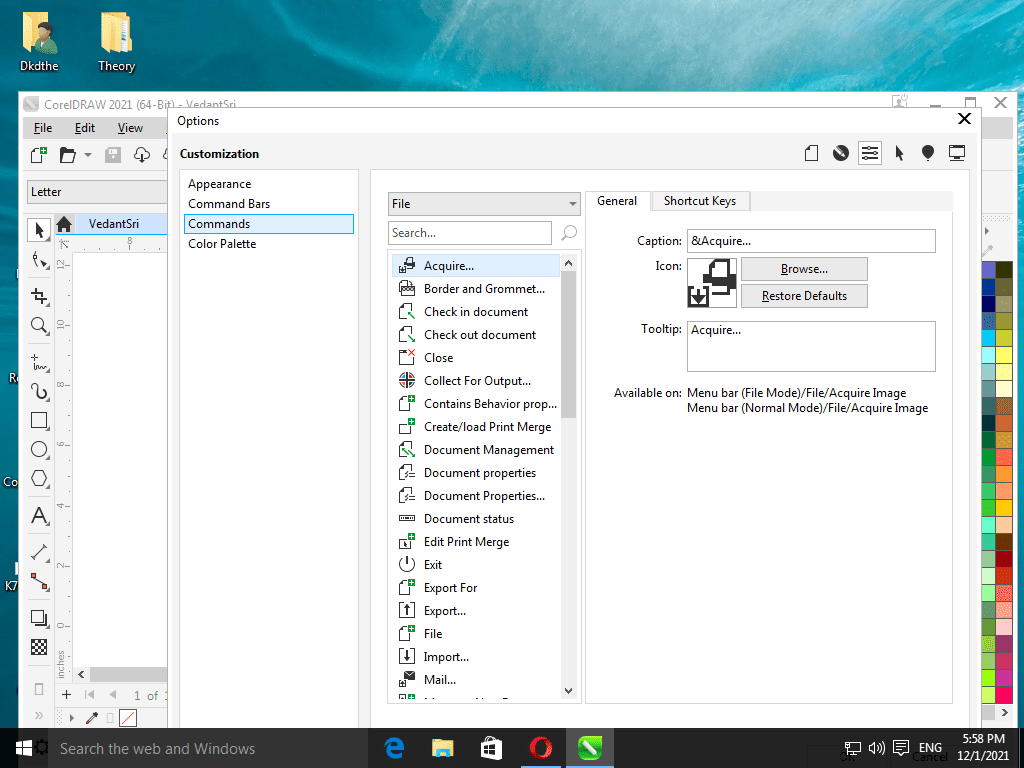
  • CorelDraw के Tools मेनू के Options के Customization पर क्लिक करें|

Read Also:-ADCA Course Fees, Duration, Scope, Syllabus, Admission, Institutes & Jobs in Varanasi

Create Shortcut For CorelDraw in Varanasi Computer Institute For Graphic Designing
  • अब Options Window के Commands पर क्लिक करें|
  • अब किसी मेनू के जिस टूल का शॉर्टकट क्रिएट करना चाहते है उसे सेलेक्ट करें | उदाहरण के लिए यदि आप PowerClip में Place Inside Container का शॉर्टकट क्रिएट करना चाहते है तो, सबसे पहले इस window के File पर Click करके Object मेनू को सेलेक्ट करें |

Read Also:- O Level Course Detail, Fees, Duration, Syllabus, Scope, Institute, Admission and Jobs in Varanasi

Create Shortcut For CorelDraw in Varanasi Computer Institute For Graphic Designing
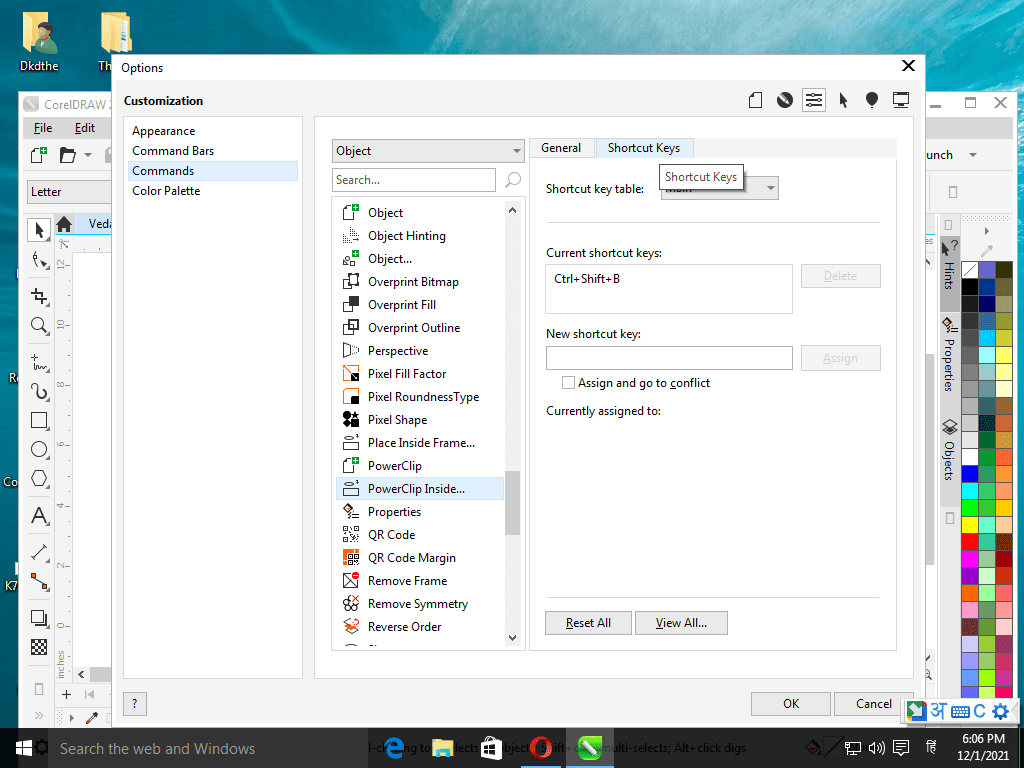
  • उसके बाद Slider ड्रैग करके निचे PowerClip Inside टूल को क्लिक करके सेलेक्ट करें|
  • अब shortcut Keys Tab पर क्लिक करें
Create Shortcut For CorelDraw in Varanasi Computer Institute For Graphic Designing
  • अब New Shortcut Key ब्लाक में कोई खुद से Shortcut टाइप करें उदाहरण के लिए मैंने Ctrl + Shift प्रेस करके C प्रेस टाइप किया |

Read Also:-CCC Course Fees, Syllabus, Duration, Scope, Jobs, and Institute in Varanasi

Create Shortcut For CorelDraw in Varanasi Computer Institute For Graphic Designing
  • और Assign बटन पर क्लिक करके Ok कर दें|
Create Shortcut For CorelDraw in Varanasi Computer Institute For Graphic Designing
  • अब आप इस शॉर्टकट यूज़ कर सकते है| और इसी प्रकार से अनेको शॉर्टकट Key Corel में क्रिएट कर सकते है|

Important Links

1-VedantSri Official Website:- https://vedantsri.com

2-VedantSri Student Support Website:- https://www.vedantsri.net

3-Students Jobs Assist Website:- https://www.jobdo.in

Create Document in Word

Create Document in Word

इस क्लास में हम जानेंगे की Create Document in Word कैसे तैयार करते है निचे दिए गए स्टेप्स को फॉलो करें|

  • MS Word Open करें |
  • Save करें |
Create Document in Word
  • Page की Formatting सेट करें|
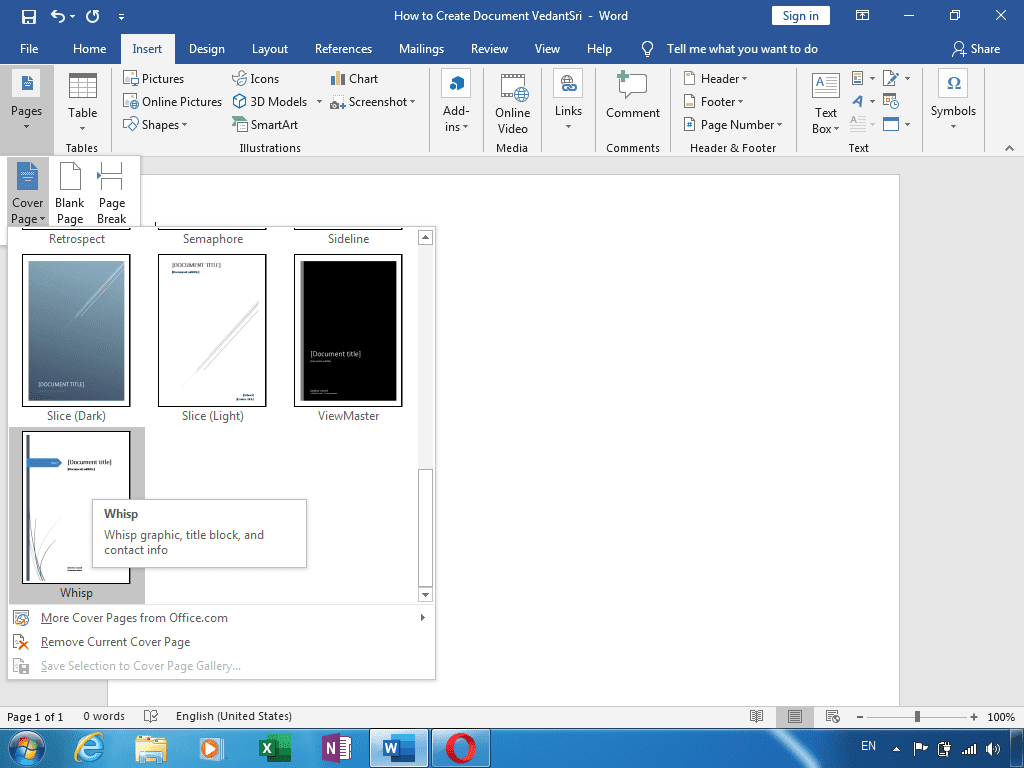
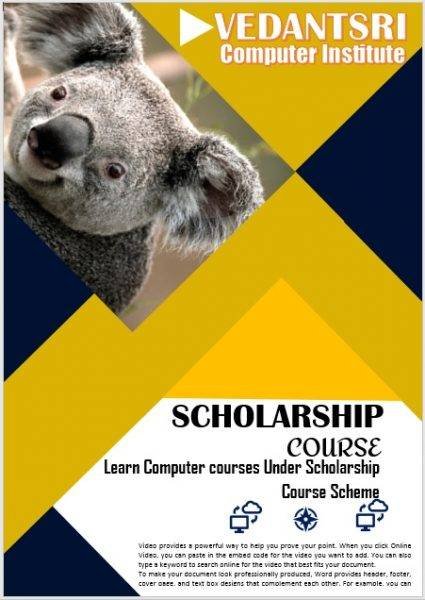
  • Page पर कोई भी Cover Page फॉर्मेट को Insert मेनू के Pages टूलबॉक्स से इन्सर्ट करें|
Create Document in Word
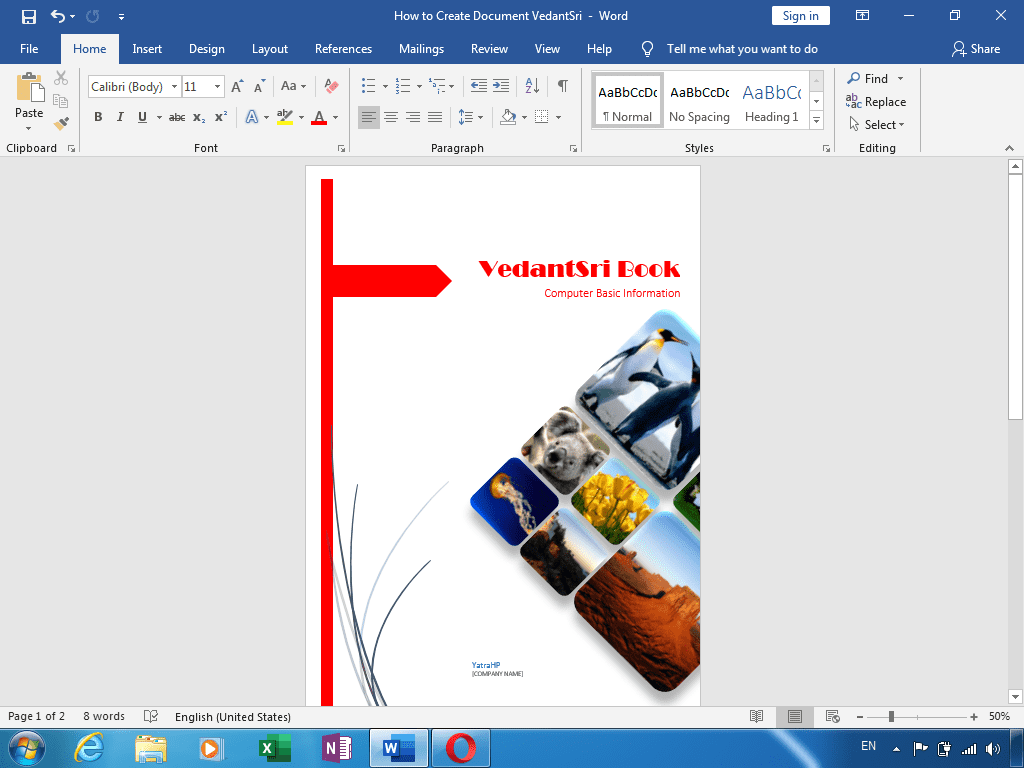
  • मैंने Whisp नाम के Cover Page फॉर्मेट को इन्सर्ट किया | इसे कस्टमाइज करें|
Create Document in Word
  • Cover Page डॉक्यूमेंट से सम्बंधित कुछ पिक्चर इन्सर्ट करना चाहते है तो निचे दिए स्टेप को फॉलो करें|
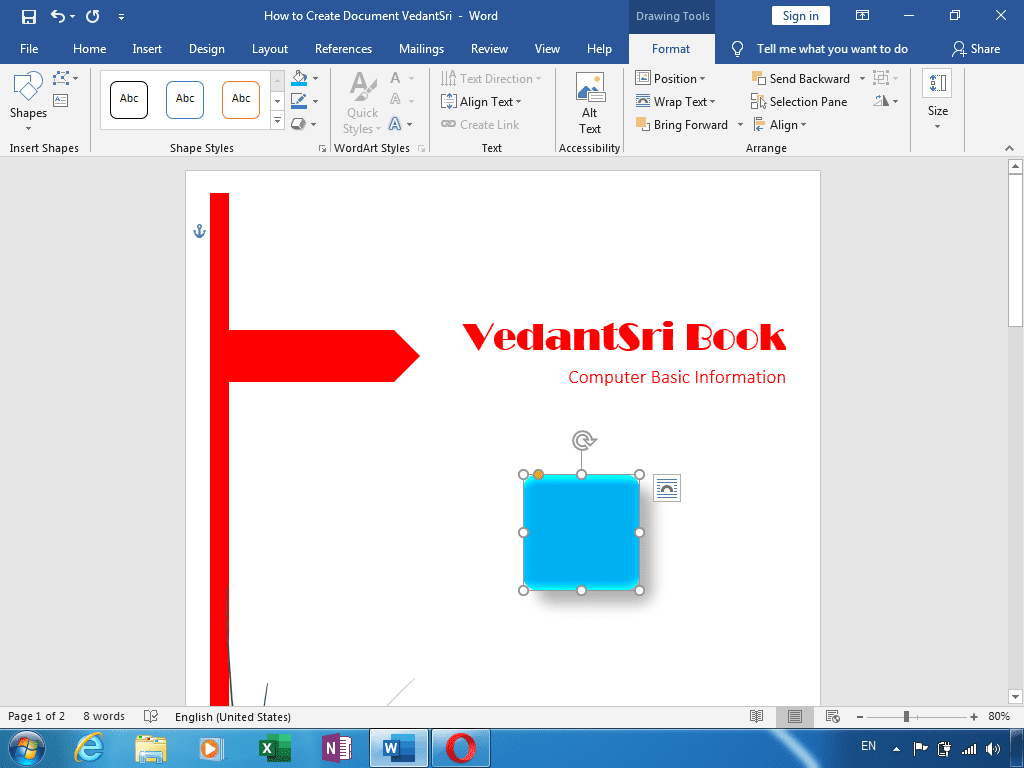
  • शेप टूल एक Rounded Rectangle shape को 1.5×1.5 के साइज़ में ड्रा करें|
  • और राउंडेड कार्नर को थोडा कम कर लें|
  • Format मेनू के Shape Fill से लाइट ब्लू कलर तथा Shape Effect के Preset आप्शन में Preset 4 को इस शेप पर अप्लाई करें|
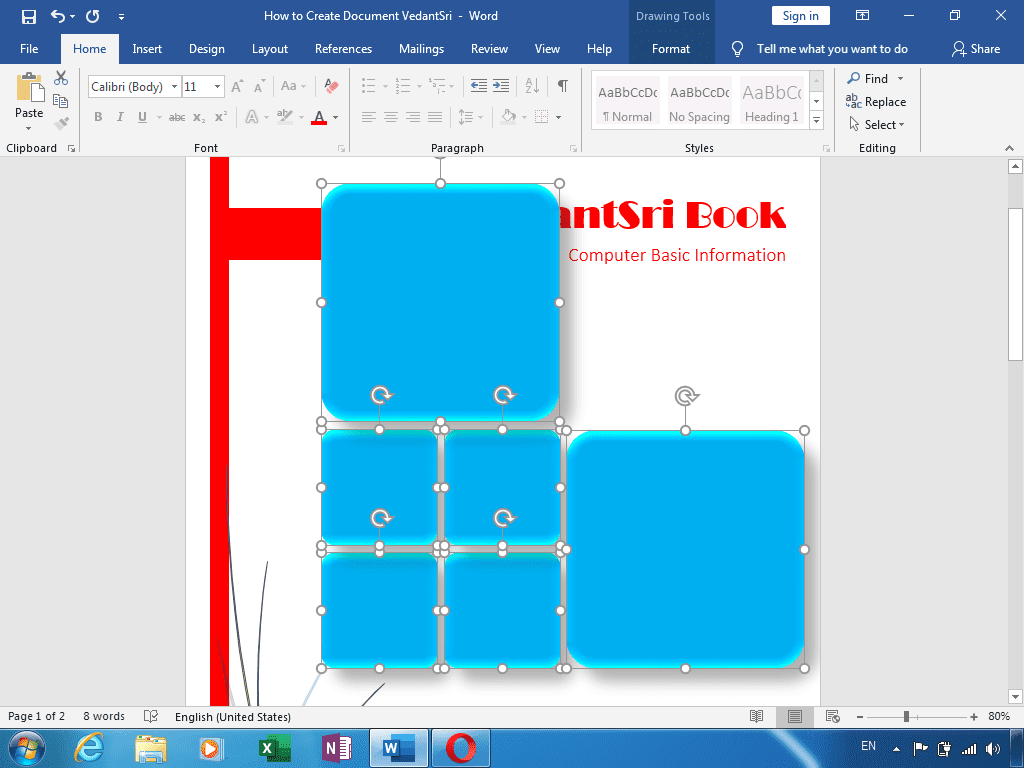
  • अब Shape को क्लिक करके सेलेक्ट करें व Ctrl+Shift+Left Click से उसका डुप्लीकेट बनाये |
  • और निचे दिए गए पिक्चर के अनुसार और भी डुप्लीकेट बना लें|
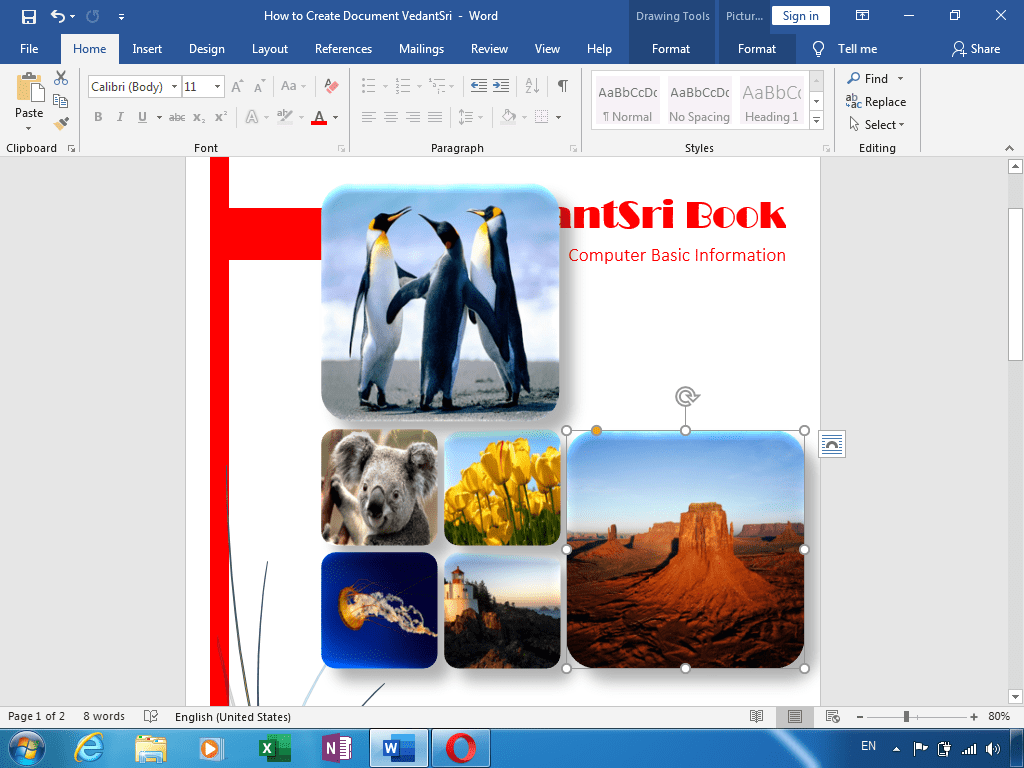
  • अब सभी शेप में डॉक्यूमेंट से सम्बंधित इम्पोर्टेन्ट पिक्चर को इन शेप में इन्सर्ट करें|
  • अब Second Format मेनू के Crop Tool से फिल अप्लाई कीजिये प्रत्येक शेप पर|
  • सभी शेप को सेलेक्ट करके Group करें व 45 डिग्री रोटेट करें|
  • और निचे दिए गए इमेज के अनुसार एडजस्ट करें|
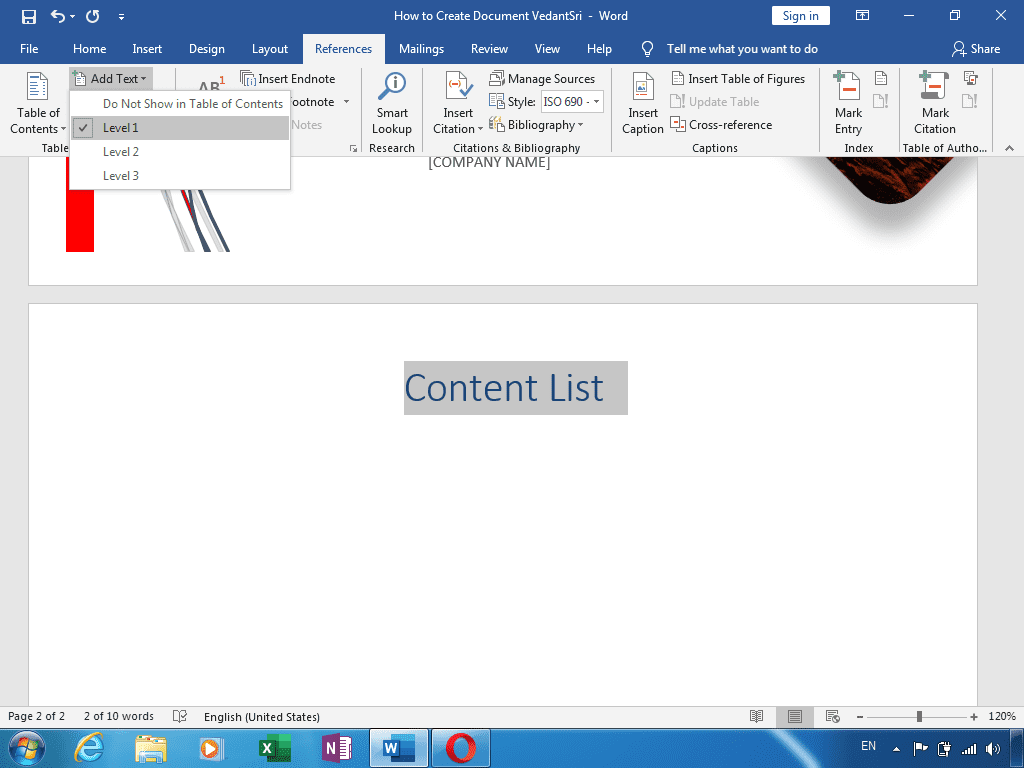
  • अब आप अगले पेज पर आये और Content List टाइप करें| और References मेनू के Table of Contents टूलबॉक्स के Add Text टूल से Level 1 अप्लाई करें| तथा Ctrl + E से अलाइन सेण्टर करें|
  • अब Design मेनू के Page Background टूलबॉक्स के Page Border टूल से कोई बॉर्डर सेलेक्ट करें तथा Apply to आप्शन से This Section – All Except First Page को सेलेक्ट करें व OK करें

Leant in MS Excel: https://youtu.be/4Y63MuEsMO4

Learnt bill remainder in MS Excel: https://youtu.be/ViP3_65P84s

MS Excel form with database macro project: https://youtu.be/tgFn7dWGIRQ

MS Word cover page design: https://youtu.be/zbkXeGNW23U

MS Excel basic calculator basic project: https://youtu.be/ELZ9MDKU3e4

MS word 3D design project: https://youtu.be/JTgFRIMnfKU

MS Word certificate project: https://youtu.be/NyqBEU5nTxA

VedantSri official website: https://vedantsri.com

Course store website: https://vedantsri.in

Job assist website: https://www.jobdo.in

MS Word class: https://mswordclass.com/ 

Corel free class: https://corelclass.com/ 

Free Excel class: https://msexcel.com/ 

1-VedantSri Official Website:- https://vedantsri.com

2-Student Support Website:- https://www.vedantsri.net

3-Jobs Assist Website:- https://www.jobdo.in

Search Entry Form in Excel

Search Entry Form in Excel

इस MS Excel के प्रोजेक्ट में हम सीखेंगे की Search Entry Form in Excel पर कैसे कम करते है| निचे दिए गए स्टेप को फॉलो करें|

  • Excel को Excel Macro-enabled workbook में सेव करें|
Search Entry Form in Excel by VedantSri Varanasi Computer Institute
  • अब Excel Sheet पर आपको Alt + F11 रेस करें और Microsoft Visual Basic ओपन करें|

Read Also:-ADCA Course Fees, Duration, Scope, Syllabus, Admission, Institutes & Jobs in Varanasi

  • Microsoft Visual Basic पर Insert मेनू से Userform आप्शन पर क्लिक करें|
Search Entry Form in Excel by VedantSri Varanasi Computer Institute
  • UserForm पर क्लिक करते ही पेज अप एक फॉर्म ओपन होगा| जिसके साथ एक Toolbox भी दिखाई देगा| तो इस टूल बॉक्स पर दिए गए टूल की मदद से UserForm को डिजाईन करेंगे |

Read Also:- O Level Course Detail, Fees, Duration, Syllabus, Scope, Institute, Admission and Jobs in Varanasi

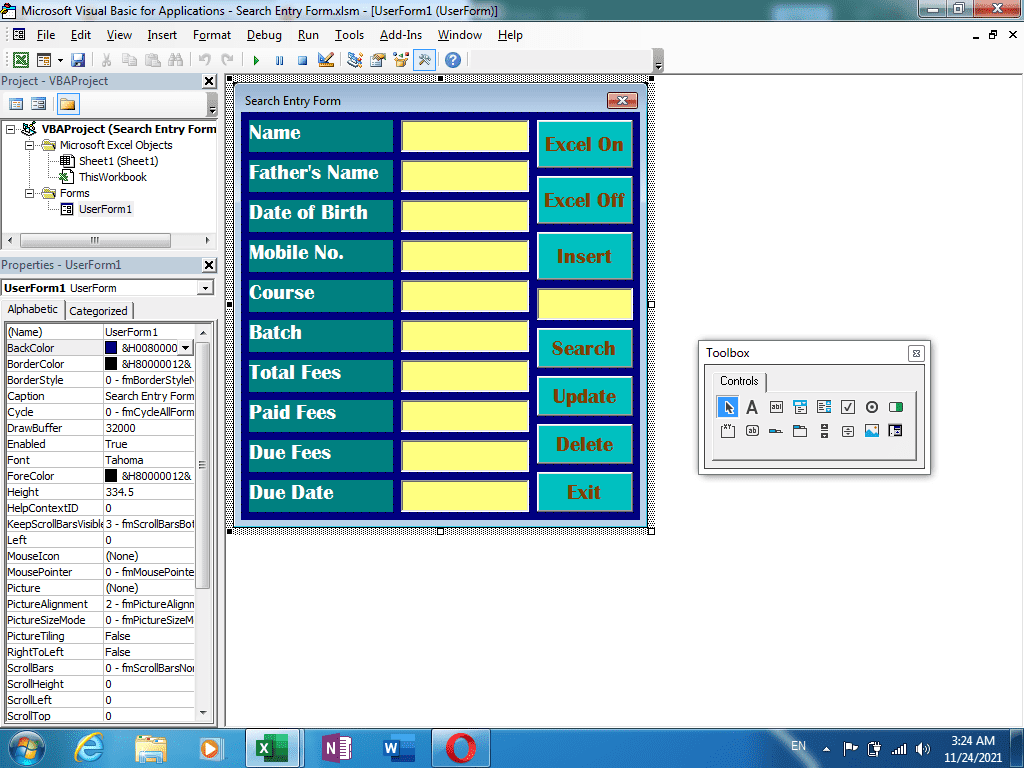
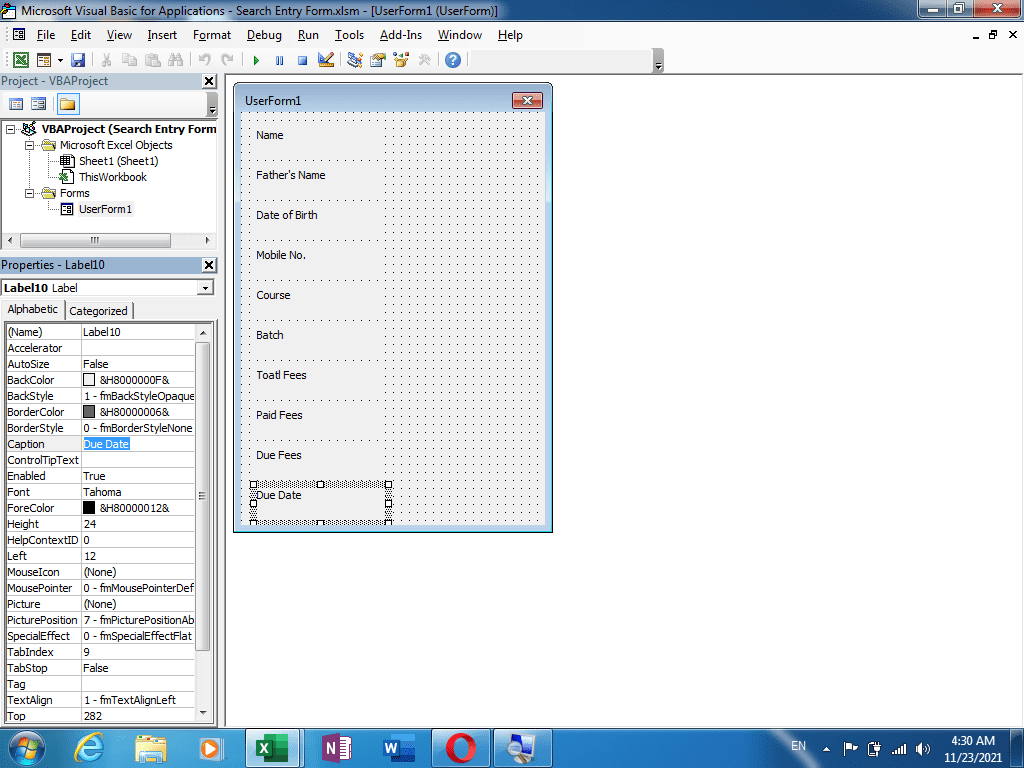
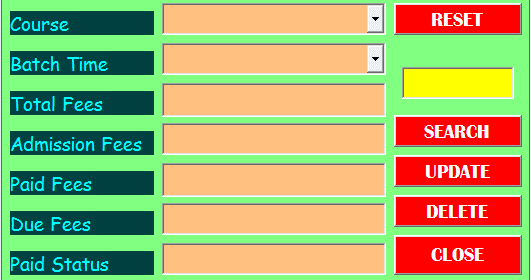
  • टूलबॉक्स से Label टूल की मदद से निचे दिए पिक्चर के तरह बटन डिजाईन कर लें| तथा Properties Window के Caption आप्शन से सभी Label बटन का नाम टाइप कर दें|
Search Entry Form in Excel by VedantSri Varanasi Computer Institute
  • सभी Label को एक साथ सेलेक्ट करें व Properties Window से Font पर क्लिक करें तथा टाइप किये गए नाम की Size व Style सेट कर लें|
  • और Properties Window से Backcolor आप्शन पर क्लिक करें तथा बटन्स के बैकग्राउंड कलर को सेट करें|

Read Also:-DFA Course Fees, Syllabus, Duration, Scope, Jobs, and Institute in Varanasi

Search Entry Form in Excel by VedantSri Varanasi Computer Institute
  • साथ ही ForeColor आप्शन से टाइप किये गए नाम को कलर भी सेट करें|
  • अब Toolbox से Textbox टूल की मदद से निचे दिए गए पिक्चर के अनुसार टेक्स्टबॉक्स ड्रा करे
  • पुरे टेक्स्टबॉक्स को सेलेक्ट करके इसके भी फॉण्ट साइज़ व स्टाइल को कस्टमाइज कर लें| साथ Backcolor आप्शन द्वारा इसका बैकग्राउंड कलर सेट कर लें|
  • अब फॉर्म को थोडा चौड़ा कीजिये व Toolbox से Command button की मदद से निचे दिए गए पिक्चर के अनुसार कुछ कमांड बटन ड्रा करें|

Read Also:-CCC Course Fees, Syllabus, Duration, Scope, Jobs, and Institute in Varanasi

Search Entry Form in Excel by VedantSri Varanasi Computer Institute
Search Entry Database in Excel by VedantSri Varanasi Computer Institute
  • सभी Commandbutton को एक साथ सेलेक्ट करें तथा Properties Window से Caption, Backcolor, Forecolor तथा Font आप्शन द्वारा पुरे Commandbutton कस्टमाइज करें|
  • एक Textbox को Insert बटन के निचे Draw करें | व कस्टमाइज कर लें | इसके बाद UserForm पर कही क्लिक करे ताकि फॉर्म सेलेक्ट हो जाये और Caption आप्शन द्वारा फॉर्म का नाम Backcolor द्वारा फॉर्म के बैकग्राउंड कलर को सेट कर लें |

Read Also:-DIT Course Details, Fees, Duration, Scope, Syllabus, Admission, Institutes & Jobs

Search Entry Form in Excel by VedantSri Varanasi Computer Institute

For practice Download This :-

Read Also:-DCA Course Fees, Duration, Scope, Syllabus, Admission, Institutes & Jobs in Varanasi

Important Links

1-VedantSri Official Website:- https://vedantsri.com

2-VedantSri Student Support Website:- https://www.vedantsri.net

3-Students Jobs Assist Website:- https://www.jobdo.in

Payroll Creation in TallyPRIME

PayRoll Creation in TallyPRIME

आज इस क्लास में हम सीखेंगे PayRoll Creation in TallyPRIME के बारे में | निचे दिए गए स्टेप को Carefully फॉलो करें|

  • सबसे पहले TallyPRIME में आप एक Company क्रिएट कर लें| और Ctrl+A से सेव करें|
  • जैसे ही Ctrl+ A प्रेस करेंगे कंपनी को सेव करने के लिए आपके सामने Feature का सेटिंग पेज ओपन होगा |
PayRoll Creation in TallyPRIME By VedantSri Varanasi
PayRoll Creation in TallyPRIME
  • इस Feature पेज में PayRoll सेक्शन में Maintain PayRoll को YES कर देंगे| और इसे भी सेव कर देंगे|
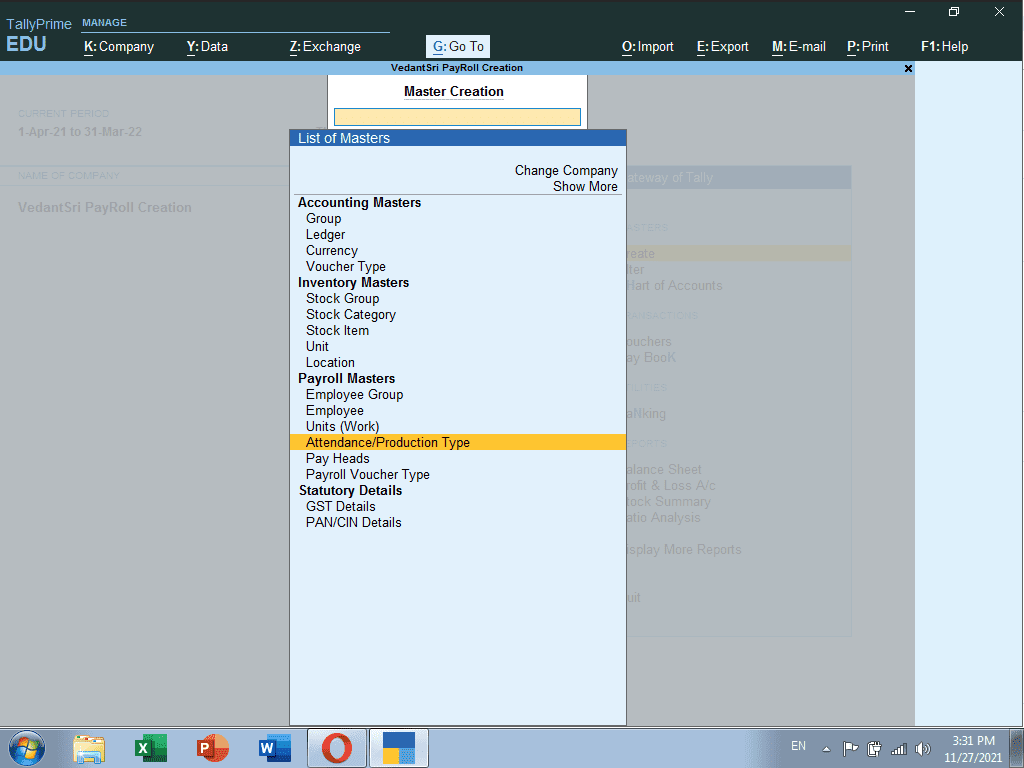
  • अब Gateway of Tally पेज से Create पर क्लिक करें व Payroll Master में Attendance/Production Type पर क्लिक करें|

Read Also:-ADCA Course Fees, Duration, Scope, Syllabus, Admission, Institutes & Jobs in Varanasi

PayRoll Creation in TallyPRIME By VedantSri Varanasi
PayRoll Creation in TallyPRIME
  • यहाँ Absent का अटेंडेंस क्रिएट करेंगे Leave without pay के अंतर्गत| और Ctrl + A से सेव करें|
PayRoll Creation in TallyPRIME By VedantSri Varanasi
PayRoll Creation in TallyPRIME
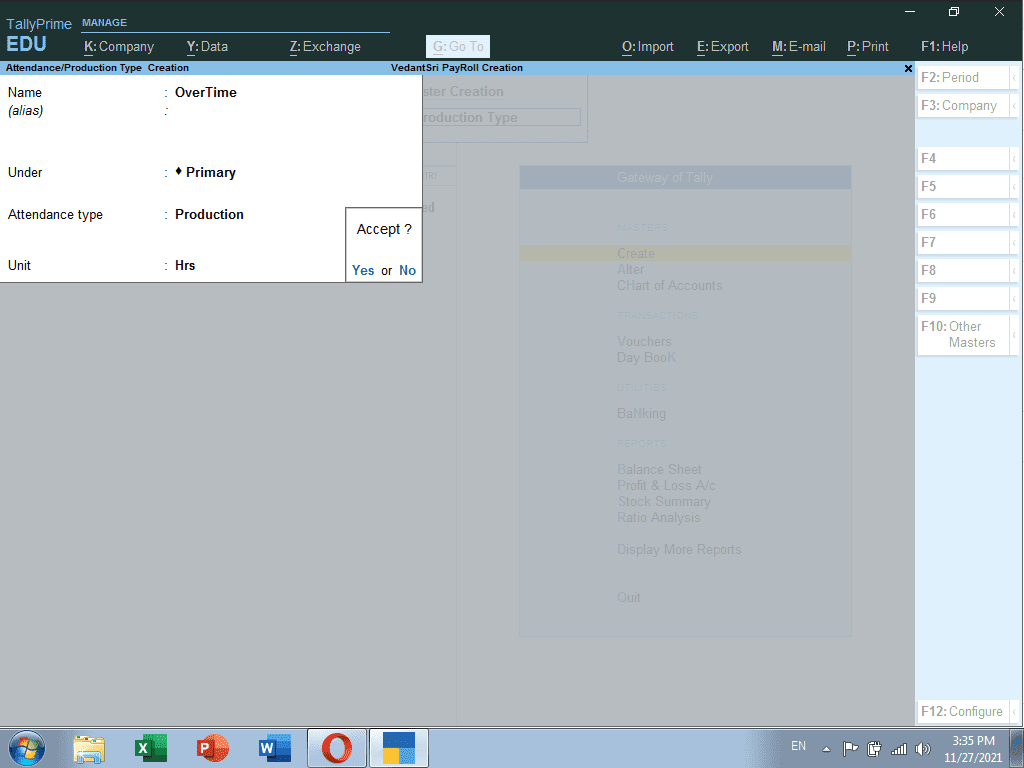
  • और Overtime का भी अटेंडेंस टाइप क्रिएट करें Production के अंतर्गत | साथ ही Alt + C प्रेस करके Hrs का यूनिट क्रिएट कर लेंगे|
PayRoll Creation in TallyPRIME By VedantSri Varanasi
PayRoll Creation in TallyPRIME
  • यह दोनों अटेंडेंस टाइप क्रिएट करने के बाद Esc बटन से बाहर आये व Pay Heads पर क्लिक करें|

Read Also:- O Level Course Detail, Fees, Duration, Syllabus, Scope, Institute, Admission and Jobs in Varanasi

PayRoll Creation in TallyPRIME By VedantSri Varanasi
  • अब आप Pay Heads के पेज पर है जहाँ आपको सबसे पहले एम्प्लोयी को पे किये जाने वाले Basic Salary का Pay Head क्रिएट करेंगे| जिसमे Under : Indirect Expenses, Calculation Type : On Attendance, तथा Calculation Period : Months सेलेक्ट करेंगे|
PayRoll Creation in TallyPRIME
  • अब Overtime का Pay Head क्रिएट करेंगे| जिसमे Under : Indirect Expenses, Calculation Type : On Production सेलेक्ट करेंगे|

Read Also:-DFA Course Fees, Syllabus, Duration, Scope, Jobs, and Institute in Varanasi

PayRoll Creation in TallyPRIME
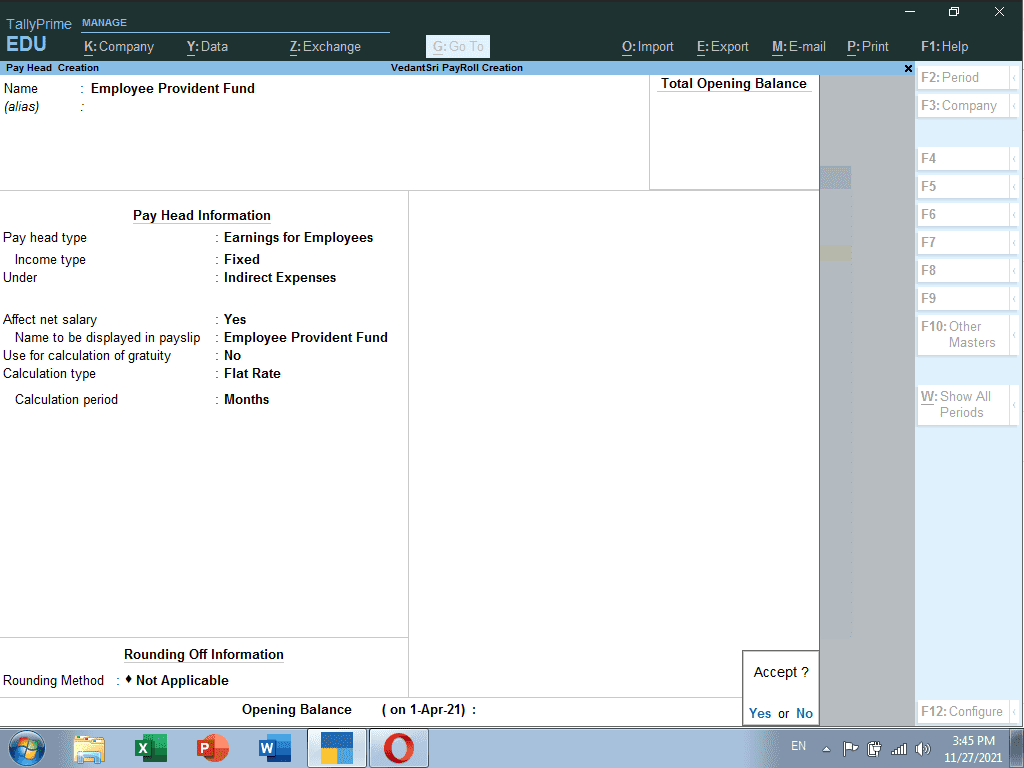
  • अब Employee Provident Fund का Pay Head क्रिएट करेंगे| जिसमे Under : Indirect Expenses, Calculation Type : Flat Rate, Calculation Period : Months सेलेक्ट करेंगे|
PayRoll Creation in TallyPRIME
  • अब Travelling Allowance का Pay Head क्रिएट करेंगे| जिसमे Under : Indirect Expenses, Calculation Type : Flat Rate, Calculation Period : Months सेलेक्ट करेंगे |

Read Also:-CCC Course Fees, Syllabus, Duration, Scope, Jobs, and Institute in Varanasi

PayRoll Creation in TallyPRIME
  • अब Dearness Allowance का Pay Head क्रिएट करेंगे| जिसमे Under : Indirect Expenses, Calculation Type : As Computer Value, Calculation Period : Months सेलेक्ट करेंगे | व Amount Upto के निचे 10000 लिखेंगे उसके आगे Percentage व value में 10% टाइप करेंगे और इसी तरह से निचे दिए गए पिक्चर में आप Computation Information को फिल कर लेंगे |
  • और Esc बटन प्रेस करके Payroll Master पर आ जायेंगे|

Read Also:-DIT Course Details, Fees, Duration, Scope, Syllabus, Admission, Institutes & Jobs

PayRoll Creation in TallyPRIME
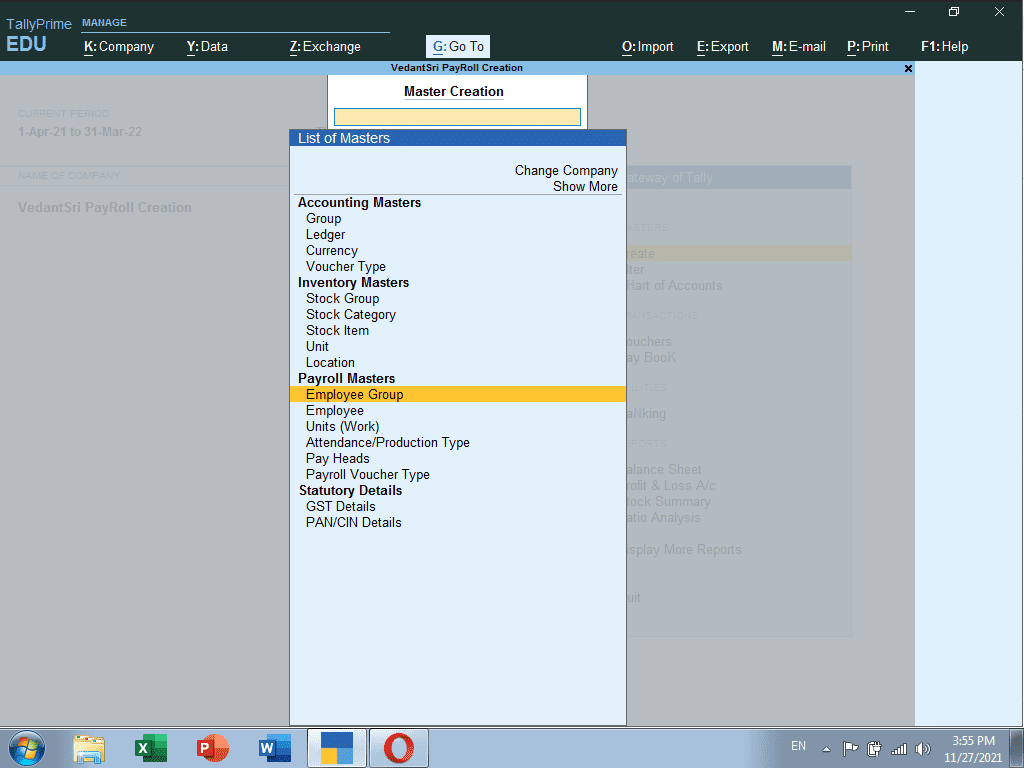
  • Payroll Masters में Employee Group पर क्लिक करें|
PayRoll Creation in TallyPRIME
  • और Employee Group में Management, Office Staff, Teacher इत्यादी का Management Group क्रिएट कर लेंगे|
PayRoll Creation in TallyPRIME
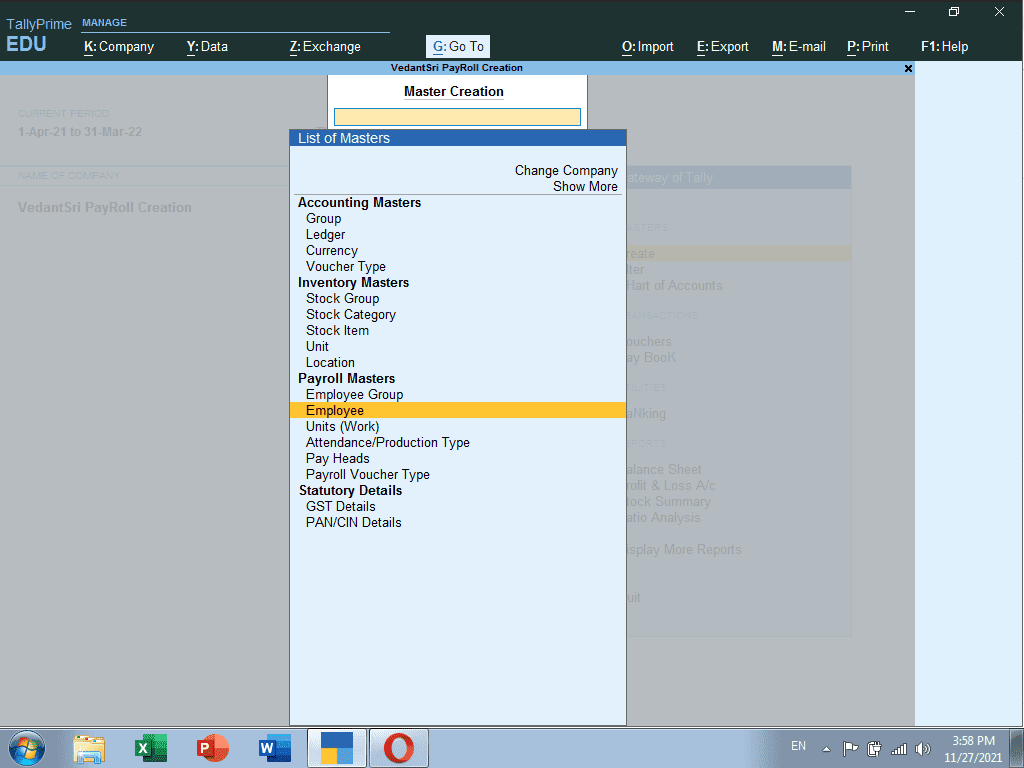
  • अब Payroll Masters से Employee आप्शन पर क्लिक करें|
PayRoll Creation in TallyPRIME
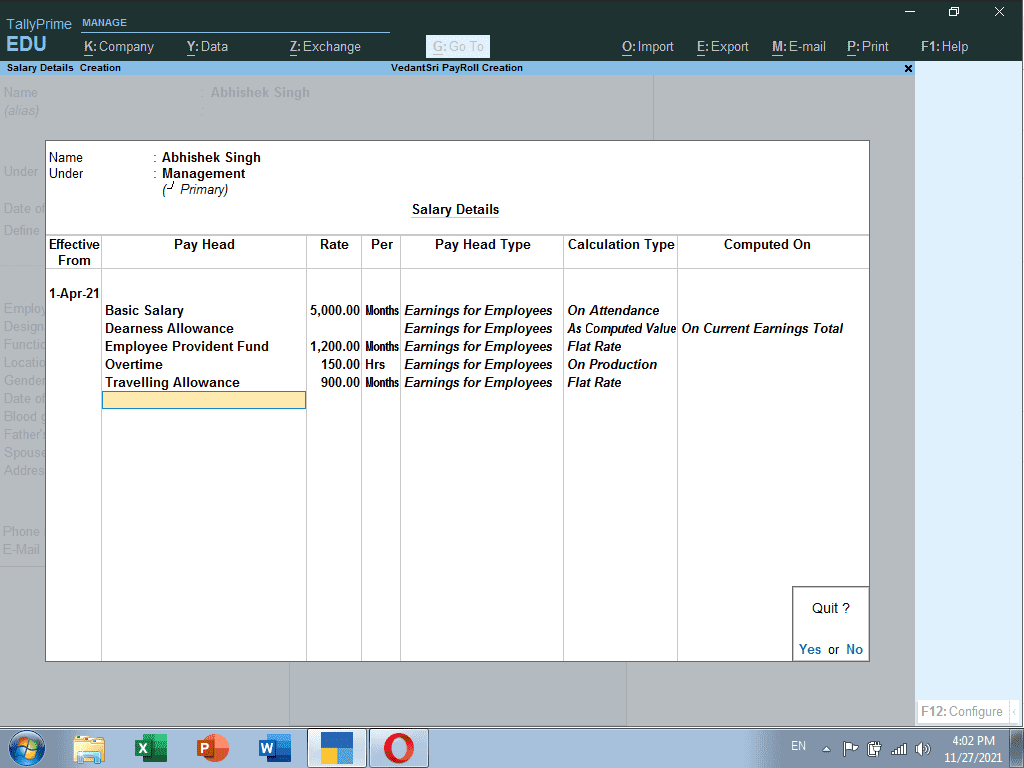
  • Employee का नाम टाइप करें | Under : Management, Define Salary Details को Yes करके Enter करें|

Read Also:-DCA Course Fees, Duration, Scope, Syllabus, Admission, Institutes & Jobs in Varanasi

PayRoll Creation in TallyPRIME
  • Yes करते ही Salary Details को फिल करेंगे |
PayRoll Creation in TallyPRIME
  • और Employee के पर्सनल डिटेल्स को निचे दिए गए पिक्चर के अनुसार फिल करें| व सेव करें|
PayRoll Creation in TallyPRIME

Leant in MS Excel: https://youtu.be/4Y63MuEsMO4

Learnt bill remainder in MS Excel: https://youtu.be/ViP3_65P84s

MS Excel form with database macro project: https://youtu.be/tgFn7dWGIRQ

MS Word cover page design: https://youtu.be/zbkXeGNW23U

MS Excel basic calculator basic project: https://youtu.be/ELZ9MDKU3e4

MS word 3D design project: https://youtu.be/JTgFRIMnfKU

MS Word certificate project: https://youtu.be/NyqBEU5nTxA

VedantSri official website: https://vedantsri.com

Course store website: https://vedantsri.in

Job assist website: https://www.jobdo.in

MS Word class: https://mswordclass.com/ 

Corel free class: https://corelclass.com/ 

Free Excel class: https://msexcel.com/ 

1-VedantSri Official Website:- https://vedantsri.com

2-Student Support Website:- https://www.vedantsri.net

3-Jobs Assist Website:- https://www.jobdo.in

Enable GST in TallyPRIME

Enable GST in TallyPRIME

यहाँ हम जानेंगे की TallyPRIME में GST कैसे Enable और Calculate करते है | निचे दिए गए स्टेप्स को फॉलो करें|

  • सबसे पहले TallyPRIME में कोई Company क्रिएट करें जिसमे State जरूर डिफाइन कर्रे |
Enable GST in TallyPRIME By VedantSri Varanasi
Enable GST in Tally PRIME By VedantSri Varanasi
  • अब जैसे ही कंपनी को Ctrl + A प्रेस करके Save करेंगे| आपके सामने Feature की सेटिंग Page ओपन होगा जिसका Shortcut Key F11 होता है इस पेज पर
Enable GST in TallyPRIME By VedantSri Varanasi
  • Taxation में Goods & Services Tax के सामने Yes पर एकबार Enter करें जिससे GST का सेटिंग पेज Open होगा|
Enable GST in TallyPRIME By VedantSri Varanasi
Enable GST in Tally PRIME By VedantSri Varanasi
  • ऊपर GST का सेटिंग्स बना लेंगे और इसे भी Ctrl + A से Save करें|
  • अब Gateway of Tally से Voucher पर Click करें|
Enable GST in TallyPRIME By VedantSri Varanasi
  • और F9 प्रेस करके Purchase वाउचर में आ जाये |
Enable GST in TallyPRIME By VedantSri Varanasi
  • Purchase Voucher पर Invoice No और Date भरे उसके बाद Party A/c Name में जिससे भी Goods या Services उधार खरीद रहे है तो उसका Ledger अंडर ग्रुप Sundry Creditor में क्रिएट करेंगे
Enable GST in TallyPRIME By VedantSri Varanasi
Enable GST in Tally PRIME By VedantSri Varanasi
  • और Sundry Creditor का भी State व GST No जरूर टाइप करें व सेव कर दें|
  • Purchase Ledger में Purchase A/c का Ledger अंडरग्रुप Purchase Account में क्रिएट करें|
  • अब आप Name of Item में जो गुड्स या सर्विस खरीद रहे है उसका Stock क्रिएट करें| जिसके लिए Alt + C प्रेस करें|
  • और Stock क्रिएट करते समय Set/Alter GST Details को YES करें व इंटर करें|
Enable GST in TallyPRIME By VedantSri Varanasi
  • Enter करते ही आपके सामने GST का एक पेज open होगा जिसमे इस Stock GST percentage देना होगा Integrated Tax के सामने तथा Taxibility को Taxable पर सेट करें व सेव करें| और स्टॉक को भी सेव करें|
Enable GST in TallyPRIME By VedantSri Varanasi
Enable GST in Tally PRIME By VedantSri Varanasi

अब स्टॉक का Quantity, रेट टाइप करें व इसी तरह सरे स्टॉक की एंट्री करने के बाद टोटल sum के निचे आयेंगे| और CGST का Ledger क्रिएट करेंगे Under Group ड्यूटी & टैक्सेज के अंतर्गत, Type of Duty में GST सेलेक्ट करें, Tax Type में Central Tax सेलेक्ट करें व सेव करें|

Read Also :-DFA Course Fees, Syllabus, Duration, Scope, Jobs, and Institute in Varanasi

Enable GST in TallyPRIME By VedantSri Varanasi
  • और इसी तरह से SGST का क्रिएट करेंगे Under Group ड्यूटी & टैक्सेज के अंतर्गत, Type of Duty में GST सेलेक्ट करें, Tax Type में State Tax सेलेक्ट करें व सेव करें|
Enable GST in TallyPRIME By VedantSri Varanasi
Enable GST in Tally PRIME By VedantSri Varanasi
  • अब आप Purchase Voucher पर CGST व SGST कैलकुलेट होते हुए देख सकते है|
Enable GST in TallyPRIME By VedantSri Varanasi

1-VedantSri Official Website:- https://vedantsri.com

2-Student Support Website:- https://www.vedantsri.net

3-Jobs Assist Website:- https://www.jobdo.in

Use of Pivot Table in Excel

Use of Pivot Table in Excel

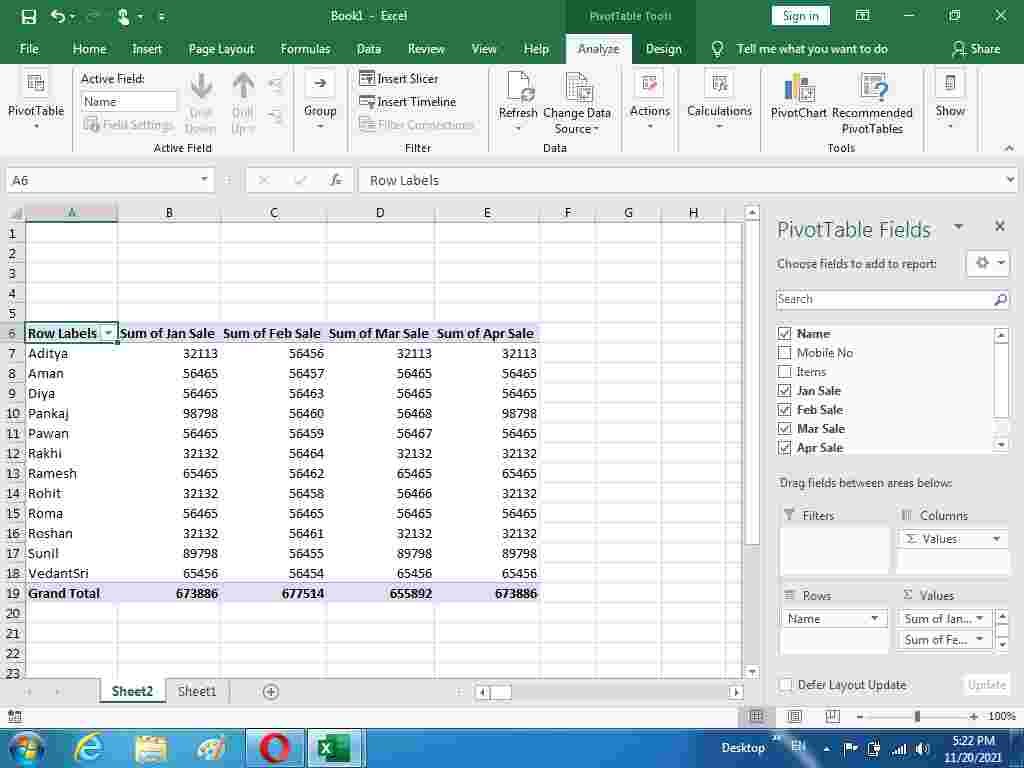
Pivot Table का यूज़ Excel में करने के लिए निचे दिए गए स्टेप को फॉलो करें|

Pivot Table का Use Excel में किसी Range को Column Wise फ़िल्टर करने के लिए किया जाता है | उदहारण के लिए यदि आपने अलग-अलग 10 Column के डाटा में से किन्ही 5 या 6 Column के डाटा को ही फ़िल्टर करना चाहते है तो Pivot Tables से यह कार्य Spreadsheet पर आसानी से किया जा सकता है | Use of Pivot Table in Excel

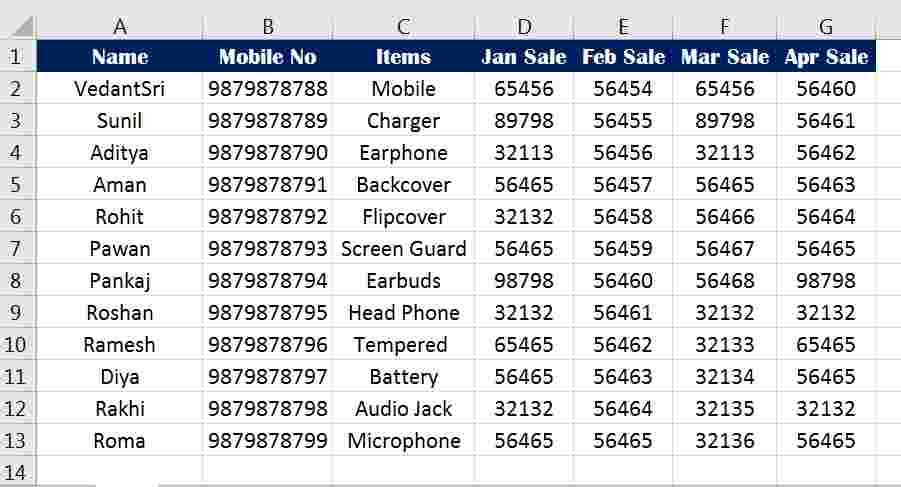
  1. Pivot Table का Use समझने के लिए First of All एक्सेल शीट पर निचे दिए गए Example के तरह कोई डाटा टाइप करें|
Use of Pivot Table in Excel
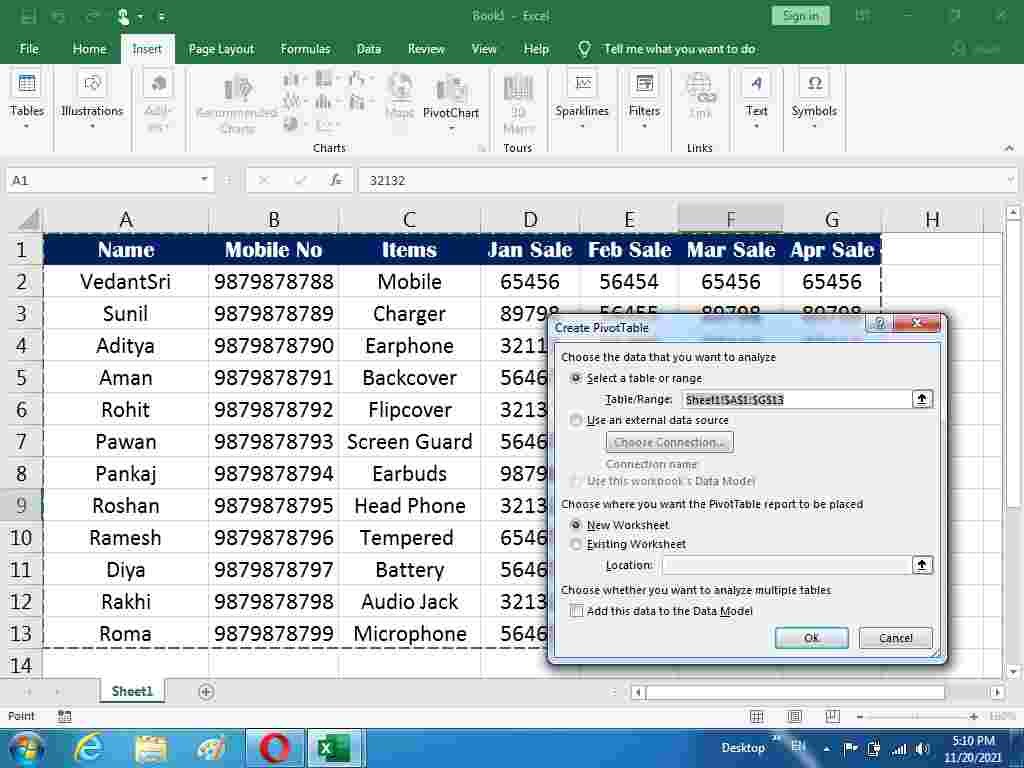
  1. अब डाटा को सेलेक्ट करें व Insert मेनू के Tables टूलबॉक्स के Pivot Table टूल पर क्लिक करें|
  2. Create Pivot Tables का एक विंडो Open होगा | See The Picture Below Use of Pivot Table in Excel
Use of Pivot Tables in MS Excel In VedantSri
  1. अब इस Pivot Table विंडो में New Worksheet या Existing Worksheet दोनों में से किसी एक आप्शन पर पर क्लिक करें| Use of Pivot Table in Excel
  2. उसके बाद यदि आपने New Worksheet सेलेक्ट किया है तो OK करते ही एक नए Excel Worksheet पर आप चले जायेंगे|
  3. और यदि आपने Existing Worksheet सलेक्ट किया है तो करंट Sheet पर कोई Blank सेल सेलेक्ट करें व OK पर क्लिक करें| Use of Pivot Table in Excel
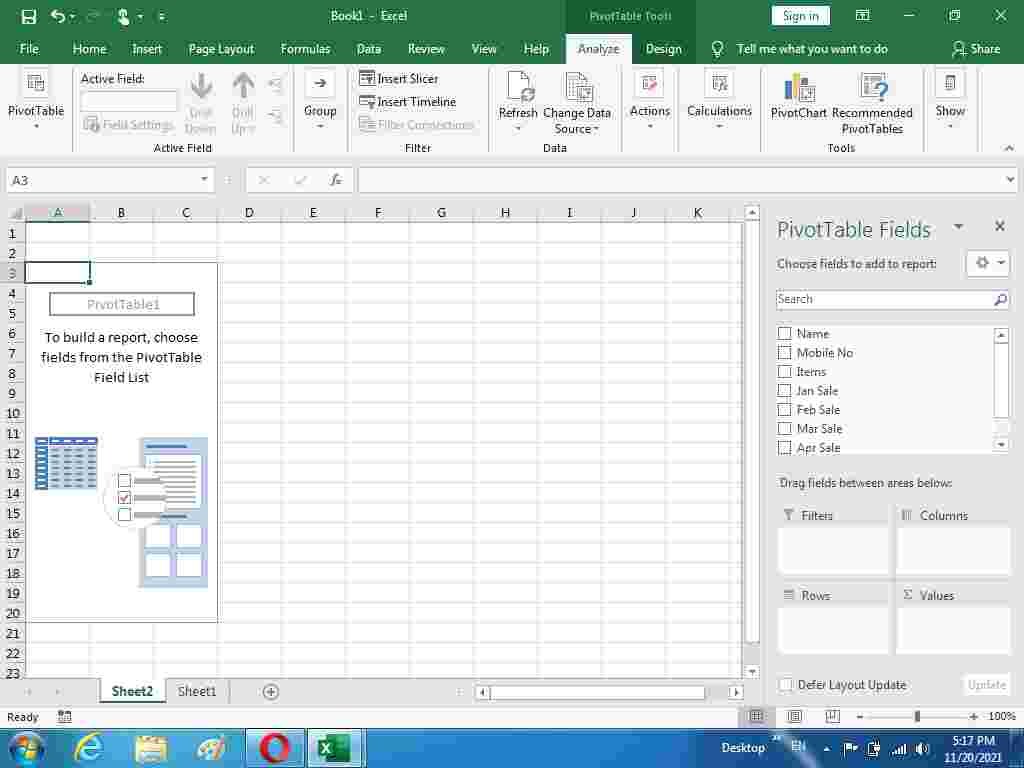
  4. OK करने के बाद् Pivot Table Fields में से उन Column को Check करें जिन्हें आप Filter करना चाहते है | See The Picture Below
Use of Pivot Table in Excel
Use of Pivot-Table in Excel
  1. निचे दिए गए Picture में मैंने Name, Jan Sale, Feb Sale, Mar Sale व Apr Sale के Check Box में क्लिक किया जिससे Pivot Chart पर सिर्फ यही सेलेक्ट कॉलम दिख रहे जिन्हें आप फ़िल्टर कर सकते है| Use of Pivot Table in Excel
Use of Pivot Table in Excel
Use of Pivot Tables in MS Excel

तो इस प्रकार से आप Excel Spreadsheet पर Pivot Tables का Use कर सकते है |

More MS Excel Projects :-

Read Also :- Highlight Row Column MS Excel Project-11

Visit at – https://www.corelclass.com

Read Also it – https://msexcelclass.com/

Also, Read- Tally Course Fees, Duration, Scope, Syllabus, Admission, Institutes

Also Read – CCC Course Fees, Syllabus, Duration, Scope, Jobs, and Institute

Important Link – DFA Course Fees, Syllabus, Duration, Scope, Jobs, and Institute

Visit – https://mswordclass.com/

MS Word Back Cover Design Project-1

MS Word Back Cover Design Project

स्वागत है एक बार फिर MS Word 2019 वर्शन के प्रोजेक्ट बेस्ड क्लासेज में इस विडियो के अंतर्गत आप सीखेंगे की MS Word के किसी भी वर्शन पर Back Cover कैसे डिजाईन किया जाता है |इस विडियो को आराम से देखेते हुए स्टेप by स्टेप फॉलो करें|यदि किसी भी प्रकार का कोई क्वेश्चन या क्वेरी है तो नीचे कमेंट बॉक्स में जरुर लिखें धन्यवाद

इस विडियो के माध्यम से आप यह जान पाएंगे कि MS Word के अंतर्गत आने वाले विभिन्न प्रकार के शेपस,कलर,टेक्स्ट,टूल्स,फॉण्ट इत्यादि का यूज़ करके एक बेहतर MsWord Back Cover Design कैसे क्रिएट कर सकते हैं जो देखने में आकर्षक लगे

Preview MS Word Back Cover Design Project

MS Word Back Cover Design Project

VedantSri Computer Institute Varanasi

MS Word Back Cover Design Project

provides the best Computer CoursesClasses, and Training in Varanasi. There is NIELIT Courses CCC, BCC, O’level, Certificates and Diploma Computer Courses available with best training materials. Also Available Top 100 Best Computer Courses, For Example, OMDCAADCADTPDFAADAMADTP, ADFA, DCEMS Office.

VedantSri Computer Coaching update CCC Online Test 2020 in www.vedantsri.net. There are some important computer Courses for jobs CCC ClassTyping, Internship And Spoken English Available Free of cost with Offer. More than 50 Computer Courses are available with a 50% Fee Discount in VedantSri Varanasi.

You can get the Best Digital Marketing Course at Varanasi Institute VedantSri. There is Latest Computer Course Offer in ADCA Computer Course, DCA Computer Course, CCC Computer Course & English Spoken.

(MS Word Back Cover Design Project)

About VedantSri Computer Institute Varanasi

VedantSri Computer Institute in Varanasi is the Government recognized and ISO Certified Computer Institute in Varanasi running since 2011. It Provides Computer Courses, Classes, Training by different own branches all over Varanasi.

There is Computer Scholarship Courses DCE Scholarship (Diploma in Computer Engineering), DIT most trusted computer course Available under Scholarship Test Scheme.

Varanasi Computer Institute vedantsri works at different places to ensure students to get better computer education. VedantSri Computer Classes has Diploma courses and advance diploma courses on the computerVedantSri Institute provides the latest version of computer application training in computer courses.

वेदांतश्री कम्प्यूटर इंस्टिट्यूट’ वाराणसी में पिछले 10 वर्षो से बेहतर व न्यूनतम शुल्क में कम्प्यूटर शिक्षा प्रदान करने वाली एक कम्प्यूटर ट्रेनिंग इंस्टिट्यूट है | यह संस्था कम्प्यूटर व इंग्लिश स्पीकिंग कोर्स की ट्रेनिंग प्रदान करती है | वाराणसी में कम्प्यूटर शिक्षा को बेहतर व न्यूनतम शुल्क में छात्रो तक पहुचाने में वेदांतश्री पिछले 10 वर्षो से प्रयासरत है |

Free To Learn In VedantSri Computer Institute in Varanasi

इस वेबसाइट का यूज़ वेदांतश्री में पढ़ रहे छात्रो को कोर्स से सम्बंधित ऑनलाइन सपोर्ट करने से सम्बंधित है | इस वेबसाइट पर उपलब्ध विडियो, टेस्ट शीट, Questions & Answer सेशन, ट्रिक्स, टिप्स वेदांतश्री में सिख रहे कोर्सेज से सम्बंधित है |

उपलब्ध कंटेंट संस्था में सिख रहे छात्रो के डिमांड पर अपडेट किया जाता है | उपलब्ध कंटेंट वेदांतश्री में पढ़ रहे छात्रो व सम्बंधित छात्रो को निशुल्क प्रदान किया जाता है जिसका कोई अलग से शुल्क नही लिया जाता है | इस वेबसाइट पर उपलब्ध कंटेंट कम्प्यूटर कोर्सेज व इंग्लिश स्पीकिंग कोर्सेज से सम्बंधित अपडेट किया जाता है | 

(MS Word Back Cover Design Project)

About CCC Online Test 2021

CCC Online Test 2021:- This is the CCC Online Test Website Page. If You are preparing for CCC Exam or any competitive exam then you should visit this www.vedantsri.net website.

you can also download this app from the play store and you find Just like many more Online Test Series Related For Example MS Word, MS Excel, MS PowerPoint, Internet-related.

This is Provided By VedantSri Computer Institute Varanasi. The VedantSri Provides Best Computer Classes, Courses, Coachings and Computer Training in Varanasi Uttar Pradesh India.

(MS Word Back Cover Design Project)

1-VedantSri Official Website:- https://vedantsri.com

2-Student Support Website:- https://www.vedantsri.net

(MS Word Back Cover Design Project)

Photoshop Online Test

Welcome To Photoshop Online Test

0%
1684

Photoshop Basic Online Test 5513

1 / 26

What is the Shortcut Key for Lasso Tool in Photoshop?

2 / 26

What is the Use of the Move Tool in Photoshop?

3 / 26

What is the Use of the Lasso Tool in Photoshop?

4 / 26

What is the Use of Crop Tool in Photoshop?

5 / 26

What is the Shortcut Key for New Page in Photoshop?

6 / 26

What is the Shortcut Key for Lasso Tool in Photoshop?

7 / 26

Which Menu Contains the Duplicate Layer Option in Photoshop?

8 / 26

What is the Full form of RGB?

9 / 26

What is the Shortcut Key of the Eyedropper Tool in Photoshop?

10 / 26

What is Shortcut Key for Crop Tool in Photoshop?

11 / 26

What is the Use of Eyedropper Tool in Photoshop?

12 / 26

What is the Run Command to Open Photoshop?


13 / 26

Which of These Formats Supports Transparency?

14 / 26

Full form of DPI?

15 / 26

What is the Shortcut Key for Move Tool in Photoshop?

16 / 26

Which of these Software is Using the Gradient tool?

17 / 26

The Full form of GIF?

18 / 26

What is the Use of Rectangular Marquee Tool in Photoshop?

19 / 26

What is the Use of Quick Selection Tool in Photoshop?

20 / 26

What is the Meaning of CMYK?

21 / 26

What is the Use of Frame Tool in Photoshop?


22 / 26

What is the Shortcut Key for Frame Tool in Photoshop?

23 / 26

For What work Photoshop is used?

24 / 26

What is the Shortcut Key for Spot Healings Brush Tool in Photoshop?

25 / 26

What is the Shortcut Key for Quick Selection Tool in Photoshop?

26 / 26

What is the Shortcut Key for Rectangular Marquee Tool in Photoshop?

Your score is

The average score is 42%

0%

इंटरनेट के अनलाइन टेस्ट के लिए यहाँ जायें- Internet Online Test 2024

Pos.NameScoreDurationPoints
1Shivam Verma100 %41 seconds26 / 26
2Shivam Verma100 %42 seconds26 / 26
3Rohit singh100 %43 seconds26 / 26
4Rohit singh100 %43 seconds26 / 26
5Rose Singh100 %43 seconds26 / 26
6Manish Singh100 %43 seconds26 / 26
7Shivam Verma100 %44 seconds26 / 26
8Shivam Verma100 %44 seconds26 / 26
9Rohit singh100 %44 seconds26 / 26
10Rohit singh100 %44 seconds26 / 26
11Rohit singh100 %45 seconds26 / 26
12Lalbahadur100 %45 seconds26 / 26
13Shivam Verma100 %46 seconds26 / 26
14Sanskar Singh100 %47 seconds26 / 26
15Rohit singh100 %47 seconds26 / 26
16Rohit singh100 %47 seconds26 / 26
17Lalbahadur100 %47 seconds26 / 26
18Shivam Verma100 %48 seconds26 / 26
19Shivam Verma100 %48 seconds26 / 26
20Sanskar Singh100 %48 seconds26 / 26
21Shivam Verma100 %48 seconds26 / 26
22Rohit singh100 %48 seconds26 / 26
23Rohit singh rajput100 %48 seconds26 / 26
24Sanskar Singh100 %48 seconds26 / 26
25Shivam Verma100 %49 seconds26 / 26
26Sanskar Singh100 %49 seconds26 / 26
27Sanskar Singh100 %49 seconds26 / 26
28Sanskar Singh100 %49 seconds26 / 26
29Lalbahadur100 %49 seconds26 / 26
30Rimjhim yadav100 %49 seconds26 / 26
31Rimjhim yadav100 %49 seconds26 / 26
32Shivam Verma100 %50 seconds26 / 26
33Shivam Verma100 %50 seconds26 / 26
34Sanskar Singh100 %50 seconds26 / 26
35Shivam Verma100 %50 seconds26 / 26
36Lalbahadur100 %50 seconds26 / 26
37Rohit singh100 %51 seconds26 / 26
38Lalbahadur100 %51 seconds26 / 26
39Shivam Verma100 %52 seconds26 / 26
40Ankit kashyap100 %52 seconds26 / 26
41Tanu100 %52 seconds26 / 26
42Ankit kashyap100 %52 seconds26 / 26
43Megha Singh100 %52 seconds26 / 26
44Ankit kashyap100 %53 seconds26 / 26
45Prashant maurya100 %53 seconds26 / 26
46Ujjwal Kumar Sahu100 %53 seconds26 / 26
47Lalbahadur100 %53 seconds26 / 26
48Shivam Verma100 %53 seconds26 / 26
49Shivam Verma100 %54 seconds26 / 26
50Rohit singh100 %54 seconds26 / 26
51Tanu100 %54 seconds26 / 26
52Vishal100 %54 seconds26 / 26
53Tanu100 %54 seconds26 / 26
54ALI KHAN100 %54 seconds26 / 26
55Srishti Singh100 %54 seconds26 / 26
56Vishal100 %54 seconds26 / 26
57Vishal100 %54 seconds26 / 26
58Ankit kashyap100 %54 seconds26 / 26
59Lalbahadur100 %54 seconds26 / 26
60Vishal100 %54 seconds26 / 26
61ALI KHAN100 %54 seconds26 / 26
62Shivam Verma100 %54 seconds26 / 26
63Ankit kashyap100 %55 seconds26 / 26
64Sahil100 %55 seconds26 / 26
65Tanu100 %55 seconds26 / 26
66ALI KHAN100 %55 seconds26 / 26
67Tanu100 %55 seconds26 / 26
68Srishti Singh100 %55 seconds26 / 26
69Shivam Verma100 %56 seconds26 / 26
70Shivam Verma100 %56 seconds26 / 26
71Rohit singh rajput100 %56 seconds26 / 26
72Srishti Singh100 %56 seconds26 / 26
73Vishal100 %56 seconds26 / 26
74ALI KHAN100 %56 seconds26 / 26
75Shivam Verma100 %56 seconds26 / 26
76Shivam Verma100 %56 seconds26 / 26
77Ujjwal Kumar Sahu100 %57 seconds26 / 26
78Ankit kashyap100 %57 seconds26 / 26
79ALI KHAN100 %57 seconds26 / 26
80Ankit kashyap100 %57 seconds26 / 26
81Rimjhim yadav100 %57 seconds26 / 26
82Shivam Verma100 %58 seconds26 / 26
83Prashant maurya100 %58 seconds26 / 26
84Prashant maurya100 %58 seconds26 / 26
85Ankit kashyap100 %58 seconds26 / 26
86Ankit kashyap100 %58 seconds26 / 26
87Shivam Verma100 %58 seconds26 / 26
88Sumit kumar100 %59 seconds26 / 26
89Vishal100 %59 seconds26 / 26
90ALI KHAN100 %59 seconds26 / 26
91Pooja Pandey100 %59 seconds26 / 26
92Tanu100 %59 seconds26 / 26
93Lalbahadur100 %59 seconds26 / 26
94Sonam100 %1 minutes26 / 26
95Ujjwal Kumar Sahu100 %1 minutes26 / 26
96Ankit kashyap100 %1 minutes26 / 26
97Vishal100 %1 minutes26 / 26
98Vishal100 %1 minutes26 / 26
99Rose Singh100 %1 minutes26 / 26
100Ankit kashyap100 %1 minutes26 / 26
101Rohit singh100 %1 minutes 1 seconds26 / 26
102Srishti Singh100 %1 minutes 1 seconds26 / 26
103Ankit kashyap100 %1 minutes 1 seconds26 / 26
104Shivam Verma100 %1 minutes 1 seconds26 / 26
105Shivam Verma100 %1 minutes 1 seconds26 / 26
106Vishal yadav100 %1 minutes 2 seconds26 / 26
107Srishti Singh100 %1 minutes 2 seconds26 / 26
108Ankit kashyap100 %1 minutes 2 seconds26 / 26
109Shivam Verma100 %1 minutes 2 seconds26 / 26
110Shivam Verma100 %1 minutes 2 seconds26 / 26
111Rohit singh100 %1 minutes 3 seconds26 / 26
112Rohit singh rajput100 %1 minutes 3 seconds26 / 26
113Lalbahadur100 %1 minutes 4 seconds26 / 26
114Sanskar Singh100 %1 minutes 4 seconds26 / 26
115Ankit kashyap100 %1 minutes 5 seconds26 / 26
116Ankit kashyap100 %1 minutes 5 seconds26 / 26
117Shivam Verma100 %1 minutes 5 seconds26 / 26
118Prashant maurya100 %1 minutes 6 seconds26 / 26
119Rohit singh100 %1 minutes 6 seconds26 / 26
120Shivam Verma100 %1 minutes 7 seconds26 / 26
121Sakti100 %1 minutes 7 seconds26 / 26
122Sumit kumar100 %1 minutes 8 seconds26 / 26
123Ritesh Chaurasia100 %1 minutes 8 seconds26 / 26
124Vishal100 %1 minutes 8 seconds26 / 26
125Vishal100 %1 minutes 8 seconds26 / 26
126Vishal100 %1 minutes 8 seconds26 / 26
127Shivam Verma100 %1 minutes 9 seconds26 / 26
128Gaurav verma100 %1 minutes 9 seconds26 / 26
129Srishti Singh100 %1 minutes 9 seconds26 / 26
130Ab100 %1 minutes 9 seconds26 / 26
131Manish Singh100 %1 minutes 9 seconds26 / 26
132Megha Singh100 %1 minutes 9 seconds26 / 26
133Gaurav verma100 %1 minutes 10 seconds26 / 26
134Pooja Pandey100 %1 minutes 10 seconds26 / 26
135Priyanshu kumar rai100 %1 minutes 10 seconds26 / 26
136Tanu100 %1 minutes 11 seconds26 / 26
137Sonali yadav100 %1 minutes 12 seconds26 / 26
138Manisha Kumari100 %1 minutes 13 seconds26 / 26
139Gaurav Srivastava100 %1 minutes 14 seconds26 / 26
140Prashant maurya100 %1 minutes 15 seconds26 / 26
141Sanskar Singh100 %1 minutes 16 seconds26 / 26
142Shivam Verma100 %1 minutes 16 seconds26 / 26
143Vivek vishwakarma100 %1 minutes 16 seconds26 / 26
144Rakesh100 %1 minutes 17 seconds26 / 26
145Sonam100 %1 minutes 17 seconds26 / 26
146Srishti Singh100 %1 minutes 17 seconds26 / 26
147DK100 %1 minutes 18 seconds26 / 26
148Huy100 %1 minutes 20 seconds26 / 26
149Nandani Prajapati100 %1 minutes 21 seconds26 / 26
150Iuuuu100 %1 minutes 21 seconds26 / 26
151Hhhh100 %1 minutes 21 seconds26 / 26
152Sattu100 %1 minutes 22 seconds26 / 26
153Pawan sahani100 %1 minutes 23 seconds26 / 26
154Vishal100 %1 minutes 23 seconds26 / 26
155Vishal100 %1 minutes 23 seconds26 / 26
156Sakti100 %1 minutes 23 seconds26 / 26
157neha prajapati100 %1 minutes 24 seconds26 / 26
158ssssssssssssssssssssssssssssssssssssssssssssssssssssssssssssss100 %1 minutes 24 seconds26 / 26
159Gaurav verma100 %1 minutes 25 seconds26 / 26
160Preeti Sonker100 %1 minutes 25 seconds26 / 26
161Harsh Dubey100 %1 minutes 26 seconds26 / 26
162Utsav Tyagi100 %1 minutes 26 seconds26 / 26
163Rohit Singh100 %1 minutes 27 seconds26 / 26
164Ruby kharwar100 %1 minutes 28 seconds26 / 26
165Nishant dubey100 %1 minutes 28 seconds26 / 26
166Rohit singh rajput100 %1 minutes 28 seconds26 / 26
167Kashish100 %1 minutes 28 seconds26 / 26
168Ompal100 %1 minutes 29 seconds26 / 26
169Shivangi100 %1 minutes 29 seconds26 / 26
170Vishal100 %1 minutes 29 seconds26 / 26
171Sangita kumari100 %1 minutes 29 seconds26 / 26
172Shivam Verma100 %1 minutes 29 seconds26 / 26
173Pragati Chaurasia100 %1 minutes 30 seconds26 / 26
174Radhika kumari100 %1 minutes 30 seconds26 / 26
175Shruti Seth100 %1 minutes 31 seconds26 / 26
176Gaurav Srivastava100 %1 minutes 32 seconds26 / 26
177Avinash Yadav100 %1 minutes 32 seconds26 / 26
178Bhakti100 %1 minutes 32 seconds26 / 26
179Anmol100 %1 minutes 33 seconds26 / 26
180Nibha100 %1 minutes 34 seconds26 / 26
181Shivam Verma100 %1 minutes 34 seconds26 / 26
182Ankur vishwakarma100 %1 minutes 34 seconds26 / 26
183Diwakar kumar mishra100 %1 minutes 34 seconds26 / 26
184Vishal100 %1 minutes 35 seconds26 / 26
185Sneha Vishwakarma100 %1 minutes 35 seconds26 / 26
186Neha Patel100 %1 minutes 35 seconds26 / 26
187Babita Kumari100 %1 minutes 36 seconds26 / 26
188Priyanshi sharma100 %1 minutes 36 seconds26 / 26
189Kalua100 %1 minutes 37 seconds26 / 26
190Xxxvx100 %1 minutes 37 seconds26 / 26
191Utsav Tyagi100 %1 minutes 38 seconds26 / 26
192Shreya100 %1 minutes 38 seconds26 / 26
193Abhishek Seth100 %1 minutes 38 seconds26 / 26
194Srishti Singh100 %1 minutes 39 seconds26 / 26
195Diwakar kumar mishra100 %1 minutes 41 seconds26 / 26
196Khushi100 %1 minutes 42 seconds26 / 26
197Somen Mandal100 %1 minutes 42 seconds26 / 26
198Sangita Kumari100 %1 minutes 43 seconds26 / 26
199Anjali choudhary100 %1 minutes 43 seconds26 / 26
200Amisha100 %1 minutes 44 seconds26 / 26
201Arman100 %1 minutes 45 seconds26 / 26
202Anubhav Kushwaha100 %1 minutes 45 seconds26 / 26
203bvv100 %1 minutes 46 seconds26 / 26
204Nitin kumar100 %1 minutes 46 seconds26 / 26
205Honey100 %1 minutes 47 seconds26 / 26
206Srishti Singh100 %1 minutes 48 seconds26 / 26
207Preeti singh100 %1 minutes 48 seconds26 / 26
208Nidhi Kumari100 %1 minutes 48 seconds26 / 26
209Srishti Singh100 %1 minutes 49 seconds26 / 26
210Sonali yadav100 %1 minutes 49 seconds26 / 26
211Pawan sahani100 %1 minutes 49 seconds26 / 26
212GAURAV SRIVASTAVA100 %1 minutes 51 seconds26 / 26
213Aditya prajapati100 %1 minutes 52 seconds26 / 26
214ss100 %1 minutes 53 seconds26 / 26
215Nibha100 %1 minutes 55 seconds26 / 26
216Pooja pandey100 %1 minutes 55 seconds26 / 26
217dasf100 %1 minutes 55 seconds26 / 26
218Somen Mandal100 %1 minutes 56 seconds26 / 26
219Rimjhim yadav100 %1 minutes 57 seconds26 / 26
220Shivam Verma100 %1 minutes 59 seconds26 / 26
221Sheetal bharti100 %1 minutes 59 seconds26 / 26
222Sulochana100 %2 minutes26 / 26
223Honey100 %2 minutes 2 seconds26 / 26
224Anjali Singh100 %2 minutes 4 seconds26 / 26
225chanda kumari100 %2 minutes 5 seconds26 / 26
226Babita Kumari100 %2 minutes 5 seconds26 / 26
227Princi singh100 %2 minutes 6 seconds26 / 26
228bobe100 %2 minutes 6 seconds26 / 26
229D100 %2 minutes 7 seconds26 / 26
230u100 %2 minutes 8 seconds26 / 26
231Manshi Singh100 %2 minutes 11 seconds26 / 26
232RITU100 %2 minutes 13 seconds26 / 26
233mjhytredf100 %2 minutes 14 seconds26 / 26
234PRIYANSHI AGRAWAL100 %2 minutes 14 seconds26 / 26
235Sumit bharti100 %2 minutes 15 seconds26 / 26
236Anubhav kushwaha100 %2 minutes 15 seconds26 / 26
237riya100 %2 minutes 17 seconds26 / 26
238Yash Gupta100 %2 minutes 17 seconds26 / 26
239Arjun100 %2 minutes 17 seconds26 / 26
240Durgesh Sonkar100 %2 minutes 18 seconds26 / 26
241Khushi Kumari100 %2 minutes 18 seconds26 / 26
242Khushi100 %2 minutes 20 seconds26 / 26
243Payal maurya100 %2 minutes 21 seconds26 / 26
244P100 %2 minutes 22 seconds26 / 26
245rashika sonkar100 %2 minutes 23 seconds26 / 26
246Aditya Sharma100 %2 minutes 24 seconds26 / 26
247Anmol Raj100 %2 minutes 28 seconds26 / 26
248Rimjhim yadav100 %2 minutes 29 seconds26 / 26
249Nandita100 %2 minutes 31 seconds26 / 26
250Akd100 %2 minutes 31 seconds26 / 26
251divyanka100 %2 minutes 32 seconds26 / 26
252Namrata And Shubhangi100 %2 minutes 32 seconds26 / 26
253Divya bind100 %2 minutes 33 seconds26 / 26
254Arjun100 %2 minutes 33 seconds26 / 26
255Nitin kumar100 %2 minutes 36 seconds26 / 26
256Aditya kumar100 %2 minutes 36 seconds26 / 26
257bhavya100 %2 minutes 37 seconds26 / 26
258Annu100 %2 minutes 39 seconds26 / 26
259Devendra100 %2 minutes 39 seconds26 / 26
260rp100 %2 minutes 40 seconds26 / 26
261komal bind100 %2 minutes 41 seconds26 / 26
262G g100 %2 minutes 42 seconds26 / 26
263sneha sonkar100 %2 minutes 46 seconds26 / 26
264Ayan100 %2 minutes 47 seconds26 / 26
265shashi100 %2 minutes 48 seconds26 / 26
266Pandey100 %2 minutes 49 seconds26 / 26
267Melina100 %2 minutes 56 seconds26 / 26
268H100 %3 minutes 2 seconds26 / 26
269sss100 %3 minutes 4 seconds26 / 26
270Gaurav100 %3 minutes 4 seconds26 / 26
271Ruchi maurya100 %3 minutes 8 seconds26 / 26
272E100 %3 minutes 9 seconds26 / 26
273Priyanshi agrawal100 %3 minutes 12 seconds26 / 26
274Prem100 %3 minutes 12 seconds26 / 26
275deeksha100 %3 minutes 14 seconds26 / 26
276priyanshi Agrawal100 %3 minutes 18 seconds26 / 26
277ttfds100 %3 minutes 22 seconds26 / 26
278Saumya Maurya100 %3 minutes 22 seconds26 / 26
279Rahul sahani100 %3 minutes 23 seconds26 / 26
280www100 %3 minutes 23 seconds26 / 26
281Suryansh Tripathi100 %3 minutes 23 seconds26 / 26
282Anjali Yadav100 %3 minutes 31 seconds26 / 26
283K100 %3 minutes 37 seconds26 / 26
284RIYA100 %3 minutes 40 seconds26 / 26
285Rahul Gupta100 %3 minutes 41 seconds26 / 26
286Manya Sachdeva100 %3 minutes 43 seconds26 / 26
287Kalash100 %3 minutes 45 seconds26 / 26
288Babita Kumari100 %4 minutes26 / 26
289Sharadha100 %4 minutes 6 seconds26 / 26
290kamendra kumar100 %4 minutes 8 seconds26 / 26
291Okay100 %4 minutes 10 seconds26 / 26
292babi100 %4 minutes 12 seconds26 / 26
293B100 %4 minutes 13 seconds26 / 26
294Ankit kashyap100 %4 minutes 29 seconds26 / 26
295Preeti singh100 %4 minutes 36 seconds26 / 26
296a100 %5 minutes 19 seconds26 / 26
297AA100 %5 minutes 22 seconds26 / 26
298Gustap Munda100 %6 minutes 56 seconds26 / 26
299Sneha100 %7 minutes 22 seconds26 / 26
300AAA100 %13 minutes 30 seconds26 / 26
301Sanskar Singh96 %47 seconds25 / 26
302Rose Singh96 %47 seconds25 / 26
303Prashant maurya96 %48 seconds25 / 26
304Vishal96 %50 seconds25 / 26
305Sanskar Singh96 %51 seconds25 / 26
306Gaurav Srivastava96 %51 seconds25 / 26
307Vishal96 %51 seconds25 / 26
308Prashant maurya96 %52 seconds25 / 26
309Prashant maurya96 %52 seconds25 / 26
310Prashant maurya96 %52 seconds25 / 26
311Rahul Sahani96 %53 seconds25 / 26
312Sanskar Singh96 %54 seconds25 / 26
313Prashant maurya96 %56 seconds25 / 26
314ALI KHAN96 %57 seconds25 / 26
315Shivam Verma96 %58 seconds25 / 26
316Prashant maurya96 %59 seconds25 / 26
317Lalbahadur96 %59 seconds25 / 26
318Pooja Pandey96 %1 minutes25 / 26
319Lalbahadur96 %1 minutes25 / 26
320Lalbahadur96 %1 minutes25 / 26
321Ujjwal Kumar Sahu96 %1 minutes 1 seconds25 / 26
322Abhi96 %1 minutes 2 seconds25 / 26
323ALI KHAN96 %1 minutes 3 seconds25 / 26
324ALI KHAN96 %1 minutes 3 seconds25 / 26
325ALI KHAN96 %1 minutes 5 seconds25 / 26
326Akay96 %1 minutes 11 seconds25 / 26
327Tanu96 %1 minutes 12 seconds25 / 26
328Sonam Gupta96 %1 minutes 16 seconds25 / 26
329Gaurav verma96 %1 minutes 16 seconds25 / 26
330Sanskar Singh96 %1 minutes 16 seconds25 / 26
331Nitin96 %1 minutes 16 seconds25 / 26
332Pooja Pandey96 %1 minutes 17 seconds25 / 26
333Pawan sahani96 %1 minutes 17 seconds25 / 26
334Rakesh96 %1 minutes 18 seconds25 / 26
335Jjjb96 %1 minutes 18 seconds25 / 26
336Sonali Yadav96 %1 minutes 19 seconds25 / 26
337Amisha96 %1 minutes 19 seconds25 / 26
338P96 %1 minutes 20 seconds25 / 26
339Shivam Verma96 %1 minutes 21 seconds25 / 26
340Manisha kumari96 %1 minutes 22 seconds25 / 26
341Gaurav verma96 %1 minutes 22 seconds25 / 26
342Ruchi96 %1 minutes 22 seconds25 / 26
343Pooja rai96 %1 minutes 22 seconds25 / 26
344Vivek vishwakarma96 %1 minutes 22 seconds25 / 26
345Nitin kumar96 %1 minutes 22 seconds25 / 26
346Nitin 🚫96 %1 minutes 22 seconds25 / 26
347Gaurav verma96 %1 minutes 23 seconds25 / 26
348.96 %1 minutes 23 seconds25 / 26
349Ankit kashyap96 %1 minutes 24 seconds25 / 26
350Melina96 %1 minutes 25 seconds25 / 26
351Gungun Mishra96 %1 minutes 26 seconds25 / 26
352Mahboob Hasan96 %1 minutes 29 seconds25 / 26
353Rakesh96 %1 minutes 29 seconds25 / 26
354Gyandeep sonkar96 %1 minutes 30 seconds25 / 26
355Jjjj96 %1 minutes 33 seconds25 / 26
356Vivek vishwakarma96 %1 minutes 36 seconds25 / 26
357neha prajapati96 %1 minutes 37 seconds25 / 26
358Priya Tamang96 %1 minutes 38 seconds25 / 26
359uy96 %1 minutes 38 seconds25 / 26
360Manisha96 %1 minutes 38 seconds25 / 26
361Anubhav Kushwaha96 %1 minutes 39 seconds25 / 26
362Ankur vishwakarma96 %1 minutes 39 seconds25 / 26
363Prashant maurya96 %1 minutes 40 seconds25 / 26
364Gaurav verma96 %1 minutes 41 seconds25 / 26
365Sangita Kumari96 %1 minutes 43 seconds25 / 26
366Somen Mandal96 %1 minutes 44 seconds25 / 26
367Pawan sahani96 %1 minutes 46 seconds25 / 26
368Kashish96 %1 minutes 48 seconds25 / 26
369Avinash Yadav96 %1 minutes 49 seconds25 / 26
370Anurag Gupta96 %1 minutes 50 seconds25 / 26
371Sahil Singh96 %1 minutes 53 seconds25 / 26
372Aditya prajapati96 %1 minutes 55 seconds25 / 26
373Divyanshi96 %1 minutes 55 seconds25 / 26
374Sneha Vishwakarma96 %1 minutes 58 seconds25 / 26
375Anushka thakur96 %2 minutes25 / 26
376Srishti Singh96 %2 minutes25 / 26
377kashish96 %2 minutes25 / 26
378Nidhi Kumari96 %2 minutes25 / 26
379Ishan Aman96 %2 minutes 3 seconds25 / 26
380Avinash Yadav96 %2 minutes 4 seconds25 / 26
381Sadhna96 %2 minutes 5 seconds25 / 26
382Sonali96 %2 minutes 5 seconds25 / 26
383Hhh96 %2 minutes 5 seconds25 / 26
384Khushi96 %2 minutes 6 seconds25 / 26
385Anushka thakur96 %2 minutes 7 seconds25 / 26
386Rahul sahani96 %2 minutes 7 seconds25 / 26
387anupam kumar96 %2 minutes 8 seconds25 / 26
388t96 %2 minutes 8 seconds25 / 26
389RITU96 %2 minutes 10 seconds25 / 26
390Khushi96 %2 minutes 10 seconds25 / 26
391Anubhav Kushwaha96 %2 minutes 10 seconds25 / 26
392lpplpplplllll96 %2 minutes 10 seconds25 / 26
393Princi singh96 %2 minutes 10 seconds25 / 26
394chanda kumari96 %2 minutes 11 seconds25 / 26
395Manshi Singh96 %2 minutes 11 seconds25 / 26
396Sandhvi96 %2 minutes 11 seconds25 / 26
397Pratishtha kumari Tyagi96 %2 minutes 13 seconds25 / 26
398Dun96 %2 minutes 13 seconds25 / 26
399Mohak96 %2 minutes 14 seconds25 / 26
400Sachi96 %2 minutes 14 seconds25 / 26
401Divya bind96 %2 minutes 14 seconds25 / 26
402Anurag96 %2 minutes 19 seconds25 / 26
403Manshi singh96 %2 minutes 19 seconds25 / 26
404chanda kumari96 %2 minutes 22 seconds25 / 26
405Divya Bind96 %2 minutes 24 seconds25 / 26
406Pranshu96 %2 minutes 24 seconds25 / 26
407DIVYANKA96 %2 minutes 26 seconds25 / 26
408Satyam Gupta96 %2 minutes 27 seconds25 / 26
409rahul rajput96 %2 minutes 27 seconds25 / 26
410Sona96 %2 minutes 27 seconds25 / 26
411aman96 %2 minutes 29 seconds25 / 26
412harshitha96 %2 minutes 29 seconds25 / 26
413Ais96 %2 minutes 29 seconds25 / 26
414Khushi96 %2 minutes 30 seconds25 / 26
415RITU96 %2 minutes 30 seconds25 / 26
416Karthikeya gunti96 %2 minutes 30 seconds25 / 26
417PRANSHU96 %2 minutes 35 seconds25 / 26
418AA96 %2 minutes 35 seconds25 / 26
419Aryan96 %2 minutes 35 seconds25 / 26
420Soniya96 %2 minutes 38 seconds25 / 26
421ghjmj,96 %2 minutes 39 seconds25 / 26
422PRANSHU96 %2 minutes 40 seconds25 / 26
423Shreya Soni96 %2 minutes 42 seconds25 / 26
424PRANSHU96 %2 minutes 43 seconds25 / 26
425Vikash soni96 %2 minutes 44 seconds25 / 26
426rs96 %2 minutes 46 seconds25 / 26
427Sonu Kumari96 %2 minutes 49 seconds25 / 26
428preeti sonker96 %2 minutes 49 seconds25 / 26
429Ayan96 %2 minutes 50 seconds25 / 26
430Bsg96 %2 minutes 51 seconds25 / 26
431jyoti96 %2 minutes 53 seconds25 / 26
432fff96 %2 minutes 54 seconds25 / 26
433komal bind96 %2 minutes 55 seconds25 / 26
434Divyanka96 %2 minutes 55 seconds25 / 26
435Babita Kumari96 %2 minutes 55 seconds25 / 26
436Rimjhim yadav96 %2 minutes 56 seconds25 / 26
437K96 %2 minutes 58 seconds25 / 26
438s96 %2 minutes 58 seconds25 / 26
439sachin kumar96 %3 minutes25 / 26
440l;;;;;;;;;;;;;;;;;;;;;;;;;;;;;;;;;;;;;;;;;;;;;;;;;;;;;;;;;;;;;;;;;;;;;;;;96 %3 minutes25 / 26
441ritika96 %3 minutes 1 seconds25 / 26
442Richa96 %3 minutes 4 seconds25 / 26
443try96 %3 minutes 5 seconds25 / 26
444Pranshu96 %3 minutes 6 seconds25 / 26
445Pradeepa96 %3 minutes 7 seconds25 / 26
446lavanya96 %3 minutes 16 seconds25 / 26
447riya96 %3 minutes 16 seconds25 / 26
448d96 %3 minutes 16 seconds25 / 26
449Harshit pal96 %3 minutes 17 seconds25 / 26
450Shristi96 %3 minutes 23 seconds25 / 26
451Khushi Kumari96 %3 minutes 24 seconds25 / 26
452chanda kumari96 %3 minutes 26 seconds25 / 26
453govind96 %3 minutes 27 seconds25 / 26
454Shivani96 %3 minutes 27 seconds25 / 26
455Pandey96 %3 minutes 28 seconds25 / 26
456Naina Gupta96 %3 minutes 29 seconds25 / 26
457pranshu96 %3 minutes 30 seconds25 / 26
458U96 %3 minutes 43 seconds25 / 26
459ballabh96 %3 minutes 44 seconds25 / 26
460Gaurav96 %3 minutes 45 seconds25 / 26
4615iu596 %3 minutes 52 seconds25 / 26
462aman kumar96 %3 minutes 54 seconds25 / 26
463Anjali chakrawal96 %3 minutes 58 seconds25 / 26
464pooja96 %4 minutes25 / 26
465ghng96 %4 minutes 1 seconds25 / 26
466sonali shakya96 %4 minutes 3 seconds25 / 26
467bimlesh yadav96 %4 minutes 7 seconds25 / 26
468Shakira96 %4 minutes 8 seconds25 / 26
469Diwakar kumar mishra96 %4 minutes 10 seconds25 / 26
470Priyanka Kumari96 %4 minutes 10 seconds25 / 26
471SAURABH KUMAR96 %4 minutes 13 seconds25 / 26
472Ar96 %4 minutes 18 seconds25 / 26
473Sonu96 %4 minutes 23 seconds25 / 26
474Shweta Pal96 %4 minutes 27 seconds25 / 26
475vicky96 %4 minutes 32 seconds25 / 26
476E96 %4 minutes 34 seconds25 / 26
477Rrr96 %4 minutes 39 seconds25 / 26
478Anushka96 %4 minutes 54 seconds25 / 26
479Nibha96 %4 minutes 59 seconds25 / 26
480K96 %5 minutes 3 seconds25 / 26
481Mayuri Mondal96 %5 minutes 17 seconds25 / 26
482Priyanshi agrawal96 %5 minutes 22 seconds25 / 26
483Sonu96 %5 minutes 24 seconds25 / 26
484Xyz96 %5 minutes 26 seconds25 / 26
485Ankit96 %5 minutes 58 seconds25 / 26
486ee96 %6 minutes 33 seconds25 / 26
487Pooja sharma96 %7 minutes 2 seconds25 / 26
488Daniel s96 %10 minutes 45 seconds25 / 26
489Priya Patel96 %11 minutes25 / 26
490Sanskar Singh92 %45 seconds24 / 26
491Gaurav Srivastava92 %47 seconds24 / 26
492Prashant maurya92 %48 seconds24 / 26
493Prashant maurya92 %48 seconds24 / 26
494Prashant maurya92 %49 seconds24 / 26
495ALI KHAN92 %58 seconds24 / 26
496Pooja Pandey92 %1 minutes 2 seconds24 / 26
497ALI KHAN92 %1 minutes 2 seconds24 / 26
498Lalbahadur92 %1 minutes 2 seconds24 / 26
499Gaurav Srivastav92 %1 minutes 7 seconds24 / 26
500Mahboob92 %1 minutes 10 seconds24 / 26

VedantSri Computer Institute Varanasi

Photoshop Online Test 2021

provides the best Computer CoursesClasses, and Training in Varanasi. There is NIELIT Courses CCC, BCC, O’level, Certificates, and Diploma Computer Courses available with the best training materials. Also Available Top 100 Best Computer Courses, For Example, OM, DCA, ADCA, DTP, DFA, ADAM, ADTP, ADFA, DCE, and MS Office. VedantSri Computer Coaching updates CCC Online Test in www.vedantsri.net. There are some important computer Courses for jobs CCC Classes, Typing, Internship, And Spoken English Available Free of cost with Offer. More than 50 Computer Courses are available with a 50% Fee Discount in VedantSri Varanasi. You can get the Best Digital Marketing Course at Varanasi Institute VedantSri. There is the Latest Computer Course Offer in ADCA Computer Course, DCA Computer Course, CCC Computer Course & English Spoken.

(Photoshop Online Test)

About VedantSri Computer Institute Varanasi

VedantSri Computer Institute in Varanasi is the Government recognized and ISO Certified Computer Institute in Varanasi running since 2008. It Provides Computer Courses, Classes, and Training through different own branches all over Varanasi. There is Computer Scholarship Courses DCE Scholarship (Diploma in Computer Engineering), DIT most trusted computer course Available under Scholarship Test Scheme.

Varanasi Computer Institute vedantsri works at different places to ensure students to get better computer education. VedantSri Computer Classes has Diploma courses and advance diploma courses on the computerVedantSri Institute provides the latest version of computer application training in computer courses.

वेदांतश्री कम्प्यूटर इंस्टिट्यूट’ वाराणसी में पिछले 10 वर्षो से बेहतर व न्यूनतम शुल्क में कम्प्यूटर शिक्षा प्रदान करने वाली एक कम्प्यूटर ट्रेनिंग इंस्टिट्यूट है | यह संस्था कम्प्यूटर व इंग्लिश स्पीकिंग कोर्स की ट्रेनिंग प्रदान करती है | वाराणसी में कम्प्यूटर शिक्षा को बेहतर व न्यूनतम शुल्क में छात्रो तक पहुचाने में वेदांतश्री पिछले 10 वर्षो से प्रयासरत है |

Free To Learn In VedantSri Computer Institute in Varanasi

इस वेबसाइट का यूज़ वेदांतश्री में पढ़ रहे छात्रो को कोर्स से सम्बंधित ऑनलाइन सपोर्ट करने से सम्बंधित है | इस वेबसाइट पर उपलब्ध विडियो, टेस्ट शीट, Questions & Answer सेशन, ट्रिक्स, टिप्स वेदांतश्री में सिख रहे कोर्सेज से सम्बंधित है | उपलब्ध कंटेंट संस्था में सिख रहे छात्रो के डिमांड पर अपडेट किया जाता है | उपलब्ध कंटेंट वेदांतश्री में पढ़ रहे छात्रो व सम्बंधित छात्रो को निशुल्क प्रदान किया जाता है जिसका कोई अलग से शुल्क नही लिया जाता है | इस वेबसाइट पर उपलब्ध कंटेंट कम्प्यूटर कोर्सेज व इंग्लिश स्पीकिंग कोर्सेज से सम्बंधित अपडेट किया जाता है |  Photoshop Online Test

(Photoshop Online Test )

About CCC Online Test

CCC Online Test: – This is the CCC Online Test Website Page. If You are preparing for CCC Exam or any competitive exam then you should visit this www.vedantsri.net website.

you can also download this app from the play store and you find Just like many more Online Test Series Related For Example MS Word, MS Excel, MS PowerPoint, and Internet-related.

This is Provided By VedantSri Computer Institute Varanasi. The VedantSri Provides the Best Computer Classes, Courses, Coaching, and Computer Training in Varanasi Uttar Pradesh India.

(Photoshop Online Test )

Introduction of CorelDraw

Introduction of CorelDraw

Useful Link:-CorelDraw Course Fees, Duration, Scope, Syllabus, Admission, Institutes & Jobs

About VedantSri

Introduction of CorelDraw

Introduction of CorelDraw:-VedantSri Computer Institute provides the best Computer Courses, Classes, and Training in Varanasi. There is NEILIT Courses CCC, BCC, O’level, Certificates, and Diploma Computer Courses available with the best training materials. Also Available Top 100 Best Computer Courses, For Example, OM, DCA, ADCA, DTP, DFA, ADAM, ADTP, ADFA, DCE, MS Office.

VedantSri Computer Coaching update CCC Online Test 2019 in www.vedantsri.net. There are some important computer Courses for jobs CCC Class, Typing, Internship, And Spoken English Available Free of cost with Offer. More than 50 Computer Courses are available with a 50% Fee Discount in VedantSri Varanasi. You can get the Best Digital Marketing Course at Varanasi Institute VedantSri. There is Latest Computer Course Offer in ADCA Computer Course, DCA Computer Course, CCC Computer Course & English Spoken.

(Introduction of CorelDraw)

About CCC Online Test 2021

MS-Word Online Test 2019:- This is the CCC Online Test Website Page. If You are preparing for CCC Exam or any competitive exam then you should visit this www.vedantsri.net website.

you can also download this app from the play store and you find Just like many more Online Test Series Related For Example MS Word, MS Excel, MS PowerPoint, Internet-related.

This is Provided By VedantSri Computer Institute in Varanasi. The VedantSri Provides Best Computer Classes, Courses, Coachings, and Computer Training in Varanasi Uttar Pradesh India.

(Introduction of CorelDraw)

1-VedantSri Official Website:- https://vedantsri.com

2-Student Support Website:- https://www.vedantsri.net

3-Jobs Assist Website:- https://www.jobdo.in

External Link

1-VedantSri Official Website:- https://vedantsri.com

2-Course Store Website:- https://vedantsri.in

3-Jobs Assist Website:- https://www.jobdo.in

4-MS Word Class:- https://mswordclass.com/

5-Corel Free Class:- https://corelclass.com/

6-Free Excel Class:- https://msexcelclass.com/

MS Excel UserForm Buttons Macros Project-1 Video

MS Excel UserForm Buttons Macros Project Video

Preview MS Excel UserForm Buttons Macros Project

MS Excel UserForm Buttons Macros Project by Varanasi VedantSri

Coding For UserForm Reset, Search, Update, Delete, Close Buttons

//Reset Button**********************************
Private Sub CommandButton3_Click()
Unload Me
UserForm1.Show
End Sub
//Search Button*******************************
Private Sub CommandButton5_Click()
Dim X As Long
Dim Y As Long
X = Sheet2.Range("A" & Rows.Count).End(xlUp).Row
For Y = 2 To X
If Sheet2.Cells(Y, "A").Text = TextBox8.Text Then
TextBox1.Text = Sheet2.Cells(Y, "a")
TextBox2.Text = Sheet2.Cells(Y, "b")
TextBox3.Text = Sheet2.Cells(Y, "c")
TextBox4.Text = Sheet2.Cells(Y, "d")
TextBox5.Text = Sheet2.Cells(Y, "e")
TextBox6.Text = Sheet2.Cells(Y, "f")
TextBox7.Text = Sheet2.Cells(Y, "g")
ComboBox1.Text = Sheet2.Cells(Y, "h")
End If
Next Y
End Sub
//Update Button********************************
Private Sub CommandButton6_Click()
Dim X As Long
Dim Y As Long
X = Sheet2.Range("A" & Rows.Count).End(xlUp).Row
For Y = 2 To X
If Sheet2.Cells(Y, "A").Text = TextBox8.Text Then
Sheet2.Cells(Y, "a") = TextBox1.Text
Sheet2.Cells(Y, "b") = TextBox2.Text
Sheet2.Cells(Y, "c") = TextBox3.Text
Sheet2.Cells(Y, "d") = TextBox4.Text
Sheet2.Cells(Y, "e") = TextBox5.Text
Sheet2.Cells(Y, "f") = TextBox6.Text
Sheet2.Cells(Y, "g") = TextBox7.Text
Sheet2.Cells(Y, "h") = ComboBox1.Text
End If
Next Y
End Sub
//Delete Button*********************************
Private Sub CommandButton7_Click()
Dim X As Long
Dim Y As Long
X = Sheet2.Range("A" & Rows.Count).End(xlUp).Row
For Y = 2 To X
If Sheet2.Cells(Y, "A").Text = TextBox8.Text Then
Rows(Y).Delete Shift:=xlUp
End If
Next Y
End Sub
//Close Button**********************************
Private Sub CommandButton4_Click()
Unload Me
End Sub
//Text ChangeCase Formate**********************
Private Sub TextBox2_Change()
TextBox2.Text = Application.WorksheetFunction.Proper(TextBox2.Text)
End Sub

Watch Excel Project Related Video Link Below

Video For Excel Data Entry Userform 2021: Excel UserForm Buttons Macros Project-1

Video For Excel Data Entry Userform 2021: Excel Userform Buttons Macros Project-2

Video For Excel Macros Search & Print: Excel Macros Search & Print Project

Video for Student Excel Entry Form: Excel Students Entry Form Macros Project-1

Video for Student Excel Entry Form: Excel Student Entry Form Macros Project-2

Video for Data Transfer in Excel: Excel Transfer Data Macros Project

VedantSri Computer Institute Varanasi

MS Excel UserForm Buttons Macros Project by Varanasi VedantSri

provides the best Computer CoursesClasses, and Training in Varanasi. There is NIELIT Courses CCC, BCC, O’level, Certificates, and Diploma Computer Courses available with the best training materials. Also Available Top 100 Best Computer Courses, For Example, OMDCAADCADTPDFAADAMADTP, ADFA, DCE, and MS Office. VedantSri Computer Coaching updates CCC Online Test 2020 on www.vedantsri.net. (MS Excel UserForm Buttons Macros Project-1 Video)

There are some important computer Courses for jobs CCC Classes, Typing, Internships, And Spoken English Available Free of cost with Offer. More than 50 Computer Courses are available with a 50% Fee Discount in VedantSri Varanasi. You can get the Best Digital Marketing Course at Varanasi Institute VedantSri. There is the Latest Computer Course Offer in ADCA Computer Course, DCA Computer Course, CCC Computer Course & English Spoken. (ADCA Course Offer in Varanasi) 9MS Excel UserForm Buttons Macros Project-1 Video)

(MS Excel UserForm Buttons Macros Project by Varanasi VedantSri)

About VedantSri Computer Institute Varanasi

VedantSri Computer Institute in Varanasi is the Government recognized and ISO Certified Computer Institute in Varanasi running since 2011. It Provides Computer Courses, Classes, and Training through different own branches all over Varanasi. There is Computer Scholarship Courses DCE Scholarship (Diploma in Computer Engineering), DIT most trusted computer course Available under Scholarship Test Scheme. (ADCA Course Fees in Varanasi) (MS Excel UserForm Buttons Macros Project-1 Video)

Varanasi Computer Institute vedantsri works at different places to ensure students to get better computer education. VedantSri Computer Classes has Diploma courses and advance diploma courses on the computerVedantSri Institute provides the latest version of computer application training in computer courses. (ADCA Course Fees in Varanasi)

वेदांतश्री कम्प्यूटर इंस्टिट्यूट’ वाराणसी में पिछले 10 वर्षो से बेहतर व न्यूनतम शुल्क में कम्प्यूटर शिक्षा प्रदान करने वाली एक कम्प्यूटर ट्रेनिंग इंस्टिट्यूट है | यह संस्था कम्प्यूटर व इंग्लिश स्पीकिंग कोर्स की ट्रेनिंग प्रदान करती है | वाराणसी में कम्प्यूटर शिक्षा को बेहतर व न्यूनतम शुल्क में छात्रो तक पहुचाने में वेदांतश्री पिछले 10 वर्षो से प्रयासरत है | (MS Excel UserForm Buttons Macros Project by Varanasi VedantSri) (MS Excel UserForm Buttons Macros Project-1 Video)

Free To Learn In VedantSri Computer Institute in Varanasi

इस वेबसाइट का यूज़ वेदांतश्री में पढ़ रहे छात्रो को कोर्स से सम्बंधित ऑनलाइन सपोर्ट करने से सम्बंधित है | इस वेबसाइट पर उपलब्ध विडियो, टेस्ट शीट, Questions & Answer सेशन, ट्रिक्स, टिप्स वेदांतश्री में सिख रहे कोर्सेज से सम्बंधित है | उपलब्ध कंटेंट संस्था में सिख रहे छात्रो के डिमांड पर अपडेट किया जाता है | उपलब्ध कंटेंट वेदांतश्री में पढ़ रहे छात्रो व सम्बंधित छात्रो को निशुल्क प्रदान किया जाता है जिसका कोई अलग से शुल्क नही लिया जाता है | इस वेबसाइट पर उपलब्ध कंटेंट कम्प्यूटर कोर्सेज व इंग्लिश स्पीकिंग कोर्सेज से सम्बंधित अपडेट किया जाता है | (MS Excel UserForm Buttons Macros Project-1 Video)

(MS Excel UserForm Buttons Macros Project by Varanasi VedantSri)

About CCC Online Test 2020

CCC Online Test 2020:- This is the CCC Online Test Website Page. If You are preparing for CCC Exam or any competitive exam then you should visit this www.vedantsri.net website. (ADCA Course Fees in Varanasi)

you can also download this app from the play store and you find Just like many more Online Test Series Related For Example MS Word, MS Excel, MS PowerPoint, and Internet-related.

This is Provided By VedantSri Computer Institute Varanasi. The VedantSri Provides the Best Computer Classes, Courses, Coaching, and Computer Training in Varanasi Uttar Pradesh India.

(MS Excel UserForm Buttons Macros Project by Varanasi VedantSri)

1-VedantSri Official Website:- https://vedantsri.com

2-Student Support Website:- https://www.vedantsri.net

3-Jobs Assist Website:- https://www.jobdo.in

External Link

1-VedantSri Official Website:- https://vedantsri.com

2-Course Store Website:- https://vedantsri.in

3-Jobs Assist Website:- https://www.jobdo.in

4-MS Word Class:- https://mswordclass.com/

5-Corel Free Class:- https://corelclass.com/

6-Free Excel Class:- https://msexcelclass.com/

MS Excel Login Form Project-2 Video

MS Excel Login Form Project Video

MS Excel Login Form Thumbnail VedantSri Varanasi
MS Excel Login Form Project-2 Video

MS Excel Login Form Project-2 Video

Coding:-

लॉग-इन बटन पर क्लिक करके इस कोडिंग को पेस्ट करें:-
********************************
If TextBox1.Text = "vedantsri" Or TextBox2.Text = "varanasi" Then
Application.Visible = True
Unload Me
Else
TextBox1 = ""
TextBox2 = ""
MsgBox "Please Enter Correct Login ID & Password"
End If


वर्कबुक पेज को ओपन करके नीचे की कोडिंग को पेस्ट करें:-
*********************************
Application.Visible = False
UserForm1.Show

Watch Excel Project Related Video Link Below

Video For Excel Data Entry Userform 2021: Excel UserForm Buttons Macros Project-1

Video For Excel Data Entry Userform 2021: Excel Userform Buttons Macros Project-2

Video For Excel Macros Search & Print: Excel Macros Search & Print Project

Video for Student Excel Entry Form: Excel Students Entry Form Macros Project-1

Video for Student Excel Entry Form: Excel Student Entry Form Macros Project-2

Video for Data Transfer in Excel: Excel Transfer Data Macros Project

About VedantSri

MS Excel Login Form Project VedantSri Varanasi

VedantSri Computer Institute provides the best Computer Courses, Classes, and Training in Varanasi. There is NEILIT Courses CCC, BCC, O’level, Certificates, and Diploma Computer Courses available with the best training materials. Also Available Top 100 Best Computer Courses, For Example, OMDCAADCADTPDFAADAMADTP, ADFA, DCE, and MS Office. VedantSri Computer Coaching updates CCC Online Test 2019 on www.vedantsri.net. (MS Excel Login Form Project-2 Video)

There are some important computer Courses for jobs CCC Classes, Typing, Internships, And Spoken English Available Free of cost with Offer. More than 50 Computer Courses are available with a 50% Fee Discount in VedantSri Varanasi. You can get the Best Digital Marketing Course at Varanasi Institute VedantSri. There is the Latest Computer Course Offer in ADCA Computer Course, DCA Computer Course, CCC Computer Course & English Spoken. (MS Excel Login Form Project-2 Video)

यदि आप 14 Important Grammar Tips को जानना चाहते है तो इस लिंक पर जाए

(MsExcel 10th Useful Tricks)

यदि आप Use single-Double Strikethroughको जानना चाहते हैं तो इस लिंक पर जाए

About CCC Online Test 2020

यदि आप Journal Voucher Entry Transactionको जानना चाहते है तो इस लिंक पर जाए

MS-Word Online Test 2019:- This is the CCC Online Test Website Page. If You are preparing for CCC Exam or any competitive exam then you should visit this www.vedantsri.net website.(MS Excel Login Form Project-2 Video)

यदि आप Increase-Decrease Space Between-Alphabet को बनाना सीखना चाहते हैं तो इस लिंक पर जाए

you can also download this app from the play store and you find Just like many more Online Test Series Related For Example MS Word, MS Excel, MS PowerPoint, and Internet-related. (MS Excel Login Form Project-2 Video)

यदि आप MsWord Indent Outline Level Toolको बनाना सीखना चाहते हैं तो इस लिंक पर जाए

This is Provided By VedantSri Computer Institute in Varanasi. The VedantSri Provides the Best Computer Classes, Courses, Coaching, and Computer Training in Varanasi Uttar Pradesh India. (MS Excel Login Form Project-2 Video)

(MSExcel 10th Useful Tricks)

Important Links

1-VedantSri Official Website:- https://vedantsri.com

2-VedantSri Student Support:- https://www.vedantsri.net

3-Students Jobs Assist Website:- https://www.jobdo.in

External Link

1-VedantSri Official Website:- https://vedantsri.com

2-Course Store Website:- https://vedantsri.in

3-Jobs Assist Website:- https://www.jobdo.in

4-MS Word Class:- https://mswordclass.com/

5-Corel Free Class:- https://corelclass.com/

6-Free Excel Class:- https://msexcelclass.com/

MsWord Spacing Expanded Condensed

MsWord Spacing Expanded Condensed

इस विडियो के माध्यम से आप यह जान पाएंगे कि MS Word के अंतर्गत आने वाला MS Word Spacing Expanded Condensed का क्या यूज़ है और कैसे इसे आसान तरीके से कर सकते हैं . MsWord Spacing Expanded Condensed

MsWord Spacing Expanded Condensed

VedantSri Computer Institute Varanasi

MsWord Spacing Expanded Condensed

provides the best Computer CoursesClasses, and Training in Varanasi. There is NIELIT Courses CCC, BCC, O’level, Certificates, and Diploma Computer Courses available with the best training materials. Also Available Top 100 Best Computer Courses, For Example, OM, DCA, ADCA, DTP, DFA, ADAM, ADTP, ADFA, DCE, and MS Office. MsWord Spacing Expanded Condensed

VedantSri Computer Coaching updates CCC Online Test 2020 on www.vedantsri.net. There are some important computer Courses for jobs CCC Classes, Typing, Internships, And Spoken English Available Free of cost with Offer. More than 50 Computer Courses are available with a 50% Fee Discount in VedantSri Varanasi. You can get the Best Digital Marketing Course at Varanasi Institute VedantSri. There is the Latest Computer Course Offer in ADCA Computer Course, DCA Computer Course, CCC Computer Course & English Spoken.

About VedantSri Computer Institute Varanasi

VedantSri Computer Institute in Varanasi is the Government recognized and ISO Certified Computer Institute in Varanasi running since 2011. It Provides Computer Courses, Classes, and Training through different own branches all over Varanasi. There is Computer Scholarship Courses DCE Scholarship (Diploma in Computer Engineering), DIT most trusted computer course Available under Scholarship Test Scheme.

MsWord Spacing Expanded Condensed

Varanasi Computer Institute vedantsri works at different places to ensure students to get better computer education. VedantSri Computer Classes has Diploma courses and advance diploma courses on the computerVedantSri Institute provides the latest version of computer application training in computer courses.

वेदांतश्री कम्प्यूटर इंस्टिट्यूट’ वाराणसी में पिछले 10 वर्षो से बेहतर व न्यूनतम शुल्क में कम्प्यूटर शिक्षा प्रदान करने वाली एक कम्प्यूटर ट्रेनिंग इंस्टिट्यूट है | यह संस्था कम्प्यूटर व इंग्लिश स्पीकिंग कोर्स की ट्रेनिंग प्रदान करती है | वाराणसी में कम्प्यूटर शिक्षा को बेहतर व न्यूनतम शुल्क में छात्रो तक पहुचाने में वेदांतश्री पिछले 10 वर्षो से प्रयासरत है | MsWord Spacing Expanded Condensed

Free To Learn In VedantSri Computer Institute in Varanasi

इस वेबसाइट का यूज़ वेदांतश्री में पढ़ रहे छात्रो को कोर्स से सम्बंधित ऑनलाइन सपोर्ट करने से सम्बंधित है | इस वेबसाइट पर उपलब्ध विडियो, टेस्ट शीट, Questions & Answer सेशन, ट्रिक्स, टिप्स वेदांतश्री में सिख रहे कोर्सेज से सम्बंधित है | उपलब्ध कंटेंट संस्था में सिख रहे छात्रो के डिमांड पर अपडेट किया जाता है | उपलब्ध कंटेंट वेदांतश्री में पढ़ रहे छात्रो व सम्बंधित छात्रो को निशुल्क प्रदान किया जाता है जिसका कोई अलग से शुल्क नही लिया जाता है | इस वेबसाइट पर उपलब्ध कंटेंट कम्प्यूटर कोर्सेज व इंग्लिश स्पीकिंग कोर्सेज से सम्बंधित अपडेट किया जाता है | 

(MsWord Spacing Expanded Condensed)

About CCC Online Test 2020

CCC Online Test 2020:- This is the CCC Online Test Website Page. If You are preparing for CCC Exam or any competitive exam then you should visit this www.vedantsri.net website.

you can also download this app from the play store and you find Just like many more Online Test Series Related For Example MS Word, MS Excel, MS PowerPoint, and Internet-related. MsWord Spacing Expanded Condensed

This is Provided By VedantSri Computer Institute Varanasi. The VedantSri Provides the Best Computer Classes, Courses, Coaching, and Computer Training in Varanasi Uttar Pradesh India. MsWord Spacing Expanded Condensed

(MsWord Spacing Expanded Condensed)

Visit at – https://www.corelclass.com

Read Also it – https://msexcelclass.com/

Also, Read- Tally Course Fees, Duration, Scope, Syllabus, Admission, Institutes

Also Read – CCC Course Fees, Syllabus, Duration, Scope, Jobs, and Institute

Important Link – DFA Course Fees, Syllabus, Duration, Scope, Jobs, and Institute

Visit – https://mswordclass.com/

(MsWord Spacing Expanded Condensed)

MsWord Default-Spacing Percentage in-Alphabet

MsWord Default-Spacing Percentage in-Alphabet

इस विडियो के माध्यम से आप यह जान पाएंगे कि MS Word के अंतर्गत आने वाला MS Word Default-Spacing Percentage in- Alphabet का क्या यूज़ है और कैसे इसे आसान तरीके से Apply कर सकते हैं .

MsWord Default-Spacing Percentage in-Alphabet

MsWord Default-Spacing Percentage in-Alphabet

VedantSri Computer Institute Varanasi

MsWord Default-Spacing Percentage in-Alphabet

provides the best Computer CoursesClasses, and Training in Varanasi. There is NIELIT Courses CCC, BCC, O’level, Certificates, and Diploma Computer Courses available with the best training materials. Also Available Top 100 Best Computer Courses, For Example, OM, DCA, ADCA, DTP, DFA, ADAM, ADTP, ADFA, DCE, and MS Office. VedantSri Computer Coaching updates CCC Online Test 2020 on www.vedantsri.net. There are some important computer Courses for jobs CCC Classes, Typing, Internships, And Spoken English Available Free of cost with Offer. More than 50 Computer Courses are available with a 50% Fee Discount in VedantSri Varanasi. You can get the Best Digital Marketing Course at Varanasi Institute VedantSri. There is the Latest Computer Course Offer in ADCA Computer Course, DCA Computer Course, CCC Computer Course & English Spoken.

About VedantSri Computer Institute Varanasi

VedantSri Computer Institute in Varanasi is the Government recognized and ISO Certified Computer Institute in Varanasi running since 2011. It Provides Computer Courses, Classes, and Training through different own branches all over Varanasi. There is Computer Scholarship Courses DCE Scholarship (Diploma in Computer Engineering), DIT most trusted computer course Available under Scholarship Test Scheme. MsWord Default-Spacing Percentage in-Alphabet

Varanasi Computer Institute vedantsri works at different places to ensure students to get better computer education. VedantSri Computer Classes has Diploma courses and advance diploma courses on the computerVedantSri Institute provides the latest version of computer application training in computer courses.

वेदांतश्री कम्प्यूटर इंस्टिट्यूट’ वाराणसी में पिछले 10 वर्षो से बेहतर व न्यूनतम शुल्क में कम्प्यूटर शिक्षा प्रदान करने वाली एक कम्प्यूटर ट्रेनिंग इंस्टिट्यूट है | यह संस्था कम्प्यूटर व इंग्लिश स्पीकिंग कोर्स की ट्रेनिंग प्रदान करती है | वाराणसी में कम्प्यूटर शिक्षा को बेहतर व न्यूनतम शुल्क में छात्रो तक पहुचाने में वेदांतश्री पिछले 10 वर्षो से प्रयासरत है |

Free To Learn In VedantSri Computer Institute in Varanasi

इस वेबसाइट का यूज़ वेदांतश्री में पढ़ रहे छात्रो को कोर्स से सम्बंधित ऑनलाइन सपोर्ट करने से सम्बंधित है | इस वेबसाइट पर उपलब्ध विडियो, टेस्ट शीट, Questions & Answer सेशन, ट्रिक्स, टिप्स वेदांतश्री में सिख रहे कोर्सेज से सम्बंधित है | उपलब्ध कंटेंट संस्था में सिख रहे छात्रो के डिमांड पर अपडेट किया जाता है | उपलब्ध कंटेंट वेदांतश्री में पढ़ रहे छात्रो व सम्बंधित छात्रो को निशुल्क प्रदान किया जाता है जिसका कोई अलग से शुल्क नही लिया जाता है | इस वेबसाइट पर उपलब्ध कंटेंट कम्प्यूटर कोर्सेज व इंग्लिश स्पीकिंग कोर्सेज से सम्बंधित अपडेट किया जाता है | 

(MsWord Default-Spacing Percentage in-Alphabet)

About CCC Online Test 2020

CCC Online Test 2020:- This is the CCC Online Test Website Page. If You are preparing for CCC Exam or any competitive exam then you should visit this www.vedantsri.net website.

you can also download this app from the play store and you find Just like many more Online Test Series Related For Example MS Word, MS Excel, MS PowerPoint, and Internet-related.

This is Provided By VedantSri Computer Institute Varanasi. The VedantSri Provides the Best Computer Classes, Courses, Coaching, and Computer Training in Varanasi Uttar Pradesh India.

(MsWord Default-Spacing Percentage in-Alphabet)

Leant in MS Excel: https://youtu.be/4Y63MuEsMO4

Learnt bill remainder in MS Excel: https://youtu.be/ViP3_65P84s

MS Excel form with database macro project: https://youtu.be/tgFn7dWGIRQ

MS Word cover page design: https://youtu.be/zbkXeGNW23U

MS Excel basic calculator basic project: https://youtu.be/ELZ9MDKU3e4

MS word 3D design project: https://youtu.be/JTgFRIMnfKU

MS Word certificate project: https://youtu.be/NyqBEU5nTxA

VedantSri official website: https://vedantsri.com

Course store website: https://vedantsri.in

Job assist website: https://www.jobdo.in

MS Word class: https://mswordclass.com/ 

Corel free class: https://corelclass.com/ 

Free Excel class: https://msexcel.com/ 

1-VedantSri Official Website:- https://vedantsri.com

2-Student Support Website:- https://www.vedantsri.net

3-Jobs Assist Website:- https://www.jobdo.in

MS Word Paste Special Tool

MsWord Paste Special Tool

इस विडियो के माध्यम से आप यह जान पाएंगे कि MS Word के अंतर्गत आने वाला MS Word Paste Special Tool का क्या यूज़ है और कैसे इसे आसान तरीके से Apply कर सकते हैं .

MS. Word Paste Special Tool

MsWord Paste Special Tool

VedantSri Computer Institute Varanasi

MsWord Paste Special Tool

provides the best Computer CoursesClasses, and Training in Varanasi. There is NIELIT Courses CCC, BCC, O’level, Certificates, and Diploma Computer Courses available with the best training materials. Also Available Top 100 Best Computer Courses, For Example, OM, DCA, ADCA, DTP, DFA, ADAM, ADTP, ADFA, DCE, and MS Office. VedantSri Computer Coaching updates CCC Online Test 2020 on www.vedantsri.net. (MS. Word Paste Special Tool)

There are some important computer Courses for jobs CCC Classes, Typing, Internships, And Spoken English Available Free of cost with Offer. More than 50 Computer Courses are available with a 50% Fee Discount in VedantSri Varanasi. You can get the Best Digital Marketing Course in Varanasi Institute VedantSri. There is the Latest Computer Course Offer in ADCA Computer Course, DCA Computer Course, CCC Computer Course & English Spoken. (MS. Word Paste Special Tool)

About VedantSri Computer Institute Varanasi

VedantSri Computer Institute in Varanasi is the Government recognized and ISO Certified Computer Institute in Varanasi running since 2011. It Provides Computer Courses, Classes, and Training through different own branches all over Varanasi. There is Computer Scholarship Courses DCE Scholarship (Diploma in Computer Engineering), DIT most trusted computer course Available under Scholarship Test Scheme. (MS. Word Paste Special Tool)

MS. Word Paste Special Tool

Varanasi Computer Institute vedantsri works at different places to ensure students to get better computer education. VedantSri Computer Classes has Diploma courses and advance diploma courses on the computerVedantSri Institute provides the latest version of computer application training in computer courses. (MS. Word Paste Special Tool)

वेदांतश्री कम्प्यूटर इंस्टिट्यूट’ वाराणसी में पिछले 10 वर्षो से बेहतर व न्यूनतम शुल्क में कम्प्यूटर शिक्षा प्रदान करने वाली एक कम्प्यूटर ट्रेनिंग इंस्टिट्यूट है | यह संस्था कम्प्यूटर व इंग्लिश स्पीकिंग कोर्स की ट्रेनिंग प्रदान करती है | वाराणसी में कम्प्यूटर शिक्षा को बेहतर व न्यूनतम शुल्क में छात्रो तक पहुचाने में वेदांतश्री पिछले 10 वर्षो से प्रयासरत है | (MS. Word Paste Special Tool)

Free To Learn In VedantSri Computer Institute in Varanasi

इस वेबसाइट का यूज़ वेदांतश्री में पढ़ रहे छात्रो को कोर्स से सम्बंधित ऑनलाइन सपोर्ट करने से सम्बंधित है | इस वेबसाइट पर उपलब्ध विडियो, टेस्ट शीट, Questions & Answer सेशन, ट्रिक्स, टिप्स वेदांतश्री में सिख रहे कोर्सेज से सम्बंधित है | उपलब्ध कंटेंट संस्था में सिख रहे छात्रो के डिमांड पर अपडेट किया जाता है | उपलब्ध कंटेंट वेदांतश्री में पढ़ रहे छात्रो व सम्बंधित छात्रो को निशुल्क प्रदान किया जाता है जिसका कोई अलग से शुल्क नही लिया जाता है | इस वेबसाइट पर उपलब्ध कंटेंट कम्प्यूटर कोर्सेज व इंग्लिश स्पीकिंग कोर्सेज से सम्बंधित अपडेट किया जाता है | 

(MS. Word Paste Special Tool)

About CCC Online Test 2020

CCC Online Test 2020:- This is the CCC Online Test Website Page. If You are preparing for CCC Exam or any competitive exam then you should visit this www.vedantsri.net website. (MS. Word Paste Special Tool)

you can also download this app from the play store and you find Just like many more Online Test Series Related For Example MS Word, MS Excel, MS PowerPoint, and Internet-related. (MS. Word Paste Special Tool)

This is Provided By VedantSri Computer Institute Varanasi. The VedantSri Provides the Best Computer Classes, Courses, Coaching, and Computer Training in Varanasi Uttar Pradesh India. (MS. Word Paste Special Tool)

(MS. Word Paste Special Tool)

Important Links

1-VedantSri Official Website:- https://vedantsri.com

2-Student Support Website:- https://www.vedantsri.net

3-Jobs Assist Website:- https://www.jobdo.in

4- Varanasi Gyan Website:- https://varanasigyan.com

5-Best Deal on IT Website:- https://www.computeritpoint.com

(MS. Word Paste Special Tool)

External Link

1-VedantSri Official Website:- https://vedantsri.com

2-Course Store Website:- https://vedantsri.in

3-Jobs Assist Website:- https://www.jobdo.in

4-MS Word Class:- https://mswordclass.com/

5-Corel Free Class:- https://corelclass.com/

6-Free Excel Class:- https://msexcelclass.com/

MS Word Mailings Tab Hidden

MS Word Mailings Tab Hidden

इस विडियो के माध्यम से आप यह जान पाएंगे कि MS Word के अंतर्गत आने वाला MS Word Mailings Tab Hidden का क्या यूज़ है और कैसे इसे आसान तरीके से कर सकते हैं

MsWord Mailings Tab Hidden

MS Word Mailings Tab Hidden

VedantSri Computer Institute Varanasi

MsWord Mailings Tab Hidden
MS Word Mailings Tab Hidden

VedantSri provides the best Computer CoursesClasses, and Training in Varanasi. There is NIELIT Courses CCC, BCC, O’ level, Certificates, and Diploma Computer Courses available with the best training materials. Also Available Top 100 Best Computer Courses, For Example, OM, DCA, ADCA, DTP, DFA, ADAM, ADTP, ADFA, DCE, and MS Office. VedantSri Computer Coaching updates CCC Online Test 2020 on www.vedantsri.net. There are some important computer Courses for jobs CCC Classes, Typing, Internships, And Spoken English Available Free of cost with Offer. More than 50 Computer Courses are available with a 50% Fee Discount in VedantSri Varanasi. You can get the Best Digital Marketing Course at Varanasi Institute VedantSri. There is the Latest Computer Course Offer in ADCA Computer Course, DCA Computer Course, CCC Computer Course & English Spoken. MS Word Mailings Tab Hidden

About VedantSri Computer Institute Varanasi

VedantSri Computer Institute in Varanasi is the Government recognized and ISO Certified Computer Institute in Varanasi running since 2011. It Provides Computer Courses, Classes, and Training through different own branches all over Varanasi. There is Computer Scholarship Courses DCE Scholarship (Diploma in Computer Engineering), DIT most trusted computer course Available under Scholarship Test Scheme. MsWord Mailings Tab Hidden

Varanasi Computer Institute vedantsri works at different places to ensure students to get better computer education. VedantSri Computer Classes has Diploma courses and advance diploma courses on the computerVedantSri Institute provides the latest version of computer application training in computer courses. MsWord Mailings Tab Hidden

वेदांतश्री कम्प्यूटर इंस्टिट्यूट’ वाराणसी में पिछले 10 वर्षो से बेहतर व न्यूनतम शुल्क में कम्प्यूटर शिक्षा प्रदान करने वाली एक कम्प्यूटर ट्रेनिंग इंस्टिट्यूट है | यह संस्था कम्प्यूटर व इंग्लिश स्पीकिंग कोर्स की ट्रेनिंग प्रदान करती है | वाराणसी में कम्प्यूटर शिक्षा को बेहतर व न्यूनतम शुल्क में छात्रो तक पहुचाने में वेदांतश्री पिछले 10 वर्षो से प्रयासरत है | MS Word Mailings Tab Hidden

Free To Learn In VedantSri Computer Institute in Varanasi

इस वेबसाइट का यूज़ वेदांतश्री में पढ़ रहे छात्रो को कोर्स से सम्बंधित ऑनलाइन सपोर्ट करने से सम्बंधित है | इस वेबसाइट पर उपलब्ध विडियो, टेस्ट शीट, Questions & Answer सेशन, ट्रिक्स, टिप्स वेदांतश्री में सिख रहे कोर्सेज से सम्बंधित है | उपलब्ध कंटेंट संस्था में सिख रहे छात्रो के डिमांड पर अपडेट किया जाता है | उपलब्ध कंटेंट वेदांतश्री में पढ़ रहे छात्रो व सम्बंधित छात्रो को निशुल्क प्रदान किया जाता है जिसका कोई अलग से शुल्क नही लिया जाता है | इस वेबसाइट पर उपलब्ध कंटेंट कम्प्यूटर कोर्सेज व इंग्लिश स्पीकिंग कोर्सेज से सम्बंधित अपडेट किया जाता है | MS Word Mailings Tab Hidden 

(MsWord Mailings Tab Hidden)

About CCC Online Test 2020

CCC Online Test 2020:- This is the CCC Online Test Website Page. If You are preparing for CCC Exam or any competitive exam then you should visit this www.vedantsri.net website.

you can also download this app from the play store and you find Just like many more Online Test Series Related For Example MS Word, MS Excel, MS PowerPoint, Internet-related.

This is Provided By VedantSri Computer Institute Varanasi. The VedantSri Provides the Best Computer Classes, Courses, Coaching, and Computer Training in Varanasi Uttar Pradesh India.

(MsWord Mailings Tab Hidden)

Leant in MS Excel: https://youtu.be/4Y63MuEsMO4

Learnt bill remainder in MS Excel: https://youtu.be/ViP3_65P84s

MS Excel form with database macro project: https://youtu.be/tgFn7dWGIRQ

MS Word cover page design: https://youtu.be/zbkXeGNW23U

MS Excel basic calculator basic project: https://youtu.be/ELZ9MDKU3e4

MS word 3D design project: https://youtu.be/JTgFRIMnfKU

MS Word certificate project: https://youtu.be/NyqBEU5nTxA

VedantSri official website: https://vedantsri.com

Course store website: https://vedantsri.in

Job assist website: https://www.jobdo.in

MS Word class: https://mswordclass.com/ 

Corel free class: https://corelclass.com/ 

Free Excel class: https://msexcel.com/ 

1-VedantSri Official Website:- https://vedantsri.com

2-Student Support Website:- https://www.vedantsri.net

3-Jobs Assist Website:- https://www.jobdo.in

MsWord Highlight Merge Field-Tool

MsWord Highlight Merge Field-Tool

इस विडियो के माध्यम से आप यह जान पाएंगे कि MS Word के अंतर्गत आने वाला MS Word Highlight Merge Field-Tool का क्या यूज़ है और कैसे इसे आसान तरीके से कर सकते हैं . MsWord Highlight Merge Field-Tool

MsWord Highlight Merge Field-Tool

VedantSri Computer Institute Varanasi

MsWord Highlight Merge Field-Tool

provides the best Computer CoursesClasses, and Training in Varanasi. There is NIELIT Courses CCC, BCC, O’level, Certificates, and Diploma Computer Courses available with the best training materials. Also Available Top 100 Best Computer Courses, For Example, OM, DCA, ADCA, DTP, DFA, ADAM, ADTP, ADFA, DCE, and MS Office. MsWord Highlight Merge Field-Tool

VedantSri Computer Coaching updates CCC Online Test 2020 on www.vedantsri.net. There are some important computer Courses for jobs CCC Classes, Typing, Internships, And Spoken English Available Free of cost with Offer. More than 50 Computer Courses are available with a 50% Fee Discount in VedantSri Varanasi. You can get the Best Digital Marketing Course at Varanasi Institute VedantSri. There is the Latest Computer Course Offer in ADCA Computer Course, DCA Computer Course, CCC Computer Course & English Spoken. MsWord Highlight Merge Field-Tool

About VedantSri Computer Institute Varanasi

VedantSri Computer Institute in Varanasi is the Government recognized and ISO Certified Computer Institute in Varanasi running since 2011. It Provides Computer Courses, Classes, and Training through different own branches all over Varanasi. There is Computer Scholarship Courses DCE Scholarship (Diploma in Computer Engineering), DIT most trusted computer course Available under Scholarship Test Scheme.

Varanasi Computer Institute vedantsri works at different places to ensure students to get better computer education. VedantSri Computer Classes has Diploma courses and advance diploma courses on the computerVedantSri Institute provides the latest version of computer application training in computer courses.

वेदांतश्री कम्प्यूटर इंस्टिट्यूट’ वाराणसी में पिछले 10 वर्षो से बेहतर व न्यूनतम शुल्क में कम्प्यूटर शिक्षा प्रदान करने वाली एक कम्प्यूटर ट्रेनिंग इंस्टिट्यूट है | यह संस्था कम्प्यूटर व इंग्लिश स्पीकिंग कोर्स की ट्रेनिंग प्रदान करती है | वाराणसी में कम्प्यूटर शिक्षा को बेहतर व न्यूनतम शुल्क में छात्रो तक पहुचाने में वेदांतश्री पिछले 10 वर्षो से प्रयासरत है |

MsWord References Menu Questions

Free To Learn In VedantSri Computer Institute in Varanasi

इस वेबसाइट का यूज़ वेदांतश्री में पढ़ रहे छात्रो को कोर्स से सम्बंधित ऑनलाइन सपोर्ट करने से सम्बंधित है | इस वेबसाइट पर उपलब्ध विडियो, टेस्ट शीट, Questions & Answer सेशन, ट्रिक्स, टिप्स वेदांतश्री में सिख रहे कोर्सेज से सम्बंधित है | उपलब्ध कंटेंट संस्था में सिख रहे छात्रो के डिमांड पर अपडेट किया जाता है | उपलब्ध कंटेंट वेदांतश्री में पढ़ रहे छात्रो व सम्बंधित छात्रो को निशुल्क प्रदान किया जाता है जिसका कोई अलग से शुल्क नही लिया जाता है | इस वेबसाइट पर उपलब्ध कंटेंट कम्प्यूटर कोर्सेज व इंग्लिश स्पीकिंग कोर्सेज से सम्बंधित अपडेट किया जाता है | MsWord Highlight Merge Field-Tool

MsWord Highlight Merge Field-Tool)

About CCC Online Test 2020

CCC Online Test 2020:- This is the CCC Online Test Website Page. If You are preparing for CCC Exam or any competitive exam then you should visit this www.vedantsri.net website.

you can also download this app from the play store and you find Just like many more Online Test Series Related For Example MS Word, MS Excel, MS PowerPoint, and Internet-related.

This is Provided By VedantSri Computer Institute Varanasi. The VedantSri Provides the Best Computer Classes, Courses, Coaching, and Computer Training in Varanasi Uttar Pradesh India. MsWord References Menu Questions

(MsWord Highlight Merge Field-Tool)

Visit at – https://www.corelclass.com

Read Also it – https://msexcelclass.com/

Also, Read- Tally Course Fees, Duration, Scope, Syllabus, Admission, Institutes

Also Read – CCC Course Fees, Syllabus, Duration, Scope, Jobs, and Institute

Important Link – DFA Course Fees, Syllabus, Duration, Scope, Jobs, and Institute

Visit – https://mswordclass.com/

(MsWord Highlight Merge Field-Tool)

ADTP Course Fees, Duration, Scope, Syllabus, Admission, Institutes & Jobs in Varanasi

ADTP Course Fees, Duration, Scope, Syllabus, Admission, Institutes & Jobs in Varanasi

What is the ADTP Course?

ADTP Course consolidates the PC and graphic design Software to make printed archives. This course will concentrate on utilising desktop Publishing software to successfully impart messages in printed form. ADTP Course Fees

The objective of this course is to utilise a mix of sorts, shading, shapes, illustrations, and Pictures to create professionally printed materials. ADTP Course Fees

This ADTP course will instruct a Mix of graphic design abilities and software aptitudes. Every class will comprise 66% address and 33% hands-on work with the software.

The software being taught is Adobe InDesign CC, CorelDRAW, and Adobe Photoshop cc. Understudies will pick up involvement in getting ready records that are professional in structure.

What’s more, substance? The understudy will figure out how to design and distribute items, for example, Bulletins, notices, logos, packaging, signs, books, flyers, magazines, yearly reports, Welcomes, and commercials. ADTP Course Fees

Understudies will likewise learn the phrasing, methodology what’s more, and creation prerequisites to successfully speak with promotion organisations, design Firms, and business printers. ADTP Course Fees

Read Also: DCE Course Details, Fees, Duration, Scope, Syllabus, Admission, Institutes & Jobs

The demand for the ADTP Course?

ADTP Course is a much-in-demand ability that is used by anyone doing it themselves, or for large corporations that are constantly in need of documents and marketing material.

Publishing from the desktop involves anything done on a computer that prepares a document from start to finish. ADTP Course Fees

A desktop publisher uses desktop publishing software that can be used to produce many kinds of documents.

Both the layout of the words and any graphic design or photo manipulation are all done by the software, although different software may be used. These projects could include. ADTP Course Fees

  1. Brochures.
  2. Business cards.
  3. Advertisements.
  4. Calendars.
  5. Newsletters.
  6. Magazines.
  7. E-books.
  8. Book.
  9. Web pages, Images.
  10. And so much more.

Read Also: DFA Course Fees, Syllabus, Duration, Scope, Jobs, and Institute in Varanasi

ADTP Course VedantSri

What Skills are Required for the ADTP Course?

ADTP Skilled operator should:-

  • have excellent computer skills and knowledge
  • Be creative, with an eye for good design
  • be able to prioritise a varied workload
  • work well under pressure and to strict deadlines
  • be flexible and able to adapt quickly to new creative briefs
  • work methodically and pay attention to detail
  • be able to work independently as well as in a team
  • be able to follow a design brief closely.

Read Also: DCA Course Fees, Duration, Scope, Syllabus, Admission, Institutes & Jobs in Varanasi

Applications in the ADTP Course?

In the ADTP course, the applications are as follows. You can learn and know properly about:-

  • Basic/Fundamental
  • MS Word 2021 Latest version
  • MS Excel 2021 Latest version
  • MS PowerPoint 2021 Latest version
  • CorelDraw
  • Graphics Designing
  • Adobe Photoshop CC
  • Adobe PageMaker
  • Adobe InDesign
  • CorelDraw Photo Paint
  • 100 Projects Training

Full Form of ADTP Course?

The full form of ADTP is Advanced Diploma in Desktop Publishing. ADTP Course Fees

VedantSri Logo
VedantSri Logo

Duration of ADTP Course?

ADTP Course is a Useful degree and its duration is 1 Year.

Read Also: DIT Course Details, Fees, Duration, Scope, Syllabus, Admission, Institutes & Jobs

Syllabus of ADTP Course?

  • All the Students will use the Adobe  Creative Suite in this course. Students will get to learn to use the basic tools of  Photoshop, Illustrator, and InDesign.
  • Upon completion of the course, students will be able to understand the difference between a pixel-based and vector-based graphic, and they will import and export graphics in multiple formats. ADTP Course Fees
  • Topics shall include creating text and gradients,  drawing and composing an illustration, transforming and distorting objects, incorporating colour techniques, placing type in an image, working with layers, and printing preparation will also be covered. ADTP Course Fees
  • Projects will include designing a logo, editing photographs for a brochure, and designing and layout for a company’s newsletter. ADTP Course Fees

Admission Fees for the ADTP Course?

Course Fees for the ADTP course are about INR 6,000 to 7,000 Rs. And the offer fee is INR 5,000.

Offer in the ADTP Course?

If people want to learn the Best Computer Course, then they also need to Learn Computer Typing, English Speaking, Personality development, etc.

But the Good news is for those who want to learn the ADTP Course. Because VedantSri is providing 5 courses completely Free in the offer, and The Free Courses are listed below:-

  1. Computer Typing For 3 Months.
  2. English Spoken For 3 Months.
  3. Personality Development.
  4. CTT training for 6 Months. ADTP Course Fees
  5. CCC Classes.

Read Also: CCC Course Fees, Syllabus, Duration, Scope, Jobs, and Institute in Varanasi

Discount on ADTP Course?

From time to time, VedantSri Institute provides a discount on different offers. And currently, the VedantSri Discount offer is 50% OFF on ADTP course Fees, and also the admission Fee is FREE in this Course offer.

Facilities in the ADTP Course?

There are many facilities in the ADTP Course:-

  1. Projector Screen Classroom.
  2. 4-ways Technique.
  3. Project-Based Training.
  4. Online Test Facilities.
  5. Online Blog Support.
  6. Free Courses Training.
  7. CTT Internship Training.
  8. Online Classes. (Free)
  9. Internship Training On Office Work. (Free)
  10. Project Presentation Training.
  11. Live Presentation.

Extra Free Course in the ADTP Course Offer?

There are so many extra free Courses in the ADTP courses:-

  1. Typing Training.
  2. English Spoken Class.
  3. Personality Development.
  4. CCC Class.
  5. CTT Training.
  6. Free Online Test.

Read Also: O Level Course Detail, Fees, Duration, Syllabus, Scope, Institute, Admission, and Jobs in Varanasi

Way to Teach of ADTP Course?

  1. Project-Based
  2. The Best Knowledgeable Teachers teach the students with the projector.
  3. Provided a single system for a single student.
  4. Time-to-time tests are taken with the related course.
  5. Live presentation.
  6. Alternate Days Theory, Projects, and Practical Session.
  7. Student skips their lab or Theory class-related video is available on the VedantSri Android apps.
  8. Provided the Latest Project Training.
  9. Online Test.
  10. Practical Classes.

Course Category of ADTP Course?

The course Category of ADTP is an Advanced Diploma in Computer Designing.

A career in ADTP Courses?

There are a number of opportunities available in various fields after completing the ADTP course. Some fields are available that give career options after completing this course. ADTP Course Fees

  • Newspaper
  • Software Companies 
  • Film Companies
  • Magazines
  • Advertising

Read Also: ADCA Course Fees, Duration, Scope, Syllabus, Admission, Institutes & Jobs in Varanasi

ADTP Course Fees
ADTP Course Fees, Duration, Scope, Syllabus, Admission, Institutes & Jobs in Varanasi

Job Placement in The DTP Course?

A vast number of employment opportunities are being offered to graduates of the private and public sectors. Some of the job opportunities that a candidate can find are listed below:

  • Applications support engineer 
  • Computer Technician 
  • Data Entry Operator 
  • Application Support Executive 
  • BPO Executive 
  • Back Office Executive 
  • Computer Operator 
  • Clerk
  • Systems Officer 
  • DTP Operator
  • Photoshop Designer
  • Graphic designer
  • Desktop Publisher
  • Desktop Designer

Read Also: CorelDraw Course Fees, Duration, Scope, Syllabus, Admission, Institutes & Jobs in Varanasi

Does eligibility require For ADTP Course?

Yes, if you have completed the 10th grade, then you are eligible for the ADTP Course.

Does Computer Basic Knowledge Require For the ADTP Course?

No, Computer Basic Knowledge is not required for the ADTP Course. Because basic knowledge is taught in the ADTP Course.

Teaching Language in the ADTP Course?

Basically, the language of the computer is English, but you can learn it in both Hindi and English.

VedantSri Computer Institute Varanasi

DCA Course, Fees, Duration, Scope, Syllabus, Admission, Institutes & Jobs in Varanasi, DCA Course Jobs in Varanasi
ADTP Course Fees, Duration, Scope, Syllabus, Admission, Institutes & Jobs in Varanasi

provides the best Computer CoursesClasses, and Training in Varanasi. There are NIELIT Courses, CCC, BCC, O-level, Certificates, and Diploma Computer Courses available with the best training materials. Also Available are the Top 100 Best Computer Courses, For Example, OM, DCA, ADCA, DTP, DFA, ADAM, ADTP, ADFA, DCE, and MS Office. VedantSri Computer Coaching updates the CCC Online Test 2022 on www.vedantsri.net. There are some important computer Courses for jobs, CCC Classes, Typing, Internships, And Spoken English Available Free of cost with an Offer. More than 50 Computer Courses are available with a 50% Fee Discount in VedantSri Varanasi. You can get the Best Digital Marketing Course at Varanasi Institute VedantSri. There is the Latest Computer Course offered in ADCA Computer Course, DCA Computer Course, CCC Computer Course & English Spoken.

(ADTP Course, Fees, Duration, Scope, Syllabus, Admission, Institutes & Jobs in Varanasi)

About VedantSri Computer Institute Varanasi

VedantSri Computer Institute in Varanasi is a government-recognised and ISO-certified computer Institute in Varanasi, running since 2011. It Provides Computer Courses, Classes, and training through different own branches all over Varanasi. There are Computer Scholarship Courses, DCE Scholarship (Diploma in Computer Engineering), DIT’s most trusted computer course, Available under the Scholarship Test Scheme.

Varanasi Computer Institute vedantsri works at different places to ensure students to get better computer education. VedantSri Computer Classes has Diploma courses and advance diploma courses on the computerVedantSri Institute provides the latest version of computer application training in computer courses.

वेदांतश्री कम्प्यूटर इंस्टिट्यूट’ वाराणसी में पिछले 10 वर्षो से बेहतर व न्यूनतम शुल्क में कम्प्यूटर शिक्षा प्रदान करने वाली एक कम्प्यूटर ट्रेनिंग इंस्टिट्यूट है | यह संस्था कम्प्यूटर व इंग्लिश स्पीकिंग कोर्स की ट्रेनिंग प्रदान करती है | वाराणसी में कम्प्यूटर शिक्षा को बेहतर व न्यूनतम शुल्क में छात्रो तक पहुचाने में वेदांतश्री पिछले 10 वर्षो से प्रयासरत है |

Free To Learn In VedantSri Computer Institute in Varanasi

इस वेबसाइट का यूज़ वेदांतश्री में पढ़ रहे छात्रो को कोर्स से सम्बंधित ऑनलाइन सपोर्ट करने से सम्बंधित है | इस वेबसाइट पर उपलब्ध विडियो, टेस्ट शीट, Questions & Answer सेशन, ट्रिक्स, टिप्स वेदांतश्री में सिख रहे कोर्सेज से सम्बंधित है | उपलब्ध कंटेंट संस्था में सिख रहे छात्रो के डिमांड पर अपडेट किया जाता है | उपलब्ध कंटेंट वेदांतश्री में पढ़ रहे छात्रो व सम्बंधित छात्रो को निशुल्क प्रदान किया जाता है जिसका कोई अलग से शुल्क नही लिया जाता है | इस वेबसाइट पर उपलब्ध कंटेंट कम्प्यूटर कोर्सेज व इंग्लिश स्पीकिंग कोर्सेज से सम्बंधित अपडेट किया जाता है|

About the CCC Online Test

CCC Online Test: – This is the CCC Online Test Website Page. If you are preparing for the CCC Exam or any competitive exam, then you should visit this website www.vedantsri.net.

You can also download this app from the Play Store, and you will find Just like many more Online Test Series Related For Example, MS Word, MS Excel, MS PowerPoint, and Internet-related. ADTP Course Fees

This is Provided By VedantSri Computer Institute, Varanasi. The VedantSri provides the Best Computer Classes, Courses, coaching, and Computer Training in Varanasi, Uttar Pradesh, India. ADTP Course Fees

FAQs

Q: What are the eligibility criteria for the ADTP Course?

A: Yes, if you have completed the 10th grade, then you are eligible for the ADTP Course.

Q: Can I pursue the ADTP Course online?

A: Yes—online options for advanced desktop publishing education are available and diverse. While the specific “ADTP” title might not always be used, programs like Executive Diplomas or DTP certificates offer equivalent skill development.

Q: What are the career prospects after completing the (ADTP Advanced Diploma in Desktop Publishing) Course?

A: Completing an ADTP (Advanced Diploma in Desktop Publishing) can open up a wide range of creative, technical, and publishing career opportunities. Since DTP is widely used in print, advertising, marketing, media, and digital design, the demand for skilled professionals is steady in both traditional print and digital publishing industries.

Career Prospects:

Desktop Publisher
Graphic Designer
Layout Artist
DTP Operator in publishing houses, newspapers, and magazines
Printing & Packaging Designer
Freelance Designer (logos, ads, brochures, social media creatives)
Jobs in advertising agencies, media companies, e-learning, and printing firms

Q: How do I choose the right institute for the ADTP Course?

A: The right institute should be recognised, have experienced trainers, an updated curriculum, strong practical training, and placement support.

Choosing the right institute for an ADTP (Advanced Diploma in Desktop Publishing) course is important because the quality of training, faculty, and placement support makes a big difference in your career.

Q: Is there any entrance exam for the ADTP Course?

A: No entrance exam.
Open admission for anyone who has completed 10th standard (SSC).
Institutes usually admit students directly; sometimes, a basic computer knowledge test may be conducted, but it’s rare.

Q: What are the fees for the ADTP Course syllabus?

A: Course Fees for the ADTP course are about INR 6000 to 7000.

Q: Is the ADTP Course good for a job?

A: Good for immediate jobs in graphic design, publishing, and media.
You can work as:

Desktop Publisher

Graphic Designer

Layout Artist

Freelance designer for advertising, e-learning, or social media content

Limitation: Salary starts modestly unless you build a strong
portfolio or upskill further.

Q: What is the duration of the ADTP Course certificate?

A: The ADTP Course is a Useful degree, and its duration is 1 Year.

Important link

O Level Course Details, Fees, Duration, Syllabus, Scope, Institute, Admission, and Jobs in Varanasi

O Level Course Details, Fees, Duration, Syllabus, Scope, Institute, Admission, and Jobs in Varanasi

About O Level accreditation is to engage an understudy to get the data related to fundamentals of Information Technology, IT Tools and Business Systems, Internet Technology, also Web setup, Programming and Problem-Solving through ‘C’ Language, Application of .NET Technology, Introduction to Multimedia, and Introduction to ICT Resources, a Practical and Project Work.

O Level Class Fees

Offer Price INR 7,100Regular Price INR 24,000
  • Class SYLLABUS
  • M1-R5 Information Technology Tools and Network Basics
  • M2-R5 Web Designing & Publishing
  • M3-R5 Programming and Problem Solving through Python
  • M4-R5 Internet of Things and its Applications
  • PR1-R5 Practical Based on M1-R5, M2-R5 ,M3-R5 and M4-R5
  • PJ1-R5 Project

O Level Course Details, Fees, Duration, Syllabus, Scope, Institute, Admission, and Jobs in Varanasi

Why do we need to do O Level?

The Course is arranged in a way that makes the basics and capacities of O Level. You will be equipped for government tests where Computer literacy is essential. Also, Major government tests are currently mentioning Computer Courses like CCC, DCA, and ADCA, so it will be an advantage.

Also Read:-Java Course Details, Fees, Duration, Scope, Syllabus, Admission, Institutes & Jobs

O Level Computer Course Syllabus?

This is The Class Syllabus For O Level. Down below:-

  • IT Tools and Business Systems
  • C++ data types
  • IT Tools and Business Systems
  • Internet Technology and Web Design
  • Programming and Problem Solving through C Language

Download O Level Syllabus

Click the button below to download the O Level Syllabus

Admission Fees for O Level Course?

Course Fees for the O Level are around INR 20,000 to INR 25,000 In any case, Offer VedantSri gives O Level Course in Varanasi for just INR 7,100 in total and No Extra Admission Charge.

Duration of O Level Course?

O-Level is a beneficial degree, and the O-Level Course Duration is 12 Months.

Discount in O Level Classes?

From time to time, VedantSri Institute gives a Discount on different offers. As of now, the VedantSri Discount offer is half OFF on any Course Fees, and the attestation Fee is FREE in this proposition.

Also Read:-Web Designing Course Details, Fees, Duration, Scope, Syllabus, Admission, Institutes & Jobs

Extra Free Courses in O Level Offer?

There are so many extra free Classes in O Level:-

  1. Typing Training
  2. English Spoken Class
  3. Personality Development
  4. Also, CCC Class.
  5. CTT Training

Also Read:- CCC Course Fees, Syllabus, Duration, Scope, Jobs, and Institute in Varanasi

Facilities in O Level Classes?

There are many establishments at the O level:-

  1. Projector Screen Classroom
  2. also 4-ways Technique
  3. Project-Based Training
  4. Online Test Facilities
  5. Online Blog Support
  6. Also, Free Courses Training
  7. CTT Internship Training
O Level Course Details, Fees, Duration, Syllabus, Scope, Institute, Admission, and Jobs in Varanasi

What is the Category of the O Level Course?

Courses Category of O Level Professional Base.

Read Also:-DCA Course Fees, Duration, Scope, Syllabus, Admission, Institutes & Jobs in Varanasi

Job Placement in O Level Courses?

An ample number of business openings are being presented to the alumni of the private and public sectors. A portion of the open positions that an up-and-comer can discover are listed underneath:

  • Government Jobs
  • Programmer
  • IoT Architect
  • Also, Information Security Analyst
  • Full Stack Developer
O Level Course Details, Fees, Duration, Syllabus, Scope, Institute, Admission, and Jobs in Varanasi

Way to Teach in O Level Classes?

Way to Teach O Level Class In VedantSri Listed Below:-

  • Project-Based
  • The Best Knowledgeable Teachers teach students with a projector.
  • Provided a single system for a single student.
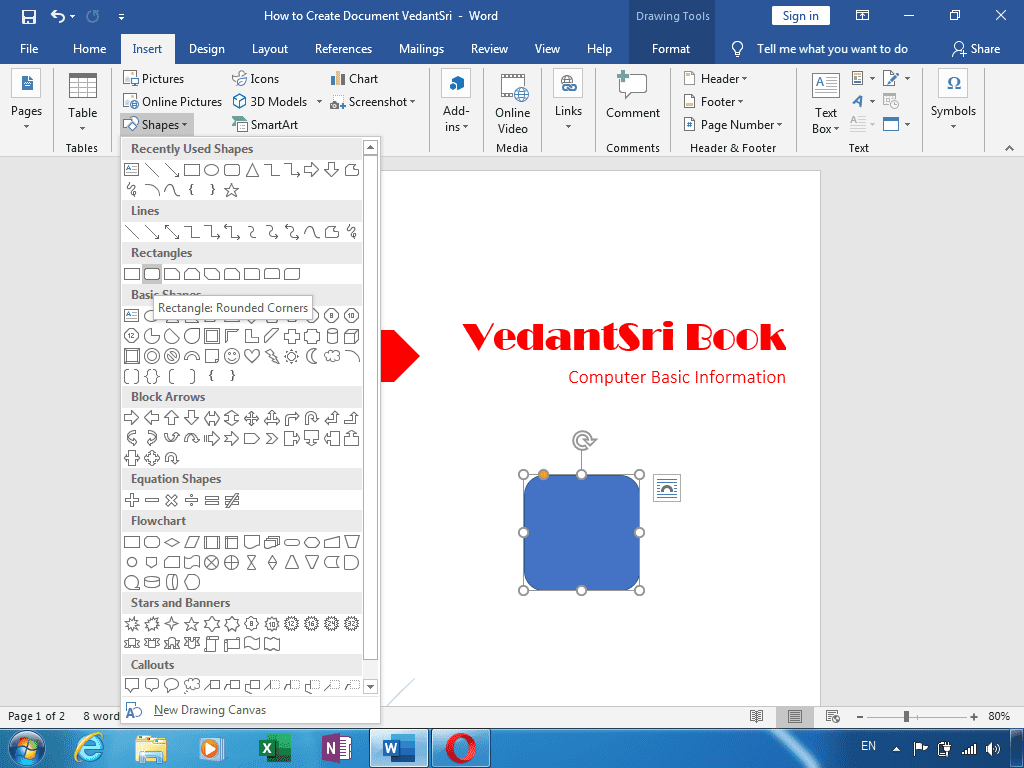
  • Also Time to time-to-time tests are taken with the related course.
  • live presentation
  • Alternate Days Theory, Projects, and Practical Session

Also Read:- Tally Course Fees, Duration, Scope, Syllabus, Admission, Institutes & Jobs in Varanasi

Teaching Language in O Level Classes?

The language of the computer is English, but you can learn it in English and Hindi.

Does Computer Basic Knowledge Require For O Level Course?

No, Computer basics knowledge is not required for O Level Classes. Because basic knowledge is taught in O Level Classes.

Does eligibility require O Level Classes?

Yes, if you have completed 10th, then you are eligible for O Level Classes.

Q: What are the eligibility criteria for the O Level course?

A: Yes, if you have completed 10th, then you are eligible for O Level Classes.

Q: Can I pursue the O Level course online?

A: Yes, you can pursue the O Level course online.

Q: What are the career prospects after completing the O Level course?

A: Because the O Level course (NIELIT, Govt. of India) is recognised by the Government & equivalent to a Diploma in Computer Applications, so it carries good weight in both government and private sector jobs.

Q: How do I choose the right institute for the O-Level course in Varanasi?

A: Teaching Quality & Methodology: Prefer institutes using hands-on training, live/classroom teaching, and real-time project guidance. Instructors with practical IT experience are a plus.

Placement & Certification Assistance:
Institutes that help with placement or job readiness and guide you through the NIELIT registration process offer better value.
Location & Reviews:
Consider proximity, accessibility, and peer reviews or ratings if available.

Q: Is there any entrance exam for the O Level course?

A: No, there is no entrance exam for admission into the O Level course.

Q: What are the fees for the O Level course?

A: INR 7,100

Q: Is O-Level good for a job scope?

A: Government Jobs, Programmer, IoT Architect Also, Information Security Analyst, Full Stack Developer

Q: What is the duration of the O-Level certificate?

A: O-Level is a beneficial degree, and the O-Level Course Duration is 12 Months.

Important links:

CCC Course Fees, Syllabus, Duration, Scope, Jobs, and Institute in Varanasi

CCC Course Fees, Syllabus, Duration, Scope, Jobs, and Institute in Varanasi

What is the CCC Course?

The Course on Computer Concepts (CCC) is designed to impart basic computer knowledge and skills to individuals. It is particularly beneficial for those seeking to enhance their computer literacy for personal and professional development. In this article, we will cover all the essential aspects of the CCC course, including fees, syllabus, duration, scope, job opportunities, and the best institutes offering this course in Varanasi.

CCC Course Fees, Syllabus, Duration, Scope, Jobs, and Institute in Varanasi

CCC Course Fees

Admission Fees for the CCC course are about 6 to 8 thousand. but in Offer VedantSri provides CCC Course in Varanasi for only 2500/- Rs. But in Vedantsri CCC Course is Free.

Download Nielit CCC Form

Download CCC Form Free here to Apply for CCC Exam Given Below Link, by clicking below link you can Download Latest CCC Nielit Form Easily.

CCC Course Syllabus

The CCC course syllabus is structured to provide comprehensive knowledge of basic computer concepts. Here is a breakdown of the syllabus:

  1. Introduction to Computer
    • History of Computers
    • Types of Computers
    • Components of a Computer System
  2. Operating System
    • Basics of an Operating System
    • Windows and Linux Overview
    • Using and Managing Files
  3. Word Processing
    • Introduction to Word Processing
    • Creating, Editing, and Formatting Documents
    • Printing Documents
  4. Spreadsheet
    • Basics of Spreadsheets
    • Creating and Editing Worksheets
    • Formulas and Functions
  5. Presentation Software
    • Introduction to Presentation Software
    • Creating Slideshows
    • Adding Multimedia Elements
  6. Internet and Email
    • Basics of the Internet
    • Using Search Engines
    • Email Communication
  7. Digital Financial Services
    • Online Banking
    • Digital Payment Methods
    • Security Measures

CCC Course Duration

The duration of the CCC course is typically 80 hours. This includes theory and practical sessions, distributed throughout 2 to 3 months, depending on the institute’s schedule and the learner’s pace.

Scope of CCC Course

The CCC course opens up various opportunities for individuals by enhancing their computer skills. It is beneficial for:

  • Students who want to enhance their computer knowledge.
  • Job seekers are looking to improve their resumes.
  • Small business owners who want to manage their business efficiently.
  • Individuals interested in digital literacy for personal growth.

Important Link: – CCC Online Test 2025 (Word)

CCC Course, Fees, Syllabus, Duration, Scope, Jobs, and Institute in Varanasi
VedantSri Varanasi

Job Opportunities After CCC

Completing the CCC course can lead to various job opportunities, such as:

  • Data Entry Operator
  • Office Assistant
  • Computer Operator
  • Front Desk Executive
  • Customer Support Executive

These roles are available in various sectors, including government offices, private companies, and educational institutions.

Important Link:-ADCA Course Fees, Duration, Scope, Syllabus, Admission, Institutes & Jobs in Varanasi

CCC Course, Fees, Syllabus, Duration, Scope, Jobs, and Institute in Varanasi

Best Institutes for CCC Course in Varanasi

Varanasi offers several reputed institutes where you can pursue the CCC course. Some of the top institutes include:

  1. VedantSri Varanasi
  2. Varanasi Institutes

FAQs

Q1: What is the eligibility for the CCC course? A1: There are no specific eligibility criteria for the CCC course. Anyone with a basic understanding of English and a desire to learn about computers can enrol.

Q2: Is the CCC course certificate recognised? A2: Yes, the CCC course certificate is recognised by many organisations and is valued for basic computer literacy.

Q3: Can I do the CCC course online? A3: Yes, many institutes offer the CCC course online, providing flexibility to learners.

Q4: What is the mode of examination for the CCC course? A4: The CCC course examination is conducted online, and it includes multiple-choice questions based on the syllabus.

Important Link:-Photoshop Course Fees, Duration, Scope, Syllabus, Admission, Institutes & Jobs in Varanasi

CCC Course, Fees, Syllabus, Duration, Scope, Jobs, and Institute in Varanasi
CCC Course Institutes |

Job Placement in the CCC Course?

A vast number of employment opportunities are being offered to graduates of the private and public sectors. Some of the job opportunities that a candidate can find are listed below:

  • Applications support engineer 
  • Computer Technician 
  • Data Entry Operator 
  • Application Support Executive 
  • BPO Executive 
  • Back Office Executive  
  • Clerk
  • Systems Officer 
  • Computer Operator Junior

Important Link:-Digital Marketing Course Fees, Duration, Syllabus, Scope, Institute, and Jobs in Varanasi

Does eligibility require For CCC Course?

Yes, if you have completed the 10th, then you are eligible for the CCC Course. CCC Course Fees

Does Basic Knowledge Require For the CCC Course?

No, Computer basics knowledge is not required for the CCC Course. Because basic knowledge is taught in the CCC Classes.

Important Link:-Free CCC Test Online

Teaching Language in the CCC Course?

Basically, the language of the computer is English, but you can learn it both in English and Hindi.

CCC Course, Fees, Syllabus, Duration, Scope, Jobs, and Institute in Uttar Pradesh
CCC Course Institutes |

DIT Course Details, Fees, Duration, Scope, Syllabus, Admission, Institutes & Jobs

DIT Course Details, Fees, Duration, Scope, Syllabus, Admission, Institutes & Jobs

What Is a Diploma In Information Technology (DIT)?

A certificate in Information Technology is a diploma-level Information Technology course. Data Technology is All About Computer Applications Like MS Excel, MS Word, the Internet, and mathematical data by a microelectronics-based blend of processing and broadcast communications. DIT Course Details

DIT Course Details, Fees, Duration, Scope, Syllabus, Admission, Institutes & Jobs

Also Read: – DCA Course Fees, Duration, Scope, Syllabus, Admission, Institutes & Jobs in Varanasi

Full Form of the DIT Course?

DIT Full Form is a Diploma In Information Technology.

Why demand DIT?

This is on the grounds that the Diploma courses give the information and abilities needed in businesses. In this way, it’s a task-situated course. The students of the Diploma in Information Technology Course figure out how to utilise the product for business purposes. They know the uses of the product planned by programmers. The items and services identified in the IT area are gadgets, semiconductors, Internet services, telecom administrations, e-commerce, and so on.

DFA Course Fees, Syllabus, Duration, Scope, Jobs, and Institute in Varanasi

Also Read: – About O Level Course, Top 1 Best Syllabus, Duration, Fees, Scope, Institute, and Jobs in Varanasi

What Skills Do We Get from Learning DIT?

Skills You Can Get From the DIT Course Given Below: –

  1. What is a Computer
  2. How To Assemble a Computer from Zero Knowledge
  3. How To do an Office-Related Documentation Job Work
  4. Knowledge To Create an Official Communicative Document
  5. How to Create a Flyer, Brochure, Form, Mailing
  6. Content Composing
  7. How To Manage Client, Customer, Product, and Services Database
  8. Learn To Create and Manage Bill Book, Cash Memo, Daybook
  9. How To Create Attendance, Salary Slip, and Loan Calculation
  10. Knowledge of dozens of Spreadsheet jobs is required for Projects
  11. How to Create a Theme, Scheme, Plan, and Ideas into a Presentation
  12. Text, Object, Link, Character, Trigger, Slides, types of Many More PPTs
  13. WWW and Internet
  14. Create Blogs and Websites Management
  15. How to do Affiliate Marketing
  16. Job Opportunities Over Freelancing
  17. SEO (Search Engine Optimisation)
  18. Create Google Maps Profiling
  19. How to do Social Media Marketing
  20. Work with AI Prompting
  21. Knowledge To Content Writing with SEO Friendly
  22. How to Create an AI-Based YouTube Shorts Clip and Video

Duration of DIT?

DIT is a Professional Expertise Job-Oriented Certificate. Thus, Its Duration is 4 Months.

Syllabus of DIT in Top Best Computer Training Institute?

The DIT Course Syllabus

  1. Fundamentals of Computer
  2. Assembling Overview
  3. MS Word 2024
  4. Excel Workbook 2024
  5. PowerPoint Presentation 2024
  6. WWW and Internet
  7. Blogs Management
  8. Affiliate Marketing
  9. Freelancing
  10. SEO (Search Engine Optimisation)
  11. Google Maps Profiling
  12. Social Media Marketing
  13. AI Prompting
  14. Content Writing with SEO Friendly
  15. YouTube Shorts Creation

Also Read: – CCC Course Fees, Syllabus, Duration, Scope, Jobs, and Institute in Varanasi

Admission Fees for DIT Courses in Top Computer Training Institute?

Admission Fees for the DIT course are about 4000 to 5000. Therefore, VedantSri provides DIT in Varanasi for only 2800/- Total and No Extra Admission Charges.

DIT Course Details, Fees, Duration, Scope, Syllabus, Admission, Institutes & Jobs

Offer in DIT in Top 1 Computer Training Institute?

If people want to learn the Best Computer Course in Varanasi, then they also need to Learn Computer Typing, English Speaking, Personality development, etc.
But the Good news is for those who want to learn DIT. Because VedantSri is providing 4 courses completely Free in the offer, and Free Courses Such As

  1. Free Computer Typing for 45 Days.
  2. English Spoken For 45 Days.
  3. Free Personality Development.
  4. CTT training.

Also Read: – DIT Course Details, Fees, Duration, Scope, Syllabus, Admission, Institutes & Jobs

Discount on DIT Course in Best Computer Training Institute?

However, from Time to Time, VedantSri Institute provides Discounts on different offers. DIT Course Details
Hence, currently, the VedantSri Discount offer is 50% off on any course Fees, and also admission Fees are FREE in this offer. DIT Course Details
DIT Course Details, Fees, Duration, Scope, Syllabus, Admission, Institutes & Jobs

Facilities in DIT in Top 1 Best Computer Training Institute?

Also, there are many facilities at DIT, Such As:-

  1. Projector Screen Classroom.

  2. 4-ways Technique.
  3. Project-Based Training.
  4. Online Test Facilities.
  5. Online Blog Support.
  6. Free Courses Training.
  7. CTT Training.

Also Read: – Top 3 Computer Diploma Courses, 6 Months of Computer Diploma, After 12th Pass Out Computer Courses.

DIT Course Details, Fees, Duration, Scope, Syllabus, Admission, Institutes & Jobs

Way to Teach of DIT in Top Computer Training Institute?

  • Project-Based.
  • The Best Knowledgeable Teachers teach the students with the projector.
  • Provided a single system for a single student.
  • Time-to-time test is taken with the related course.
  • Live presentation.
  • Alternate Days Theory, Projects, and Practical Session.
  • Student skips their lab or Theory class-related video is available on the VedantSri Android apps.
  • Provided the Latest Project Training.
  • Online Test.
  • Practical Classes.

Read Also: – Tally Course Fees, Duration, Scope, Syllabus, Admission, Institutes & Jobs in Varanasi

Diploma in Financial Accounting Course, Details, Fees, Duration, Syllabus, Institute, Admission & Jobs

Course Category of DIT?

The course Category of DIT is the Certificate.

Jobs Opportunity After DIT Course

  1. Computer System Assembling Jobs
  2. Official Document Creator
  3. Spreadsheet Database Manager
  4. Billing & Printing
  5. Cash Memo, Invoice, Receipt Generator
  6. Content Animator
  7. Content Perpetrator
  8. Company Blogs and Website Manager
  9. Blogs Content Updater
  10. Company Social Media Marketer
  11. Pro YouTube Channel Thumbnail, Titles, Description, Creator
  12. Content Writer
  13. Affiliate Marketer
  14. Freelancers

Is computer Basic Knowledge required for DIT?

At Last, no Computer Basic Knowledge is Required For DIT. So basic knowledge is taught in DIT.

Teaching Language in DIT?

The Language Taught Here In English. However, you can learn it both in Hindi and English.

DIT Course Details, Fees, Duration, Scope, Syllabus, Admission, Institutes & Jobs

FAQs

Q: What are the eligibility criteria for the DIT course in Best Computer Training Institute?

A: The primary eligibility criterion is the completion of 10 or equivalent from a recognised board. A basic knowledge of computers is preferred, but not mandatory.

Q: Can I pursue the DIT course online?

A: Yes, many institutes offer online DIT courses, providing flexibility for working professionals and students who prefer distance learning.

Q: What are the career prospects after completing the DIT course?

A: DIT can pursue various roles such as Computer software development, IT support, network administration, cybersecurity, digital marketing, and more.

Q: How do I choose the right institute for the DIT course in Varanasi?

A: Consider factors like the institute’s reputation, faculty experience, infrastructure, placement assistance, and course fees when choosing an institute.

Q: Is there any entrance exam for the DIT course?

A: Yes, for some courses at DIT University, specifically B.Tech programs, JEE Main scores are accepted for admission

Q: What are the fees for the DIT course syllabus?

A: INR 4,000 to INR 5,000

Q: Is DIT good for a job?

A: Whether DIT is good for a job depends on individual career goals and expectations.

Q: What is the duration of the DIT certificate?

A: As soon as the Certificate is achieved, when the Course is completed, and the Course Certificate Completion Duration is 12 Months Only.

Important External Link

  1. VedantSri Official Website:- https://vedantsri.com
  2. Course Store Website:- https://vedantsri.in
  3. Jobs Assist Website:- https://www.jobdo.in
  4. MS Word Class:- https://mswordclass.com/
  5. Corel Free Class:- https://corelclass.com/
  6. Free Excel Class:- https://msexcelclass.com/
0%
872
A To Z Tally Shortcut Keys Online Test Series 102

A To Z Tally Shortcut Keys Online Test Series 2025

1 / 36

Tally Shortcut to Open Help Website?

2 / 36

Press Ctrl+F6 To Open

3 / 36

Tally Shortcut key to Change Current date?

4 / 36

Press Ctrl+F8 To Open

5 / 36

Shortcut Key To Open Configuration Setting in Tally?

6 / 36

F7 Open Journal Voucher in Tally

7 / 36

Press F6 to Open

8 / 36

Press Alt+F8 To Open

9 / 36

Press F3 in Tally To Open

10 / 36

F9 Open Purchase Return Voucher

11 / 36

Tally Shortcut Key To Check Installed Release

12 / 36

Use of Ctrl+A in Tally

13 / 36

Press Backspace Key Go to Previous Options in Tally

14 / 36

Tally F4 To Open

15 / 36

Shortcut Key to Open Physical Stock in Tally?

16 / 36

Press Ctrl+Alt+R in Tally To Open

17 / 36

Shortcut key To Open Features Setting In Tally?

18 / 36

Press Alt+F9 To Open

19 / 36

Press Ctrl+F3 in Tally To Open

20 / 36

Esc Key Press to Go Back/Previous Pages in Tally

21 / 36

Single Underline Represents in Tally

22 / 36

Press F5 To Open

23 / 36

Tally Shortcut key To Change Date Periods?

24 / 36

Press Ctrl+F5 To Open Rejection Out Voucher in Tally

25 / 36

Tally Shortcut Key to Open Others Voucher?

26 / 36

Shortcut Key To Open Purchase Order Voucher?

27 / 36

Shortcut key To Open Stock Journal in Tally?

28 / 36

Press Alt+F5 to Open Which Voucher

29 / 36

Tally Shortcut Key To Open Company Menu

30 / 36

Shortcut Key To Check Tally Product Information

31 / 36

Contra Voucher Used To Record Banks Related Entry in Tally

32 / 36

Double Underline Represent in Tally

33 / 36

Press Ctrl+F4 To Open

34 / 36

Press Alt+F3 in Tally Open

35 / 36

Press F8 To Open

36 / 36

F1 Key

Your score is

The average score is 34%

0%

Download This Course Syllabus in PDF

Call Now Button