Home Blog Page 19

MS PowerPoint Questions Answers

MS PowerPoint Questions Answers

Que 1. MS PowerPoint का क्या use है?

Ans. MS PowerPoint का use हम कोई भी presentation बनाने के लिए करते है जैसे की identity card, alphabetical books, video type presentation, etc. MS PowerPoint Questions Answers

Que 2. MS PowerPoint का Run command क्या है?

Ans. MS PowerPoint का run command powerpnt होता है

Que 3. MS PowerPoint का Minimum और Maximum size कितनी है?

Ans:- Minimum Size – 8 और Maximum Size-96 होती है

Que 4. MS power point में कितने menu होते है?

Ans.MS PowerPoint में 8 menus होते है home, insert, design, animation, slide show, review, view. MS PowerPoint Questions Answers

Also Read: ADCA Course Fees, Duration, Scope, Syllabus, Admission, Institutes & Jobs in Varanasi

Que 5. MS PowerPoint के home menu में कितने tools box होते है?

Ans. ms PowerPoint में 6 tool होते है clipboard, slide, font, paragraph, drawing, editing.

MS PowerPoint Questions Answers

Que 6. MS powerpoint के insert menu में कितने tool होते है?

Ans. ms PowerPoint में 5 tools होते है table, illustration, links, text, media clip. MS PowerPoint Questions Answers

Que 7. MS powerpoint में illustration tool किस menu में आता है?

Ans. insert में

Que 8. MS PowerPoint में add-ins किस menu में आता है?

Ans. Insert menu में

Que 9. MS PowerPoint में design menu में कितने toolbox है?

Ans. 3 Setup, theme, background. MS PowerPoint Questions Answers

Also Read: O Level Course Detail, Fees, Duration, Syllabus, Scope, Institute, Admission, and Jobs in Varanasi

Que 10.MS powerpoint में review menu में कितने tool होते है?

Ans. 3 Proofing, comment, protect.

Que 11. MS PowerPoint में clipboard toolbox का क्या use है?

Ans . इस tool box का use हम power point slide पर insert कराये गए shape ,picture, text को एक जगह से हटाके दुसरे जगह पर रखने के लिए तथा cut, copy, paste करके एक जगह से दुसरे जगह पर रखने के लिए तथा किसी भी shape पर same editing दुसरे shape पर देने के लिए इस tool box का use करते है MS PowerPoint Questions Answers

Que 12. MS PowerPoint में format painter का क्या use है?

Ans. इस tool का Use हम किसी भी shape पर same editing दुसरे shape पर देने के लिए करते है

Que 13. MS PowerPoint में slides toolbox का क्या use है?

Ans. इस tool box का use power point slide पर एक नया slide लेने के लिए तथा लिए गए slide में editing करने के लिए और slide पर name add करने के लिए इस toolbox का use करते है MS PowerPoint Questions Answers

Que 14. MS PowerPoint में font toolbox का क्या use है?

Ans. इस toolbox का use पॉवर point slide में लिए गए shape में लिखे गए matter के बिच के spacing को कम और ज्यादा करने के लिए इस toolbox का use करते है MS PowerPoint Questions Answers

Que 15. MS PowerPoint में paragraph toolbox का use क्या है?

Ans. इस tool box का use power point slide में लिखे गए shape के अन्दर लिखे हुए matter को top ,middle ,bottom में करने के लिए तथा लिखे गए matter के बिच में column देने के लिए इस toolbox का use करते है MS PowerPoint Questions Answers

Read Also: DCA Course Fees, Duration, Scope, Syllabus, Admission, Institutes & Jobs in Varanasi

Que 16. MS PowerPoint के editing toolbox में कितने tools है?

Ans. 3 Find, Replace, and select all

Que 17. MS powerpoint में link का क्या use है?

Ans. इस toolbox का use पॉवर point slide में insert कराये गए shape में लिखे गए matter पर कोई भी object ,video ,picture जोड़ने के लिए और power point में बनाये गए presentation के slide को किसी एक slide में कई सारे slide को insert करने के लिए तथा किसी भी text पर action देने के लिए इस toolbox का use करते है | MS PowerPoint Questions Answers

Que. 18. MS PowerPoint में media tool का क्या use है?

Ans. इस toolbox का use power point slide पर video चलने के लिए करते है

Que 19. MS power point में variants toolbox का क्या use है?

Ans. इस toolbox का use power point slide पर लिए गए theme को edit करने के लिए इस toolbox का use करते है?

Que 20. MS powerpoint में theme का क्या use है?

Ans . इस toolbox का use पॉवर point slide पर अलग अलग तरह का theme लेने के लिए इस toolbox का use करते है MS PowerPoint Questions Answers

Important Link: DFA Course Fees, Syllabus, Duration, Scope, Jobs, and Institute in Varanasi

Que 21. MS powerpoint में customize का क्या use है?

Ans. इस toolbox का use power point slide पर लिए गए theme के background को format करने के लिए तथा slide के size को बड़ा या छोटा करेने के लिए इस toolbox का use करते है MS PowerPoint Questions Answers

Que 22. MS powerpoint में preview का क्या use है?

Ans. इस toolbox का use power point slide में बनाये गए presentation को बड़ा करके देखने के लिए इस toolbox का use करते है MS PowerPoint Questions Answers

Que 23.MS PowerPoint में transition to this slide का क्या use है?

Ans . इस toolbox का use power point slide पर transition देने के लिए तथा effect देने के लिए इस toolbox का use करते है MS PowerPoint Questions Answers

Que 24. ms PowerPoint में timing toolbox का क्या use है?

Ans. इस toolbox का use पॉवर point slide पर बनाये गए presentation को एक fix time देने के लिए और बनाये गए presentation को साथ apply to all करने के लिए तथा presentation को आटोमेटिक प्ले करने के लिए इस toolbox का use करते है|

Important Link: CCC Course Fees, Syllabus, Duration, Scope, Jobs, and Institute in Varanasi

Que 25. MS PowerPoint में advanced animation का क्या use है?

Ans. इस toolbox का use power point slide में insert कराये गए picture, shape, text पर advanced effect देने के किये और shape, picture, text पर दिए गए animation को एक साथ देखने के लिए एक साथ animation को mouse द्वारा चलने के लिए इस toolbox का use करते है MS PowerPoint Questions Answers

Que 26. MS PowerPoint में start slide show का क्या use है?

Ans. इस toolbox का use पॉवर point slide पर बनाये गए presentation को current slide से play करके देखने के लिए और बनाये गए कोशुरु से देखने के लिए (from begining ) तथा sellacted slide को play करके देखने के लिए PRESENTATION को online देखने के लिए इस toolbox का use करते है

Que 27. ms PowerPoint में setup toolbox का क्या use है?

Ans. इस toolbox का use पॉवर point slide पर बनाये गए presentation को हाईड करने के लिए और presentation को record करने के लिए तथा बनाये गए presentation में timing को बदलने के लिए इस toolbox का use करते है|

Read Also: DTP Course Fees, Duration, Scope, Syllabus, Admission, Institutes & Jobs in Varanasi

Que.28 MS power point में moniters का क्या use है?

Ans. इस toolbox का use power point slide पर बनाये गए presentation को automatically play करके देखने के लिए लिए इस toolbox का use करते है

Que 29. MS PowerPoint में master view का क्या use है?

Ans. इस toolbox का use power point slide में कई सरे slide को एक साथ देखने के लिए और एक slide में कई सारे slide को लेने के लिए तथा एक slide में कई slide को देखने के लिए इस toolbox का use करते है

Que 30. MS powerpoint में show का use क्या है?

Ans. is toolbox का यूजर power point slide के ruler bar को दिखने और छुपाने के लिए और graide line को दिखने और छुपाने के लिए तथा slide को छोटा और बड़ा करने के लिए इस toolbox का use करते है

Que 31. MS PowerPoint में zoom tool का क्या use है?

Ans. इस toolbox का use पॉवर point slide पर slide को बड़ा या छोटा करने के लिए तथा slide एक fix size में करने के लिए इसका use करते है

Que 32. MS power point में color और grayscale का क्या use है?

Ans. इस toolbox का use power point slide पर लिए गए theme को color को black and white में करने के लिए तथा लिए गए theme को color में करने के लिए इस toolbox का use करते है

Que 33. MS PowerPoint का extension name बताइए?

Ans. MS PowerPoint का extension name .pptx है

Que 34. macro और window ms power point के किस menu में आते है

Ans. view

Leant in MS Excel: https://youtu.be/4Y63MuEsMO4

Learnt bill remainder in MS Excel: https://youtu.be/ViP3_65P84s

MS Excel form with database macro project: https://youtu.be/tgFn7dWGIRQ

MS Word cover page design: https://youtu.be/zbkXeGNW23U

MS Excel basic calculator basic project: https://youtu.be/ELZ9MDKU3e4

MS word 3D design project: https://youtu.be/JTgFRIMnfKU

MS Word certificate project: https://youtu.be/NyqBEU5nTxA

VedantSri official website: https://vedantsri.com

Course store website: https://vedantsri.in

Job assist website: https://www.jobdo.in

MS Word class: https://mswordclass.com/ 

Corel free class: https://corelclass.com/ 

Free Excel class: https://msexcel.com/ 

Spoken English Helping Verbs

Spoken English Helping Verbs

1-Should – चाहिए {Chahiye}:

उसे जाना चाहिए।
Use Jana Chahiye.
He should go.

मुझे खेलना चाहिए।
Mujhe khelna chahiye.
I should play.

Also Read: Most Used words English-Spoken

2-Must – जरूर चाहिए {Zaroor Chahiye}:

उसे अवश्य जाना चाहिए।
Use avashya jana chahiye.
He must go.

उसे अस्पताल जरूर जाना चाहिए।
Use aspatal zaroor jana chahiye.
He must go to the hospital.

Also Read: English Spoken FeelLike Uses

3-Should be (होना चाहिए)

वह घर पर होना चाहिए।
Wah ghar par hona chahiye.
He should be at home.

मुझे आपके साथ होना चाहिए।
Mujhe tumhare sath rahna chahiye.
I should be with you.

Read Also: 14 Usage in English-Speaking

4-Should have (पास होना चाहिए)

मेरे पास कम से कम कुछ होना चाहिए।
Mere paas kam se kam kuch hona chahiye.
I should have at least something.

हमारे पास कम से कम 5000 रूपए होने चाहिए।
Hamaare paas kam se kam 5000 rupay hone chahiye.
We should have at least ₹5000.

Also Learn: Learn Tense in English-Speaking

5-चाहिए था {Chahiye tha}:

मुझे चले जाना चाहिए था।
Mujhe chale jana chahiye tha.
I should have gone.

उसे आना चाहिए था।
Use Aana Chahiye tha.
He should have come.

Learn Also: Daily Routine in English-Speaking

6-Is/Am/Are + to
किसी काम को करना है (Kisi kaam ko karna hai)

हमें आपसे मिलना है।
Hamen aapase milana hai.
We are to meet you.

मुझे स्कूल जाना है।
Mujhe school jaana hai.
am to go to school.

Important Link: Introduction in English-Speaking

7-Has/Have + to (पड़ता है)

मुझे स्कूल जाना पड़ता है।
Mujhe school jana padta hai.
I have to go to School.

राम को बाजार जाना है।
Ram ko baajaar jaana hai.
Ram has (has got) to go to market. (Spoken English Helping Verbs)

Learn Also: Top 3 Computer Diploma Courses, 6 Months of Computer Diploma, After 12th Pass Out Computer Courses

8-Was/Were + to (ना था)

हमें आपसे मिलना था।
Hamen aapase milana tha.
We were to meet you.

मुझे स्कूल जाना था।
Mujhe school jaana tha.
was to go to school.

9-Had + to (पड़ता था या पड़ा)

मुझे स्कूल जाना पड़ता था।
Mujhe school jana padta tha.
I had to go to School.

मुझे स्कूल जाना पडा।
Mujhe school jana pada.
I had to go to School. (Spoken English Helping Verbs)

10-Will have to (पड़ेगा)

Spoken English Helping Verbs

मुझे आपसे मिलना होगा/पड़ेगा।
mujhe aapase milana hoga/padega.
will have to meet you.

हमें आपके घर आना होगा/पड़ेगा।
hamen aapake ghar aana hoga/padega.
We will have to come to your home. (Spoken English Helping Verbs)

11-Would have to (होता)

मुझे आपसे मिलना होता।
mujhe aapase milana hota.
would have to meet you.

हमें आपके घर आना होता।
hamen aapake ghar aana hota.
We would have to come to your home. (Spoken English Helping Verbs)

12-Must be (जरूर होना चाहिए/जरूर होगा)

उसे घर पर जरूर होना चाहिए।
Use ghar par zaroor hona chahiye.
He must be at home.

उसे इस वक्त स्कूल में जरूर होना चाहिए।
Use is waqt school me zaroor hona chahiye.
She must be in school right now.

वो वहाँ जरूर होगा।
Vo vahaan zaroor hoga.
He must be there. (Spoken English Helping Verbs)

Must have (पास जरूर होना चाहिए/पास जरूर होगा/ मिलना चाहिए था )

उसके पास मोबाईल जरूर होना चाहिए।
Uske paas mobile zaroor hona chahiye.
He must have a mobile.

राहुल के पास कैल्कुलेटर जरूर होगा।
Rahul ke paas calculator zaroor hoga.
Rahul must have a calculator.

हमें आपके ऑफिस जरूर आना चाहिए था।
Hamen aapke office zaroor aana chahiye tha.
We must have come to your office. (Spoken English Helping Verbs)

Can (सकता है)

आप मैच जीत सकते हैं।
aap maich jeet sakate hain.
You can win the match.

मैं आसानी से परीक्षा पास कर सकता हूँ।
main aasaanee se pareeksha paas kar sakata hoon.
I can pass the exam easily.

Can be (किया जा सकता है)

यह लक्ष्य हासिल किया जा सकता है।
yah lakshy haasil kiya ja sakata hai.
This target can be achieved.

यह किया जा सकता है।
yah kiya ja sakata hai.
It can be done.

Can have (पास हो सकता है)

जल्द ही आपके पास एक अच्छी नौकरी हो सकती है।
jald hee aapake paas ek achchhee naukaree ho sakatee hai.
You can have a good job soon.

मेरे पास अगले साल कार हो सकती है।
mere paas agale saal kaar ho sakatee hai.
I can have a car next year.

Could (सकता/सका)

मैं किसी तरह उससे मिल सका।
main kisee tarah usase mil saka.
I could somehow meet him.

वह क्रिकेट खेल सकता यदि उसे चांस मिले तो|
wah cricket Khel skta yadi use chance mile to.
He could play cricket if he gets the chance.

Spoken English Helping Verbs

1-VedantSri Official Website:- https://vedantsri.com

2-Course Store Website:- https://vedantsri.in

3-Jobs Assist Website:- https://www.jobdo.in

4-MS Word Class:- https://mswordclass.com/

External Link

1-VedantSri Official Website:- https://vedantsri.com

2-Course Store Website:- https://vedantsri.in

3-Jobs Assist Website:- https://www.jobdo.in

4-MS Word Class:- https://mswordclass.com/

5-Corel Free Class:- https://corelclass.com/

6-Free Excel Class:- https://msexcelclass.com/

MS Word Online Test Set, Comprehensive, Interactive, and Free Practice Tests to Master Microsoft Word

MS Word Online Test Set, Comprehensive, Interactive, and Free Practice Tests to Master Microsoft Word

This is the MS Word Latest Version Related to the MS Word Online Test of September. In this post, you will prepare yourself Questions with Answers related to WinWord.

0%
2933

MS Word Basic Online Test 5471

MS Word Basic Online Test Series 5471

1 / 32

Line Spacing is in the _____ of MS Word.

2 / 32

Latest Version of MS Word in 2024 Now...

3 / 32

Shortcut To Insert Bullets...

4 / 32

Correct Email Format...

5 / 32

MS Word's Run Command:

6 / 32

Default Means?

7 / 32

The name of a word document displays in

8 / 32

The Key Used to Cancel...

9 / 32

Which term is not related to the font?

10 / 32

Default Min and Max Font Size?

11 / 32

Custom Means?

12 / 32

MS Word develop by which company?

13 / 32

Shortcut key for copy in MS Word's format painter tool?

14 / 32

Page Count Display in...

15 / 32

To Deselect Text, press

16 / 32

What is the default page size for word documents?

17 / 32

Size of A4 Paper...

18 / 32

Object is...

19 / 32

To Fill Picture in Shape, Option Available in...

20 / 32

Table can be deleted by...

21 / 32

Keyboard can type...

22 / 32

Shape Related Customization available in...

23 / 32

To apply center alignment to a paragraph we can press

24 / 32

Which of the following is not a type of page margin?

25 / 32

MS Word Extension name?

26 / 32

Formatting Means

27 / 32

Use of Shift+f3?

28 / 32

Which is not in MS word?

29 / 32

Select All the text in MS Word documents by

30 / 32

Shortcut Key To Customize Absolute Font Size?

31 / 32

Word Create...

32 / 32

Font is

Your score is

The average score is 41%

0%

Pos.NameScoreDurationPoints
1Tamanna sharma100 %57 seconds32 / 32
2Sarthak maurya100 %59 seconds32 / 32
3Shweta Singh100 %59 seconds32 / 32
4Tamanna Sharma100 %59 seconds32 / 32
5Shweta gupta100 %59 seconds32 / 32
6Aparna Singh100 %1 minutes 1 seconds32 / 32
7Kajal100 %1 minutes 1 seconds32 / 32
8Tamanna Sharma100 %1 minutes 2 seconds32 / 32
9Mayank Vishwakarma100 %1 minutes 3 seconds32 / 32
10Tamanna Sharma100 %1 minutes 3 seconds32 / 32
11Ankit Sharma100 %1 minutes 3 seconds32 / 32
12Shweta Shah..100 %1 minutes 4 seconds32 / 32
13Aparna Singh100 %1 minutes 4 seconds32 / 32
14Harsh singh100 %1 minutes 5 seconds32 / 32
15Tamanna Sharma100 %1 minutes 5 seconds32 / 32
16Shweta gupta100 %1 minutes 5 seconds32 / 32
17Harsh kumar singh100 %1 minutes 6 seconds32 / 32
18Jaya patel100 %1 minutes 6 seconds32 / 32
19Tamanna Sharma100 %1 minutes 6 seconds32 / 32
20Vishal Yadav100 %1 minutes 6 seconds32 / 32
21Shweta Shah100 %1 minutes 6 seconds32 / 32
22Jaya patel100 %1 minutes 6 seconds32 / 32
23Jaya patel100 %1 minutes 7 seconds32 / 32
24Tamanna Sharma100 %1 minutes 8 seconds32 / 32
25Tamanna Sharma100 %1 minutes 8 seconds32 / 32
26Tanish100 %1 minutes 8 seconds32 / 32
27Harsh singh100 %1 minutes 8 seconds32 / 32
28Jaya patel100 %1 minutes 8 seconds32 / 32
29Tamanna Sharma100 %1 minutes 8 seconds32 / 32
30Tamanna Sharma100 %1 minutes 9 seconds32 / 32
31Tamanna sharma100 %1 minutes 9 seconds32 / 32
32Tamanna Sharma100 %1 minutes 9 seconds32 / 32
33Tamanna sharma100 %1 minutes 9 seconds32 / 32
34Vishal Yadav100 %1 minutes 9 seconds32 / 32
35Harsh kumar singh100 %1 minutes 10 seconds32 / 32
36Tamanna Sharma100 %1 minutes 10 seconds32 / 32
37Ritika Thapa100 %1 minutes 10 seconds32 / 32
38Jaya patel100 %1 minutes 10 seconds32 / 32
39Tamanna sharma100 %1 minutes 10 seconds32 / 32
40Tamanna Sharma100 %1 minutes 10 seconds32 / 32
41Tamanna Sharma100 %1 minutes 10 seconds32 / 32
42Jaya patel100 %1 minutes 11 seconds32 / 32
43Jaya patel100 %1 minutes 11 seconds32 / 32
44Shweta gupta100 %1 minutes 11 seconds32 / 32
45Ritika Thapa100 %1 minutes 11 seconds32 / 32
46Gautam Prajapati100 %1 minutes 11 seconds32 / 32
47Jaya patel100 %1 minutes 11 seconds32 / 32
48Jaya patel100 %1 minutes 11 seconds32 / 32
49Jaya patel100 %1 minutes 11 seconds32 / 32
50Tamanna Sharma100 %1 minutes 11 seconds32 / 32
51Manas100 %1 minutes 11 seconds32 / 32
52Manas100 %1 minutes 11 seconds32 / 32
53Ayush patel100 %1 minutes 12 seconds32 / 32
54Chandrachurna Singh100 %1 minutes 12 seconds32 / 32
55Ritika Thapa100 %1 minutes 12 seconds32 / 32
56Manas100 %1 minutes 12 seconds32 / 32
57Tamanna Sharma100 %1 minutes 13 seconds32 / 32
58Tamanna Sharma100 %1 minutes 13 seconds32 / 32
59Manas100 %1 minutes 13 seconds32 / 32
60Satyam100 %1 minutes 14 seconds32 / 32
61Ritika Thapa100 %1 minutes 14 seconds32 / 32
62Ritika Thapa100 %1 minutes 14 seconds32 / 32
63Jaya patel100 %1 minutes 14 seconds32 / 32
64Sarthak maurya100 %1 minutes 15 seconds32 / 32
65Mayank Vishwakarma100 %1 minutes 15 seconds32 / 32
66Tamanna sharma100 %1 minutes 15 seconds32 / 32
67Vishal Yadav100 %1 minutes 15 seconds32 / 32
68Aparna Singh100 %1 minutes 15 seconds32 / 32
69Tamanna Sharma100 %1 minutes 15 seconds32 / 32
70Ankit Sharma100 %1 minutes 15 seconds32 / 32
71Ritika Thapa100 %1 minutes 16 seconds32 / 32
72Vagisha100 %1 minutes 16 seconds32 / 32
73Tamanna Sharma100 %1 minutes 17 seconds32 / 32
74Tamanna Sharma100 %1 minutes 17 seconds32 / 32
75Ritika Thapa100 %1 minutes 17 seconds32 / 32
76Jaya patel100 %1 minutes 17 seconds32 / 32
77Ritika Thapa100 %1 minutes 18 seconds32 / 32
78Pragya pandey100 %1 minutes 19 seconds32 / 32
79Naitik chakrawal100 %1 minutes 19 seconds32 / 32
80Krishna Rawat100 %1 minutes 19 seconds32 / 32
81Tamanna Sharma100 %1 minutes 19 seconds32 / 32
82Satyam100 %1 minutes 20 seconds32 / 32
83Arti pal100 %1 minutes 20 seconds32 / 32
84Manas100 %1 minutes 20 seconds32 / 32
85Ayush patel100 %1 minutes 21 seconds32 / 32
86lol100 %1 minutes 21 seconds32 / 32
87Nitish jaiswal100 %1 minutes 22 seconds32 / 32
88Nitin pal100 %1 minutes 22 seconds32 / 32
89Rishu Chaurasiya100 %1 minutes 23 seconds32 / 32
90Ahtesham100 %1 minutes 23 seconds32 / 32
91Harsh kumar singh100 %1 minutes 24 seconds32 / 32
92Vishal yadav100 %1 minutes 24 seconds32 / 32
93Jaya patel100 %1 minutes 25 seconds32 / 32
94Ankit Sharma100 %1 minutes 25 seconds32 / 32
95Ritika Thapa100 %1 minutes 25 seconds32 / 32
96Aditya Bharti100 %1 minutes 26 seconds32 / 32
97Nitish jaiswal100 %1 minutes 26 seconds32 / 32
98Ankit Sharma100 %1 minutes 26 seconds32 / 32
99Aditya singh100 %1 minutes 27 seconds32 / 32
100Abhay100 %1 minutes 27 seconds32 / 32
101Bhart Singth100 %1 minutes 28 seconds32 / 32
102Vagisha100 %1 minutes 28 seconds32 / 32
103Nitish jaiswal100 %1 minutes 28 seconds32 / 32
104Jaya patel100 %1 minutes 28 seconds32 / 32
105Ishita patel100 %1 minutes 29 seconds32 / 32
106Ehtesham Hussain100 %1 minutes 30 seconds32 / 32
107Tausif Akhtar100 %1 minutes 30 seconds32 / 32
108Kajal 04100 %1 minutes 30 seconds32 / 32
109Nikita yadav100 %1 minutes 31 seconds32 / 32
110Abhay kumar100 %1 minutes 31 seconds32 / 32
111Manas100 %1 minutes 31 seconds32 / 32
112Suhani Singh100 %1 minutes 31 seconds32 / 32
113Mayank100 %1 minutes 31 seconds32 / 32
114Nikita yadav100 %1 minutes 32 seconds32 / 32
115Pranjali100 %1 minutes 32 seconds32 / 32
116Paridhi100 %1 minutes 32 seconds32 / 32
117Naveen100 %1 minutes 32 seconds32 / 32
118Tamanna Sharma100 %1 minutes 32 seconds32 / 32
119Aditya Bharti100 %1 minutes 33 seconds32 / 32
120Pappu100 %1 minutes 33 seconds32 / 32
121Manish maurya100 %1 minutes 34 seconds32 / 32
122Aneesur Rahman100 %1 minutes 34 seconds32 / 32
123Vivek M100 %1 minutes 34 seconds32 / 32
124Aditya Bharti100 %1 minutes 35 seconds32 / 32
125Satyam100 %1 minutes 35 seconds32 / 32
126Rammani yadav100 %1 minutes 36 seconds32 / 32
127Sneha Sonkar100 %1 minutes 37 seconds32 / 32
128Ayush Kumar Singh100 %1 minutes 37 seconds32 / 32
129Shashank singh100 %1 minutes 37 seconds32 / 32
130Arti pal100 %1 minutes 38 seconds32 / 32
131Tamanna Sharma100 %1 minutes 38 seconds32 / 32
132Ashutosh Bhardwaj100 %1 minutes 38 seconds32 / 32
133Divya Dubey100 %1 minutes 39 seconds32 / 32
134Aditya Bharti100 %1 minutes 40 seconds32 / 32
135Ritika Thapa100 %1 minutes 40 seconds32 / 32
136Shweta kumari100 %1 minutes 40 seconds32 / 32
137Vishal100 %1 minutes 40 seconds32 / 32
138Nancy Gupta100 %1 minutes 40 seconds32 / 32
139Vikram Singh100 %1 minutes 41 seconds32 / 32
140Shreya100 %1 minutes 42 seconds32 / 32
141Arpita singh100 %1 minutes 42 seconds32 / 32
142Arti pal100 %1 minutes 42 seconds32 / 32
143Pragati Gupta100 %1 minutes 42 seconds32 / 32
144Rishabh Gautam100 %1 minutes 42 seconds32 / 32
145Abhay100 %1 minutes 42 seconds32 / 32
146Tamanna Sharma100 %1 minutes 43 seconds32 / 32
147Ritika Thapa100 %1 minutes 43 seconds32 / 32
148Neha100 %1 minutes 43 seconds32 / 32
149Anmol100 %1 minutes 43 seconds32 / 32
150Arpita Singh100 %1 minutes 44 seconds32 / 32
151Arti pal100 %1 minutes 45 seconds32 / 32
152bart100 %1 minutes 45 seconds32 / 32
153Ritika Thapa100 %1 minutes 45 seconds32 / 32
154Rishabh100 %1 minutes 45 seconds32 / 32
155Manju Sharma100 %1 minutes 45 seconds32 / 32
156doctor100 %1 minutes 45 seconds32 / 32
157Demacreace100 %1 minutes 46 seconds32 / 32
158Shashank singh100 %1 minutes 46 seconds32 / 32
159Prerna100 %1 minutes 47 seconds32 / 32
160Chahat yadav100 %1 minutes 47 seconds32 / 32
161Deepanshu100 %1 minutes 47 seconds32 / 32
162Nancy gupta100 %1 minutes 47 seconds32 / 32
163Sanjana chauhan100 %1 minutes 48 seconds32 / 32
164Aditya singh100 %1 minutes 48 seconds32 / 32
165Neha100 %1 minutes 48 seconds32 / 32
166DEV100 %1 minutes 48 seconds32 / 32
167Ayushi shah100 %1 minutes 48 seconds32 / 32
168?????100 %1 minutes 49 seconds32 / 32
169Shahid juned100 %1 minutes 49 seconds32 / 32
170Mayank100 %1 minutes 50 seconds32 / 32
171Paridhi sonkar100 %1 minutes 50 seconds32 / 32
172Shrey pathak100 %1 minutes 50 seconds32 / 32
173Naman sahani100 %1 minutes 50 seconds32 / 32
174Arti pal100 %1 minutes 51 seconds32 / 32
175Rishabh Gautam100 %1 minutes 52 seconds32 / 32
176Aditya Bharti100 %1 minutes 52 seconds32 / 32
177Divesh100 %1 minutes 52 seconds32 / 32
178Lucky maurya100 %1 minutes 53 seconds32 / 32
179Nancy Gupta100 %1 minutes 53 seconds32 / 32
180Arti pal100 %1 minutes 54 seconds32 / 32
181Aditya Bharti100 %1 minutes 54 seconds32 / 32
182Paridhi sonkar100 %1 minutes 54 seconds32 / 32
183Pragati Gupta100 %1 minutes 54 seconds32 / 32
184vivek100 %1 minutes 54 seconds32 / 32
185vivek100 %1 minutes 56 seconds32 / 32
186Anjum bano100 %1 minutes 57 seconds32 / 32
187abhinav prajapati100 %1 minutes 57 seconds32 / 32
188Muskan gupta100 %1 minutes 58 seconds32 / 32
189Anjali Dubey100 %1 minutes 58 seconds32 / 32
190Arpita singh100 %2 minutes32 / 32
191Priyanshu gautam100 %2 minutes32 / 32
192Shashank singh100 %2 minutes32 / 32
193Mridul Srivastava100 %2 minutes 1 seconds32 / 32
194Shakti Pratap Singh100 %2 minutes 1 seconds32 / 32
195king100 %2 minutes 1 seconds32 / 32
196Jaya patel100 %2 minutes 2 seconds32 / 32
197Vishal jii100 %2 minutes 2 seconds32 / 32
198Arpita singh100 %2 minutes 2 seconds32 / 32
199Zishan Ahmad100 %2 minutes 3 seconds32 / 32
200Priyanshusingh100 %2 minutes 3 seconds32 / 32
201Akanksha Tripathi100 %2 minutes 5 seconds32 / 32
202Shubhanshu100 %2 minutes 5 seconds32 / 32
203Piyush Kant Tiwari100 %2 minutes 5 seconds32 / 32
204naitik chakrawal100 %2 minutes 6 seconds32 / 32
205Arti pal100 %2 minutes 7 seconds32 / 32
206Ut100 %2 minutes 7 seconds32 / 32
207Sheetal100 %2 minutes 8 seconds32 / 32
208Muskan pal100 %2 minutes 8 seconds32 / 32
209Vaishali chaurasia100 %2 minutes 8 seconds32 / 32
210Shreya100 %2 minutes 9 seconds32 / 32
211HIMANSHU RANJAN100 %2 minutes 10 seconds32 / 32
212Neha100 %2 minutes 10 seconds32 / 32
213Shivangi Kumari100 %2 minutes 10 seconds32 / 32
214Shreya100 %2 minutes 11 seconds32 / 32
215Mahtab100 %2 minutes 12 seconds32 / 32
216Shweta Sonkar100 %2 minutes 13 seconds32 / 32
217Priyanshu gautam100 %2 minutes 13 seconds32 / 32
218Ritika Thapa100 %2 minutes 13 seconds32 / 32
219Mohini Singh100 %2 minutes 14 seconds32 / 32
220Ananya Verma100 %2 minutes 15 seconds32 / 32
221Saloni100 %2 minutes 15 seconds32 / 32
222Shivangi Kumari100 %2 minutes 16 seconds32 / 32
223Afasad Ali100 %2 minutes 16 seconds32 / 32
224Kundan100 %2 minutes 16 seconds32 / 32
225Ashutosh Maurya100 %2 minutes 16 seconds32 / 32
226Arti pal100 %2 minutes 17 seconds32 / 32
227Ponnarasi100 %2 minutes 17 seconds32 / 32
228Anchal Dubey100 %2 minutes 17 seconds32 / 32
229sapna chauhan100 %2 minutes 18 seconds32 / 32
230Prajjwal Kumar100 %2 minutes 18 seconds32 / 32
231abhinav prajapati100 %2 minutes 18 seconds32 / 32
232Tarun verma100 %2 minutes 19 seconds32 / 32
233Jaya Kumari100 %2 minutes 19 seconds32 / 32
234Aditya singh100 %2 minutes 20 seconds32 / 32
235jiya binu100 %2 minutes 20 seconds32 / 32
236Yuvraj Tiwari100 %2 minutes 21 seconds32 / 32
237vivek100 %2 minutes 21 seconds32 / 32
238Shivangi100 %2 minutes 22 seconds32 / 32
239Shivangi Kumari100 %2 minutes 22 seconds32 / 32
240Shruti100 %2 minutes 23 seconds32 / 32
241Amisha Patel100 %2 minutes 23 seconds32 / 32
242Swati Dubey100 %2 minutes 23 seconds32 / 32
243Bhavya100 %2 minutes 23 seconds32 / 32
244Vikram Singh100 %2 minutes 24 seconds32 / 32
245khushi kumari100 %2 minutes 24 seconds32 / 32
246Ritu100 %2 minutes 24 seconds32 / 32
247Aditya singh100 %2 minutes 26 seconds32 / 32
248Saloni yadav100 %2 minutes 27 seconds32 / 32
249SMITA100 %2 minutes 27 seconds32 / 32
250Vatsala Singh100 %2 minutes 27 seconds32 / 32
251Kumari Srishti100 %2 minutes 30 seconds32 / 32
252Riya shree100 %2 minutes 30 seconds32 / 32
253Deepak100 %2 minutes 31 seconds32 / 32
254Priyanshu gautam100 %2 minutes 32 seconds32 / 32
255Khushi100 %2 minutes 32 seconds32 / 32
256Ritika Singh100 %2 minutes 33 seconds32 / 32
257Samiksha Choudhary100 %2 minutes 33 seconds32 / 32
258vedanshkumar142@gmail.com100 %2 minutes 33 seconds32 / 32
259Rachana100 %2 minutes 35 seconds32 / 32
260Adarsh maurya100 %2 minutes 37 seconds32 / 32
261Priya singh100 %2 minutes 37 seconds32 / 32
262Ashish kumar100 %2 minutes 38 seconds32 / 32
263Vishal yadav100 %2 minutes 38 seconds32 / 32
264Ritika Thapa100 %2 minutes 38 seconds32 / 32
265Priyanka100 %2 minutes 39 seconds32 / 32
266Sristy kumari100 %2 minutes 39 seconds32 / 32
267Sheetal100 %2 minutes 40 seconds32 / 32
268Pragati Jaiswal100 %2 minutes 43 seconds32 / 32
269Dakshya bagga100 %2 minutes 44 seconds32 / 32
270shanvi singh100 %2 minutes 47 seconds32 / 32
271Samiksha Choudhary100 %2 minutes 47 seconds32 / 32
272Kajal gupta100 %2 minutes 49 seconds32 / 32
273Pragati Jaiswal100 %2 minutes 50 seconds32 / 32
274Aashi kumari100 %2 minutes 50 seconds32 / 32
275Gunja kannaujiya100 %2 minutes 52 seconds32 / 32
276Astuti Rai100 %2 minutes 53 seconds32 / 32
277DEV100 %2 minutes 56 seconds32 / 32
278Nandani100 %2 minutes 56 seconds32 / 32
279Piyush Kant tiwari100 %2 minutes 57 seconds32 / 32
280Himanshu Raj100 %2 minutes 58 seconds32 / 32
281Priya singh100 %2 minutes 58 seconds32 / 32
282Chandrachurna Singh100 %2 minutes 59 seconds32 / 32
283Sandhya100 %3 minutes32 / 32
284Aditya singh100 %3 minutes32 / 32
285Prajjwal Kumar100 %3 minutes 3 seconds32 / 32
286Akash Kumar100 %3 minutes 4 seconds32 / 32
287Nikita Sonkar100 %3 minutes 7 seconds32 / 32
288User100 %3 minutes 12 seconds32 / 32
289Rajkumar Yadav100 %3 minutes 12 seconds32 / 32
290Flavia100 %3 minutes 17 seconds32 / 32
291Khushi Sonkar100 %3 minutes 17 seconds32 / 32
292Nandani100 %3 minutes 18 seconds32 / 32
293Salahuddin Ansari100 %3 minutes 25 seconds32 / 32
294Aditya Bharti100 %3 minutes 26 seconds32 / 32
295Raghu100 %3 minutes 29 seconds32 / 32
296Pooja Sharma100 %3 minutes 30 seconds32 / 32
297Tanvi keshari100 %3 minutes 37 seconds32 / 32
298Kulsoom100 %3 minutes 37 seconds32 / 32
299Anupama Singh100 %3 minutes 42 seconds32 / 32
300Greeta100 %3 minutes 47 seconds32 / 32
301Sunil100 %3 minutes 50 seconds32 / 32
302Charanjit singh100 %3 minutes 50 seconds32 / 32
303Aditi sahu100 %3 minutes 51 seconds32 / 32
304Harshit yadav100 %3 minutes 52 seconds32 / 32
305Shivansh100 %3 minutes 58 seconds32 / 32
306Risha maurya100 %4 minutes 4 seconds32 / 32
307Ayesha singh100 %4 minutes 5 seconds32 / 32
308Raj chaurasiya100 %4 minutes 12 seconds32 / 32
309Muskan jaiswal100 %4 minutes 16 seconds32 / 32
310Abhimanyu Kumar100 %4 minutes 28 seconds32 / 32
311Manjeet Singh Sodhi100 %4 minutes 31 seconds32 / 32
312Naman sahami100 %4 minutes 34 seconds32 / 32
313Madhu Jaiswal100 %4 minutes 58 seconds32 / 32
314Charanjit singh100 %5 minutes 6 seconds32 / 32
315Salahuddin100 %5 minutes 8 seconds32 / 32
316Dana Stewart100 %5 minutes 22 seconds32 / 32
317Dhananjay Mourya100 %5 minutes 23 seconds32 / 32
318Charanjit singh100 %6 minutes 53 seconds32 / 32
319gauranshi100 %8 minutes 28 seconds32 / 32
320Mahavir100 %8 minutes 53 seconds32 / 32
321Jyoti Sharma100 %10 minutes 33 seconds32 / 32
322FDVV100 %16 minutes 40 seconds32 / 32
323Tamanna sharma97 %58 seconds31 / 32
324Tamanna Sharma97 %1 minutes31 / 32
325Tamanna sharma97 %1 minutes31 / 32
326Tamanna Sharma97 %1 minutes 1 seconds31 / 32
327Tamanna Sharma97 %1 minutes 1 seconds31 / 32
328Tamanna sharma97 %1 minutes 1 seconds31 / 32
329Tamanna Sharma97 %1 minutes 1 seconds31 / 32
330Tamanna Sharma97 %1 minutes 2 seconds31 / 32
331Ankit Sharma97 %1 minutes 4 seconds31 / 32
332Tamanna Sharma97 %1 minutes 4 seconds31 / 32
333Tamanna Sharma97 %1 minutes 4 seconds31 / 32
334Tamanna Sharma97 %1 minutes 5 seconds31 / 32
335Tamanna Sharma97 %1 minutes 5 seconds31 / 32
336Tamanna Sharma97 %1 minutes 5 seconds31 / 32
337Tanish97 %1 minutes 6 seconds31 / 32
338Tamanna Sharma97 %1 minutes 6 seconds31 / 32
339Aparna Singh97 %1 minutes 6 seconds31 / 32
340Tamanna sharma97 %1 minutes 6 seconds31 / 32
341Ankit Sharma97 %1 minutes 6 seconds31 / 32
342Tamanna Sharma97 %1 minutes 7 seconds31 / 32
343Jaya patel97 %1 minutes 7 seconds31 / 32
344Tamanna sharma97 %1 minutes 7 seconds31 / 32
345Ankit Sharma97 %1 minutes 8 seconds31 / 32
346Ankit Sharma97 %1 minutes 9 seconds31 / 32
347Jaya patel97 %1 minutes 9 seconds31 / 32
348Jaya patel97 %1 minutes 10 seconds31 / 32
349Tanish97 %1 minutes 11 seconds31 / 32
350Harsh singh97 %1 minutes 11 seconds31 / 32
351Jaya patel97 %1 minutes 11 seconds31 / 32
352Tamanna Sharma97 %1 minutes 11 seconds31 / 32
353Tamanna Sharma97 %1 minutes 11 seconds31 / 32
354Ankit Sharma97 %1 minutes 12 seconds31 / 32
355Ankit Sharma97 %1 minutes 13 seconds31 / 32
356Chandrachurna Singh97 %1 minutes 13 seconds31 / 32
357Jaya patel97 %1 minutes 13 seconds31 / 32
358Jaya patel97 %1 minutes 13 seconds31 / 32
359Jaya patel97 %1 minutes 14 seconds31 / 32
360Gaurav Chauhan97 %1 minutes 14 seconds31 / 32
361Jaya patel97 %1 minutes 15 seconds31 / 32
362Jaya patel97 %1 minutes 17 seconds31 / 32
363Ankit Sharma97 %1 minutes 17 seconds31 / 32
364Chandrachurna Singh97 %1 minutes 17 seconds31 / 32
365Tamanna sharma97 %1 minutes 17 seconds31 / 32
366Tamanna Sharma97 %1 minutes 18 seconds31 / 32
367Chandrachurna Singh97 %1 minutes 18 seconds31 / 32
368Anjali Pandey97 %1 minutes 18 seconds31 / 32
369Tamanna Sharma97 %1 minutes 20 seconds31 / 32
370Tamanna Sharma97 %1 minutes 21 seconds31 / 32
371Gautam Prajapati97 %1 minutes 21 seconds31 / 32
372Aparna Singh97 %1 minutes 21 seconds31 / 32
373Tamanna Sharma97 %1 minutes 22 seconds31 / 32
374Tamanna Sharma97 %1 minutes 22 seconds31 / 32
375Nikita yadav97 %1 minutes 23 seconds31 / 32
376Ayush patel97 %1 minutes 23 seconds31 / 32
377Anmol97 %1 minutes 23 seconds31 / 32
378Raka97 %1 minutes 23 seconds31 / 32
379pro nation97 %1 minutes 23 seconds31 / 32
380Ankit Sharma97 %1 minutes 24 seconds31 / 32
381Abhay97 %1 minutes 24 seconds31 / 32
382Ankit Sharma97 %1 minutes 24 seconds31 / 32
383Pragya pandey97 %1 minutes 25 seconds31 / 32
384Kolaal97 %1 minutes 25 seconds31 / 32
385Gautam Prajapati97 %1 minutes 25 seconds31 / 32
386Ritika Thapa97 %1 minutes 25 seconds31 / 32
387bART SINGH97 %1 minutes 25 seconds31 / 32
388Ayush patel97 %1 minutes 26 seconds31 / 32
389Nitish jaiswal97 %1 minutes 26 seconds31 / 32
390Chandani Kumari Chauhan97 %1 minutes 26 seconds31 / 32
391Naitik chakrawal97 %1 minutes 27 seconds31 / 32
392Ankit Sharma97 %1 minutes 30 seconds31 / 32
393Anwesha97 %1 minutes 30 seconds31 / 32
394Nitish jaiswal97 %1 minutes 31 seconds31 / 32
395Ayush Kumar Singh97 %1 minutes 32 seconds31 / 32
396Nikita yadav97 %1 minutes 33 seconds31 / 32
397Sham97 %1 minutes 33 seconds31 / 32
398Jaya Patel97 %1 minutes 33 seconds31 / 32
399Vrushika patel97 %1 minutes 33 seconds31 / 32
400Abhay97 %1 minutes 34 seconds31 / 32
401Nikita yadav97 %1 minutes 35 seconds31 / 32
402Ankit Sharma97 %1 minutes 35 seconds31 / 32
403Chandrachurna Singh97 %1 minutes 36 seconds31 / 32
404Vagisha97 %1 minutes 36 seconds31 / 32
405Gaurav Chauhan97 %1 minutes 38 seconds31 / 32
406Vivek97 %1 minutes 39 seconds31 / 32
407Mahtab aalam97 %1 minutes 39 seconds31 / 32
408Aneesur Rahman97 %1 minutes 40 seconds31 / 32
409Rahul97 %1 minutes 40 seconds31 / 32
410Rupa Bharti97 %1 minutes 41 seconds31 / 32
411Abhay97 %1 minutes 41 seconds31 / 32
412Kajal97 %1 minutes 41 seconds31 / 32
413Jaya patel97 %1 minutes 42 seconds31 / 32
414bart97 %1 minutes 42 seconds31 / 32
415Ritika Thapa97 %1 minutes 42 seconds31 / 32
416Sapna sahani97 %1 minutes 43 seconds31 / 32
417Jaya patel97 %1 minutes 44 seconds31 / 32
418Ankit Sharma97 %1 minutes 44 seconds31 / 32
419Shashank singh97 %1 minutes 45 seconds31 / 32
420Arti pal97 %1 minutes 45 seconds31 / 32
421Tamanna Sharma97 %1 minutes 46 seconds31 / 32
422Mushkan97 %1 minutes 47 seconds31 / 32
423Ansh baranwal 10097 %1 minutes 47 seconds31 / 32
424Rishabh Gautam97 %1 minutes 48 seconds31 / 32
425Chandani Kumari Chauhan97 %1 minutes 48 seconds31 / 32
426Tausif Akhtar97 %1 minutes 49 seconds31 / 32
427Srikant97 %1 minutes 51 seconds31 / 32
428Tamanna Sharma97 %1 minutes 51 seconds31 / 32
429Rishabh Gautam97 %1 minutes 51 seconds31 / 32
430Jaya patel97 %1 minutes 52 seconds31 / 32
431Ankit Sharma97 %1 minutes 52 seconds31 / 32
432Manju Sharma97 %1 minutes 53 seconds31 / 32
433Mohit97 %1 minutes 54 seconds31 / 32
434Ishita patel97 %1 minutes 55 seconds31 / 32
435Tamanna Sharma97 %1 minutes 55 seconds31 / 32
436Manas Agrawal97 %1 minutes 57 seconds31 / 32
437Harsh Vardhan Singh97 %1 minutes 57 seconds31 / 32
438Khushi Singh97 %1 minutes 57 seconds31 / 32
439Mohit97 %1 minutes 57 seconds31 / 32
440Chahat yadav97 %1 minutes 57 seconds31 / 32
441Abhay kumar97 %1 minutes 58 seconds31 / 32
442Chahat yadav97 %1 minutes 59 seconds31 / 32
443Kashish97 %2 minutes31 / 32
444Kashish97 %2 minutes31 / 32
445Aditya97 %2 minutes31 / 32
446Suryansh Maurya97 %2 minutes 1 seconds31 / 32
447Kashish kannaujiya97 %2 minutes 2 seconds31 / 32
448Chandrachurna Singh97 %2 minutes 2 seconds31 / 32
449Suhani Singh97 %2 minutes 2 seconds31 / 32
450Rahul97 %2 minutes 3 seconds31 / 32
451dev97 %2 minutes 3 seconds31 / 32
452Neha97 %2 minutes 5 seconds31 / 32
453Priya singh97 %2 minutes 5 seconds31 / 32
454Daminiprajapati97 %2 minutes 6 seconds31 / 32
455Kashish97 %2 minutes 7 seconds31 / 32
456Pragati Gupta97 %2 minutes 8 seconds31 / 32
457Vaishali chaurasia97 %2 minutes 9 seconds31 / 32
458Suryansh Maurya97 %2 minutes 10 seconds31 / 32
459Paridlhi sonkar97 %2 minutes 10 seconds31 / 32
460Ayush Kumar Singh97 %2 minutes 10 seconds31 / 32
461Anjali97 %2 minutes 11 seconds31 / 32
462Abhay97 %2 minutes 11 seconds31 / 32
463Neha97 %2 minutes 11 seconds31 / 32
464Pragati Gupta97 %2 minutes 12 seconds31 / 32
465abc97 %2 minutes 13 seconds31 / 32
466Dali97 %2 minutes 13 seconds31 / 32
467Jyoti97 %2 minutes 13 seconds31 / 32
468Vivek97 %2 minutes 13 seconds31 / 32
469Anushka singh97 %2 minutes 14 seconds31 / 32
470vivek97 %2 minutes 14 seconds31 / 32
471sapna chauhan97 %2 minutes 14 seconds31 / 32
472jiya binu97 %2 minutes 14 seconds31 / 32
473Muskan gupta97 %2 minutes 15 seconds31 / 32
474Nidhi97 %2 minutes 15 seconds31 / 32
475Amisha Patel97 %2 minutes 15 seconds31 / 32
476Manas97 %2 minutes 15 seconds31 / 32
477Shiwangi Singh97 %2 minutes 15 seconds31 / 32
478Khushi yadav97 %2 minutes 16 seconds31 / 32
479naitik97 %2 minutes 17 seconds31 / 32
480Pragati Gupta97 %2 minutes 17 seconds31 / 32
481vivek97 %2 minutes 17 seconds31 / 32
482Pragya pandey97 %2 minutes 18 seconds31 / 32
483Daminiprajapati97 %2 minutes 18 seconds31 / 32
484Khushi Singh97 %2 minutes 19 seconds31 / 32
485Priyanshusingh97 %2 minutes 19 seconds31 / 32
486Vrushika patel97 %2 minutes 19 seconds31 / 32
487Rudra Rai97 %2 minutes 19 seconds31 / 32
488Shahid juned97 %2 minutes 19 seconds31 / 32
489Zishan Ahmad97 %2 minutes 20 seconds31 / 32
490Shashank singh97 %2 minutes 20 seconds31 / 32
491Shivangi kumari97 %2 minutes 20 seconds31 / 32
492Nancy Gupta97 %2 minutes 20 seconds31 / 32
493Tamanna Sharma97 %2 minutes 21 seconds31 / 32
494Dakshita sonkar97 %2 minutes 22 seconds31 / 32
495Amisha Patel97 %2 minutes 23 seconds31 / 32
496Vaishali chaurasia97 %2 minutes 23 seconds31 / 32
497Priyanshu gautam97 %2 minutes 23 seconds31 / 32
498Shreya97 %2 minutes 25 seconds31 / 32
499Shreya97 %2 minutes 25 seconds31 / 32
500HARSHIT97 %2 minutes 25 seconds31 / 32

MS Word Online Test Set, Comprehensive, Interactive, and Free Practice Tests to Master Microsoft Word
MS Word Basic Online Test 5471 VedantSri Institute for Top Best Online Quiz Mock Test Practice Test for Free Jobs Preparations website

MS Word Online Test Set, Comprehensive, Interactive, and Free Practice Tests to Master Microsoft Word

Read Also: MS Word Online Test Oct

Also Read: MS Word Online Test, Sept

Also Read: MS Word Online Test Aug

About MS Word Online Test

MS Word Online Test: – This is the MS Word Online Test of September Website Page. If You are preparing for the MS Word Online Test of September Exam or any competitive exam then you should visit this www.vedantsri.net website.

you can also download this app from the Play Store and you find Just like many more Online Test Series Related For Example MS Word, MS Excel, MS PowerPoint, and Internet-related.

This is Provided By VedantSri Computer Institute Varanasi. The VedantSri Provides the Best Computer Classes, Courses, Coaching, and Computer Training in Varanasi Uttar Pradesh India. MS Word Online Test Set, Comprehensive, Interactive, and Free Practice Tests to Master Microsoft Word

MS-Excel Related Shortcut-Key Questions

MS-Excel Related Shortcut-Key Questions

1- Excel में Only select active cell का क्या shortcut key है?

Ans- Excel में Only select active cell का shortcut key ‘Shift+Backspace’ होता है| MS-Excel Related Shortcut-Key Questions

2- Excel में Show active cell का क्या shortcut key है?

Ans- Excel में Show active cell का shortcut key ‘Ctrl+Backspace’ होता है|

Also Read: ADCA Course Fees, Duration, Scope, Syllabus, Admission, Institutes & Jobs in Varanasi

3- Excel में Move active cell का क्या shortcut key है?

Ans- Excel में Move active cell का shortcut key ‘Clockwise Ctrl + ‘ होता है|

4- Excel में Move active cell down का क्या shortcut key है?

Ans- Excel में Move active cell down का shortcut key ‘Enter Return’ होता है|

5- Excel में Move active cell up का क्या shortcut key है? MS-Excel Related Shortcut-Key Questions

Ans- Excel में Move active cell up का shortcut key ‘Shift+Enter’ होता है|

Also Read: O Level Course Detail, Fees, Duration, Syllabus, Scope, Institute, Admission, and Jobs in Varanasi

MS-Excel Related Shortcut-Key Questions

6- Excel में Move active cell right का क्या shortcut key है?

Ans- Excel में Move active cell right का shortcut key ‘Tab’ होता है|

7- Excel में Move active cell left का क्या shortcut key है?

Ans- Excel में Move active cell left का shortcut key ‘Shift+Tab’ होता है| MS-Excel Related Shortcut-Key Questions

8- Excel में Select current region का क्या shortcut key है?

Ans- Excel में Select current region का shortcut key ‘Ctrl+Shift+*’ होता है|

Read Also: DCA Course Fees, Duration, Scope, Syllabus, Admission, Institutes & Jobs in Varanasi

9- Excel में Select all precedents का क्या shortcut key है?

Ans- Excel में Select all precedents का shortcut key ‘Ctrl+Shift+{‘ होता है|

10- Excel में Select direct dependents का क्या shortcut key है?

Ans- Excel में Select direct dependents का shortcut key ‘Ctrl+]’ होता है| MS-Excel Related Shortcut-Key Questions

Leant in MS Excel: https://youtu.be/4Y63MuEsMO4

Learnt bill remainder in MS Excel: https://youtu.be/ViP3_65P84s

MS Excel form with database macro project: https://youtu.be/tgFn7dWGIRQ

MS Word cover page design: https://youtu.be/zbkXeGNW23U

MS Excel basic calculator basic project: https://youtu.be/ELZ9MDKU3e4

MS word 3D design project: https://youtu.be/JTgFRIMnfKU

MS Word certificate project: https://youtu.be/NyqBEU5nTxA

VedantSri official website: https://vedantsri.com

Course store website: https://vedantsri.in

Job assist website: https://www.jobdo.in

MS Word class: https://mswordclass.com/ 

Corel free class: https://corelclass.com/ 

Free Excel class: https://msexcel.com/ 

Animation Visual Effects Course, Fees, Duration, Syllabus, Scope, Institute, and Jobs in Varanasi

Animation Visual Effects Course, Fees, Duration, Syllabus, Scope, Institute, and Jobs in Varanasi

What are Animation And VFX Courses?

Animation and Visual effects are at this point just used just while making colossal spending emotional motion pictures. Today, these creation strategies are similarly commonly utilized in clinical investigation, planning, TV, web content, performing articulations, corporate exchanges, and high-level training. The significance and multifaceted design of this interesting field require an intensive course of study to best arrange understudies for the solicitations of callings in these best-in-class disciplines.

Animation Visual Effects Course, Fees, Duration, Syllabus, Scope, Institute, and Jobs in Varanasi

The Demand for Animation And Visual Effects?

In India and all throughout the planet, activity, and VFX are developing consistently. Films were at that point utilizing enhancements yet presently with the coming of over-the-top (OTT) stages like Netflix and Amazon, the interest for movement and VFX specialists has risen.

It covers a scope of abilities, including the basics of activity, narrating, execution, planning, drawing, 3D demonstrating, 2D and PC-created movement, compositing, liveliness hypothesis, and the creation of short movies.

Also Read:-Java Course Details, Fees, Duration, Scope, Syllabus, Admission, Institutes & Jobs

What Skills Are Required for Animation And VFX Courses?

Animation And Visual Effects come Up With Great Skills

1. Exploration ventures to make sensible animation.

2. Make designs and liveliness through delineations and projects.

3. Tweak visual effects or animations based on feedback from clients or designers.

4. Content composing abilities.

4. Ability to oversee apparatuses and innovation.

5. Interactive abilities.

6. Technical skills.

7. Digital Photography

8. Digital Imaging.

10. Motion Graphics.

Also Read:-Web Designing Course Details, Fees, Duration, Scope, Syllabus, Admission, Institutes & Jobs

Applications in Animation And Visual Effects Class?

In the Animation Visual Effects class Applications are listed below:-

You can learn and know properly about

Autodesk Maya

Adobe After Effects

Nuke

Mocha

Animation Visual Effects Course, Fees, Duration, Syllabus, Scope, Institute, and Jobs in Varanasi

Duration of Animation Visual Effects Course?

Animation Visual Effects is a beneficial degree and its duration is 1 Year

Syllabus of Animation Visual Effects?

Animation Visual Effects Syllabus with 20 Modules will give you a total image of what computerized promoting abilities you can get toward the finish of the course.

1. History of animation

2. Photography

3. Character Design

4. Colour Theory

5. Introduction to Computer Graphics

6. Digital Animation by Flash

7. Modelling

Also Read:- Tally Course Fees, Duration, Scope, Syllabus, Admission, Institutes & Jobs in Varanasi

Admission Fees of Animation Visual Effects?

Admission Fees for the Animation Visual Effects are about 12000. And the offer fee is 6000/- Rs thousand Only 50% OFF on the course of Digital Marketing

Offer in Animation Visual Effects Course?

If people want to learn Best Computer Course then they have to Also need to Learn Computer Typing, English Speaking, Personality development, etc.

But the Good news for those who want to learn an Animation Course. Because Varanasi is providing 5 Course Completely Free in offers and The Free Courses are listed below:-

1. Computer Typing for 3 Months.

2. English Spoken For 3 Months.

3. Personality Development.

4. CTT training For 6 Months.

5. CCC Classes.

Discount in Animation Visual Effects?

Time to Time Varanasi Institute provides a discount on different offers.

And currently, the Varanasi Discount offer is 50% OFF on Animation Visual Effects Fees, and also admission Fee is FREE for the Animation Visual Effects offered.

Animation Visual Effects Course, Fees, Duration, Syllabus, Scope, Institute, and Jobs in Varanasi

Facilities in Animation Course?

There are so many extra free Courses in Animation Course:-

1. Typing Training.

2. English Spoken Class.

3. Personality Development.

4. CCC Class.

5. CTT Training.

6. Free Online Test.

Also Read:- CCC Course Fees, Syllabus, Duration, Scope, Jobs, and Institute in Varanasi

Extra Free Course in Animation Visual Effects Course Offer?

There are so many extra free Courses in Animation and Visual Effects:-

1. Typing Training.

2. English Spoken Class.

3. Personality Development.

4. CCC Class.

5. CTT Training.

6. Free Online Test.

Way to Teach Animation Visual Effects Course?

Way to Teach Animation Course In Varanasi:

1. Project-Based.

2. Best Knowledgeable Teachers teach the student with the projector.

3. Provided a single system for a single student.

4. Time to Time tests are taken with the related course.

5. live presentation.

6. Alternate Days Theory, Projects, and Practical Session.

7. Student skips their lab or Theory class-related video is available on Easy Tarika Android apps.

8. Provided Latest Project Training.

9. Online Test.

10. Live Classes.

Course Category of Animation Visual Effects Class?

Animation Visual Effects is a Diplomatic Type Course.

A career in Animation Visual Effects Course?

You can get a job in digital marketing if you have passion and creativity. Some of the prospective careers in Digital marketing are enlisted below:-

Graphic Designer

Content Designer

Story Teller

Production designer

TV production coordinator/producer

Animator

Game Designing

Animation Visual Effects Course Fees, Duration, Syllabus, Scope, Institute, and Jobs in Varanasi

Does eligibility require For an Animation Course?

Yes, If you have completed 10 then you are eligible for the Animation Visual Effects Course.

Does Computer Basic Knowledge Require For an Animation Visual Course?

Yes, Computer Basic Knowledge is Require For the Animation Visual Effects Course. Because basic knowledge is necessary for Animation Visual Effect Course.

Teaching Language in Animation Visual Effects Course?

Basically, the language of the computer is English but you can learn it both in Hindi and English.

1-VedantSri Official Website:- https://vedantsri.com

2-Student Support Website:- https://www.vedantsri.net

MS Word Pamphlet Project-2

MS Word Pamphlet Project-2

स्वागत है एक बार फिर MS Word वर्शन के प्रोजेक्ट बेस्ड क्लासेज में इस विडियो के अंतर्गत आप सीखेंगे की MS Word के किसी भी वर्शन पर Pamphlet कैसे डिजाईन किया जाता है |इस विडियो को आराम से देखेते हुए स्टेप by स्टेप फॉलो करें| यदि किसी भी प्रकार का कोई क्वेश्चन या क्वेरी है तो नीचे कमेंट बॉक्स में जरुर लिखें धन्यवाद (MS Word Pamphlet Project-2)

इस विडियो के माध्यम से आप यह जान पाएंगे कि MS Word के अंतर्गत आने वाले विभिन्न प्रकार के शेपस,कलर ,टेक्स्ट,टूल्स इत्यादि का यूज़ करके एक बेहतर पम्पलेट डिज़ाइन कैसे क्रिएट कर सकते हैं जो देखने में आकर्षक लगे. (MS Word Pamphlet Project-2)

Preview MS Word Pamphlet Project-2

Read Also: MS Word Cover Page Project-3

MS Word Pamphlet Project-2

VedantSri Computer Institute Varanasi

MS Word Design Pamphlet Project

provides the best Computer CoursesClasses, and Training in Varanasi. There is NIELIT Courses CCC, BCC, O’level, Certificates and Diploma Computer Courses available with the best training materials. Also Available Top 100 Best Computer Courses, For Example, OM, DCA, ADCA, DTP, DFA, ADAM, ADTP, ADFA, DCE, MS Office. VedantSri Computer Coaching update CCC Online Test 2020 in www.vedantsri.net. (MS Word Pamphlet Project-2)

There are some important computer Courses for jobs CCC Classes, Typing, Internships, And Spoken English Available Free of cost with Offer. More than 50 Computer Courses are available with a 50% Fee Discount in VedantSri Varanasi. You can get the Best Digital Marketing Course at Varanasi Institute VedantSri. There is the Latest Computer Course Offer in ADCA Computer Course, DCA Computer Course, CCC Computer Course & English Spoken. (MS Word Pamphlet Project-2)

About VedantSri Computer Institute Varanasi

VedantSri Computer Institute in Varanasi is the Government recognized and ISO Certified Computer Institute in Varanasi running since 2011. It Provides Computer Courses, Classes, and Training through different own branches all over Varanasi. There is Computer Scholarship Courses DCE Scholarship (Diploma in Computer Engineering), DIT most trusted computer course Available under Scholarship Test Scheme. (MS Word Pamphlet Project-2)

Varanasi Computer Institute Vedantsri works at different places to ensure students get better computer education. VedantSri Computer Classes has Diploma courses and advanced diploma courses on the computerVedantSri Institute provides the latest version of computer application training in computer courses.

वेदांतश्री कम्प्यूटर इंस्टिट्यूट’ वाराणसी में पिछले 10 वर्षो से बेहतर व न्यूनतम शुल्क में कम्प्यूटर शिक्षा प्रदान करने वाली एक कम्प्यूटर ट्रेनिंग इंस्टिट्यूट है | यह संस्था कम्प्यूटर व इंग्लिश स्पीकिंग कोर्स की ट्रेनिंग प्रदान करती है | वाराणसी में कम्प्यूटर शिक्षा को बेहतर व न्यूनतम शुल्क में छात्रो तक पहुचाने में वेदांतश्री पिछले 10 वर्षो से प्रयासरत है | (MS Word Pamphlet Project-2)

Free To Learn In VedantSri Computer Institute in Varanasi

इस वेबसाइट का यूज़ वेदांतश्री में पढ़ रहे छात्रो को कोर्स से सम्बंधित ऑनलाइन सपोर्ट करने से सम्बंधित है | इस वेबसाइट पर उपलब्ध विडियो, टेस्ट शीट, Questions & Answer सेशन, ट्रिक्स, टिप्स वेदांतश्री में सिख रहे कोर्सेज से सम्बंधित है | उपलब्ध कंटेंट संस्था में सिख रहे छात्रो के डिमांड पर अपडेट किया जाता है | उपलब्ध कंटेंट वेदांतश्री में पढ़ रहे छात्रो व सम्बंधित छात्रो को निशुल्क प्रदान किया जाता है जिसका कोई अलग से शुल्क नही लिया जाता है | इस वेबसाइट पर उपलब्ध कंटेंट कम्प्यूटर कोर्सेज व इंग्लिश स्पीकिंग कोर्सेज से सम्बंधित अपडेट किया जाता है | 

(MS Word Pamphlet Project-2)

About CCC Online Test 2023

CCC Online Test 2023:- This is the CCC Online Test Website Page. If You are preparing for CCC Exam or any competitive exam then you should visit this www.vedantsri.net website.

you can also download this app from the play store and you find Just like many more Online Test Series Related For Example MS Word, MS Excel, MS PowerPoint, and Internet-related.

This is Provided By VedantSri Computer Institute Varanasi. The VedantSri Provides Best Computer Classes, Courses, Coaching, and Computer Training in Varanasi Uttar Pradesh India.

(MS Word Pamphlet Project-2)

1-VedantSri Official Website:- https://vedantsri.com

2-Student Support Website:- https://www.vedantsri.net

3-Jobs Assist Website:- https://www.jobdo.in

(MS Word Design Pamphlet Project)

External Link

1-VedantSri Official Website:- https://vedantsri.com

2-Course Store Website:- https://vedantsri.in

3-Jobs Assist Website:- https://www.jobdo.in

4-MS Word Class:- https://mswordclass.com/

5-Corel Free Class:- https://corelclass.com/

6-Free Excel Class:- https://msexcelclass.com/

MS Word Shortcut Keys List

MS Word Shortcut Keys List

MS Word Shortcut Keys List

ShortcutDescription
Ctrl+0Toggles 6pts of spacing before a paragraph.
Ctrl+ASelect all contents of the page.
Ctrl+BBold highlighted selection.
Ctrl+CCopy selected text.
Ctrl+DOpen the font preferences window.
Ctrl+EAligns the line or selected text to the center of the screen.
Ctrl+FOpen the find box.
Ctrl+IItalic highlighted selection.
Ctrl+JAligns the selected text or line to justify the screen.
Ctrl+KInsert a hyperlink.
Ctrl+LAligns the line or selected text to the left of the screen.
Ctrl+MIndent the paragraph.
Ctrl+NOpens a new, blank document window.
Ctrl+OOpens the dialog box or page for selecting a file to open.
Ctrl+POpen the print window.
Ctrl+RAligns the line or selected text to the right of the screen.
Ctrl+SSave the open document. Just like Shift+F12.
Alt, F, ASave the document under a different file name.
Ctrl+TCreate a hanging indent.
Ctrl+UUnderline the selected text.
Ctrl+VPaste.
Ctrl+WClose the currently open document.
Ctrl+XCut selected text.
Ctrl+YRedo the last action performed.
Ctrl+ZUndo the last action.
Ctrl+Shift+LQuickly create a bullet point.
Ctrl+Shift+FChange the font.
Ctrl+Shift+>Increase selected font +1pts up to 12pt and then increase font +2pts.
Ctrl+]Increase selected font by +1pts.
Ctrl+Shift+<Decrease selected font -1pts if 12pt or lower; if above 12, decrease font by +2pt.
Ctrl+[Decrease selected font -1pts.
Ctrl+/+cInsert a cent sign (¢).
Ctrl+’+<char>Insert a character with an accent (grave) mark, where <char> is the character you want. For example, if you wanted an accented è you would use Ctrl+’+e as your shortcut key. To reverse the accent mark use the opposite accent mark, often on the tilde key.
Ctrl+Shift+*View or hide non-printing characters.
Ctrl+<left arrow>Moves one word to the left.
Ctrl+<right arrow>Moves one word to the right.
Ctrl+<up arrow>Moves to the beginning of the line or paragraph.
Ctrl+<down arrow>Moves to the end of the paragraph.
Ctrl+DelDeletes word to the right of the cursor.
Ctrl+BackspaceDeletes word to the left of the cursor.
Ctrl+EndMoves the cursor to the end of the document.
Ctrl+HomeMoves the cursor to the beginning of the document.
Ctrl+SpacebarReset highlighted text to the default font.
Ctrl+1Single-space lines.
Ctrl+2Double-space lines.
Ctrl+51.5-line spacing.
Ctrl+Alt+1Changes text to heading 1.
Ctrl+Alt+2Changes text to heading 2.
Ctrl+Alt+3Changes text to heading 3.
Alt+Ctrl+F2Open a new document.
Ctrl+F1Open the Task Pane.
Ctrl+F2Display the print preview.
Ctrl+Shift+>Increases the selected text size by one font size.
Ctrl+Shift+<Decreases the selected text size by one font size.
Ctrl+Shift+F6Switches to another open Microsoft Word document.
Ctrl+Shift+F12Prints the document.
F1Open Help.
F4Repeat the last action performed (Word 2000+).
F5Open the Find, Replace, and Go To window in Microsoft Word.
F7Spellcheck and grammar check selected text or document.
F12Save As.
Shift+F3Change the text in Microsoft Word from uppercase to lowercase or a capital letter at the beginning of every word.
Shift+F7Runs a Thesaurus check on the selected word.
Shift+F12Save the open document. Just like Ctrl+S.
Shift+EnterCreate a soft break instead of a new paragraph.
Shift+InsertPaste.
Shift+Alt+DInsert the current date.
Shift+Alt+TInsert the current time.

MS Word Shortcut Keys List

About VedantSri

MS Word Shortcut Keys List VedantSri Varanasi

VedantSri Computer Institute provides the best Computer Courses, Classes, and Training in Varanasi. There is NEILIT Courses CCC, BCC, O’level, Certificates, and Diploma Computer Courses available with the best training materials. (MS Word Shortcut Keys List) Also Available Top 100 Best Computer Courses, For Example, OM, DCA, ADCA, DTP, DFA, ADAM, ADTP, ADFA, DCE, and MS Office. VedantSri Computer Coaching updates CCC Online Test 2019 on www.vedantsri.net.(MS Word Shortcut Keys List)

MS Word Shortcut Keys List

There are some important computer Courses for jobs CCC Classes, Typing, Internships, And Spoken English Available Free of cost with Offer. More than 50 Computer Courses are available with a 50% Fee Discount in VedantSri Varanasi. You can get the Best Digital Marketing Course at Varanasi Institute VedantSri. (MS Word Shortcut Keys List)There is the Latest Computer Course Offer in ADCA Computer Course, DCA Computer Course, CCC Computer Course & English Spoken. (MS Word Shortcut Keys List)

यदि आप Ms Word Design Resume 2020 को बनाना सीखना चाहते हैं तो इस लिंक पर जाए

यदि आप Wordpad Simple Resume Matter को बनाना सीखना चाहते हैं तो इस लिंक पर जाए

(MsWord Shortcut Keys List)

यदि आप Varanasi Computer Instituteकी जानकारी चाहते हैं तो इस लिंक पर जाए (MS Word Shortcut Keys List)

Important Links

यदि आप 1st Rank in Surprise Test की जानकारी चाहते हैं तो इस लिंक पर जाए

1-VedantSri Official Website:- https://vedantsri.com

2-VedantSri Student Support:- https://www.vedantsri.net

3-Students Jobs Assist Website:- https://www.jobdo.in

4-Best Deal on IT Website:- https://www.computeritpoint.com

यदि आप Design Blogger as Websiteको बनाना सीखना चाहते हैं तो इस लिंक पर जाए

(MS Word Shortcut Keys List)

External Link

1-VedantSri Official Website:- https://vedantsri.com

2-Course Store Website:- https://vedantsri.in

3-Jobs Assist Website:- https://www.jobdo.in

4-MS Word Class:- https://mswordclass.com/

5-Corel Free Class:- https://corelclass.com/

6-Free Excel Class:- https://msexcelclass.com/

Wordpad Shortcut Keys

Wordpad Shortcut Keys

Wordpad Shortcut Keys
Ctrl+N Create a new document (नए वर्डपैड डॉक्यूमेंट को क्रिएट करने के लिए )
Ctrl+O Open an existing document (वर्डपैड डॉक्यूमेंट को खोलने के लिए)
Ctrl+S Save changes to a document (वर्डपैड को सेव करने के लिए)
F12 Save the document as a new file (पहले से सेव डॉक्यूमेंट को दुसरे नाम व लोकेशन बदलकर दुबारा सेव करने के लिए)
Ctrl+P Print a document (पेज पर उपलब्ध मैटर को प्रिंट करने के लिए)
Alt+F4 Close WordPad (वर्डपैड डॉक्यूमेंट को बंद करने के लिए)
सीखें वर्डपैड टॉप 20 Question के Answers से
Ctrl+Z Undo a change (पिछले एक्टिविटी पर जाने के लिए)
Ctrl+Y Redo a change (अगले एक्टिविटी पर जाने के लिए)
Ctrl+A Select the entire document (पेज पर उपलब्ध टेक्स्ट, मैटर व ऑब्जेक्ट को एक साथ सेलेक्ट करने के लिए)
Ctrl+X Cut a selection (पेज पर उपलब्ध टेक्स्ट, मैटर, ऑब्जेक्ट को एक स्थान से हटाकर अन्य दुसरे स्थानों पर रखने के लिए)
सीखे Ctrl, Shift, Alt व A to Z तक के शॉर्टकट
Ctrl+C Copy a selection to the Clipboard ( पेज पर उपलब्ध टेक्स्ट, मैटर, ऑब्जेक्ट को एक स्थान के अलावा अन्य दुसरे स्थानों पर रखने के लिए )
Ctrl+V Paste a selection from the Clipboard (कट तथा कॉपी किये गए डाटा को किसी स्थान पर रखने के लिए)
Ctrl+B Make selected text bold (सिलेक्टेड टेक्स्ट मैटर को मोटा करने के लिए)
Ctrl+I Italicize selected text ( सिलेक्टेड टेक्स्ट मैटर को तिरक्षा करने के लिए )
यहाँ सीखें माउस के शॉर्टकट-कीस
Ctrl+U Underline selected text ( सिलेक्टेड टेक्स्ट मैटर अंडरलाइन इफ़ेक्ट के लिए )
Ctrl+= Make selected text subscript (दुसरे टेक्स्ट को पहले टेक्स्ट पर तिरक्षे नीचे स्विच करने के लिए)
Ctrl+Shift+= Make selected text superscript ( दुसरे टेक्स्ट को पहले टेक्स्ट पर तिरक्षे ऊपर स्विच करने के लिए )
Ctrl+L Align text left (पैराग्राफ को लेफ्ट साइड का अलाइन देने के लिए)
Ctrl+E Align text center (पैराग्राफ को सेंटर साइड का अलाइन देने के लिए )
कम्प्यूटर सीखने से पहले इन 8 पॉइंट्स पर जरुर ध्यान दें
Ctrl+R Align text right ( पैराग्राफ को राईट साइड का अलाइन देने के लिए )
Ctrl+J Justify text ( पैराग्राफ को लेफ्ट तथा राईट साइड से बराबर अलाइन देने के लिए )
Ctrl+1 Set single line spacing (पैराग्राफ में सिंगल लाइन स्पेस देने के लिए)
Ctrl+2 Set double line spacing ( पैराग्राफ में डबल लाइन स्पेस देने के लिए)
Wordpad Shortcut Keys

(Wordpad Shortcut Keys) यदि आप या आपके अपने कोई कम्प्यूटर सीखना चाहते है तो 15 January के New Year Offer यहाँ जरुर चेक करें|जिसमे आपको फीस डिस्काउंट के साथ-साथ अन्य कई कोर्स फ्री करने का अवसर मिलेगा

Ctrl+5 Set line spacing to 1.5 (पैराग्राफ में डेढ़ लाइन का स्पेस देने के लिए )
Ctrl+Shift+> Increase the font size (फॉण्ट की साइज़ बढ़ने के लिए)
Ctrl+Shift+< Decrease the font size (फॉण्ट की साइज़ घटने के लिए)
Ctrl+Shift+A Change characters to all capitals (अक्षरों को कैपिटल लैटर में बदलने के लिए)
Ctrl+Shift+L Change the bullet style (पैराग्राफ के बुल्लेट्स स्टाइल्स को बदलने के लिए)
Ctrl+D Insert a Microsoft Paint drawing (वर्डपैड में पेंट एप्लीकेशन को ओपन करने के लिए)
यदि आप कोर्स कम्पलीट कर चुके है तो अपना सर्टिफिकेट यहाँ वेरीफाई करें
Ctrl+F Find text in a document (पेज पर उपलब्ध टेक्स्ट, मैटर को ढूंढने के लिए)
F3 Find the next instance of the text in the Find dialog box (एक ही शब्द को डॉक्यूमेंट में बार-बार ढूढना)
Ctrl+H Replace text in a document (पेज पर उपलब्ध किसी शब्द के स्थान पर दुसरे शब्द को प्लेस करना)
Ctrl+Left Arrow Move the cursor one word to the left (एक शब्द लेफ्ट साइड के तरफ कर्सर को ले जाने के लिए)
Ctrl+Right Arrow Move the cursor one word to the right (एक शब्द राईट साइड के तरह कर्सर को ले जाने के लिए)
Ctrl+Up Arrow Move the cursor to the line above (उपर के लाइन पर कर्सर को ले जाने के लिए)
Ctrl+Down Arrow Move the cursor to the line below (नीचे के लाइन पर कर्सर को ले जाने के लिए)
अपने कोर्स के लेटेस्ट क्लास, विडियो, tutorials, टिप्स, ट्रिक्स, शॉर्टकट, व प्रोजेक्ट्स के लिए इस लिंक पर क्लिक करें
Ctrl+Home Move to the beginning of the document (वर्डपैड के पहले पेज पर आने के लिए)
Ctrl+End Move to the end of the document (वर्डपैड के लास्ट पेज पर मूव करने के लिए)
Ctrl+Page Up Move up one page (एक पेज उपर मूव करने के लिए)
Ctrl+Page Down Move down one page (एक पेज नीचे मूव करने के लिए)
कोई Questions पूछने के लिए यहाँ पर क्लिक करें
Ctrl+Delete Delete the next word (नेक्स्ट वर्ड को डिलीट करने के लिए)
F10 Display key tips (कीटिप्स डिस्प्ले करने के लिए)
Shift+F10 Show the current shortcut menu (करंट शॉर्टकट मेनू को दिखाने व छिपाने के लिए)
F1 Open WordPad Help (वर्डपैड का हेल्प आप्शन ओपन करने के लिए)
Wordpad Shortcut Keys

Wordpad Shortcut Keys

About VedantSri

Computer Types by ComputerITpoint

VedantSri Computer Institute provides the best Computer Courses, Classes, and Training in Varanasi. There is NEILIT Courses CCC, BCC, O’level, Certificates, and Diploma Computer Courses available with the best training materials. (Wordpad Shortcut Keys) Also Available Top 100 Best Computer Courses, For Example, OM, DCA, ADCA, DTP, DFA, ADAM, ADTP, ADFA, DCE, and MS Office. VedantSri Computer Coaching updates CCC Online Test 2019 on www.vedantsri.net. (Wordpad Shortcut Keys)There are some important computer Courses for jobs CCC Classes, Typing, Internships, And Spoken English Available Free of cost with Offer. More than 50 Computer Courses are available with a 50% Fee Discount in VedantSri Varanasi. You can get the Best Digital Marketing Course at Varanasi Institute VedantSri. There is the Latest Computer Course Offer in ADCA Computer Course, DCA Computer Course, CCC Computer Course & English Spoken. ( Wordpad Shortcut Keys)

Wordpad Shortcut Keys

About CCC Online Test 2023

MS-Word Online Test 2023:- This is the CCC Online Test Website Page. If You are preparing for CCC Exam or any competitive exam then you should visit this www.vedantsri.net website. (Wordpad Shortcut Keys)

You can also download this app from the play store and you find Just like many more Online Test Series Related For Example MS Word, MS Excel, MS PowerPoint, and Internet-related. This is Provided By VedantSri Computer Institute in Varanasi. The VedantSri Provides the Best Computer Classes, Courses, Coaching, and Computer Training in Varanasi Uttar Pradesh India. ( Wordpad Shortcut Keys )

Important Links

1-VedantSri Official Website:- https://vedantsri.com

2-VedantSri Student Website:- https://www.vedantsri.net

3-Students Jobs Assist Website:- https://www.jobdo.in

4- News By Students Website:- https://varanasigyan.com

5-Best Deal on IT Website:- https://www.computeritpoint.com

External Link

1-VedantSri Official Website:- https://vedantsri.com

2-Course Store Website:- https://vedantsri.in

3-Jobs Assist Website:- https://www.jobdo.in

4-MS Word Class:- https://mswordclass.com/

5-Corel Free Class:- https://corelclass.com/

6-Free Excel Class:- https://msexcelclass.com/

Wordpad Important Questions Answers

Table of Contents

Wordpad Important Questions Answers

Wordpad Important Questions Answers

1-Cut तथा Copy में अंतर?

Ans:- Cut द्वारा पेज पर उपलब्ध टेक्स्ट मैटर को एक स्थान से हटाकर अन्य दुसरे स्थानों पर रखा जा सकता है, Copy द्वारा पेज पर उपलब्ध टेक्स्ट मैटर को एक स्थान के अलावा अन्य दुसरे स्थानों पर रखा जा सकता है . Wordpad Important Questions Answers

2-Clipboard क्या है?

Ans: – Clipboard के अंतर्गत Copy तथा Cut किया गया डाटा सेव रहता है जिससे की पेस्ट करके उस डाटा का उपयोग किया जा सके Wordpad Important Questions Answers

3-Use of फॉण्ट टूलबॉक्स?

Ans:- Font Toolbox का उपयोग निम्नलिखित चार कार्यो के लिए किया जाता है, 1-Font Style (Writing Style Change करने के लिए), 2-Font Size (Font size को 1 से लेकर मैक्सिमम 1638 तक कम व ज्यादा करने के लिए), 3-Font Effect (Font effect जैसे की Bold, Italic, Underline, Strikethrough, Script के लिए), 4- Font Color (Font के बैकग्राउंड व फॉण्ट को कलर करने के लिए). (Wordpad Important Questions Answers)

4-Default and Custom (डिफ़ॉल्ट तथा कस्टम क्या है)?

Ans:- Default का मतलब है System की Setting व Custom का मतलब है User की Setting.

5-Work of Mouse Button(माउस बटन का कार्य क्या है)?

Ans:- Mouse में Left तथा Right दो button होते है इसमें Left बटन का यूज़ किसी आप्शन पर क्लिक या OK करने के लिए किया जाता है तथा Right बटन का यूज़ Options को लेन के लिए किया जाता है.

6-Max & Min Font Size(मैक्सिमम तथा मिनिमम फॉण्ट साइज़ क्या है)?

Ans:-1 & 1638

सीखे कंप्यूटर के सभी रन कमांड को

7-Default Min, Max & Normal Font Size(डिफ़ॉल्ट मैक्सिमम, मिनिमम तथा नार्मल फॉण्ट साइज़)?

Ans:- 8 & 72 and 11

8-Shortcut of Increase & Decrease Font Size(फॉण्ट साइज़ बढ़ाने तथा घटाने का शॉर्टकट)? Wordpad Important Questions Answers

Ans:- Font Increase – Ctrl + Shift + >, Font Decrease – Ctrl + Shift + <

VedantSri Fundamental book app को यह से इंस्टाल करें

9-Object in Wordpad(ऑब्जेक्ट क्या है)?

Ans:- Object – पेज पर इन्सर्ट किये जाने वाले आइटम जैसे की Image, picture, Shape, SmartArt, Chart, etc. Wordpad Important Questions Answers

10-Data in Wordpad(डाटा क्या है)?

Ans:- Data – Wordpad पेज पर उपलब्ध कंटेंट जैसे की अल्फा-नुमेरिक, symbol और Objects, डाटा है.

11-Two Run Command of Wordpad(वर्डपैड का दो रन कमांड)?

Ans:- Wordpad के दो रन कमांड – write व Wordpad. Wordpad Important Questions Answers

जाने हिंदी के फॉण्ट को कम्प्यूटर में कैसे यूज़ करें

12-Extention Name of Wordpad(वर्डपैड का एक्सटेंशन नेम)?

Ans:- Wordpad Extention Name – RTF (Rich Text Format).

13-Different between Enter and Insert(इंटर तथा इन्सर्ट में क्या अंतर)?

Ans:- Enter के द्वारा प्रवेश करते है तथा Insert के द्वारा प्रवेश कराया जाता है. (Wordpad Important Questions Answers)

14-Use of Align(अलाइन का यूज़ क्या है)?

Ans:- Align – पैराग्राफ को लेफ्ट, राईट, सेण्टर तथा जस्टिफाई करने के लिए यूज़ किया जाता है.

जाने की MS Office 2019 वर्शन को फ्री में कैसे इंस्टाल करें

15-Select Single Word By Mouse(माउस से सिंगल शब्द कैसे सेलेक्ट करते है)?

Ans:- Double क्लिक करें किसी भी एक शब्द पर वह सेलेक्ट हो जायेगा.

16-Select Single Cherector By Mouse(माउस से सिंगल अक्षर सेलेक्ट कैसे करें)?

Ans:- Single Cherector को Mouse से Select करने के लिए Mouse का Left बटन press करके Overmove करें.

17-Select Single Cherector by Keyboard (कीबोर्ड से सिंगल अक्षर सेलेक्ट करें)?

Ans:- Shift + Arrow Key

जाने कृतिदेव हिंदी फॉण्ट को कैसे इंस्टाल करें

18-Select Single Word by Keyboard(कीबोर्ड से सिंगल शब्द कैसे सेलेक्ट करें)?

Ans:- Ctrl + Shift + Arrow Key

19-Select Paragraph by Keyboard(कीबोर्ड से सिंगल पैराग्राफ कैसे सेलेक्ट करें)?

Ans:- किसी पैराग्राफ को select करने के लिए पहले Curser को पैराग्राफ के शुरू ता अंत में क्लिक कर दे उसके बाद Ctrl + Shift + Up or Down Arrow.

जाने Ctrl, Alt, Shift तथा A to Z तक के सभी शॉर्टकट

20-Two ways to Select whole Matter(पुरे मैटर को सेलेक्ट करने का दो तरीका बताये)?

Ans:- पूरे मैटर को select करने के लिए पहला तरीका Ctrl + A है तथा दूसरा तरीका Curser को मैटर के शुरू या अंत में क्लिक कर दे उसके बाद Ctrl + Shift + Up or Down Arrow प्रेस करें

VedantSri app को यह से इंस्टाल करें

About VedantSri

Download VedantSri Android app

VedantSri Computer Institute provides the best Computer Courses, Classes, and Training in Varanasi. There is NEILIT Courses CCC, BCC, O’level, Certificates, and Diploma Computer Courses available with the best training materials. Also Available Top 100 Best Computer Courses, For Example, OM, DCA, ADCA, DTP, DFA, ADAM, ADTP, ADFA, DCE, and MS Office. VedantSri Computer Coaching updates CCC Online Test 2019 on www.vedantsri.net. There are some important computer Courses for jobs CCC Classes, Typing, Internships, And Spoken English Available Free of cost with Offer. More than 50 Computer Courses are available with a 50% Fee Discount in VedantSri Varanasi. You can get the Best Digital Marketing Course at Varanasi Institute VedantSri. There is the Latest Computer Course Offer in ADCA Computer Course, DCA Computer Course, CCC Computer Course & English Spoken. (Wordpad Important Questions Answers)

CCC Online Test 2020

CCC Online Test 2019:- This is the CCC Online Test Website Page. If You are preparing for CCC Exam or any competitive exam then you should visit this www.vedantsri.net website. you can also download this app from the play store and you find Just like many more Online Test Series Related For Example MS Word, MS Excel, MS PowerPoint, and Internet-related. This is Provided By VedantSri Computer Institute in Varanasi. The VedantSri Provides the Best Computer Classes, Courses, Coaching, and Computer Training in Varanasi Uttar Pradesh India. (Wordpad Important Questions Answers)

Visit at – https://www.corelclass.com

Read Also it – https://msexcelclass.com/

Also, Read- Tally Course Fees, Duration, Scope, Syllabus, Admission, Institutes

Also Read – CCC Course Fees, Syllabus, Duration, Scope, Jobs, and Institute

Important Link – DFA Course Fees, Syllabus, Duration, Scope, Jobs, and Institute

Visit – https://mswordclass.com/

Font-Based Questions Answers

Font-Based Questions Answers

Read Questions and Watch Answers Below (Font-Based Questions Answers)

1- How to convert English Font Into Hindi Mangal Font? (इंग्लिश फॉण्ट को हिंदी मंगल फॉण्ट कैसे बदला जाता है?)

Ans:-

2- What is Shortcut Keys of Switch English To Hindi Language? (इंग्लिश से हिंदी भाषा में बदलने का शॉर्टकट क्या है?) (Font-Based Questions Answers)

Ans:- Alt + Shift

3- How to Install Krutidev Font in Computer?(कंप्यूटर में कृतिदेव फॉण्ट कैसे इंस्टाल करें?)

Ans:-

Download Krutidev 300 Hindi Fonts :- Download

4- How to select Krutidev font in any Text Editor as Like Notepad, Wordpad or MS Word? (किसी टेक्स्ट एडिटर में कृतिदेव फॉण्ट को कैसे सेलेक्ट करें?) (Font-Based Questions Answers)

Ans:- कृतिदेव फॉण्ट को सेलेक्ट करने के फॉण्ट स्टाइल में Kruti Dev 010 टाइप करें तथा सर्च करें

5-Have Mangal font to install in Computer or It is already install with OS (Operating System)?(क्या मंगल फॉण्ट को अलग से कंप्यूटर में इंस्टाल करना पड़ता है या यह ऑपरेटिंग सिस्टम के साथ ही कंप्यूटर में इंस्टाल हो जाता है?) (Font-Based Questions Answers)

Ans:- मंगल फॉण्ट ऑपरेटिंग सिस्टम विंडोज 7, विंडोज 8 तथा विंडोज 10 में पहले से इंस्टाल रहता है

6- Mangal Font and Krutidev Font Different?(क्या मंगल फॉण्ट और कृतिदेव फॉण्ट हिंदी के अलग-अलग फॉण्ट है?) 9Font-Based Questions Answers)

Ans:- हाँ मंगल फॉण्ट और कृतिदेव फॉण्ट अलग-अलग हिंदी के फॉण्ट होते है|

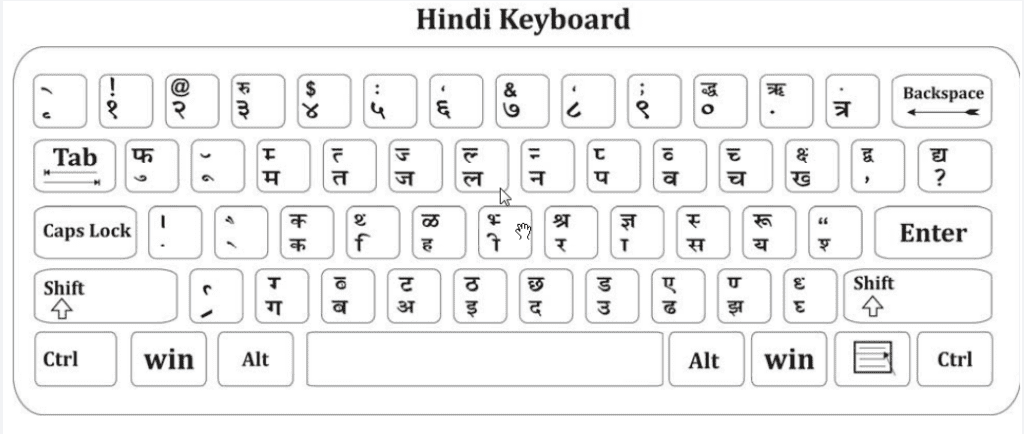
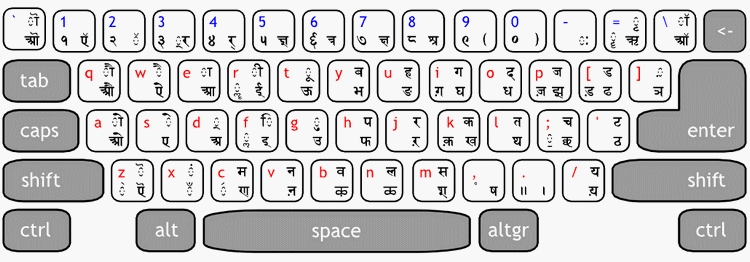
7-Show me Keyboard Layout photo of Mangal Font and Krutidev Font.(मंगल फॉण्ट तथा कृतिदेव फॉण्ट के कीबोर्ड लेआउट का फोटो दिखाईये?) (Font-Based Questions Answers)

Ans:- Krutidev Font Layout

Mangal Keyboard Layout:-

Mangal Keyboard

8- What all button do you have to press to Type VEDANTSRI in Mangal and Krutidev Font in Hindi Language? (मंगल तथा कृतिदेव में VEDANTSRI शब्द को हिंदी में लिखने के लिए किस-किस बटन को प्रेस करना पड़ेगा?)

Ans:- Wait for the Answer

9- Mostly where all Mangal font demanded? (अधिकत्तर मंगल फॉण्ट का डिमांड किन-किन जगहों पर होता है?)

Ans:- Wait for the Answer

10- Mostly where is all Krutidev font demanded? (अधिकत्तर कृतिदेव फॉण्ट का डिमांड किन-किन जगहों पर होता है?)

Ans:- Wait for the Answer

(Font-Based Questions Answers)

VedantSri Computer Institute Varanasi

Font Based Questions Answers

provides the best Computer CoursesClasses, and Training in Varanasi. There is NIELIT Courses CCC, BCC, O’level, Certificates, and Diploma Computer Courses available with the best training materials. Also Available Top 100 Best Computer Courses, For Example, OMDCAADCADTPDFAADAMADTP, ADFA, DCE, and MS Office. VedantSri Computer Coaching updates CCC Online Test 2020 on www.vedantsri.net. ( Font-Based Questions Answers )

There are some important computer Courses for jobs CCC Classes, Typing, Internships, And Spoken English Available Free of cost with Offer. More than 50 Computer Courses are available with a 50% Fee Discount in VedantSri Varanasi. You can get the Best Digital Marketing Course at Varanasi Institute VedantSri. There is the Latest Computer Course Offer in ADCA Computer Course, DCA Computer Course, CCC Computer Course & English Spoken. (Font-Based Questions Answers)

About VedantSri Computer Institute Varanasi

VedantSri Computer Institute in Varanasi is the Government recognized and ISO Certified Computer Institute in Varanasi running since 2011. It Provides Computer Courses, Classes, and Training through different own branches all over Varanasi. There is Computer Scholarship Courses DCE Scholarship (Diploma in Computer Engineering), DIT’s most trusted computer course Available under Scholarship Test Scheme. (Font-Based Questions Answers)

Font-Based Questions Answers

Varanasi Computer Institute Vedantsri works at different places to ensure students get better computer education. VedantSri Computer Classes has Diploma courses and advanced diploma courses on the computerVedantSri Institute provides the latest version of computer application training in computer courses. (Font-Based Questions Answers)

वेदांतश्री कम्प्यूटर इंस्टिट्यूट’ वाराणसी में पिछले 10 वर्षो से बेहतर व न्यूनतम शुल्क में कम्प्यूटर शिक्षा प्रदान करने वाली एक कम्प्यूटर ट्रेनिंग इंस्टिट्यूट है | यह संस्था कम्प्यूटर व इंग्लिश स्पीकिंग कोर्स की ट्रेनिंग प्रदान करती है | वाराणसी में कम्प्यूटर शिक्षा को बेहतर व न्यूनतम शुल्क में छात्रो तक पहुचाने में वेदांतश्री पिछले 10 वर्षो से प्रयासरत है | (Font Based Questions Answers)

Free To Learn In VedantSri Computer Institute in Varanasi

इस वेबसाइट का यूज़ वेदांतश्री में पढ़ रहे छात्रो को कोर्स से सम्बंधित ऑनलाइन सपोर्ट करने से सम्बंधित है | इस वेबसाइट पर उपलब्ध विडियो, टेस्ट शीट, Questions & Answer सेशन, ट्रिक्स, टिप्स वेदांतश्री में सिख रहे कोर्सेज से सम्बंधित है | उपलब्ध कंटेंट संस्था में सिख रहे छात्रो के डिमांड पर अपडेट किया जाता है | उपलब्ध कंटेंट वेदांतश्री में पढ़ रहे छात्रो व सम्बंधित छात्रो को निशुल्क प्रदान किया जाता है जिसका कोई अलग से शुल्क नही लिया जाता है | इस वेबसाइट पर उपलब्ध कंटेंट कम्प्यूटर कोर्सेज व इंग्लिश स्पीकिंग कोर्सेज से सम्बंधित अपडेट किया जाता है | (Font-Based Questions Answers)

Also Know: CorelDraw Course Fees, Duration, Scope, Syllabus, Admission, Institutes & Jobs in Varanasi

(Font-Based Questions Answers)

About CCC Online Test

CCC Online Test: – This is the CCC Online Test Website Page. If You are preparing for CCC Exam or any competitive exam then you should visit this www.vedantsri.net website.

you can also download this app from the play store and you find Just like many more Online Test Series Related For Example MS Word, MS Excel, MS PowerPoint, and Internet-related. (Font-Based Questions Answers)

This is Provided By VedantSri Computer Institute Varanasi. The VedantSri Provides the Best Computer Classes, Courses, Coaching, and Computer Training in Varanasi Uttar Pradesh India. (Font-Based Questions Answers)

Search Entry Form Excel 4

Search Entry Form Excel 4

इस Search Entry Form Excel 4 के पार्ट में कैसे फॉर्म के लिए एक टूलबॉक्स बनाये तथा Update, Delete व Reset button का फार्मूला सेट करना सीखेंगे| इसके तीसरे पार्ट को जरूर देखें यहाँ Search Entry Form Excel 4

  • अब आप Form में Update बटन पर डबल क्लिक करके उसके फार्मूला पेज पर आये व अपडेट का निचे दिया गया फार्मूला टाइप करें|
Dim x As Long
Dim y As Long
x = Sheet1.Range("A" & Rows.Count).End(xlUp).Row
For y = 2 To x

If Sheet1.Cells(y, "A").Text = TextBox11.Text Then
Sheet1.Cells(y, "A") = TextBox1.Text
Sheet1.Cells(y, "B") = TextBox2.Text
Sheet1.Cells(y, "C") = TextBox3.Text
Sheet1.Cells(y, "D") = TextBox4.Text
Sheet1.Cells(y, "E") = TextBox5.Text
Sheet1.Cells(y, "F") = TextBox6.Text
Sheet1.Cells(y, "G") = TextBox7.Text
Sheet1.Cells(y, "H") = TextBox8.Text
Sheet1.Cells(y, "I") = TextBox9.Text
Sheet1.Cells(y, "J") = TextBox10.Text
End If
Next y
  • और इसी तरह आप Form में Delete बटन पर डबल क्लिक करके उसके फार्मूला पेज पर आये व डिलीट का निचे दिया गया फार्मूला टाइप करें| Search Entry Form Excel 4
Dim x As Long
Dim y As Long
x = Sheet1.Range("A" & Rows.Count).End(xlUp).Row
For y = 2 To x

If Sheet1.Cells(y, "A").Text = TextBox11.Text Then
Rows(y).Delete shift:=xlUp
End If
Next y
  • और इसी तरह आप Form में Reset बटन पर डबल क्लिक करके उसके फार्मूला पेज पर आये व रिसेट का निचे दिया गया फार्मूला टाइप करें |
Unload Me
UserForm1.Show
Search Entry Form Excel 4
  • अब इस फॉर्म का पूरा फार्मूला आपने टाइप कर दिया तो विसुअल बेसिक को क्लोज करके एक्सेल पेज पर आ जाये | यहाँ आपको Search Entry Form को ओपन करने के लिए एक टूलबॉक्स Home Menu में क्रिएट करना होगा |
Search Entry Form Excel 4
  • इस एक्सेल शीट पर एक शेप ड्रा करे |
Search Entry Form Excel 4
  • इस शेप पर राईट क्लिक करके Assign Macro पर क्लिक करें|
  • आपके सामने Assign Macro का नया विंडो ओपन होगा जिसमे New बटन पर क्लिक करें |
  • और इस एक Module ओपन होगा जिस पर निचे दिया गया फार्मूला टाइप करें| और इस Module को क्लोज करें|
UserForm1.Show
  • हम Home मेनू पर माउस राईट क्लिक करके Customize the Ribbon आप्शन पर क्लिक करें| आपके सामने Excel Option का एक विंडो ओपन होगा|
  • इस विंडो कस्टमाइज the रिबन कॉलम साइड में Home आप्शन क्लिक करके सेलेक्ट करे उसके बाद निचे दिए गए New Group बटन पर क्लिक करें
  • New Group पर क्लिक करते ही Home मेनू में एक टूलबॉक्स आएगा जिसे रीनेम करने के लिए Rename Button पर क्लिक करें व उसका कोई नाम टाइप कर दें |
  • अब इस Form टूलबॉक्स को जिसे आपने अभी Home Menu में बनाया है उसे क्लिक करकें सेलेक्ट रखे और पहले कॉलम Choose Command From में Macros को सेलेक्ट करेंगे |
  • यहाँ आपको जो शेप आपने एक्सेल पर बनाया व उसपे Macro असाइन किया था वह दिखाई देगा जिसे क्लिक करके सेलेक्ट करे व दोनों कॉलम के बीच Add बटन पर क्लिक कर दें इससे यह Assign Button आपके द्वारा बनाये गए नए Toolbox में Add हो जायेगा | और लास्ट में आप निचे दिए गए OK बटन पर क्लिक करें|
  • अब आप एक्सेल पर आ जाये व जो शेप आपने बनाया था Use सेलेक्ट करके डिलीट कर दें और साथ Home मेनू में देखें तो आपको एक टूलबॉक्स लास्ट में दिखेगा जिसमे एक टूल भी दिखाई देगा जिस पर क्लिक करके कभी भी आप एक्सेल पर अपने फॉर्म को ओपन कर सकते है|

Leant in MS Excel: https://youtu.be/4Y63MuEsMO4

Learnt bill remainder in MS Excel: https://youtu.be/ViP3_65P84s

MS Excel form with database macro project: https://youtu.be/tgFn7dWGIRQ

MS Word cover page design: https://youtu.be/zbkXeGNW23U

MS Excel basic calculator basic project: https://youtu.be/ELZ9MDKU3e4

MS word 3D design project: https://youtu.be/JTgFRIMnfKU

MS Word certificate project: https://youtu.be/NyqBEU5nTxA

VedantSri official website: https://vedantsri.com

Course store website: https://vedantsri.in

Job assist website: https://www.jobdo.in

MS Word class: https://mswordclass.com/ 

Corel free class: https://corelclass.com/ 

Free Excel class: https://msexcel.com/ 

1-VedantSri Official Website:- https://vedantsri.com

2-Student Support Website:- https://www.vedantsri.net

3-Jobs Assist Website:- https://www.jobdo.in

MS Word Simple Certificate Project-4

MS Word Simple Certificate Project

स्वागत है एक बार फिर MS Word 2019 वर्शन के प्रोजेक्ट बेस्ड क्लासेज में इस विडियो के अंतर्गत आप सीखेंगे की MS Word के किसी भी वर्शन पर Simple Certificate कैसे डिजाईन किया जाता है |इस विडियो को आराम से देखेते हुए स्टेप by स्टेप फॉलो करें|यदि किसी भी प्रकार का कोई क्वेश्चन या क्वेरी है तो नीचे कमेंट बॉक्स में जरुर लिखें धन्यवाद

Preview MS Word Simple Certificate Project

VedantSri Computer Institute Varanasi

MS Word Simple Certificate Project

provides the best Computer CoursesClasses, and Training in Varanasi. There is NIELIT Courses CCC, BCC, O’level, Certificates and Diploma Computer Courses available with best training materials. Also Available Top 100 Best Computer Courses, For Example, OMDCAADCADTPDFAADAMADTP, ADFA, DCEMS Office. VedantSri Computer Coaching update CCC Online Test 2020 in www.vedantsri.net. There are some important computer Courses for jobs CCC ClassTyping, Internship And Spoken English Available Free of cost with Offer. More than 50 Computer Courses which are available with 50% Fee Discount in VedantSri Varanasi. You can get the Best Digital Marketing Course in Varanasi Institute VedantSri. There is Latest Computer Course Offer in ADCA Computer Course, DCA Computer Course, CCC Computer Course & English Spoken.

(MS Word Simple Certificate Project)

About VedantSri Computer Institute Varanasi

VedantSri Computer Institute in Varanasi is the Government recognized and An ISO Certified Computer Institute in Varanasi running since 2011. It Provides Computer Courses, Classes, Training by different own branches in all over Varanasi. There is Computer Scholarship Courses DCE Scholarship (Diploma in Computer Engineering), DIT most trusted computer course Available under Scholarship Test Scheme.

Varanasi Computer Institute vedantsri works at different places to ensure students to get better computer education. VedantSri Computer Classes has Diploma courses and advance diploma courses on the computerVedantSri Institute provides the latest version of computer application training in computer courses.

वेदांतश्री कम्प्यूटर इंस्टिट्यूट’ वाराणसी में पिछले 10 वर्षो से बेहतर व न्यूनतम शुल्क में कम्प्यूटर शिक्षा प्रदान करने वाली एक कम्प्यूटर ट्रेनिंग इंस्टिट्यूट है | यह संस्था कम्प्यूटर व इंग्लिश स्पीकिंग कोर्स की ट्रेनिंग प्रदान करती है | वाराणसी में कम्प्यूटर शिक्षा को बेहतर व न्यूनतम शुल्क में छात्रो तक पहुचाने में वेदांतश्री पिछले 10 वर्षो से प्रयासरत है |

Free To Learn In VedantSri Computer Institute in Varanasi

इस वेबसाइट का यूज़ वेदांतश्री में पढ़ रहे छात्रो को कोर्स से सम्बंधित ऑनलाइन सपोर्ट करने से सम्बंधित है | इस वेबसाइट पर उपलब्ध विडियो, टेस्ट शीट, Questions & Answer सेशन, ट्रिक्स, टिप्स वेदांतश्री में सिख रहे कोर्सेज से सम्बंधित है | उपलब्ध कंटेंट संस्था में सिख रहे छात्रो के डिमांड पर अपडेट किया जाता है | उपलब्ध कंटेंट वेदांतश्री में पढ़ रहे छात्रो व सम्बंधित छात्रो को निशुल्क प्रदान किया जाता है जिसका कोई अलग से शुल्क नही लिया जाता है | इस वेबसाइट पर उपलब्ध कंटेंट कम्प्यूटर कोर्सेज व इंग्लिश स्पीकिंग कोर्सेज से सम्बंधित अपडेट किया जाता है | 

(MS Word Simple Certificate Project)

About CCC Online Test 2020

CCC Online Test 2020:- This is the CCC Online Test Website Page. If You are preparing for CCC Exam or any competitive exam then you should visit on this www.vedantsri.net website.

you can also download this app from play store and you find Just like many more Online Test Series Related For Example MS Word, MS Excel, MS PowerPoint, Internet-related.

This is Provided By VedantSri Computer Institute Varanasi. The VedantSri Provides Best Computer Classes, Courses, Coachings and Computer Training in Varanasi Uttar Pradesh India.

(MS Word Simple Certificate Project)

Important Links

1-VedantSri Official Website:- https://vedantsri.com

2-Student Support Website:- https://www.vedantsri.net

3-Jobs Assist Website:- https://www.jobdo.in

4- Varanasi Gyan Website:- https://varanasigyan.com

5-Best Deal on IT Website:- https://www.computeritpoint.com

(MS Word Simple Certificate Project)

Create a Document in MS Word, Learn Step by Step to Create Document

Create a Document in MS Word, Learn Step by Step to Create a Document

Create Document in MS-Word: इस प्रोजेक्ट को आप ऍमएस वर्ड के पूराने वर्शन जैसे की 2007, 2010, 2013, 2016, 2019 वर्शन में भी बना सकते है, मगर हमने इस प्रोजेक्ट को ऍमएस वर्ड के 2021 के latest वर्शन पर बनाया है|

1-ऍम एस वर्ड को ओपन करें|

2-लेआउट मेनू से पेज की साइज़ A4 करें|

यदि आप Ms Word Visiting Card Projectsको बनाना सीखना चाहते हैं तो इस लिंक पर जाए

Create a Document in MS Word

यदि आप Ms Word Registration Form Projects को बनाना सीखना चाहते है तो इस लिंक पर जाए

3-लेआउट मेनू के Margin टूल से पेज का मार्जिन Narrow करें|

Create a Document in MS Word

4-Design मेनू से Page का बॉर्डर सेलेक्ट करें| Create a Document in MS-Word

Create a Document in MS Word

5-इन्सर्ट Menu के Pages टूलबॉक्स द्वारा एक Cover Page इन्सर्ट करें तथा कवर पेज पर डॉक्यूमेंट का नाम तथा डॉक्यूमेंट से सम्बंधित एक शेप में तस्बीर इन्सर्ट कर लें| Create a Document in MS-Word

Create Document in MS-Word

6-अब नेक्स्ट पेज पर जाये यदि Next पेज न हो तो Ctrl + Enter प्रेस करें जिससे की नेक्स्ट पेज क्रिएट हो जायेगा जिसपर आप जाये|

7-दुसरे पेज का Heading ‘Content List’ टाइप करें|तथा Ctrl + Enter से तीसरे पेज को क्रिएट करके जाएँ| Create a Document in MS-Word

Create Document in MS-Word

8-तीसरे पेज पर =rand(50) कमांड द्वारा आटोमेटिक टेक्स्ट टाइप करें|

Create Document in MS-Word

9-अब पेज का लेसन नेम टाइप करें|

Create Document in MS-Word

10-लेसन नेम को सेलेक्ट कर Home मेनू के Styles टूलबॉक्स से Heading-1 का इफ़ेक्ट अप्लाई करें| Ctrl + E द्वारा सेण्टर व Ctrl+Shift+>द्वारा लेसन नेम का साइज़ 20 करें तथा Ctrl + B द्वारा बोल्ड इफ़ेक्ट दें|

Create Document in MS-Word

11-अब पेज नंबर 2 जिसपर Content List का हैडिंग टाइप किया था|

Create Document in MS-Word

12-व References मेनू के table of Contents टूलबॉक्स से Automatic Table -1 इन्सर्ट करें|

Create Document in MS-Word

12-अब आप लेसन को सेलेक्ट करें व Ctrl + K प्रेस करें एक बॉक्स ओपन होगे जिसने Place in this Document आप्शन पर क्लिक करें तथा Top of the Document आप्शन सेलेक्ट करें व ओके कर दें|

Create Document in MS-Word

13-अब पेज को F12 या Ctrl+S प्रेस करके जिस फॉर्मेट में चाहते है उसमे पेज को सेव करें|

Create Document in MS-Word

Ms Word Certificate Projects

यदि आप Create Document in MS-Wordप्रोजेक्ट को बनाना सीखना चाहते हैं तो इस लिंक पर जाए

Read Also: MS Word Course Details, Fees, Duration, Scope, Syllabus, Admission, Institutes & Jobs

Search Entry Form Excel 3

Search Entry Form Excel 3

इस क्लास में हम सिखने वाले है की Search Entry Form Excel 3 पर कैसे काम करेंगे अतः निचे दिए गए स्टेप को फॉलो करें | पहले भाग 2 को यहाँ जरूर देखें

आपने पिछले क्लास में निचे दिए गए पिक्चर किए अनुसार Exit Button तक का फार्मूला लिख लिया है | Search Entry Form Excel 3

Search Entry Form Excel 3 in VedantSri Computer Institute
  • अब Insert बटन का फार्मूला टाइप करेंगे | इसके लिए Project विंडो से Userform1 पर डबल क्लिक करके Form ओपन करें तथा Insert बटन पर डबल क्लिक करे जिससे आप इस बटन के फार्मूला पेज पर आ जायेंगे |

Read Also:-After 12th Class Computer Courses, after 10th Class Computer Courses

  • अब निचे दिए फोर्मुले को टाइप करें| Search Entry Form Excel 3
Dim x As Long
Dim y As Worksheet
Set y = Sheet1

x = y.Range("A" & Rows.Count).End(xlUp).Row
With y
.Cells(x + 1, "A").Value = TextBox1.Text
.Cells(x + 1, "B").Value = TextBox2.Text
.Cells(x + 1, "C").Value = TextBox3.Text
.Cells(x + 1, "D").Value = TextBox4.Text
.Cells(x + 1, "E").Value = TextBox5.Text
.Cells(x + 1, "F").Value = TextBox6.Text
.Cells(x + 1, "G").Value = TextBox7.Text
.Cells(x + 1, "H").Value = TextBox8.Text
.Cells(x + 1, "I").Value = TextBox9.Text
.Cells(x + 1, "J").Value = TextBox10.Text
End With
On Error Resume Next

Also Read:-Top 3 Computer Diploma Courses, 6 Months of Computer Diploma, After 12th Pass Out Computer Courses

Search Entry Form Excel 3 in VedantSri Computer Institute
  • अब पुनः Project विंडो से Userform1 पर डबल क्लिक करके Form ओपन करें तथा Search बटन पर डबल क्लिक करे जिससे आप इस बटन के फार्मूला पेज पर आ जायेंगे |
  • अब निचे दिए गए Search फोर्मुले को टाइप करें |
Dim x As Long
Dim y As Long
x = Sheet1.Range("A" & Rows.Count).End(xlUp).Row
For y = 2 To x
If Sheet1.Cells(y, "A").Text = TextBox11.Text Then

TextBox1.Text = Sheet1.Cells(y, "A")
TextBox2.Text = Sheet1.Cells(y, "B")
TextBox3.Text = Sheet1.Cells(y, "C")
TextBox4.Text = Sheet1.Cells(y, "D")
TextBox5.Text = Sheet1.Cells(y, "E")
TextBox6.Text = Sheet1.Cells(y, "F")
TextBox7.Text = Sheet1.Cells(y, "G")
TextBox8.Text = Sheet1.Cells(y, "H")
TextBox9.Text = Sheet1.Cells(y, "I")
TextBox10.Text = Sheet1.Cells(y, "J")
End If
Next y

Also Read:-ADTP Course, Fees, Duration, Scope, Syllabus, Admission, Institutes & Jobs in Varanasi

Search Entry Form Excel 3 in VedantSri Computer Institute

Also Read:-Video Editing Course Details, Fees, Duration, Scope, Syllabus, Admission, Institutes & Jobs

Important Links

1-VedantSri Official Website:- https://vedantsri.com

2-VedantSri Student Website:- https://www.vedantsri.net

3-Students Jobs Assist Website:- https://www.jobdo.in

Also Read:-DIT Course Details, Fees, Duration, Scope, Syllabus, Admission, Institutes & Jobs

Create Document in Word 2

Create Document in Word 2

इस क्लास में हम जानेंगे की Create Document in Word कैसे तैयार करते है निचे दिए गए स्टेप्स को फॉलो करें| पहले भाग 1 को यहाँ जरूर देखें

  • अब Content List जो आपने टाइप किया है और उसपर आपने पिछले भाग में Level-1 ऐड किया था तो ठीक उसी शब्द के बाद अपने ब्लिंकर को लायेंगे व Enter प्रेस करें|
  • आपका ब्लिंकर नेक्स्ट लाइन में लेफ्ट अलाइन हो जायेगा| Create Document in Word 2
Create Document in Word 2 in VedantSri Computer Institute
  • उसके बाद Ctrl+Enter प्रेस करेंगे व नेक्स्ट ब्लेंक पेज पर जायेंगे|

Read Also:-PHP Course Details, Fees, Duration, Scope, Syllabus, Admission, Institutes & Jobs

  • और मैटर को लिखने शुरू करेंगे जिसमे डॉक्यूमेंट फॉर्मेटिंग का पूरा ध्यान देंगे| तो उदाहरण देने के लिए मै =rand(50) लिखकर Randomly 50 पैराग्राफ इन्सर्ट करूंगा| तथा मैटर को सेलेक्ट करके Text Formatting में पांचो इफेक्ट्स को Set करें |

Also Read:-Mobile Repairing Course Details, Fees, Duration, Scope, Syllabus, Admission, Institutes & Jobs

Create Document in Word 2 in VedantSri Computer Institute
  • अब मैटर के हिसाब से ऑब्जेक्ट इन्सर्ट कर लें| तथा हर ऑब्जेक्ट की Text Wrapping को Through सेट करें| Create Document in Word 2
  • अब ऑब्जेक्ट को एक-एक करके सेलेक्ट करें व References मेनू के Caption टूलबॉक्स से Insert Caption को इन्सर्ट करें|

Also Read:-Computer Hardware Course Details, Fees, Duration, Scope, Syllabus, Admission, Institutes & Jobs

Create Document in Word 2 in VedantSri Computer Institute
  • और इन्सर्ट किये गये Caption की Formatting को कस्टमाइज कर साथ ही कस्टमाइज किये गए Formatting को Ctrl+Shift+C से कॉपी कर ले ताकि बाकि कैप्शन पर अप्लाई करेंगे|
  • अब इन्सर्ट किये गए मैटर में Lesson Name/Title टाइप करें व उसके बाद Level-1 अप्लाई करें |

Also Read:-jQuery Course Details, Fees, Duration, Scope, Syllabus, Admission, Institutes & Jobs

Create Document in Word 2 in VedantSri Computer Institute
  • अब Lesson Name/Title के अंतर्गत Heading टाइप करें व उसपर Level-2 अप्लाई करें|
  • अब Heading के अंतर्गत जरूरी हो तो Sub Heading/Point Name टाइप करें व उसपर Level-3 अप्लाई करें|

Also Read:-Visual Studio Course Details, Fees, Duration, Scope, Syllabus, Admission, Institutes & Jobs

Create Document in Word 2 in VedantSri Computer Institute
  • इसी प्रकार से पुरे डॉक्यूमेंट में Title Name, Heading Name व Point Name टाइप करके उस पर क्रमशः Level-1, Level-2, Level-3 अप्लाई करें|

Read Also:-AutoCAD Course Details, Fees, Duration, Scope, Syllabus, Admission, Institutes & Jobs

Important Links

1-VedantSri Official Website:- https://vedantsri.com

2-VedantSri Student Website:- https://www.vedantsri.net

3-Students Jobs Assist Website:- https://www.jobdo.in

Tally ERP Online Test 2025

Tally ERP Online Test 2025

0%
278

Tally Online Test 5444, Accounting Shortcuts Related Test Series

Tally Prime Shortcut Related Test Series

1 / 25

What is the Shortcut Key for Date in Tally Prime?

2 / 25

What does G refer to in Tally Prime?

3 / 25

What do you mean by Create in Tally Prime?

4 / 25

What is the Shortcut Key for Other Vouchers in Tally Prime?

5 / 25

What is the Shortcut Key of More Detail in Tally Prime?

6 / 25

What does E refer to in Tally Prime?

7 / 25

What is the Shortcut Key for Payment in Tally Prime?

8 / 25

What does M refer to in Tally Prime?

9 / 25

What Z refers to in Tally Prime

10 / 25

What is the Shortcut Key for Company in Tally Prime?

11 / 25

What is the Shortcut Key for Journal in Tally Prime?

12 / 25

What is the Shortcut Key for Help in Tally Prime?

13 / 25

What is the Shortcut Key of Autofill in Tally Prime?

14 / 25

What K refers to in Tally Prime?

15 / 25

What is the Shortcut Key of Purchase in Tally Prime?

16 / 25

What does O refer to in Tally Prime?

17 / 25

What is the Shortcut Key for Contra in Tally Prime?

18 / 25

What is the Meaning of Double underline in Tally Prime?

19 / 25

What is the Shortcut Key for Sales in Tally Prime?

20 / 25

What Y refers to in Tally Prime?

21 / 25

What is the Shortcut Key of Receipt in Tally Prime?

22 / 25

What is the Shortcut Key for Optional in Tally Prime?

23 / 25

What is the Shortcut Key for Change Mode in Tally Prime?

24 / 25

What is the Shortcut Key for Related Reports in Tally Prime?

25 / 25

What does P refer to in Tally Prime?

Your score is

0%

Pos.NameScoreDurationPoints
1fsdgfdg100 %1 minutes 32 seconds25 / 25
2Saira100 %1 minutes 46 seconds25 / 25
3Bindu100 %2 minutes 25 seconds25 / 25
4ipio100 %2 minutes 34 seconds25 / 25
5Malashree A.P100 %3 minutes 7 seconds25 / 25
6Sakshi96 %1 minutes 35 seconds24 / 25
7sadasfasdf96 %1 minutes 41 seconds24 / 25
8Sakshi96 %1 minutes 45 seconds24 / 25
9Sakshi96 %1 minutes 46 seconds24 / 25
10lavanya.J96 %2 minutes24 / 25
11Jaya96 %2 minutes 6 seconds24 / 25
12Saira96 %2 minutes 10 seconds24 / 25
13Saira96 %2 minutes 17 seconds24 / 25
14KGF96 %2 minutes 28 seconds24 / 25
15bhawna96 %2 minutes 50 seconds24 / 25
16G96 %3 minutes 14 seconds24 / 25
17apii96 %3 minutes 26 seconds24 / 25
18Simi96 %3 minutes 40 seconds24 / 25
19Ramya96 %3 minutes 42 seconds24 / 25
20KAMLA96 %3 minutes 48 seconds24 / 25
21Rambaboo96 %5 minutes 39 seconds24 / 25
22Leena92 %1 minutes 53 seconds23 / 25
23adafs92 %2 minutes 3 seconds23 / 25
24GAYATHRI S92 %2 minutes 4 seconds23 / 25
25ford92 %2 minutes 11 seconds23 / 25
26appi92 %2 minutes 12 seconds23 / 25
27yyth92 %2 minutes 32 seconds23 / 25
28kamla92 %2 minutes 37 seconds23 / 25
29LAXMAN JAGTAP92 %3 minutes 4 seconds23 / 25
30vim92 %3 minutes 25 seconds23 / 25
31prachibhuvad92 %3 minutes 44 seconds23 / 25
32VENUMADHAV G92 %3 minutes 52 seconds23 / 25
33Trupti Shankar Jadhav92 %3 minutes 53 seconds23 / 25
34Trupti Shankar Jadhav92 %4 minutes 18 seconds23 / 25
35VENUMADHAV G92 %5 minutes 7 seconds23 / 25
36A92 %5 minutes 26 seconds23 / 25
37Gj88 %1 minutes 49 seconds22 / 25
38Tina pandey88 %2 minutes22 / 25
39Sakshi88 %2 minutes 13 seconds22 / 25
40ayush nishad88 %2 minutes 46 seconds22 / 25
41Zunnurain88 %2 minutes 48 seconds22 / 25
42nikita88 %2 minutes 57 seconds22 / 25
43Jaya88 %3 minutes 14 seconds22 / 25
44Trupti Shankar Jadhav88 %3 minutes 27 seconds22 / 25
45Malashree88 %3 minutes 41 seconds22 / 25
46bhawna.maver88 %3 minutes 45 seconds22 / 25
47Malashree88 %3 minutes 56 seconds22 / 25
48K88 %4 minutes 1 seconds22 / 25
49HK KUMAWAT88 %4 minutes 2 seconds22 / 25
50Amar88 %4 minutes 24 seconds22 / 25
51shraddha88 %6 minutes 59 seconds22 / 25
52sa88 %7 minutes22 / 25
53588 %9 minutes 2 seconds22 / 25
54Sakshi84 %2 minutes 9 seconds21 / 25
55Pragati84 %2 minutes 23 seconds21 / 25
56Vichu84 %2 minutes 46 seconds21 / 25
57MG84 %3 minutes 2 seconds21 / 25
58Sukhila M84 %3 minutes 8 seconds21 / 25
59bhawna84 %3 minutes 16 seconds21 / 25
60PRACHI BHUVAD84 %3 minutes 17 seconds21 / 25
61PRACHI CHANDRAKANT BHUVAD84 %3 minutes 21 seconds21 / 25
62Sakshi84 %3 minutes 35 seconds21 / 25
63sudha84 %4 minutes 20 seconds21 / 25
64SHARMILA84 %4 minutes 34 seconds21 / 25
65Rashika84 %5 minutes 44 seconds21 / 25
66Vivek R84 %6 minutes 9 seconds21 / 25
67Anshika84 %7 minutes 7 seconds21 / 25
68F84 %8 minutes 4 seconds21 / 25
69Leena80 %2 minutes 4 seconds20 / 25
70Naimit thakur80 %2 minutes 32 seconds20 / 25
71aaliya80 %2 minutes 33 seconds20 / 25
72Gyyf80 %2 minutes 59 seconds20 / 25
73FATHIMA80 %3 minutes 9 seconds20 / 25
74Pooja80 %3 minutes 35 seconds20 / 25
75YUI80 %3 minutes 40 seconds20 / 25
76PRACHI BHUVAD80 %3 minutes 45 seconds20 / 25
77ADITYA KUMAR GOYAL80 %3 minutes 47 seconds20 / 25
78Urhv80 %3 minutes 49 seconds20 / 25
79sandhya80 %3 minutes 52 seconds20 / 25
80Chaitali80 %4 minutes 21 seconds20 / 25
81Naimit thakur80 %4 minutes 23 seconds20 / 25
82SP80 %5 minutes 26 seconds20 / 25
83Ravi80 %6 minutes 16 seconds20 / 25
84Sushant waghmare80 %6 minutes 17 seconds20 / 25
85Soham Das76 %2 minutes 10 seconds19 / 25
86Roshani76 %2 minutes 24 seconds19 / 25
87GAYATHRI S76 %2 minutes 38 seconds19 / 25
88Shan76 %2 minutes 50 seconds19 / 25
89Shahun76 %3 minutes 1 seconds19 / 25
90Riya sharma76 %3 minutes 11 seconds19 / 25
91PRACHI BHUVAD76 %3 minutes 13 seconds19 / 25
92MONABBAR HASAN76 %3 minutes 14 seconds19 / 25
93naha76 %3 minutes 15 seconds19 / 25
94MALATHI76 %3 minutes 22 seconds19 / 25
95Sagun76 %3 minutes 22 seconds19 / 25
96Shagun76 %3 minutes 33 seconds19 / 25
97Aastha Rajput76 %3 minutes 40 seconds19 / 25
98az76 %3 minutes 55 seconds19 / 25
99HJK76 %3 minutes 59 seconds19 / 25
100sakshi76 %4 minutes 12 seconds19 / 25
101Tre76 %4 minutes 16 seconds19 / 25
102Kusum76 %4 minutes 20 seconds19 / 25
103PRIYA76 %4 minutes 42 seconds19 / 25
104tnu76 %4 minutes 44 seconds19 / 25
105Jestin76 %4 minutes 55 seconds19 / 25
106Jeetender76 %5 minutes 41 seconds19 / 25
107Mumtaz76 %5 minutes 54 seconds19 / 25
108Prakash76 %6 minutes 14 seconds19 / 25
109RENUKAKS76 %6 minutes 33 seconds19 / 25
110Komal76 %11 minutes 23 seconds19 / 25
111Kriti72 %2 minutes 10 seconds18 / 25
112Amit72 %2 minutes 18 seconds18 / 25
113Soham Das72 %2 minutes 29 seconds18 / 25
114dharani72 %2 minutes 52 seconds18 / 25
115Kusum gupta72 %3 minutes 7 seconds18 / 25
116Sakshi72 %3 minutes 8 seconds18 / 25
117bhawna72 %3 minutes 21 seconds18 / 25
118Tt72 %3 minutes 22 seconds18 / 25
119nikita72 %3 minutes 25 seconds18 / 25
120prachi72 %3 minutes 41 seconds18 / 25
121kamla72 %3 minutes 41 seconds18 / 25
122KASHISH SHARMA72 %3 minutes 51 seconds18 / 25
123d72 %4 minutes 11 seconds18 / 25
124sdfgdfh72 %4 minutes 24 seconds18 / 25
125Fff72 %4 minutes 29 seconds18 / 25
126prachi72 %4 minutes 42 seconds18 / 25
127Vava72 %4 minutes 50 seconds18 / 25
128bhumika rathod72 %5 minutes 55 seconds18 / 25
129aaru srivastava72 %10 minutes 55 seconds18 / 25
130Prasad72 %17 minutes 38 seconds18 / 25
131Prasad72 %17 minutes 38 seconds18 / 25
132Agatha68 %2 minutes 17 seconds17 / 25
133Muskan68 %2 minutes 22 seconds17 / 25
134Saira68 %2 minutes 38 seconds17 / 25
135Ashu68 %2 minutes 58 seconds17 / 25
136Ravi68 %3 minutes 5 seconds17 / 25
137yaswanth68 %3 minutes 18 seconds17 / 25
138Comp68 %3 minutes 36 seconds17 / 25
139faiza68 %3 minutes 53 seconds17 / 25
140prachi bhuavd68 %4 minutes 1 seconds17 / 25
141SUBHA68 %4 minutes 19 seconds17 / 25
142sou68 %4 minutes 26 seconds17 / 25
143SHRADDHA68 %4 minutes 34 seconds17 / 25
144kkk68 %4 minutes 43 seconds17 / 25
145malashree68 %5 minutes 11 seconds17 / 25
146Pavani68 %5 minutes 52 seconds17 / 25
147liu68 %6 minutes 32 seconds17 / 25
148divya kuhada68 %6 minutes 45 seconds17 / 25
149Gj64 %1 minutes 37 seconds16 / 25
150vim64 %2 minutes 43 seconds16 / 25
151ATUL64 %3 minutes16 / 25
152Juhi64 %3 minutes 2 seconds16 / 25
153jannath begum64 %3 minutes 17 seconds16 / 25
154VENUMADHAV G64 %3 minutes 26 seconds16 / 25
155Ravi64 %3 minutes 38 seconds16 / 25
156MELVINA64 %3 minutes 42 seconds16 / 25
157Soniya64 %3 minutes 56 seconds16 / 25
158arpit64 %3 minutes 57 seconds16 / 25
159pari64 %3 minutes 59 seconds16 / 25
160NEHA64 %4 minutes 15 seconds16 / 25
161aami64 %4 minutes 18 seconds16 / 25
162Chaitali64 %4 minutes 23 seconds16 / 25
163bhawna64 %4 minutes 32 seconds16 / 25
164Zunnurain64 %5 minutes 19 seconds16 / 25
165kuldeep yadav364 %9 minutes 5 seconds16 / 25
166Arjun60 %2 minutes 26 seconds15 / 25
167sakshi doke60 %2 minutes 48 seconds15 / 25
168Leena60 %2 minutes 50 seconds15 / 25
169ford60 %2 minutes 57 seconds15 / 25
170Dheeraj60 %3 minutes 11 seconds15 / 25
171maha60 %3 minutes 14 seconds15 / 25
172Vaishali60 %3 minutes 50 seconds15 / 25
173Sarika60 %4 minutes 3 seconds15 / 25
174T.saranya60 %4 minutes 6 seconds15 / 25
175Siya60 %4 minutes 17 seconds15 / 25
176NISHITA60 %4 minutes 19 seconds15 / 25
177Manjeet60 %5 minutes 14 seconds15 / 25
178hari60 %5 minutes 30 seconds15 / 25
179P60 %5 minutes 31 seconds15 / 25
180opl60 %5 minutes 40 seconds15 / 25
181Arsalan ali60 %6 minutes 38 seconds15 / 25
182goldy chauhan60 %10 minutes 41 seconds15 / 25
183mohd hasan60 %10 minutes 58 seconds15 / 25
184VIJAYALAKSHMI56 %3 minutes 1 seconds14 / 25
185MONIKA56 %3 minutes 14 seconds14 / 25
186Chandan kumar56 %3 minutes 23 seconds14 / 25
187Ppp56 %3 minutes 25 seconds14 / 25
188Ciya56 %3 minutes 31 seconds14 / 25
189Iqra56 %4 minutes 12 seconds14 / 25
190Priya56 %4 minutes 16 seconds14 / 25
191A56 %4 minutes 25 seconds14 / 25
192azzee56 %4 minutes 28 seconds14 / 25
193LAXMAN JAGTAP56 %4 minutes 29 seconds14 / 25
194Khusboo56 %4 minutes 31 seconds14 / 25
195Trupti Shankar Jadhav56 %4 minutes 33 seconds14 / 25
196Sumit Sen56 %5 minutes 3 seconds14 / 25
197Vivek R56 %5 minutes 6 seconds14 / 25
198RK NIWANA56 %5 minutes 57 seconds14 / 25
199aradhya56 %6 minutes 8 seconds14 / 25
200Dk56 %7 minutes 3 seconds14 / 25
201Ram56 %7 minutes 21 seconds14 / 25
202kapil56 %7 minutes 58 seconds14 / 25
203F56 %10 minutes 8 seconds14 / 25
204Gj52 %2 minutes 48 seconds13 / 25
205lavanya. J52 %3 minutes 2 seconds13 / 25
206uioo52 %3 minutes 17 seconds13 / 25
207Vismaya52 %3 minutes 22 seconds13 / 25
208Radhika52 %3 minutes 33 seconds13 / 25
209Ravi52 %4 minutes 24 seconds13 / 25
210Sakshi52 %4 minutes 38 seconds13 / 25
211Dh52 %4 minutes 51 seconds13 / 25
212Shivansh52 %4 minutes 53 seconds13 / 25
213Sagar Gaikwad52 %4 minutes 56 seconds13 / 25
214srilekha52 %5 minutes13 / 25
215papiya52 %5 minutes 59 seconds13 / 25
216Simi52 %9 minutes 16 seconds13 / 25
217Rambaboo52 %10 minutes 2 seconds13 / 25
218Guest48 %2 minutes 38 seconds12 / 25
219Soham Das48 %2 minutes 40 seconds12 / 25
220Juhi48 %3 minutes 31 seconds12 / 25
221Vaishali parmar48 %3 minutes 40 seconds12 / 25
222Harshit Sharma48 %3 minutes 58 seconds12 / 25
223Mehenaaz48 %4 minutes 7 seconds12 / 25
224wahid48 %4 minutes 8 seconds12 / 25
225Soham Das48 %4 minutes 24 seconds12 / 25
226Naimit thakur48 %4 minutes 35 seconds12 / 25
227Jims48 %4 minutes 38 seconds12 / 25
228PRACHI CHANDRAKANT BHUVAD48 %4 minutes 40 seconds12 / 25
229Vaibhav48 %5 minutes 19 seconds12 / 25
230Sagun48 %5 minutes 45 seconds12 / 25
231Harsh44 %1 minutes 50 seconds11 / 25
232Shantanu44 %2 minutes 28 seconds11 / 25
233Roshani44 %3 minutes 11 seconds11 / 25
234aaliya44 %3 minutes 56 seconds11 / 25
235Shraddha44 %4 minutes 24 seconds11 / 25
236dk44 %4 minutes 31 seconds11 / 25
237Jyoti44 %4 minutes 53 seconds11 / 25
238Jaya44 %5 minutes11 / 25
239monika44 %5 minutes 7 seconds11 / 25
240ayush kumar44 %5 minutes 10 seconds11 / 25
241Amit44 %5 minutes 14 seconds11 / 25
242Mmnnxc40 %3 minutes 34 seconds10 / 25
243s40 %3 minutes 49 seconds10 / 25
244Aastha Rajput40 %4 minutes 29 seconds10 / 25
245Fn40 %4 minutes 29 seconds10 / 25
246VENUMADHAV G40 %5 minutes 50 seconds10 / 25
247Kajal40 %6 minutes 55 seconds10 / 25
248XYZ40 %7 minutes 11 seconds10 / 25
249sai40 %7 minutes 43 seconds10 / 25
250KULDEEP40 %8 minutes 15 seconds10 / 25
251rais ahmad40 %16 minutes 40 seconds10 / 25
252Uttam Bodke36 %1 minutes 48 seconds9 / 25
253sakshi36 %5 minutes 46 seconds9 / 25
254S36 %6 minutes 9 seconds9 / 25
255Ankit kumar32 %1 minutes 24 seconds8 / 25
256Kantariya sandip32 %3 minutes 38 seconds8 / 25
257Rohit32 %5 minutes 37 seconds8 / 25
258Honey32 %13 minutes8 / 25
259KAUSHIK32 %16 minutes 16 seconds8 / 25
260Honey32 %16 minutes 40 seconds8 / 25
261Vivek28 %1 minutes 2 seconds7 / 25
262antara28 %2 minutes 50 seconds7 / 25
263Vishal28 %2 minutes 54 seconds7 / 25
264Shantanu28 %4 minutes 9 seconds7 / 25
265dharani28 %4 minutes 11 seconds7 / 25
266Pooja28 %4 minutes 24 seconds7 / 25
267Vishakha28 %5 minutes 57 seconds7 / 25
268Ajay28 %16 minutes 40 seconds7 / 25
269Parbati singh28 %16 minutes 46 seconds7 / 25
270y pa24 %3 minutes 10 seconds6 / 25
271varshu24 %5 minutes 17 seconds6 / 25
272shradha wandre24 %16 minutes 40 seconds6 / 25
273Arjun20 %3 minutes 49 seconds5 / 25
274H'12 %16 minutes 42 seconds3 / 25
275vvs8 %16 minutes 42 seconds2 / 25
276MG4 %16 minutes 40 seconds1 / 25
277Guest0 %0 second0 / 0
278Guest0 %0 second0 / 0
279Guest0 %0 second0 / 0
280Guest0 %0 second0 / 0
281Guest0 %0 second0 / 0
282Guest0 %0 second0 / 0
283Guest0 %0 second0 / 0
284Guest0 %0 second0 / 0
285Guest0 %0 second0 / 0
286Guest0 %0 second0 / 0
287Guest0 %0 second0 / 0
288Guest0 %0 second0 / 0
289Guest0 %0 second0 / 0
290Guest0 %0 second0 / 0
291Guest0 %0 second0 / 0
292Guest0 %0 second0 / 0
293Guest0 %0 second0 / 0
294Guest0 %0 second0 / 0
295Guest0 %0 second0 / 0
296Guest0 %0 second0 / 0
297Guest0 %0 second0 / 0
298Guest0 %0 second0 / 0
299Guest0 %0 second0 / 0
300Guest0 %0 second0 / 0
301Guest0 %0 second0 / 0
302Guest0 %0 second0 / 0
303Guest0 %0 second0 / 0
304Guest0 %0 second0 / 0
305Guest0 %0 second0 / 0
306Guest0 %0 second0 / 0
307Guest0 %0 second0 / 0
308Guest0 %0 second0 / 0
309Guest0 %0 second0 / 0
310Guest0 %0 second0 / 0
311Guest0 %0 second0 / 0
312Guest0 %0 second0 / 0
313Guest0 %0 second0 / 0
314Guest0 %0 second0 / 0
315Guest0 %0 second0 / 0
316Guest0 %0 second0 / 0
317Guest0 %0 second0 / 0
318Guest0 %0 second0 / 0
319Guest0 %0 second0 / 0
320Guest0 %0 second0 / 0
321Guest0 %0 second0 / 0
322Guest0 %0 second0 / 0
323Guest0 %0 second0 / 0
324Guest0 %0 second0 / 0
325Guest0 %0 second0 / 0
326Guest0 %0 second0 / 0
327Guest0 %0 second0 / 0
328Guest0 %0 second0 / 0
329Guest0 %0 second0 / 0
330Guest0 %0 second0 / 0
331Guest0 %0 second0 / 0
332Guest0 %0 second0 / 0
333Guest0 %0 second0 / 0
334Guest0 %0 second0 / 0
335Guest0 %0 second0 / 0
336Guest0 %0 second0 / 0
337Guest0 %0 second0 / 0
338Guest0 %0 second0 / 0
339Guest0 %0 second0 / 0
340Guest0 %0 second0 / 0
341Guest0 %0 second0 / 0
342Guest0 %0 second0 / 0
343Guest0 %0 second0 / 0
344Guest0 %0 second0 / 0
345Guest0 %0 second0 / 0
346Guest0 %0 second0 / 0
347Guest0 %0 second0 / 0
348Guest0 %0 second0 / 0
349Guest0 %0 second0 / 0
350Guest0 %0 second0 / 0
351Guest0 %0 second0 / 0
352Guest0 %0 second0 / 0
353Guest0 %0 second0 / 0
354Guest0 %0 second0 / 0
355Guest0 %0 second0 / 0
356Guest0 %0 second0 / 0
357Guest0 %0 second0 / 0
358Guest0 %0 second0 / 0
359Guest0 %0 second0 / 0
360Guest0 %0 second0 / 0
361Guest0 %0 second0 / 0
362Guest0 %0 second0 / 0
363Guest0 %0 second0 / 0
364Guest0 %0 second0 / 0
365Guest0 %0 second0 / 0
366Guest0 %0 second0 / 0
367Guest0 %0 second0 / 0
368Guest0 %0 second0 / 0
369Guest0 %0 second0 / 0
370Guest0 %0 second0 / 0
371Guest0 %0 second0 / 0
372Guest0 %0 second0 / 0
373Guest0 %0 second0 / 0
374Guest0 %0 second0 / 0
375Guest0 %0 second0 / 0
376Guest0 %0 second0 / 0
377Guest0 %0 second0 / 0
378Guest0 %0 second0 / 0
379Guest0 %0 second0 / 0
380Guest0 %0 second0 / 0
381Guest0 %0 second0 / 0
382Guest0 %0 second0 / 0
383Guest0 %0 second0 / 0
384Guest0 %0 second0 / 0
385Guest0 %0 second0 / 0
386Guest0 %0 second0 / 0
387Guest0 %0 second0 / 0
388Guest0 %0 second0 / 0
389Guest0 %0 second0 / 0
390Guest0 %0 second0 / 0
391Guest0 %0 second0 / 0
392Guest0 %0 second0 / 0
393Guest0 %0 second0 / 0
394Guest0 %0 second0 / 0
395Guest0 %0 second0 / 0
396Guest0 %0 second0 / 0
397Kajal0 %1 minutes 55 seconds0 / 25
398pari0 %2 hours 16 minutes 42 seconds0 / 25

Read Also:- DFA Course Fees, Syllabus, Duration, Scope, Jobs, and Institute in Varanasi

VedantSri Computer Institute Varanasi

VedantSri provides the best Computer Courses, Classes, and Training in Varanasi. NIELIT Courses CCC, BCC, O-level, Certificates, and Diploma Computer Courses are available with the best training materials. Also Available: Top 100 Best Computer Courses, For Example, OM, DCA, ADCA, DTP, DFA, ADAM, ADTP, ADFA, DCE, and MS Office. VedantSri Computer Coaching updates the CCC Online Test on www.vedantsri.net. There are some important computer Courses for jobs, CCC Classes, Typing, Internships, And Spoken English Available Free of cost with an Offer.

More than 50 Computer Courses are available with a 50% Fee Discount in VedantSri Varanasi. You can get the Best Digital Marketing Course at Varanasi Institute VedantSri. There is the Latest Computer Course Offer in the ADCA Computer Course, DCA Computer Course, CCC Computer Course & English Spoken.

About VedantSri Computer Institute Varanasi

VedantSri Computer Institute in Varanasi is a government-recognised and ISO ISO-certified computer Institute in Varanasi running since 2011. It Provides Computer Courses, Classes, and training through different branches all over Varanasi. There are Computer Scholarship Courses, DCE Scholarship (Diploma in Computer Engineering), DIT’s most trusted computer course, Available under the Scholarship Test Scheme. Tally ERP Online Test 2025

Tally Prime Online Test 5444 VedantSri Institute for Top Best Online Quiz Mock Test Practice Test for Jobs Preparations

Varanasi Computer Institute Vedantsri works at different places to ensure students get better computer education. VedantSri Computer Classes has Diploma courses and advanced diploma courses on the computerVedantSri Institute provides the latest version of computer application training in computer courses. Tally ERP Online Test 2025

वेदांतश्री कम्प्यूटर इंस्टिट्यूट’ वाराणसी में पिछले 10 वर्षो से बेहतर व न्यूनतम शुल्क में कम्प्यूटर शिक्षा प्रदान करने वाली एक कम्प्यूटर ट्रेनिंग इंस्टिट्यूट है | यह संस्था कम्प्यूटर व इंग्लिश स्पीकिंग कोर्स की ट्रेनिंग प्रदान करती है | वाराणसी में कम्प्यूटर शिक्षा को बेहतर व न्यूनतम शुल्क में छात्रो तक पहुचाने में वेदांतश्री पिछले 10 वर्षो से प्रयासरत है | Tally ERP Online Test 2025

Free To Learn In VedantSri Computer Institute in Varanasi

इस वेबसाइट का यूज़ वेदांतश्री में पढ़ रहे छात्रो को कोर्स से सम्बंधित ऑनलाइन सपोर्ट करने से सम्बंधित है | इस वेबसाइट पर उपलब्ध विडियो, टेस्ट शीट, Questions & Answer सेशन, ट्रिक्स, टिप्स वेदांतश्री में सिख रहे कोर्सेज से सम्बंधित है | उपलब्ध कंटेंट संस्था में सिख रहे छात्रो के डिमांड पर अपडेट किया जाता है | Tally ERP Online Test 2025

उपलब्ध कंटेंट वेदांतश्री में पढ़ रहे छात्रो व सम्बंधित छात्रो को निशुल्क प्रदान किया जाता है जिसका कोई अलग से शुल्क नही लिया जाता है | इस वेबसाइट पर उपलब्ध कंटेंट कम्प्यूटर कोर्सेज व इंग्लिश स्पीकिंग कोर्सेज से सम्बंधित अपडेट किया जाता है | Tally ERP Online Test 2025

External Link

Excel Salary Slip Project

Excel Salary Slip Project

Excel Salary Slip Project – एक्सेल में सैलरी स्लिप बनाने के के लिए आपको Excel में 2 Sheet लीजिये | Excel Salary Slip Project

पहले Sheet का नाम Salary Slip तथा दुसरे Sheet का नाम Database रखिये |

पहले Excel Sheet जिसका नाम Salary Slip रखा है उसमे निचे दिए गए Example के अनुसार एक Salary Slip का Format डिजाईन करें | Excel Salary Slip Project

Excel Salary Slip Project

अब Excel में दूसरा Sheet जिसका नाम Database है उसमे Database के Headline को डिफाइन करें| तथा उसकी Cells व Text की Formatting सेट करें| Example के लिए निचे दिए गए पिक्चर को देखें|

Excel Salary Slip Project
MS Excel Project by VedantSri Varanasi

अब Database Sheet में Data Entry करने के लिए Form टूल का Use करेंगे | Form को Excel Menu में Add करने के लिए निचे दिए गए Steps को Follow करें| Excel Salary Slip Project

  • किसी भी Menu पर Mouse का Right क्लिक करें
  • Customize the Ribbon आप्शन पर क्लिक करें
  • एक Window ओपन होगा जिसमे 2 सेक्शन दिखेंगे पहले सेक्शन को Choose Commands From तथा दुसरे सेक्शन को Customize the Ribbon कहते है
  • Choose Commands From सेक्शन में Command not in the Ribbon सेलेक्ट रखेंगे जिससे वह टूल निचे दिखेंगे जो रिबन में नही है उनमे से Form को सर्च करके उसको क्लिक करके सेलेक्ट करेंगे| Excel Salary Slip Project
  • अब Customize the Ribbon सेक्शन में Home पर क्लिक करेंगे व निचे New Group बटन पर क्लिक करेंगे
  • उसके बाद Rename बटन पर क्लिक करके ग्रुप का नाम Form टाइप करेंगे|
  • और Add बटन पर क्लिक करेंगे जिससे Form बटन Group में Add हो जायेगे
  • अंत में निचे दिए गए OK पर क्लिक करके आप Excel आ जाये जहाँ Home मेनू में Form नाम का नया टूलबॉक्स जिसमे फॉर्म नाम का एक टूल दिखेगा

Read Also :- Use of Pivot Table in Excel

इस फॉर्म Button को Database Sheet पर यूज़ करने के लिए सबसे पहले जो आपने Headline डिजाईन किया है उनपर कहीं भी क्लिक रखें व Form टूल पर क्लिक करें और OK करें| जिससे आपको निचे दिए गए Example के अनुसार एक फॉर्म ओपन होगा Excel Salary Slip Project

Excel Salary Slip Project

इस फॉर्म की मदद से आप Database में Data Entry करें|

Excel Salary Slip Project

डेटाबेस में Data Entry के बाद पहले Sheet Salary Slip में चलेंगे जहाँ Employee Name के आगे वाले सेल में Vlookup का Formula लिखेंगे| Excel Salary Slip Project

=IfError(Vlookup(स्लिप नंबर का सेल एड्रेस,Database शीट में हैडलाइन छोड़कर पूरा रेंज सेलेक्ट करें,Employee Name कॉलम का नंबरिंग,False),””)

Excel Salary Slip Project MS Excel Project
MS Excel Project Type Vlookup Formula

ऊपर दिए गए Formula को एक-एक करके Salary Slip में इंटर करेंगे व फार्मूला में सिर्फ Column नंबर को टाइप करेंगे जिस कॉलम का डाटा आपको Salary Slip पर डिस्प्ले करनी है| Excel Salary Slip Project

सभी रेंज के लिए फार्मूला Type करने के बाद अब आप Salary Slip में Slip No टाइप करें जिससे Database में से सम्बंधित Slip No का डाटा salary Slip पर Display हो जायेगा|

Excel Salary Slip Project by VedantSri Computer Institutes
Excel Salary Slip Project

Watch Excel Project Related Video Link Below

Video For Excel Data Entry Userform 2021: Excel UserForm Buttons Macros Project-1

Video For Excel Data Entry Userform 2021: Excel Userform Buttons Macros Project-2

Video For Excel Macros Search & Print: Excel Macros Search & Print Project

Video for Student Excel Entry Form: Excel Students Entry Form Macros Project-1

Video for Student Excel Entry Form: Excel Student Entry Form Macros Project-2

Video for Data Transfer in Excel: Excel Transfer Data Macros Project

Visit at – https://www.corelclass.com

Read Also it – https://msexcelclass.com/

Also, Read- Tally Course Fees, Duration, Scope, Syllabus, Admission, Institutes

Also Read – CCC Course Fees, Syllabus, Duration, Scope, Jobs, and Institute

Important Link – DFA Course Fees, Syllabus, Duration, Scope, Jobs, and Institute

Visit – https://mswordclass.com/

Search Entry Form Excel 2

Search Entry Form Excel 2

इस क्लास में Search Entry Form Excel 2 के दुसरे अहम् पार्ट को सीखेंगे जिसमे फार्मूला कैसे अप्लाई करें इस प्रोजेक्ट पर| निचे दिए गये स्टेप को फॉलो करें|

  • Excel को ओपन करें व Alt + F11 प्रेस करके बनाये गये Search Entry Form Excel डिजाईन को ओपन कीजिये |
Search Entry Form Excel 2 Design UserForm
  • अब Project Window में This Workbook पर डबल क्लिक करें|

Read Also:-ADCA Course Fees, Duration, Scope, Syllabus, Admission, Institutes & Jobs in Varanasi

Search Entry Form Excel 2 Visual Basic This Workbook
  • और General को Workbook में कन्वर्ट कर लें|
Search Entry Form Excel 2 Visual Basic General to Workbook
  • अब निचे दिए गए फोर्मुले को टाइप करें|
Application.Visible = False
UserForm1.Show
Search Entry Form Excel 2 Visual Basic Application Visible False
  • Project Window में UserForm1 पर डबल क्लिक करके Userform1 को ओपन कर ले जहाँ आपने डिजाईन किया है और Excel ON बटन पर डबल क्लिक करें | व Application.Visible = True टाइप करें |

Read Also:-ADCA Course Fees, Duration, Scope, Syllabus, Admission, Institutes & Jobs in Varanasi

Search Entry Form Excel 2 Visual Basic Userform show
Search Entry Form Excel
  • और इसी प्रकार से Userform पर जाकर Excel OFF बटन पर डबल क्लिक करें और Application.Visible = False टाइप करें|
Excel 2 Visual Basic Userform Excel On Button Formula
  • इन दोनों बटन को टेस्ट करने के लिए पहले विसुअल बेसिक को एक सेव बार सेव बटन पर क्लिक करके सेव करें व विसुअल बेसिक को क्लोज करें व एक्सेल के Sheet को क्लोज करने के लिए Ctrl + W प्रेस करें| अब वापस अपने फाइल ओपन कीजिये जिसके लिए File मेनू पर क्लिक करें व Open ओपन पर जाईये जहाँ Recently क्लोज्ड Excel फाइल दिखेंगे | Click करके ओपन करें| आपके सामने Visual Basic के Userform पर जो Form डिजाईन किया था वो Open होगा |

Read Also:- O Level Course Detail, Fees, Duration, Syllabus, Scope, Institute, Admission and Jobs in Varanasi

Search Entry Form Excel 2 Visual Basic Userform Run on Desktop
Visual Basic Project in MS Excel
  • जिसमे Excel On बटन पर क्लिक करके वापस एक्सेल को ओपन करें व Form को क्लोज करें तथा Alt+F11 से वापस Visual Basic पर जाएँ | व Form के Exit बटन पर डबल क्लिक कर Unload Me टाइप करें |
Excel 2 Visual Basic Userform Exit Button Formula
  • अब वापस Excel Sheet पर आयें व Sheet1 का नाम Database टाइप करें व निचे दिए गए पिक्चर के अनुसार Headline डिफाइन करे व Formatting कस्टमाइज करें |

Read Also:-CCC Course Fees, Syllabus, Duration, Scope, Jobs, and Institute in Varanasi

Search Entry Form Excel 2 Excel Spreadsheet
Search Entry Form Excel

Important Links

1-VedantSri Official Website:- https://vedantsri.com

2-VedantSri Student Support Website:- https://www.vedantsri.net

3-Students Jobs Assist Website:- https://www.jobdo.in

Visit at – https://www.corelclass.com

Read Also it – https://msexcelclass.com/

Also, Read- Tally Course Fees, Duration, Scope, Syllabus, Admission, Institutes

Also Read – CCC Course Fees, Syllabus, Duration, Scope, Jobs, and Institute

Important Link – DFA Course Fees, Syllabus, Duration, Scope, Jobs, and Institute

Visit – https://mswordclass.com/

YouTube Thumbnail on CorelDraw

YouTube Thumbnail on CorelDraw

इस पोस्ट में हम लोग जानेंगे की बेसिक तरीके से YouTube Thumbnail को CorelDraw पर कैसे Create करेंगे |

सबसे पहले CorelDraw ओपन करें |

YouTube Thumbnail on CorelDraw

File आप्शन पर क्लिक करके एक नया पेज इन्सर्ट करें |

YouTube Thumbnail on CorelDraw

Standard Bar से Unit जो Inches में दिख रहा है उसे Pixels में बदल लें |

YouTube Thumbnail on CorelDraw

अब F6 प्रेस करें या Rectangle टूल पर क्लिक करके एक शेप ड्रा करें| तथा इस Shape की हाइट : 720 व विड्थ : 1280 px सेट करें|

YouTube Thumbnail on CorelDraw

अब Shape को क्लिक करके सेलेक्ट रखें व Selected ऑब्जेक्ट को Zoom करने के लिए Shift + F2 प्रेस करें|

अब इस शेप का एक और डुप्लीकेट इससे थोडा छोटा बनायेंगे इसके लिए Shift + Mouse Left प्रेस करें व Shape को किसी भी कार्नर से पकड़ कर शेप को अन्दर के तरफ प्रेस करें शेप थोडा छोटा हो जायेगा |अब माउस लेफ्ट बटन छोड़ने से पहले माउस राईट बटन क्लिक कर दें|

छोटे वाले रेक्टेंगल शेप का कार्नर राउंडेड करने के लिए F10 प्रेस करें व किसी भी कार्नर को माउस लेफ्ट क्लिक से थोडा कम राउंडेड करें|

छोटे वाले रेक्टेंगल शेप को सेलेक्ट करके किसी भी कलर पर माउस का लेफ्ट क्लिक करे जिससे की वह कलर फिल हो जाये | और इसी प्रकार बड़े वाले शेप को सेलेक्ट करके कोई कलर फिल कर लेंगे | साथ No color block पर माउस राईट क्लिक करके दोनों शेप का आउटलाइन हटा देंगे|

अब छोटे वाले शेप को सेलेक्ट करे व G प्रेस Interactive Fill टूल के लिए व शेप के बीच से ड्रैग करते हुए शेप की किनारे तक जाये व Fill Type से Redial सेलेक्ट करें|

अब F8 प्रेस करके टेक्स्ट टूल लें व निचे दिए गए पिक्चर अनुसार टेक्स्ट टाइप करें| साथ टेक्स्ट की साइज़, स्टाइल व इफेक्ट्स को अपने हिसाब से कस्टमाइज कर लें| टेक्स्ट को कैपिटल या स्माल करने के लिए टेक्स्ट को सेलेक्ट करें व Shift + F3 प्रेस करें|

टाइप किये गए टेक्स्ट के बराबर एक रेक्टेंगल शेप ड्रा करें | रेक्टेंगल शेप को टेक्स्ट के निचे ले जाने के लिए Ctrl + PgDown बटन प्रेस करें शेप तथा टेक्स्ट पर एक-एक करके Drop Shadow इफ़ेक्ट अप्लाई करें| साथ ही टेक्स्ट व शेप को एक साथ सेलेक्ट करके C व E प्रेस करें ताकि टेक्स्ट ठीक शेप के मिडिल व सेण्टर में सेट हो जाये|

ठीक इसी तरह से और भी टेक्स्ट को निचे दिए गए पिक्चर के अनुसार डिजाईन व मैनेज करें|

To be Continued…

1-VedantSri Official Website:- https://vedantsri.com

2-Student Support Website:- https://www.vedantsri.net

3-Jobs Assist Website:- https://www.jobdo.in

External Link

1-VedantSri Official Website:- https://vedantsri.com

2-Course Store Website:- https://vedantsri.in

3-Jobs Assist Website:- https://www.jobdo.in

4-MS Word Class:- https://mswordclass.com/
5-Corel Free Class:- https://corelclass.com/

6-Free Excel Class:- https://msexcelclass.com/

0%
872
A To Z Tally Shortcut Keys Online Test Series 102

A To Z Tally Shortcut Keys Online Test Series 2025

1 / 36

Press Alt+F9 To Open

2 / 36

Press F6 to Open

3 / 36

Shortcut key To Open Features Setting In Tally?

4 / 36

Shortcut key To Open Stock Journal in Tally?

5 / 36

Tally Shortcut Key To Open Company Menu

6 / 36

Shortcut Key to Open Physical Stock in Tally?

7 / 36

Press Ctrl+F4 To Open

8 / 36

Single Underline Represents in Tally

9 / 36

Press F8 To Open

10 / 36

Shortcut Key To Open Purchase Order Voucher?

11 / 36

Double Underline Represent in Tally

12 / 36

Contra Voucher Used To Record Banks Related Entry in Tally

13 / 36

Press Alt+F3 in Tally Open

14 / 36

Tally Shortcut key to Change Current date?

15 / 36

Tally Shortcut key To Change Date Periods?

16 / 36

Shortcut Key To Check Tally Product Information

17 / 36

Press Backspace Key Go to Previous Options in Tally

18 / 36

F7 Open Journal Voucher in Tally

19 / 36

Press Alt+F8 To Open

20 / 36

F9 Open Purchase Return Voucher

21 / 36

Tally Shortcut Key To Check Installed Release

22 / 36

Tally Shortcut Key to Open Others Voucher?

23 / 36

Press Alt+F5 to Open Which Voucher

24 / 36

Press F5 To Open

25 / 36

F1 Key

26 / 36

Esc Key Press to Go Back/Previous Pages in Tally

27 / 36

Tally F4 To Open

28 / 36

Press Ctrl+Alt+R in Tally To Open

29 / 36

Press Ctrl+F3 in Tally To Open

30 / 36

Press Ctrl+F8 To Open

31 / 36

Press F3 in Tally To Open

32 / 36

Press Ctrl+F6 To Open

33 / 36

Shortcut Key To Open Configuration Setting in Tally?

34 / 36

Tally Shortcut to Open Help Website?

35 / 36

Press Ctrl+F5 To Open Rejection Out Voucher in Tally

36 / 36

Use of Ctrl+A in Tally

Your score is

The average score is 34%

0%

Download This Course Syllabus in PDF

Call Now Button